|
|
Comments and Discussions
|
|
 |

|
Can I use it on a combobox dropdown list as well?
|
|
|
|
|

|
To enable the mousewheel functionality follow these steps:
Open TransparentListBox.h and add this method declaration:
afx_msg BOOL OnMouseWheel(UINT nFlags, short zDelta, CPoint pt);
Open TransparentListBox.cpp and add ON_WM_MOUSEWHEEL() to the message map.
Add this method to the cpp file:
BOOL CTransparentListBox::OnMouseWheel(UINT nFlags, short zDelta, CPoint pt)
{
SetRedraw(FALSE);
BOOL ret = CListBox::OnMouseWheel(nFlags, zDelta, pt);
SetRedraw(TRUE);
RedrawWindow(0,0,RDW_FRAME|RDW_INVALIDATE|RDW_UPDATENOW);
return ret;
}
AliR.
Visual C++ MVP
|
|
|
|

|
This method can not work normally in dynamic created listbox.
Could you have a look ?thanks.
Great & Free windows software for you
http://www.aisnote.com
|
|
|
|

|
Has Anyone Tried writing the C# Version of the Code???
|
|
|
|

|
Hi,
I am trying to develop a transparent control.It is having a picture box with a png image and transparent background.I have set the background color of the control to transparent.
Now, it is working if I place it on a panel or a form. But, it is not working as a transparent control if I place it on another control such as list view or month calender.
If some body can help me,I would be thankful to him.
|
|
|
|

|
Placing controls on top of each other is generally a bad idea, unless one is a child of the other.
I am not sure what it is exactly that you are trying to accomplish.
But I was going to suggest that you use TransparentBlt to draw the png file yourself instead of using a Picture control.
AliR.
Visual C++ MVP
|
|
|
|

|
Dear Ali,
Thank you for your suggestion.I am sorry because I could not explain the exact problem.
I am a young programmer and trying to develop an animation in c# which can be placed over any where in the form.I took a picture box and an image list with some png images.I used a timer to change those images.
-- modified at 9:30 Saturday 10th March, 2007
|
|
|
|

|
has anyone out there ported the basic functionality of this to c# ?
|
|
|
|

|
sir sorry
i donot exlpain the problem properly,i follow your sending code and application ,it is my fult i understand in different maner.it is perfect and work properly.sorry there is no error in the code and consept.it ie my fult.sorry for miss jurdge ment.thanks for solve problem.
-- modified at 5:18 Tuesday 21st November, 2006
Ram krishna pattnayak
Software Developer SDS(SUN-DEW Solutions)
www.sun-dewsolutions.com
|
|
|
|

|
:->Sir Thanks a lot,Now it work properly,but same text when go to down it the test display change littel bit(after 10 iteration)
..........................................
.i am a vc++ developer....................
. " " " ....................
after 10 iteration ....................
.i am a vc++ developer ..................
..........................................
i think in the drawing section the rectangle draw iregularly,latter spacing is change or font size change.i donot understand,why it is happen.plese refer the problem.but overally it is so good.i am very much glad to use and refer.again thanks a lot
Ramkrishna Pattnayak
SoftwareDeveloper(SDS-SunDew Solutions)
www.sun-dewsolutions.com
|
|
|
|

|
I'm sorry, but I don't follow what you are saying. Are you only adding two lines, but see 3 lines after while? What does 10 iterations mean. 10 times of doing what? What do all the . mean?
Here is the sample with horizontal scroll and longer items. Let me know what I need to do to the code to replicate the problem.
http://www.learnstar.com/alir/TransListBoxSample.zip
AliR.
Visual C++ MVP
|
|
|
|

|
void CTransparentListBox::DrawItem(CDC &Dc,int Index,CRect &Rect,BOOL Selected)
{
if (Index == LB_ERR || Index >= GetCount())
return;
CString Text;
GetText(Index,Text);
CRect TheRect = Rect;
Dc.SetBkMode(TRANSPARENT);
updateWidth(Text);
int VPos = GetScrollPos(SB_HORZ);//this is important 1
TheRect.OffsetRect(-VPos,0);//important 2
CDC memdc;
memdc.CreateCompatibleDC(&Dc);
CFont *pFont = GetFont();
CFont *oldFont = Dc.SelectObject(pFont);
CBitmap *oldbmp = memdc.SelectObject(&m_Bmp);
Dc.BitBlt(TheRect.left,TheRect.top,TheRect.Width(),TheRect.Height(),&memdc,TheRect.left,TheRect.top,SRCCOPY);
if (m_Shadow)
{
if (IsWindowEnabled())
{
Dc.SetTextColor(m_ShadowColor);
}
else
{
Dc.SetTextColor(RGB(255,255,255));
}
TheRect.OffsetRect(m_ShadowOffset,m_ShadowOffset);
Dc.DrawText(Text,TheRect,DT_LEFT|DT_EXPANDTABS|DT_NOPREFIX);
TheRect.OffsetRect(-m_ShadowOffset,-m_ShadowOffset);
}
if (IsWindowEnabled())
{
if (Selected)
{
Dc.SetTextColor(m_SelColor);
}
else
{
Dc.SetTextColor(m_Color);
}
}
else
{
Dc.SetTextColor(RGB(140,140,140));
}
Dc.DrawText(Text,TheRect,DT_LEFT|DT_EXPANDTABS|DT_NOPREFIX);
Dc.SelectObject(oldFont);
memdc.SelectObject(oldbmp);
}
void CTransparentListBox::OnHScroll(UINT nSBCode, UINT nPos, CScrollBar* pScrollBar)
{SetRedraw(FALSE);
CListBox::OnHScroll(nSBCode, nPos, pScrollBar);
SetRedraw(TRUE);
RedrawWindow(0,0,RDW_FRAME|RDW_INVALIDATE|RDW_UPDATENOW);
}
void CTransparentListBox::updateWidth(LPCTSTR s)
{
CClientDC dc(this);
CFont * f = CListBox::GetFont();
dc.SelectObject(f);
CSize sz = dc.GetTextExtent(s, _tcslen(s));
sz.cx += 3 * ::GetSystemMetrics(SM_CXBORDER);
if(sz.cx > width)
{ /* extend */
width = sz.cx;
CListBox::SetHorizontalExtent(width);
w=width;
} /* extend */
//Invalidate();
//UpdateWindow();
//OnPaint();
}
i required....
if the text is:i am a VC++ developer
.................................
.i am vc++ deve..................
. ..................
when i scroll torard right then i must get
.................................
.m vc++ developer................
. ................
but when i scroll toward right or left i get
i am vc++ deve but next part of sentence i can,t get
due to that ,i request u to solve my problem.i only want to scroll the totaltext in Hscroll bar.
Ram krishna pattnayak
Software developer
Sun-Dew Solutions(SDS)
|
|
|
|

|
Sorry my mistake
Change line
TheRect.OffsetRect(-VPos,0);
to
TheRect.left -= VPos;
Also make sure that you have ON_WM_HSCROLL() in your message map
Just wanted to let you know that your updateWidth might not work correctly
This should work a little better for you.
void CTransparentListBox::updateWidth(const CString &Text,CDC *pDC)
{
CSize sz = pDC->GetTextExtent(Text);
sz.cx += 3 * ::GetSystemMetrics(SM_CXBORDER);
int width = GetHorizontalExtent();
if(sz.cx > width)
{
CListBox::SetHorizontalExtent(sz.cx);
}
}
And make your call right before the shadow if statement
.....
CFont *pFont = GetFont();
CFont *oldFont = Dc.SelectObject(pFont);
CBitmap *oldbmp = memdc.SelectObject(&m_Bmp);
Dc.BitBlt(TheRect.left,TheRect.top,TheRect.Width(),TheRect.Height(),&memdc,TheRect.left,TheRect.top,SRCCOPY);
CString Text;
GetText(Index,Text);
updateWidth(Text,&Dc); <---- call here, this way font is already in the dc also
if (m_Shadow)
{
if (IsWindowEnabled())
{
Dc.SetTextColor(m_ShadowColor);
.......
AliR.
Visual C++ MVP
|
|
|
|

|
void CTransparentListBox::updateWidth(LPCTSTR s)
{
CClientDC dc(this);
CFont * f = CListBox::GetFont();
dc.SelectObject(f);
CSize sz = dc.GetTextExtent(s, _tcslen(s));
sz.cx += 3 * ::GetSystemMetrics(SM_CXBORDER);
if(sz.cx > width)
{ /* extend */
width = sz.cx;
CListBox::SetHorizontalExtent(width);
} /* extend */
//Invalidate();
//UpdateWindow();
//OnPaint();
}
i use this code for extended the hscroll,i refer your code for Hscroll :int VPos = GetScrollPos(SB_HORZ);
TheRect.OffsetRect(-VPos,0);
but in this method we dn't display total text,it only scroll or show some person of total text.it display only the text which present in the show area of listbox,it means it show the text size which fit in the rectangle of listBox,that part of text only scroll left and right direction when we scroll the HScroll,the extra part of text which hide that not display by your code.
ram krishna pattnayak
Software Developer(SUN-DEW SOLUTIONS)
www.sundewsolutions.com
|
|
|
|

|
I see that you wrote the code to turn on the Horizontal scrollbar, but I am not sure what you are talking about.
AliR.
Visual C++ MVP
|
|
|
|

|
hello,
I have enabled horizontall scrollbar for your listbox. However when i horizontally scroll, the text appears untill i click on it. Seems like the text is not being drawn properly. How can I fix this?
"Some guys hack just to get themselves a girlfriend.What a pathetic reason huh ?"
|
|
|
|

|
Hi Kane,
The reason I didn't include horizontal scrolling is that no matter what it will flicker.
But here is how to add it.
first add these lines to DrawItem method
int VPos = GetScrollPos(SB_HORZ);
TheRect.left -= VPos;
This code should go in right after the decleration of TheRect.
Then add a message handeler for WM_HSCROLL and put the following code in the method
void CTransparentListBox::OnHScroll(UINT nSBCode, UINT nPos, CScrollBar* pScrollBar)
{
SetRedraw(FALSE);
CListBox::OnHScroll(nSBCode, nPos, pScrollBar);
SetRedraw(TRUE);
RedrawWindow(0,0,RDW_FRAME|RDW_INVALIDATE|RDW_UPDATENOW);
}
Hope this helps you out.
-- modified at 19:57 Sunday 19th November, 2006
AliR.
Visual C++ MVP
|
|
|
|

|
I bad speack English.
If use you Class in Modal Dialog after two start- get Assept
file: wingdi.cpp
line: 1120
What may be change this?
C++
|
|
|
|

|
What do you mean by two starts. Can you send some sample code?
AliR.
Visual C++ MVP
|
|
|
|

|
I use appication on base Dialog. From parent dialog start child(DoModal).
First open -Ok.
Subsequent open dialog I can Assert Message.
Project very big, therefore I send small code this is very simple code.
From Main dialog call karDlg.DoModal();
In karDlg:
void CKarDlg::On1()
{
CFileFind finder;
BOOL bWorking = TRUE;
LPCTSTR m_dirNameRoc;
int clear=0,index=0;
CString st;
if (m_verhpict.Load(_T("newelem\\karaoke\\15.bmp")))
m_verhpict.Draw();
m_listk.SetFont(18,"Franklin Gothic Medium",RGB(0,0,0),
RGB(255,255,255)); //Optional
while(m_listk.GetCount())
{
m_listk.DeleteString(index);
}
/////////////////////////
m_dirNameRoc = "d:\\karaoke\\1\\*.kar";
finder.FindFile(m_dirNameRoc, 0);
while (bWorking)
{
bWorking = finder.FindNextFile();
m_listk.AddString(finder.GetFileName());
}
m_listk.DeleteString(0);
finder.Close();
m_listk.SetFocus();
m_listk.SetRedraw(TRUE);
m_listk.SetCaretIndex(0,FALSE);
index=m_listk.GetCaretIndex();
m_listk.GetText(indexk,stk);
strk="";
strk="d:\\karaoke\\1\\";
UpdateData(FALSE);
tempk=strk;
}
Finished dialog.And subsequent open dialog and press button I can Assert Message.
if You Class to change:
void CTransparentListBox::PreSubclassWindow()
{
CListBox::PreSubclassWindow();
ModifyStyle(0,SS_NOTIFY|LBS_NOSEL);
CWnd *pParent = GetParent();
if (pParent)
{
CRect Rect;
GetClientRect(&Rect);
ClientToScreen(&Rect);
pParent->ScreenToClient(&Rect);
CDC *pDC = pParent->GetDC();
================================
m_Bmp.Detach();
================================
m_Bmp.CreateCompatibleBitmap(pDC,Rect.Width(),Rect.Height());
}
}
Class working very good.
C++
|
|
|
|

|
Here is the fix.
void CTransparentListBox::PreSubclassWindow()
{
CListBox::PreSubclassWindow();
ModifyStyle(0,SS_NOTIFY|LBS_NOSEL);
CWnd *pParent = GetParent();
if (pParent)
{
m_Bmp.DeleteObject(); //<---- Add this line
CRect Rect;
GetClientRect(&Rect);
ClientToScreen(&Rect);
pParent->ScreenToClient(&Rect);
CDC *pDC = pParent->GetDC();
m_Bmp.CreateCompatibleBitmap(pDC,Rect.Width(),Rect.Height());
}
}
You should not call Detach the way you are doing, that will cause a resource leak!
AliR.
Visual C++ MVP
|
|
|
|

|
Is very good.Thanck You.
Re:You should not call Detach the way you are doing, that will cause a resource leak!
Yes I know-> this i can show for exsample
C++
|
|
|
|

|
Is there any chance of porting this control to WinCE? I tried, yet it is not functioning well :S
A polar bear is a bear whose coordinates has been changed in terms of sine and cosine.
|
|
|
|

|
Hi Ali,
How can u enable and disable items in your list box. I saw 'Enable' parameter in AddString Function, but the coding for the same is not seen to be done. Can u help me? I am in need of doing something like that.
Thanks, RKM.
|
|
|
|

|
I am sorry but I didn't see this message until now. For some reason I didn't get a notification for it.
Anyway, the enable paramter was a leftover from the version I used in my program. What I did in that one is that I created an array of bools which corresponded to the items in the listbox. When I added an item, i would also insert an item into the array which kept track of which items where enabled/disabled. In the DrawItem I would check the bool array to see if the item was disabled, and if so I would draw it in gray.
I hope this helps you out. If you still need this and need sample code let me know.
AliR.
Visual C++ MVP
|
|
|
|

|
Hi,It's a good class.Here is my problem.
First,I call AddString() to insert data in the listbox.When new data come in,I call ResetContent() to empty the listbox.Then I call AddString() again to show new data.the two function calls like the fellowing:
m_DataList.AddString(strItem1); //strItem1 is a CString type variable
m_DataList.ResetContent(TRUE);
m_DataList.AddString(strItem2); //strItem2 is also a CString variable
It doesnot remove strItem1,just adds strItem2.
Is it a bug?
thanks for your code!!! It's very nice,I like it!
|
|
|
|

|
Here is my solution:
void CTransparentListBox::ResetContent(BOOL bInvalidate)
{
//Default(); //comment out this code
CListBox::ResetContent(); //replace by this line
if ( bInvalidate )
{
Invalidate();
UpdateWindow();
}
}
I'm just not sure it really will do all the work the designer want to do.
Wish
|
|
|
|

|
I am sorry about the bug. I guess I forgot to test that function.
Actually here is a better fix. Get rid of the ResetContent override all together and add this function instead. (This fix will work better in case the programmer uses GetDlgItem or if the CTransparentListBox is ever casted to a CListBox, or if the LB_RESETCONTENT message comes from some other place than calling ResetContent)
put this in the message map
ON_MESSAGE(LB_RESETCONTENT,OnResetContent)
LRESULT CTransparentListBox::OnResetContent(WPARAM,LPARAM)
{
SetRedraw(FALSE);
LRESULT Ret = Default();
SetRedraw(TRUE);
RedrawWindow(0,0,RDW_FRAME|RDW_INVALIDATE|RDW_UPDATENOW);
return Ret;
}
AliR.
-- modified at 13:49 Thursday 12th January, 2006
|
|
|
|

|
Thanks. It's really a good work.
|
|
|
|

|
Please tell me how can I capture right mouse button on only items of the listbox. I subclassed the listbox and handled WM_RBUTTONDOWN message. But it handles right click on the whole list box.
I'll apreciate your answers.
Thanks.
|
|
|
|

|
In your OnRButtonDown message handler call CListBox's ItemFromPoint using the point passed into OnRButtonDown to see if the user actually right clicked on an item or in the empty space below the items. If ItemFromPoint returns a -1 simply ignore the message and do nothing.
Ali
|
|
|
|

|
How can I implement this functionality on list view control.
Thanks.
|
|
|
|

|
On which message handler we can update the list box when its contents are being dragged up or down.
Thanks.
|
|
|
|

|
When this demo application window is opened such that another window remains on top of it then the demo application window gets the image of the other window on the area of listbox.
How can this be rectified.
Thanks.
|
|
|
|

|
To solve this problem you can make the parent window Topmost until OnEraseBkGnd is called (where the listbox get's it parent's background) and then set it back to a none topmost window.
Ali
|
|
|
|
|

|
Nice class - thanks!
I found a bug when using this listbox on a resizable window. If during the program startup the listbox isn't visible (or only part of it is visible) the background is corrupted. To fix it the background bitmap should be updated until it includes complete listbox area.
Here is the fix for OnEraseBackground function:
if (!m_HasBackGround)
{
CWnd *pParent = GetParent();
if (pParent)
{
CRect Rect;
GetClientRect(&Rect);
ClientToScreen(&Rect);
pParent->ScreenToClient(&Rect);
CDC *pDC = pParent->GetDC();
CRect rectClip;
pDC->GetClipBox(&rectClip);
if(rectClip.Width() >= Rect.Width() &&
rectClip.Height() >= Rect.Height())
{
m_HasBackGround = TRUE;
}
CDC memdc;
memdc.CreateCompatibleDC(pDC);
CBitmap *oldbmp = memdc.SelectObject(&m_Bmp);
memdc.BitBlt(0,0,Rect.Width(),Rect.Height(),pDC,Rect.left,Rect.top,SRCCOPY);
memdc.SelectObject(oldbmp);
pParent->ReleaseDC(pDC);
}
}
|
|
|
|

|
Sorry, please use the following code snippet
if (!m_HasBackGround)
{
CWnd *pParent = GetParent();
if (pParent)
{
CRect Rect;
GetClientRect(&Rect);
ClientToScreen(&Rect);
pParent->ScreenToClient(&Rect);
CDC *pDC = pParent->GetDC();
CRect rectClip;
pDC->GetClipBox(&rectClip);
if(rectClip.PtInRect(Rect.TopLeft()) &&
rectClip.PtInRect(Rect.BottomRight()))
{
m_HasBackGround = TRUE;
}
CDC memdc;
memdc.CreateCompatibleDC(pDC);
CBitmap *oldbmp = memdc.SelectObject(&m_Bmp);
memdc.BitBlt(0,0,Rect.Width(),Rect.Height(),pDC,Rect.left,Rect.top,SRCCOPY);
memdc.SelectObject(oldbmp);
pParent->ReleaseDC(pDC);
}
}
return TRUE;
|
|
|
|

|
I am sorry,but this way doesn't work well.
seeint the code
CBitmap *oldbmp = memdc.SelectObject(&m_Bmp);
memdc.BitBlt(0,0,Rect.Width(),Rect.Height(),pDC,Rect.left,Rect.top,SRCCOPY);
yes,it works when the first time when memdc copys the background from the parent.
When it comes to the second time,part of the parent background is filled with the listbox text or other,
so,the m_Bmp containing the text or other will be used as background bitmap.
this is not right.
Does anyone have a better way?
Thanks!
|
|
|
|

|
I can't recreate the problem that you are talking about. Can you post a link to a sample project that demonstrates the problem, or email it to me.
Thanks
AliR.
Visual C++ MVP
|
|
|
|
|

|
I see the problem you are talking about. Can you tell me the steps I need to do to make that happen on my computer?
Thanks
AliR.
Visual C++ MVP
|
|
|
|

|
The bug is mentioned by two people above.
1.Start the task-manager and set it always on top.
2.Move task-manager to the area where the dialog will be shown.
3.Start the program,if the area of listbox is covered by the t-m,the bug comes.
The bug will come out every windows expect you are under win7 aero theme.
Thx!
|
|
|
|

|
Thanks, I see the problem. Let me see if I can come up with a good solution to it.
AliR.
Visual C++ MVP
|
|
|
|
|

|
Try this:
1. Open TransparentListBox.cpp
2. Comment out line 160. if (!m_HasBackGround)
Let me know how that works out.
Thanks
AliR.
Visual C++ MVP
|
|
|
|

|
Sorry for being busy these days.
In the demo, it works.
But in fact , I don't think it is correct.
If you copy the dc from the parent more than once,
the first time,the parent's dc only include the Dialog background(such as part of a bitmap).
but the next time,the dc may include part of listbox,so,I don't think the "m_Bmp" will be OK.
If i use the GetCurrentBitmap function,only under win7 Aero theme will there be no proble.
Maybe there are some details different between your demo and my application.
Anyway,Thanks for your relay.I will get a solution to my application.
|
|
|
|

|
The is what I have been looking for, for months, is there a way to remove the virticle scroll bar, I tried the LBS_DISABLENOSCROLL msg, but it did not work, can you sugest any help. thanks
|
|
|
|

|
In order to remove the vertical scroll bar, set the Vertical Scrollbar property of the listbox to false in the Resource Editor. Or if you are creating the listbox dynamically don't pass WS_VSCROLL to the create method.
Let me know if you have any other questions
Ali
|
|
|
|
 |
|
|
General News Suggestion Question Bug Answer Joke Rant Admin
|
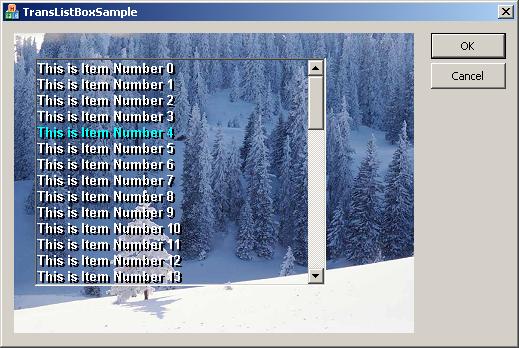
How to accomplish true transparency in listboxes.
| Type | Article |
| Licence | CPOL |
| First Posted | 19 Aug 2005 |
| Views | 152,861 |
| Bookmarked | 74 times |
|
|
