Introduction
EAN-13, based upon the UPC-A standard, was implemented by the International Article Numbering Association (EAN) in Europe. This standard was implemented mostly because the UPC-A standard was not well-designed for international use. It was probably also implemented partly because no-one likes the U.S. to be in charge of anything, especially the Europeans.
Purpose of making it an ActiveX control
There was the need for some code to draw the EAN-13 barcode for an Oracle application. The solution came to be an ActiveX control that may be used anywhere it is registered on a computer, from any language and any environment.
EAN-13 code structure
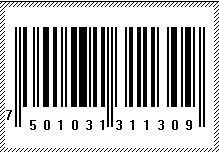
A typical EAN-13 barcode looks something like this:
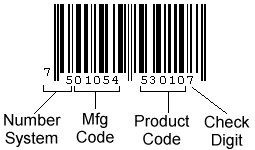
Check the code for validity by the parity code, the 13th number
bool CEANBarCode::CheckCode()
{
    int Sum = 0;
    for(int i=2;i<=12;i+=2)
        Sum += GetAt(i) * 3;
    for(int i=1;i<=12;i+=2)
        Sum += GetAt(i);
    if(10-(Sum%10)==GetAt(13))
        return true;
    return false;
}
Then how are the numbers of the code being drawn?
Any number is being represented by a constant binary representation that is translated into white bar for 1 and black bar for 0. This constant is used as-is for the left part when the parity is odd, as a complement for the right part, and as reverse-order for the complement of the left part for even parity code.
Then EAN-13 is very simple
Thanks to the great reference, Barcode Island, which made me understand it very easily and contain more details about EAN-13.
Registering the OCX
You can register the OCX by running the following command:
regsvr32 "c:\BarCode.ocx"
Replace the path with the original path of the OCX.
UnRegistering the OCX
Simply by writing the previous line, but with the parameter /u as follows:
regsvr32 /u "c:\BarCode.ocx"
About regsvr32
The Windows tool for registering any self-registered objects such as COM objects. For more information, run the command:
regsvr32
History
- 4 March, 2006 -- Original version posted
- 10 March, 2006 -- Updated
- 25 June, 2007 -- Article edited and moved to the main CodeProject.com article base



 General
  News
News  Suggestion
  Question
  Bug
Bug  Answer
  Joke
Joke  Praise
  Rant
Rant  Admin
Admin 


 Submit an article or tip


