Click here to Skip to main content

A UITypeEditor for easy editing of flag enum properties in the property browser

By , 14 Apr 2006
 

Introduction

The design time support in Visual Studio .NET is very good, and makes it very easy to quickly develop forms and user controls. Even so, it has some minor shortcomings - some irritating, and some causing inconvenience. One such shortcoming is the lack of a good way to edit 'flag enum properties' in the design time property browser. Flag enum properties are properties whose type is an enum which has the FlagsAttribute applied to it. This attribute indicates that the enum can be treated as a bit field; that is, a set of flags. An example of such an enum is the FontStyle enum. It contains bit values for the Bold, Italic, and Underline styles, which can be combined together if needed. However, the property grid has no inbuilt support for such flag enums - if you want to specify that your font should be Bold as well as Italic, the only way to do so is to write equivalent code.

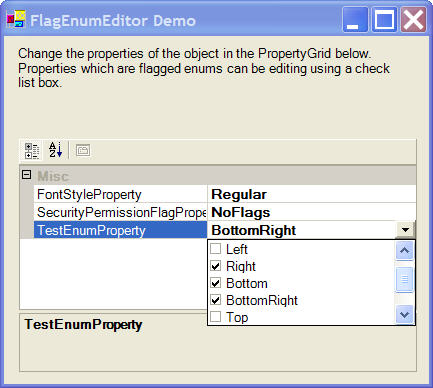
This article presents a simple UITypeEditor which can be applied to such flag enums and makes it very easy to edit such properties using the design time property browser.

Background

Before discussing the code, it is necessary to give a brief introduction on what an UI Type Editor is. In situations where the simple string-to-value and value-to-string conversion provided by the property browser is not sufficient or convenient, a UI type editor can be used to provide an advanced UI for editing the property. For example, the Dock and Anchor properties of all controls use a UI type editor for easy editing of the properties. To specify that a property should use a UI type editor, the EditorAttribute is applied to the type of the property or to the property itself. In the first case, the UI type editor is used whenever a property has the type to which the attribute is applied. In the second case, the UI type editor is used only for that property.

The FlagEnumUIEditor class

The UI type editor used for flag enums is called FlagEnumUIEditor, and is derived from UITypeEditor. It is a dropdown style editor, which means that a small drop-down button is displayed in the property browser when the property is selected. When this button is clicked, a control is shown which can be used to edit the property. The FlagEnumUIEditor uses a class derived from CheckedListBox to display the flag enums.

The FlagCheckedListBox class

The FlagCheckedListBox class is derived from CheckedListBox and contains items of type FlagCheckedListBoxItem. Each item has a value and a description for the value corresponding to the values and names of the enum members. The EnumValue property is used to associate an enum value with the FlagCheckedListBox:

public Enum EnumValue
{
    get
    {
        object e = Enum.ToObject(enumType,GetCurrentValue());
        return (Enum)e;
    }
    set
    {
        
        Items.Clear();
        enumValue = value; // Store the current enum value
        enumType = value.GetType(); // Store enum type
        FillEnumMembers(); // Add items for enum members
        ApplyEnumValue(); // Check/uncheck items depending on enum value
     }
}

The FillEnumMembers and ApplyEnumValue functions are as follows:

// Adds items to the checklistbox based on the members of the enum
private void FillEnumMembers()
{
    foreach ( string name in Enum.GetNames(enumType))
    {
        object val = Enum.Parse(enumType,name);
        int intVal = (int)Convert.ChangeType(val, typeof(int));

        Add(intVal,name);
    }
}

// Checks/unchecks items based on the current value of the enum variable
private void ApplyEnumValue()
{
    int intVal = (int)Convert.ChangeType(enumValue, typeof(int));
    UpdateCheckedItems(intVal);

}
        
// Checks/Unchecks items depending on the give bitvalue
protected void UpdateCheckedItems(int value)
{

    isUpdatingCheckStates = true;

    // Iterate over all items
    for(int i=0;i<Items.Count;i++)
    {
        FlagCheckedListBoxItem item = Items[i] as FlagCheckedListBoxItem;

        // If the bit for the current item is on in the bitvalue, check it
        if( (item.value & value)== item.value && item.value!=0)
            SetItemChecked(i,true);
        // Otherwise uncheck it
        else
            SetItemChecked(i,false);
    }

    isUpdatingCheckStates = false;

}

The OnItemCheck function of CheckListBox is overridden to update all other items whenever any item is checked or unchecked:

protected override void OnItemCheck(ItemCheckEventArgs e)
{
    base.OnItemCheck(e);

    if (isUpdatingCheckStates)
        return;

    // Get the checked/unchecked item
    FlagCheckedListBoxItem item = Items[e.Index] as FlagCheckedListBoxItem;
    // Update other items
    UpdateCheckedItems(item, e.NewValue);
}

// Updates items in the checklistbox
// composite = The item that was checked/unchecked
// cs = The check state of that item
protected void UpdateCheckedItems(FlagCheckedListBoxItem composite, 
                                  CheckState cs)
{

    // If the value of the item is 0, call directly.
    if(composite.value==0)
        UpdateCheckedItems(0);


    // Get the total value of all checked items
    int sum = 0;
    for(int i=0;i<Items.Count;i++)
    {
        FlagCheckedListBoxItem item = Items[i] as FlagCheckedListBoxItem;

        // If item is checked, add its value to the sum.
        if(GetItemChecked(i))
            sum |= item.value;
    }

    // If the item has been unchecked, remove its bits from the sum
    if(cs==CheckState.Unchecked)
        sum = sum & (~composite.value);
    // If the item has been checked, combine its bits with the sum
    else
        sum |= composite.value;

    // Update all items in the checklistbox based on the final bit value
    UpdateCheckedItems(sum);

}

Finally, when the user is done editing the property, the GetCurrentValue method is used to return the bit value corresponding to all checked items in the CheckListBox.

// Gets the current bit value corresponding to all checked items
public int GetCurrentValue()
{
    int sum = 0;

    for(int i=0;i<Items.Count;i++)
    {
        FlagCheckedListBoxItem item = 
                   Items[i] as FlagCheckedListBoxItem;

        if( GetItemChecked(i))
            sum |= item.value;
    }

    return sum;
}

Using the code

Using the code in your own project is very easy. Simply add the FlagEnumEditor.cs file to your project, and apply the UI type editor to your enums or properties as follows:

[Editor(typeof(Utils.FlagEnumUIEditor), 
        typeof(System.Drawing.Design.UITypeEditor))]

The source code zip file contains a Visual Studio .NET solution with a single Windows Application project. To see the FlagEnumUIEditor in action, simply compile and run this solution. The main form has a property grid which is assigned an object of type TestObject which is just a dummy type written only for demonstration purposes. TestObject has three properties, all of type flag enums, namely:

  • TestEnum: A flag enum defined for demonstration purposes. Contains enum values which are composites of two other flag members of the enum.
  • SecurityPermissionFlag: A flag enum from the System.Security.Permissions namespace.
  • FontStyle: A flag enum from the System.Drawing namespace.

License

This article has no explicit license attached to it but may contain usage terms in the article text or the download files themselves. If in doubt please contact the author via the discussion board below.

A list of licenses authors might use can be found here

About the Author

LogicNP
Software Developer (Senior) LogicNP Software
India India
Member
LogicNP Software is a privately owned software development company which specializes in developing reusable controls, components and libraries for .Net, WPF, ActiveX and MFC/ATL developers. Our mission is to provide innovative, robust and easy-to-use components and controls that help developers build the best applications that today's competitive marketplace demands. Our products are used by large corporations, multi-national companies, consultants, ISVs and single developers all over the world.
 
At LogicNP Software, customer satisfaction, pursuit of quality and ease-of-use are the main goals by which we guide our development process and support activities. Our commitment to these goals will enable us establish ourselves as the leading providers of professional software products for developers.

Sign Up to vote   Poor Excellent
Add a reason or comment to your vote: x
Votes of 3 or less require a comment

Comments and Discussions

 
You must Sign In to use this message board.
Search this forum  
    Spacing  Noise  Layout  Per page   
QuestionDynamic enum with EnumBuilder as a PropertyGrid item/propertymemberNino Mrdjen2 Sep '08 - 3:44 
Related to this whole property subject and enums.. I've created an Enum type at runtime via reflection and EnumBuilder, but I was unable to find a way of exposing such enum as a property. Can this be done? I've tried with declarin member Enum type to which I would assign my dynamic Enum created with EnumBuilder and then expose it with a property accessor. What I get in the end is an empty drowdown.
I would need to know how to implement this feature, and it doesn't have to be via enums, but that's the only data type that I've seen to manifest as a dropdown in PropertyGrid.
 
Thanks
AnswerRe: Dynamic enum with EnumBuilder as a PropertyGrid item/propertymemberbfis10813727 Oct '08 - 11:54 
The problem is that usually an enum exists outside a class and and a property is required to be in a class. I would really have to see your code but one option might be to reference the enum directly or to return it in a function. You probably will have to use casting in some of these places since the enum is being created dynamically. Anyways the basically functionality of the enum can be duplicated with a list<> of objects who have an index and text property or something of the sort. With that you will have full access to the list and it's contents. Also you could use a datatable.
QuestionRegular-Non-flag enum?membertwesterd6 Jun '06 - 20:56 
Wow, everyone - I mean everyone loves to show that they can do a flags enumeration. Where are the examples for a simple regular enumeration (no flags)?
AnswerRe: Regular-Non-flag enum?memberVyacheslav Trubarov15 Jan '07 - 4:30 
Simple regular enumerations editing is supported automatically...
GeneralEnum 0 valuememberLaurent Muller18 Apr '06 - 20:36 
Hello !
Just a small bug when the enum value is 0, the enum checkbox is not checked, so you must modify the UpdateCheckedItems function :

// Checks/Unchecks items depending on the give bitvalue
protected void UpdateCheckedItems(int value)
{
isUpdatingCheckStates = true;
 
if (value == 0)
{
// Iterate over all items
for (int i = 0; i < Items.Count; i++)
{
FlagCheckedListBoxItem item = Items[i] as FlagCheckedListBoxItem;
//checked or uncheck
SetItemChecked(i, item.Value == 0);
}
}
else
{
// Iterate over all items
for (int i = 0; i < Items.Count; i++)
{
FlagCheckedListBoxItem item = Items[i] as FlagCheckedListBoxItem;
 
// If the bit for the current item is on in the bitvalue, check it
if ((item.Value & value) == item.Value && item.Value != 0)
SetItemChecked(i, true);
// Otherwise uncheck it
else
SetItemChecked(i, false);
}
}
isUpdatingCheckStates = false;
 
}

GeneralRe: Enum 0 valuememberghimangi19 Apr '06 - 0:49 
Thanks. The code has been updated.
QuestionWhat about localization support?memberAmadrias15 Apr '06 - 12:58 
Your article is quite interesting and explains the ins and outs of providing such feature to our controls and I thank you for that.
 
However, you do not open your code to provide localization support. What design pattern would you recommend for that purpose?
AnswerRe: What about localization support?memberghimangi16 Apr '06 - 19:37 
I dont see how this feature could be affected by localization. It only displays the names of enum members which are not localizable since they are variable names.
 
Do you have something else in mind?
GeneralRe: What about localization support?memberAmadrias17 Apr '06 - 14:34 
Well, I thought that instead of just trying to displays the names of enum members, you could make use of some AOP to store a identifier of a string stored in a resource file that would therefore allow localization.
 
Say we declare and implement an attribute named EnumResourceStringAttribute or equivalent that would accept as its constructor a string that reflects a resource string, we would then be able to retrieve the localized name of the enum.
 
We would then just have an enum like:
 
[EnumResourceString(GenresEnumResource)]
public enum Genres
{
Male,
Female,
};
 
This could be used either in the UITypeEditor or even for runtime UI components such as Windows Forms or Web Forms.
GeneralRe: What about localization support?memberghimangi18 Apr '06 - 0:08 
OK. I understand you now.
This might be a useful feature to add - something to consider when it is updated.

General General    News News    Suggestion Suggestion    Question Question    Bug Bug    Answer Answer    Joke Joke    Rant Rant    Admin Admin   

Permalink | Advertise | Privacy | Mobile
Web03 | 2.6.130516.1 | Last Updated 15 Apr 2006
Article Copyright 2006 by LogicNP
Everything else Copyright © CodeProject, 1999-2013
Terms of Use
Layout: fixed | fluid
