Click here to Skip to main content
 

A Workaround to Customizing and Localizing the Microsoft ReportViewer .NET Toolbar

By , 25 May 2006
 

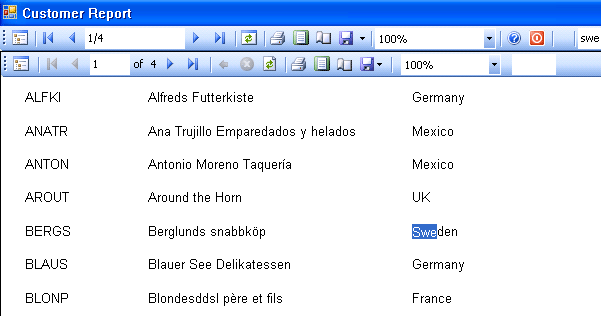
ReportViewer Toolbar

Introduction

Microsoft released a new component called ReportViewer based on the new RDL technology. Since this is a new component, there are not enough samples about it. There are many questions about how to localize and customize the ReportViewer toolbar, in some forums. Some developers want to add a help button on it, some people want to localize it for Turkish etc.

What is RDL - Report Definition Language

A report definition contains data retrieval and layout information for a report. Report Definition Language (RDL) is an XML representation of this report definition. RDL is an open schema; developers can extend RDL with additional attributes and elements.

The standard file extension for report definition files is .rdl. Its MIME type is text/xml.

More resources about RDL

Background

The best way to localize and customize the ReportViewer toolbar is to hide it and implement its methods in your own code. This article is simply based on this idea.

Using the code

You can simply hide the ReportViewer toolbar, like this:

repView.ShowToolBar = false;

This will completely hide the ReportViewer toolbar. Then add your own toolstrip and implement the necessary methods.

To find a string in the report:

private bool frmCmdFind()
{
    int found = this.repView.Find(txtSearch.Text, 1);
    if (found > 0)
    {
        btnFindNext.Enabled = true;
    }
    else
    {
        MessageBox.Show("Searched string not found", 
                        "Info", MessageBoxButtons.OK, 
                        MessageBoxIcon.Information);
        btnFindNext.Enabled = false;
    }
    return true;
}

To exporting a report as an Adobe Acrobat PDF file:

private bool frmCmdPdf()
{
    LocalReport lr = this.repView.LocalReport;
    lr.ReportPath = this.repView.LocalReport.ReportPath;
    string outputFile = this.ReportDisplayName + ".pdf";
    File.Delete(outputFile);
    Warning[] warnings;
    string[] streamids;
    string mimeType = "";
    string encoding = "";
    string extension = "";

    deviceInfo = "";

    byte[] bytes = lr.Render("PDF", deviceInfo, out mimeType, 
                             out encoding, out extension, 
                             out streamids, out warnings);

    FileStream fs = new FileStream(outputFile, FileMode.Create);
    fs.Write(bytes, 0, bytes.Length);
    fs.Close();
    System.Diagnostics.Process p = new System.Diagnostics.Process();
    p = new System.Diagnostics.Process();

    p.StartInfo.FileName = outputFile;
    p.Start();
    return true;
}

For full implementation, see the source file above.

Conclusion

Microsoft ReportViewer is a powerful component to display your report, and RDL is a good way to implement the reporting features. I believe that in the near future, many RDL designer tools and RDL viewer tools will be available in the market.

License

This article, along with any associated source code and files, is licensed under The Code Project Open License (CPOL)

About the Author

yincekara
Software Developer (Senior) MikroKom Yazilim A.S.
Turkey Turkey
c# , vb6 , mssql , oracle , mysql , asp , asp.net developer.

Sign Up to vote   Poor Excellent
Add a reason or comment to your vote: x
Votes of 3 or less require a comment

Comments and Discussions

 
You must Sign In to use this message board.
Search this forum  
    Spacing  Noise  Layout  Per page   
GeneralSimply way to customize report ToolBarmembergeneral.jesiu5-Nov-09 8:42 
Get the toolbar from ReportViewer control:
ToolStrip toolStrip = (ToolStrip)reportViewer.Controls.Find("toolStrip1", true)[0]
 
Add new items:
toolStrip.Items.Add(...)
 
Chris
GeneralThanks,memberS. Töpfer28-Sep-09 22:20 
Thanks your code helped me a lot!
GeneralRe: Thanks,memberyincekara29-Sep-09 1:09 
Your welcome Smile | :)
QuestionHow to invoke the pagesteup dialog box programaticallymemberMember 429011810-Apr-08 6:57 
Hi
 
Can any body let me know how to invoke the pagesetup dialogbox in report viewer programatically.
 
Regards
Rajesh
AnswerRe: How to invoke the pagesteup dialog box programaticallymemberyincekara29-Sep-09 1:23 
Did you download the source code ?
see frmCmdPageSetup() method.
 
Additionally ...http://www.gotreportviewer.com/EMFPrint.zip[^]
Generalcode licencemembermarsu3622-Dec-07 22:29 
Dear yincekara,
I wonder what licence your code is. Can I use codefragments in my own application?
 
yours sincerely,
marsu36
GeneralRe: code licencememberyincekara14-May-08 22:11 
Sure. It is open.
GeneralRefreshing the Report Boundsmemberf r i s c h13-Sep-07 3:17 
Hello there, nice article i must say.
 
Unfortunately i have another issue for you. After changing the margin-values via PageSetup i can not see any change until i have restarted my Application or at least show the same report in a newly created control.
 
I guess thats because the control doesnt reload the report definitions probably.
 
I have already tried setting the LocalReport.ReportPath again and also reportViewer.RefreshReport but without any success.
 
May i have an advice from you please.
 
Thank you.
GeneralRe: Refreshing the Report Boundsmemberyincekara13-Sep-07 3:32 
Sorry. I have no idea.
GeneralRe: Refreshing the Report Boundsmemberf r i s c h13-Sep-07 21:33 
I found a Solution for that.
 
You have to call the Reset-Method of the ReportViewer-Control and then reload its data and link all the Events again.
 
This is kinda clumsy but it works.
 
Anyways you did a great job, this article was what i needed.
GeneralRe: Refreshing the Report Boundsmemberyincekara13-Sep-07 21:58 
Nice to see you solved problem somehow.
Your wellcome for article.
Generalshowing report in report viewer without using smart tagsmemberMeSiddy16-Aug-07 6:37 
I am writing a report using report viewer in asp.net 2.0 but a can't seem to fiqure out the code to show the report in report viewer without using smart tags
GeneralRe: showing report in report viewer without using smart tagsmemberyincekara16-Aug-07 7:50 
I 'm sorry. I 've never develop any web application till now.
QuestionReportviewer Helpmemberabraylyan11-Mar-07 15:00 
I found your article very helpfull, but when I tried to point the app at my own data after I created a new datasource and I got this message in the reportviewer "A data source instance has not been supplied for ...".
Would you have any ideas as to why it might be happening.
Thanks
 
Alex
AnswerRe: Reportviewer Helpmemberyincekara11-Mar-07 21:47 
When you change datasource you also change something else.
For report creation basics visit this site please.
http://www.gotreportviewer.com/
GeneralReportViewer problemmemberKschuler29-Jan-07 8:31 
This is a little off topic from your article, but I'm hoping that since you seem to have some experience with the ReportViewer you may still be able to help me. I've got windows forms project that uses the ReportViewer in local mode. When I run my report using Visual Studio 2005 everything looks fine. The form pops up and the report loads and it's just the way I want it. However, if I run the .exe outside of Visual Studio this is not the case. The form pops up and the report displays this message "Report processing was cancelled." and a few seconds later the report displays just fine. I do not understand why the error message is displaying and have not been able to find a way to shut it off. Have you heard of or experienced this problem and do you know of a solution or workaround for it? I would appreciate any advice. Thank you.
GeneralRe: ReportViewer problemmemberpolymorphism8-Feb-07 2:32 
1- Try to hangle message :
after InitializeComponent(); type :
 

this.reportViewer.ReportError += new ReportErrorEventHandler(reportViewer_ReportError);
private void reportViewer_ReportError(object sender, ReportErrorEventArgs e)
{
if (e.Exception.Message == "A generic error occurred in GDI+.")
{
e.Handled = true;
}
}
 
2- Place breakpoints and see if theese cause the problem if you are using :
Application.DoEvents(); lines.
 
3- Place breakpoints where you refresh report and see if theese are causing the problem.
 
I hope theese helps. Otherwise write a sample project using standart MSSQL Northwind database and send me for me to inspect.
GeneralRe: ReportViewer problemmemberKschuler9-Feb-07 2:54 
The problem is that no exception is ever thrown. I've pretty much determined that this is some kind of bug. When I run a program that is virtually the same except it is written in C#, I do not have the problem. It is only with VB code. And I think I've proven that, for whatever reason, the issue comes down to the fact that the ReportViewer's RenderingComplete Event fires twice when you run the .exe by itself, but runs only once when you run the program through Visual Studio. At least that appears to be what is going on. I ended up using a work around that counts how many times the RenderingComplete event fires and hides the report until it's the second time...and then I threw in a timer control to always show the report after five seconds no matter what. It's not the nicest solution, but it seem to be working.
 
Thanks for trying to help me out.
GeneralRe: ReportViewer problemmemberAeroday19-Jul-07 6:16 
I witnessed the same problem when I noticed that RefreshReport() was being called twice. For whatever reason Visual Basic throws this code in Form_Load when the ReportViewer is placed in the form (from the toolbox). Try looking in there... and make sure you're not calling it twice.
GeneralTurkish languagememberMaksi20-Nov-06 22:25 
Hi, how can i translate .net 2005 reportviewer toolbar text languages to turkish language. microsoft's site has not any turkish language pack.
thanks in advance..
 
cuma196@yahoo.com
GeneralRe: Turkish languagememberyincekara20-Nov-06 22:58 
We already have a nice solution about this issue. Not a workarouns. Exact solution. If you 've noticed one of a comment about this article, someone already sent me the solution. I 'll update the article soon or will write a new one. I hope this week Smile | :)
GeneralRe: Turkish language [modified]memberyincekara12-Feb-07 0:03 
Here is the new article : New article

modified on Monday, April 26, 2010 4:59 AM

Generallocalization [modified]memberlemravec14-Aug-06 8:16 
http://msdn2.microsoft.com/en-us/library/microsoft.reporting.webforms.ireportviewermessages.aspx[^]
GeneralRe: localizationmemberpolymorphism20-Aug-06 23:26 
What if i am using Infragistic Toolbar ? and that 's why i don 't want to display Microsoft 's toolbar ?
QuestionAnother approachmemberKoru.nl1-Jun-06 23:31 
Dear yincekara,
 
As you have already stated, it is difficult to find proper documentation and samples about the ReportViewer. I was very glad to find your resource links.
 
You didn't mention it, but there is a built-in alternative for localizing the viewer. Besides that I'm using a different approach customizing the toolbar, although I must confess it is a bit a 'dirty' (Smile | :) ) trick to do it that way. The code that goes with it is rather long and so I think this is not the proper place to put it. I can post another article on CodeProject, but an alternative is to join forces and together rework your article a bit. Are you willing to do that?
 
Jan.

General General    News News    Suggestion Suggestion    Question Question    Bug Bug    Answer Answer    Joke Joke    Rant Rant    Admin Admin   

Permalink | Advertise | Privacy | Mobile
Web01 | 2.6.130617.1 | Last Updated 25 May 2006
Article Copyright 2006 by yincekara
Everything else Copyright © CodeProject, 1999-2013
Terms of Use
Layout: fixed | fluid
