Introduction
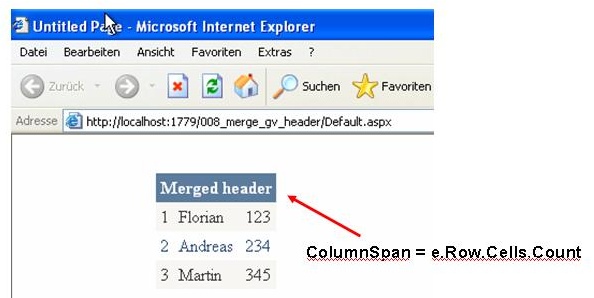
This very short article explains an easy way to merge the header columns for the GridView control. It works like the colspan property in HTML tables. This article is based on another one describing how to bind XML data to a GridView: How to bind an XML file to a GridView.
The Code
First, insert an event handler for the RowCreated event into your website. Then, check whether the new row is of type DataControlRowType.Header. If it is a header row, remove it and add a new TableCell.
Here is the code for this task:
Protected Sub GridView1_RowCreated(ByVal sender As Object, _
              ByVal e As System.Web.UI.WebControls.GridViewRowEventArgs) _
              Handles GridView1.RowCreated
    If e.Row.RowType = DataControlRowType.Header Then
        Dim oCell As New TableCell
        oCell.ColumnSpan = e.Row.Cells.Count
        e.Row.Cells.Clear()
        oCell.Text = "Merged header"
        e.Row.Cells.Add(oCell)
    End If
End Sub
The ColumnSpan property is set to the amount of cells generated by the GridView. Next, remove the header using e.Row.Cells.Clear. Finally, assign the Text property for the new header and add it to the GridView.
Florian works as consultant for change- and configuration management for about 7 years. In this environment he is often forced to work with unix, perl and shell scripts.
For more information about change- and configuration management (espacially Serena Dimensions) visit:
www.venco.de
For video tutorials about asp.net, ajax, gridviews, ... (in german) visit:
www.siore.com



 General
  News
News  Suggestion
  Question
  Bug
Bug  Answer
  Joke
Joke  Praise
  Rant
Rant  Admin
Admin 


 Submit an article or tip


