Click here to Skip to main content

GridView Custom Paging

By , 3 Nov 2006
 

Introduction

The GridView control provides you with an easy way to display the number of items on a page without taking much space, with the help of paging. You can enable the paging feature in the GridView control in seconds. The built-in paging is pretty good if you are fetching less than 100 items. As soon as the number of items increases, the performance suffers. The main reason for the performance kill is that whenever you go to a new page of the GridView, it fetches all the items from the database. In this article, I will demonstrate how you can use custom paging to improve the performance of GridView paging.

Database and Stored Procedure

I will be using the good old Northwind database. The stored procedure is written by Greg Hamilton. You can view Greg Hamilton's article here: A More Efficient Method for Paging Through Large Result Sets. Greg created a very efficient stored procedure that works without the use of temporary tables or the TABLE variable.

I have modified the stored procedure by adding a few fields. Here is the modified version of the stored procedure:

CREATE PROCEDURE [usp_GetProducts] 
@startRowIndex int,
@maximumRows int, 
@totalRows int OUTPUT

AS

DECLARE @first_id int, @startRow int

SET @startRowIndex =  (@startRowIndex - 1)  * @maximumRows

IF @startRowIndex = 0 
SET @startRowIndex = 1

SET ROWCOUNT @startRowIndex

SELECT @first_id = ProductID FROM Products ORDER BY ProductID

PRINT @first_id

SET ROWCOUNT @maximumRows

SELECT ProductID, ProductName FROM Products WHERE 
ProductID >= @first_id 
ORDER BY ProductID
 
SET ROWCOUNT 0

-- GEt the total rows 

SELECT @totalRows = COUNT(ProductID) FROM Products
GO

I highly recommend that you check out Greg’s article in which he explains in detail how the stored procedure works.

Displaying Paged Data on the Page

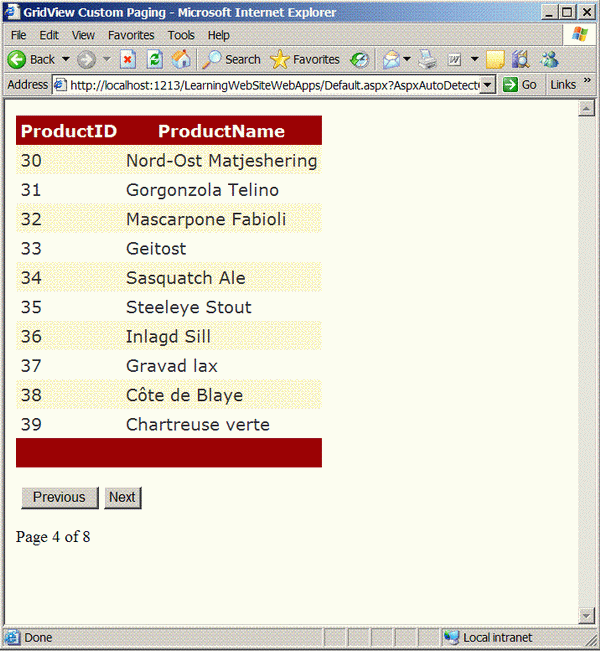
I will be paging through the records using the “Next” and the “Previous” buttons. The Label control will display our current location in the paged GridView. Let’s first set up some of the variables.

protected int currentPageNumber = 1;
private const int PAGE_SIZE = 10;

The currentPageNumber represents the current page of the GridView, and the PAGE_SIZE is the total number of records displayed on each page. You can also allow the user to adjust the page size using a DropDownList, but that is not covered in this article.

Next, we need to bind the data source to the GridView. Let’s check out the BindData method as a whole, and later I will dissect it so you will have a better idea.

private void BindData()
{
    string connectionString = "Server=localhost;" + 
           "Database=Northwind;Trusted_Connection=true";
    SqlConnection myConnection = new SqlConnection(connectionString);
    SqlCommand myCommand = new SqlCommand("usp_GetProducts", 
                                           myConnection);
    myCommand.CommandType = CommandType.StoredProcedure;

    myCommand.Parameters.AddWithValue("@startRowIndex", 
                                      currentPageNumber);
    myCommand.Parameters.AddWithValue("@maximumRows", PAGE_SIZE);
    myCommand.Parameters.Add("@totalRows", SqlDbType.Int, 4);
    myCommand.Parameters["@totalRows"].Direction = 
                       ParameterDirection.Output;

    SqlDataAdapter ad = new SqlDataAdapter(myCommand);

    DataSet ds = new DataSet();
    ad.Fill(ds);

    gvProducts.DataSource = ds;
    gvProducts.DataBind();

    // get the total rows 
    double totalRows = (int)myCommand.Parameters["@totalRows"].Value;

    lblTotalPages.Text = CalculateTotalPages(totalRows).ToString();

    lblCurrentPage.Text = currentPageNumber.ToString(); 

    if (currentPageNumber == 1)
    {
        Btn_Previous.Enabled = false;

        if (Int32.Parse(lblTotalPages.Text) > 0)
        {
            Btn_Next.Enabled = true;
        }
        else
            Btn_Next.Enabled = false;

    }

    else
    {
        Btn_Previous.Enabled = true;

        if (currentPageNumber == Int32.Parse(lblTotalPages.Text))
            Btn_Next.Enabled = false;
        else Btn_Next.Enabled = true; 
    }
}

Now, let’s take a look at the above code in more detail. I am sending the currentPageNumber and the PAGE_SIZE into the database so I can get the data for the current page. The totalRows variable returns the total number of rows in the table. Once I have totalRows, I calculate the total number of pages that will be used for this GridView. The total number of pages is calculated by using a small helper function:

private int CalculateTotalPages(double totalRows)
{
    int totalPages = (int)  Math.Ceiling(totalRows / PAGE_SIZE);

    return totalPages; 
}

At the end of the BindData method, there are some conditional checks which ensure that the Next and Previous buttons are only displayed when applicable.

Attaching the Events to the Buttons

The final thing that is left is to attach the events to the Button controls. Check out the following code in which I created two Button controls.

<asp:Button ID="Btn_Previous" CommandName="Previous" 
            runat="server" OnCommand="ChangePage" 
            Text="Previous" />
<asp:Button ID="Btn_Next" runat="server" CommandName="Next" 
            OnCommand="ChangePage" Text="Next" />

Both the buttons call the ChangePage event which is shown below:

// This method will handle the navigation/ paging index
protected void ChangePage(object sender, CommandEventArgs e)
{
    
    switch (e.CommandName)
    {
        case "Previous":
            currentPageNumber = Int32.Parse(lblCurrentPage.Text) - 1;
            break; 

        case "Next":
            currentPageNumber = Int32.Parse(lblCurrentPage.Text) + 1; 
            break; 
    }

    BindData();
}

The ChangePage event is used to change the page number of the GridView and also to update the Label text by calling the BindData method.


License

This article has no explicit license attached to it but may contain usage terms in the article text or the download files themselves. If in doubt please contact the author via the discussion board below.

A list of licenses authors might use can be found here

About the Author

azamsharp
Web Developer
United States United States
Member
I am the founder of knowledge base website, HighOnCoding, GridViewGuy, RefactorCode.com and ScreencastADay.com.
 
HighOnCoding is a website which will get you high legally with useful information. There are tons of articles, videos and podcasts hosted on HighOnCoding.
 
HighOnCoding.com www.HighOnCoding.com
 

My Blog:

Blog


Buy my iPhone app ABC Pop

Sign Up to vote   Poor Excellent
Add a reason or comment to your vote: x
Votes of 3 or less require a comment

Comments and Discussions

 
You must Sign In to use this message board.
Search this forum  
    Spacing  Noise  Layout  Per page   
GeneralSome suggestionsmemberITMaiO1 Jul '09 - 22:21 
As in subject:
 
Afer
 
SELECT ProductID, ProductName FROM Products WHERE 
ProductID >= @first_id 
ORDER BY ProductID
 
you could use
SET @totalRows = @@rowcount
 
instead of
SELECT @totalRows = COUNT(ProductID) FROM Products
 

In your code you should allways use
using(){}
when managing an SQL interogation.
using (SqlConnection cn = new SqlConnection(ConnectionString))
{
    SqlCommand cmd = new SqlCommand(query, cn);
    cmd.Parameters.Add("@inpProgPratica", SqlDbType.Decimal).Value = progPratica;
    cmd.Parameters.Add("@respVitt", SqlDbType.VarChar, 2).Direction = ParameterDirection.Output;
    cn.Open();
    IDataReader reader = cmd.ExecuteReader(CommandBehavior.Default);
}
ecc...
 
Did you tought about on how to implement even a sorting in your code?
 
Bye bye
Generalgridview custom pagingmemberBob MacNeel22 Jan '09 - 4:41 
I have a gridview that is driven by a select statemebt contained in a session. The session is loaded during page load with this code:
 
SqlDataSource1.SelectCommand = Session("buildquery")
GridView1.DataBind()
 
the select statement may look like this:
 
SELECT [parcelnbr], [lastname], [firstname], [stnbr], [stname], [townname], [date_latest_sale], [saleprice] FROM [parcelrecs] WHERE mccode = 33 and landuse_code = 1101 and sfla = 1200 and sfla <= 2345 and saleprice >= 150000 and saleprice <= 275000 and date_latest_sale >= '1/22/2008' and date_latest_sale <= '1/22/2009'
 
Here is my question. This query will go to a set of records that match the mccode 33, and also match the other query criteria. Thus
 :laugh: 
there will be a noncontiguous set of records produced. Will your custom paging routine handle something like this? If so can you suggest how to incorporate my session select statement into it? Thanks for any help.
QuestionSqlDataAdaptermembermaxtoroq4 Jan '07 - 16:57 
The SqlDataAdapter's Fill method has an overload that takes a startRecord and maxRecords as parameters. Isn't that much easier?
AnswerRe: SqlDataAdaptermemberinetfly1238 May '08 - 5:05 
I was using that but I needed to query the data twice. Once to get the total row count, and second to do calculations for the fill parameters. Is there a better way to use the fill method once and get the total row count and only return a certain number of rows?
 

GeneralUsing Labelsmemberfahiemulleh21 Dec '06 - 22:45 
Can I use Labels instead of Buttons
Generalpage number issuemembermbowles2015 Dec '06 - 9:18 
Great article...especially for those of us on VS 2005 but the office won't allow SQL 2005. Anyway, when I set @startRowIndex to 1 and maxrows to 5 I get 5 records, when startRow changes to 2, I get the next set, but it includes the last record of the first set as the first record of this second set. Any ideas?
 
-MickeyB

GeneralRe: page number issuememberdonnapep11 Dec '06 - 6:57 
Hi,
 
I found this problem as well. If you change the line:
 
SET @startRowIndex = (@startRowIndex - 1) * @maximumRows
 
to
 
SET @StartRowIndex = (@StartRowIndex - 1) * @MaximumRows + 1
 
it works fine.
GeneralRe: page number issuesussevil_gouki_x25 Dec '07 - 17:48 
Waz up every one
I am on this stored procedure since last week and I just want to precise something.
 
SET @startRowIndex = (@startRowIndex - 1) * @maximumRows is a bad way and a really try a lot's of possibility.
 
anyway, donnapep is right but this scenario won't be good if you have for instance 8 entries in your table and you want to show 2 entries by pages (I simplify...I know). in that case you'll see on the first page:
entry 1 and entry 2
second page:
entry 3 and entry 4
third page:
entry 4 and entry 5
fourth page:
entry 6 and entry 7
and no entry 8.
 
but if you you set 4 entries in 2 pages, with donnapep solution youll got a good result:
first page:
1 2 3 4
second page:
5 6 7 8
 
so I recommand you to add brakets like this :
 
SET @StartRowIndex = ((@StartRowIndex - 1) * @MaximumRows) + 1
 
you wont have any probleme even if your "first_id" is a nvarchar (yes I didn't use int in my proc.)
 
And just a message for those who post codes, please review and correct your code if someone told you there is something strange in it.
I saw that the last post was in 2006 and the author never did nothing about it..... "tomorow" it's 2008.

General General    News News    Suggestion Suggestion    Question Question    Bug Bug    Answer Answer    Joke Joke    Rant Rant    Admin Admin   

Permalink | Advertise | Privacy | Mobile
Web03 | 2.6.130516.1 | Last Updated 3 Nov 2006
Article Copyright 2006 by azamsharp
Everything else Copyright © CodeProject, 1999-2013
Terms of Use
Layout: fixed | fluid