 |
|
 |
Hello,
How can I select the entire text (value) of currencybox on the GotFocus event, so that the value set to zero when we want to change it?
Please help.
|
|
|
|
 |
|
 |
Hi Manuel...
i think ur article is very usefull...really appreciate it
i have a little problem with ur code...
i have converted it to VB and try to use it, by drag from toolbox into form
but it's show an error like this http://www.mediafire.com/imageview.php?quickkey=54imaz44cific6a
i hope u can help me to find the problem because it just show error when i wanna use this component..but when i compile it
it seem's fine
and here is my code. http://www.mediafire.com/file/fz2qcdtxohurazm/TestComponent.rar
|
|
|
|
 |
|
 |
Hello,
the control is working excellently, but the question is, how to make it display numbers according to the locale of the application? I dont want to use Arabic numbers? want to use Hindi numbers.
(2B)||(!2B)
|
|
|
|
 |
|
 |
To those who might need the answer to my own question:
Just change the definition of the ExtTextOut in the Utiles.cs file changing the number 4 to the number 1028
public static void ExtTextOut(IntPtr hdc, int x, int y, Rectangle clip, string str)
{
RECT rect1;
rect1.top = clip.Top;
rect1.left = clip.Left;
rect1.bottom = clip.Bottom;
rect1.right = clip.Right;
Win32API.ExtTextOut(hdc, x, y, 1028, ref rect1, str, str.Length, IntPtr.Zero);
//http://msdn.microsoft.com/en-us/library/cc231172(PROT.10).aspx
}
</pre>
(2B)||(!2B)
|
|
|
|
 |
|
 |
Excellent, Exactly what was in my mind.
|
|
|
|
 |
|
 |
The problem im talkin about occures often after massive key pressing on focused Currency box. I dunno why but when i press a digit key and hold it for a long while i got something looks like GDI crash or something and ofcourse application crash after this. Below i paste some error reports from Windows 7 and XP. I suppose this problem is related to onpaint event within currencybox.dll
****** Windows 7 *******
Description:
Stopped working
Problem signature:
Problem Event Name: CLR20r3
Problem Signature 01: program.exe
Problem Signature 02: 1.0.0.0
Problem Signature 03: 4b45f476
Problem Signature 04: System.Drawing
Problem Signature 05: 2.0.0.0
Problem Signature 06: 4a275e83
Problem Signature 07: 184
Problem Signature 08: 20
Problem Signature 09: System.ArgumentException
OS Version: 6.1.7600.2.0.0.256.48
Locale ID: 1045
Read our privacy statement online:
http://go.microsoft.com/fwlink/?linkid=104288&clcid=0x0409
If the online privacy statement is not available, please read our privacy statement offline:
C:\Windows\system32\en-US\erofflps.txt
********Windows XP*************************
System.ArgumentException was unhandled
Message="Parameter is not valid."
Source="System.Drawing"
StackTrace:
at System.Drawing.Bitmap..ctor(Int32 width, Int32 height, PixelFormat format)
at System.Drawing.Bitmap..ctor(Int32 width, Int32 height)
at System.Drawing.Icon.ToBitmap()
at System.Windows.Forms.ThreadExceptionDialog..ctor(Exception t)
at System.Windows.Forms.Application.ThreadContext.OnThreadException(Exception t)
at System.Windows.Forms.Control.WndProcException(Exception e)
at System.Windows.Forms.Control.ControlNativeWindow.OnThreadException(Exception e)
at System.Windows.Forms.NativeWindow.Callback(IntPtr hWnd, Int32 msg, IntPtr wparam, IntPtr lparam)
at System.Windows.Forms.UnsafeNativeMethods.DispatchMessageW(MSG& msg)
at System.Windows.Forms.Application.ComponentManager.System.Windows.Forms.UnsafeNativeMethods.IMsoComponentManager.FPushMessageLoop(Int32 dwComponentID, Int32 reason, Int32 pvLoopData)
at System.Windows.Forms.Application.ThreadContext.RunMessageLoopInner(Int32 reason, ApplicationContext context)
at System.Windows.Forms.Application.ThreadContext.RunMessageLoop(Int32 reason, ApplicationContext context)
at System.Windows.Forms.Application.Run(Form mainForm)
at Program.Program.Main() in G:\Program.cs:line 23
I looked deeper into the source code and tried to diagnose what is goin on but i was not able to.
What could it be ?
|
|
|
|
 |
|
 |
Thank you very much for the Control.
I just noticed that when you use this control and the form has a button with a mnemonic, i.e. &Aceptar and you press the key A when focus is in currencybox the behavior is the same as pressing ALT+A.
Same happened with ProSoft Control btw.
modified on Thursday, October 15, 2009 11:33 AM
|
|
|
|
 |
|
 |
Juan,
Your control is fantastic. You solve one problem to me.
I just add it to my project and bind it to a field in bindsource and done!
Thank you!
But I realize that it uses some Windows DLLs.
How can I use this control in a Pocket PC project?
|
|
|
|
 |
|
|
 |
|
 |
When tabing into the control it would be nice if it could select the entire text so on data entry the current value is replaced with the new value.
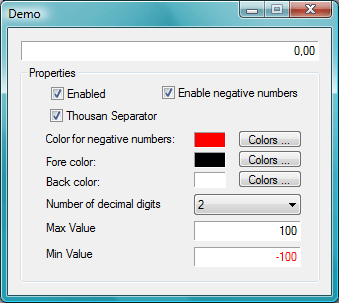
This is a great control. A min max value would be good also.
|
|
|
|
 |
|
 |
if you translate it in C++/MFC, it will be a very good thing!
|
|
|
|
 |
|
 |
First of all - Very good job!!!!!
I've tried to use the NumberBox Control from Prosoft, but it has lot's of bugs.
I have tried your control, but there are a few bugs and suggestions I would like to participate.
First of all, when I try to delete a number with Backspace, the control eliminate 2 numbers.
Can you add propertys to indicate the max and the min value.
Thank you again!
Miguel
|
|
|
|
 |
|
 |
Hi Miguel:
Thanks for your comments.
Now the control work properly
Greetings
JME.
|
|
|
|
 |
|
 |
Thanks Juan! It works good.
If I'm not asking too much, would you be interested in adding some extra features to the control, like a property to define the max and other to define the min value?
Thanks anyway!
Best regards,
Miguel
|
|
|
|
 |
