Click here to Skip to main content
Licence 
First Posted 11 Feb 2002
Views 321,243
Bookmarked 153 times

Per Pixel Alpha Blend in C#

By Rui Lopes | 3 Jun 2004
Demonstrates how to create per pixel alpha blending windows
2 votes, 4.0%
1
1 vote, 2.0%
2
2 votes, 4.0%
3
5 votes, 10.0%
4
40 votes, 80.0%
5
4.60/5 - 54 votes
3 removed
μ 4.23, σa 1.71 [?]

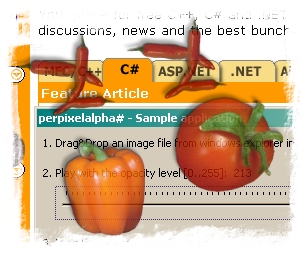
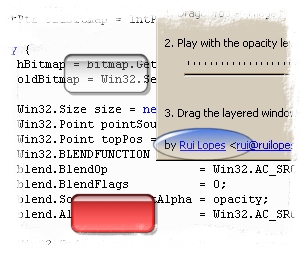
Preview of the per pixel alpha blend effect

Preview of the per pixel alpha blend effect

Introduction

This is a port of my other article from C++/MFC to C#/Windows Forms. The concept of creating a per-pixel-alpha blending window remains the same, the GDI function UpdateLayeredWindow.

What changed

  • Image loading is handled by GDI+ classes (System.Drawing namespace).
  • No need to pre-multiply the rgb channels with the alpha channel.
  • No more support for PSP files. PNG file are the best choice.

Usage

To use this code you need to include PerPixelAlphaForm.cs file in your project, create a class that inherits from PerPixelAlphaForm, load a bitmap using System.DrawingImage.FromFile static method and then call the PerPixelAlphaForm.SetBitmap method.

The example source code is inside the main.cs file. In the source code you will also find the new ways of doing the old things, like, handling dropped files from windows explorer.

Installing & Building

  1. Download and extract the source code of this article;
  2. To build, run the build.bat file from command prompt;
  3. Now, run the bin\main.exe and enjoy!

Changelog

31 May 2004

  • Fix clipping problems by creating the form without borders.
  • Move PerPixelAlphaForm class to PerPixelAlphaForm.cs file.

12 Feb 2002

  • Initial version.

Do you have any question or comment? Contact me!

License

This article has no explicit license attached to it but may contain usage terms in the article text or the download files themselves. If in doubt please contact the author via the discussion board below.

A list of licenses authors might use can be found here

About the Author

Rui Lopes

Web Developer

Portugal Portugal

Member


Sign Up to vote   Poor Excellent
Add a reason or comment to your vote: x
Votes of 3 or less require a comment

Comments and Discussions

 
You must Sign In to use this message board. (secure sign-in)
 
Search this forum  
 FAQ
    Noise  Layout  Per page   
  Refresh
QuestionDrawing other stuff on? PinmemberRohit Dubey from Hyderabad21:10 22 Jan '12  
AnswerRe: Drawing other stuff on? PinmemberRohit Dubey from Hyderabad21:14 22 Jan '12  
QuestionImage Size Pinmemberdownsource1:51 6 Jan '12  
Questionform controls Tooltip PinmemberAntonio Pelleriti22:45 14 Dec '11  
SuggestionCan you give use link of whole project PinmemberMember 79336927:16 29 Jun '11  
GeneralMy vote of 2 Pinmemberjoin sam lee23:51 25 Jul '10  
GeneralMy vote of 5 PinmemberKPEBEDKO3:53 19 Jul '10  
GeneralThank you! PinmemberEduard Keilholz3:41 2 Jul '10  
AnswerFinding a working image [SOLVED] Pinmemberelmernite6:25 17 Dec '09  
I made an image in the GIMP and saved it as a transparent png but it isn't working?
I'm getting the "The bitmap must be 32ppp with alpha-channel." exception. How do I check to this? I've never hear of "ppp" before.
 
-Elmernite
 
After editing around I found that I need to set "Save color values from transparent pixels" With that checked it works.
 
modified on Thursday, December 17, 2009 11:37 AM

GeneralRe: Finding a working image [SOLVED] PinmemberGee.13:13 1 Mar '10  
GeneralAnchor Controls doesnt work if using Per Pixel Alpha Blend Pinmemberdamon8822:03 12 Dec '09  
Generalsmall question Pinmembernirishere16:46 4 Sep '09  
GeneralAdd Controls PinmemberGottdrak9913:23 19 Nov '08  
GeneralRe: Add Controls Pinmembercolche20:52 25 Feb '09  
GeneralRe: Add Controls Pinmemberrbrender18:44 9 Mar '09  
GeneralRe: Add Controls PinmemberMarko Padjen14:39 31 Mar '09  
GeneralExactly what I was looking for. Thanks. Pinmembermlavenne12:36 18 Aug '08  
QuestionGreat but can I use the function also for a control? Pinmemberit-bergmann2:24 14 Feb '08  
AnswerRe: Great but can I use the function also for a control? PinmemberMember 42028005:49 19 May '09  
Generalcool Pinmemberradioman.lt@gmail.com23:20 12 Dec '07  
Questionwhy doing win32 with c#? Pinmemberbkaratte21:46 11 Dec '07  
AnswerRe: why doing win32 with c#? Pinmembertic8414:12 10 Jun '08  
GeneralVB.Net Pinmemberdawmail33323:47 24 Aug '07  
GeneralRe: VB.Net PinmemberDj Den4ik0:05 12 Feb '08  
GeneralGreat!!!!!!!!!!!!! Pinmembershp-coding8:44 9 Aug '07  

General General    News News    Suggestion Suggestion    Question Question    Bug Bug    Answer Answer    Joke Joke    Rant Rant    Admin Admin   

Use Ctrl+Left/Right to switch messages, Ctrl+Up/Down to switch threads, Ctrl+Shift+Left/Right to switch pages.

Permalink | Advertise | Privacy | Mobile
Web03 | 2.5.120210.1 | Last Updated 4 Jun 2004
Article Copyright 2002 by Rui Lopes
Everything else Copyright © CodeProject, 1999-2012
Terms of Use
Layout: fixed | fluid
