Click here to Skip to main content

TopMost MessageBox

By , 1 May 2007
 

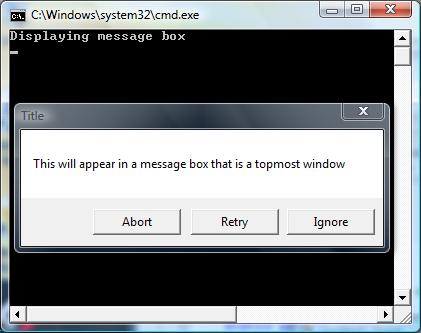
Screenshot - TopMostMessageBox.jpg

Introduction

Problem

I was writing some custom installer code for a Visual Studio installer project and had to display messages to the user in my custom installer class. The problem was that when using the standard System.Windows.Forms.MessageBox.Show method the message box was appearing behind the main installer window. There are no options on the MessageBox class to alter this behavior. I could just see the support lines lighting up with calls of the install hanging.

Solution

The solution was to make the window owning the MessageBox a TopMost window. One difficulty with that was that the custom installer class does not have a reference to the main installer window and has no UI of its own. So, a new form had to be created within my custom installer class which could be the owner of the MessageBox. Setting this form as a TopMost window causes the MessageBox to be a TopMost window as well. Thus, the messages displayed by my custom installer would always be visible. Special actions are taken to ensure this new form is not visible since it would merely be a distraction to the user.

This solution was packaged into a wrapper class called TopMostMessageBox.

Using the code

Here is how you could use the TopMostMessageBox in your code.

TopMostMessageBox.Show(
    "This will appear in a message box that is a topmost window",
    "Title", MessageBoxButtons.AbortRetryIgnore);

Here is the declaration of the TopMostMessageBox class.

static public class TopMostMessageBox
{
    static public DialogResult Show(string message)
    {
        return Show(message, string.Empty, MessageBoxButtons.OK);
    }

    static public DialogResult Show(string message, string title)
    {
        return Show(message, title, MessageBoxButtons.OK);
    }

    static public DialogResult Show(string message, string title, 
        MessageBoxButtons buttons)
    {
        // Create a host form that is a TopMost window which will be the 
        // parent of the MessageBox.
        Form topmostForm = new Form();
        // We do not want anyone to see this window so position it off the 
        // visible screen and make it as small as possible
        topmostForm.Size = new System.Drawing.Size(1, 1);
        topmostForm.StartPosition = FormStartPosition.Manual;
        System.Drawing.Rectangle rect = SystemInformation.VirtualScreen;
        topmostForm.Location = new System.Drawing.Point(rect.Bottom + 10, 
            rect.Right + 10);
        topmostForm.Show();
        // Make this form the active form and make it TopMost
        topmostForm.Focus();
        topmostForm.BringToFront();
        topmostForm.TopMost = true;
        // Finally show the MessageBox with the form just created as its owner
        DialogResult result = MessageBox.Show(topmostForm, message, title, 
            buttons);
        topmostForm.Dispose(); // clean it up all the way

        return result;
    }
}

Points of Interest

  • I tried to make this wrapper mimic the existing MessageBox.Show method, but many overrides of this method are not included in this simple wrapper. However, they can easily be added if you need them.
  • The hidden form is created off the visible screen to prevent any flickering. This is done by finding the size of the virtual desktop and positioning the hidden form just off past the right side of it. I do not use the physical screen size to account for multiple monitors.
  • The combination of Focus(), BringToFront(), and TopMost seemed to be needed to get the MessageBox to show up properly and have input focus.
  • To clean up the hidden form completely I call Dispose on the form.

Other Options

I could have used the MessageBoxIndirect function to accomplish the same thing. However, this is a bit simpler as it does not involve reproducing any Win32 structures.

History

1.0 - 21 Apr 07 - First Posting

License

This article has no explicit license attached to it but may contain usage terms in the article text or the download files themselves. If in doubt please contact the author via the discussion board below.

A list of licenses authors might use can be found here

About the Author

Vance Kessler
Web Developer
United States United States
Member
I have been developing .NET applications since 2001 and have been working in software development since 1989.


Sign Up to vote   Poor Excellent
Add a reason or comment to your vote: x
Votes of 3 or less require a comment

Comments and Discussions

 
You must Sign In to use this message board.
Search this forum  
    Spacing  Noise  Layout  Per page   
AnswerRe: Thought i sharemembertomtom198027 Aug '09 - 22:22 
MessageBoxOptions.ServiceNotification is what you are looking for. but be aware of its side effects ...
GeneralA quick workaround to make MessageBox Topmostmemberuribraun5 Jun '07 - 20:05 
Here is a silly yet simple and efficient way to make a MessageBox topmost:
 
Form f = new Form();
f.TopMost = true;
MessageBox.Show(f,"I'm on top");
 

All you need to do is create a dummy Form, set it as topmost and send it to the MessageBox as the Parent form. You don't need to display this dummy form.


GeneralRe: A quick workaround to make MessageBox TopmostmemberKorayem.NET10 Dec '08 - 4:53 
Sweeet!!
 
and with C# 3.0 you can create it as easy as
MessageBox.Show(new Form(){TopMost = true},"I'm still on top, YEAH");
QuestionRe: A quick workaround to make MessageBox TopmostmemberJimmyyy3 Feb '09 - 17:52 
Oh man, I soo wanted this to work... but it doesn't for me. When I use this, the dialog never shows up. I am creating the dialog in a new thread (I want a *non-modal* topmost dialog!), so maybe that's different than what you're doing.... Just using
 
MessageBox.Show(myText, myCaption, MessageBoxButtons.OK);
 
works, but using
 
MessageBox.Show(new Form(){TopMost = true}, myText, myCaption, MessageBoxButtons.OK);
 
doesn't... :(
AnswerRe: A quick workaround to make MessageBox TopmostmemberAndy Missico1 May '09 - 8:51 
The message box will not show or behave correctly when spawn from a different thread. In your specific case, you need to invoke (call) the message box on the thread used to create the new form. You do this by calling the Form's Invoke method, which executes a delegate on the thread that owns the control's underlying window handle. This will work:
 
Dim oForm As New Form 
oForm.TopMost = True
oForm.ShowInTaskbar = False
'other form initialization
oForm.Invoke(...) 'where ... is a delegate to a method that shows the message box.
 
This is the basic idea.
    Private Delegate Sub AlarmHandler()
 
    Private Sub DoAlarm()
        'message box and other user-interface statements
    End Sub
 
    ''' <remarks>
    ''' This method is called from the background thread of a System.Threading.Timer object (non-Form timer).
    ''' </remarks>
    Private Sub CheckForAlarm(ByVal ignoredOnPurpose As Object)
        If (App.ReportingDate.CompareTo(moAlarmTime) > 0) And (mfAlarmSet = True) Then
            If Me.InvokeRequired Then
                Me.Invoke(New AlarmHandler(AddressOf DoAlarm))
            Else
                DoAlarm
            End If
        End If
    End Sub
 
See http://msdn.microsoft.com/en-us/library/system.windows.forms.control.invokerequired.aspx[^]

General General    News News    Suggestion Suggestion    Question Question    Bug Bug    Answer Answer    Joke Joke    Rant Rant    Admin Admin   

Permalink | Advertise | Privacy | Mobile
Web03 | 2.6.130523.1 | Last Updated 1 May 2007
Article Copyright 2007 by Vance Kessler
Everything else Copyright © CodeProject, 1999-2013
Terms of Use
Layout: fixed | fluid