Click here to Skip to main content

Expanding and collapsing Dialogs

By , 9 Jan 2000
 

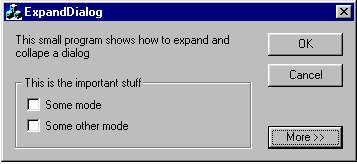
Dialog in collapsed state

Dialog in expanded state

Sometimes it may be useful to show only the important part in a dialog and have a button usually labeled "More" that expands the dialog when the user clicks on it. Once the dialog is expanded, the "More" button displays "Less" and as soon as the user clicks on the "Less" button, the dialog will shrink to its initial size.

The CExpandDialog class performs this for you. All you have to to is add the DialogExpander.cpp file to your project and make some minor changes in your dialog class and template.

Modify the header file of your dialog class like this:

/////////////////////////////////////////////////////////////////////////////
// CExpandDialogDlg dialog

#include "DialogExpander.h"    //<<<< add here

...
class CExpandDialogDlg : public CDialog
{
...
protected:
...
    CExpandDialog m_ExpandDialog ;    //<<<< add here
...
}

Modify the OnInitDialog function dialog class like this:

BOOL CExpandDialogDlg::OnInitDialog()
{
    CDialog::OnInitDialog();


    m_ExpandDialog.Initialize(this, FALSE, IDC_MOREBUTTON, 
                    IDC_SHRINKMARK, IDC_EXPANDEDMARK,
                    IDC_LESSTEXT) ; //<<<< add here

    ...
}

With the class wizard, add a handler for the "More" button (e.g. OnMore()) and modify it like this:

void CExpandDialogDlg::OnMore() 
{
    m_ExpandDialog.OnExpandButton() ;
}

The dialog template must include two special static controls. One that indicates the position of the bottom of the dialog when it is in the collapsed state (1 on the legend below) and one that contains the string that should appear on the "More/Less" button when the dialog is in the expanded state (2 on the legend below). These two controls will not be shown because the CExpandDialog class will hide them automatically.
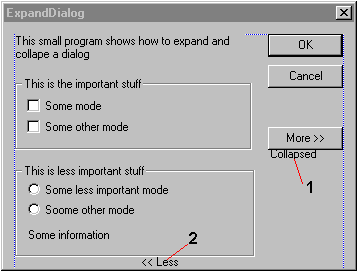
Dialog template

License

This article, along with any associated source code and files, is licensed under The Code Project Open License (CPOL)

About the Author

Michael Walz
Switzerland Switzerland
Member
No Biography provided

Sign Up to vote   Poor Excellent
Add a reason or comment to your vote: x
Votes of 3 or less require a comment

Comments and Discussions

 
Hint: For improved responsiveness ensure Javascript is enabled and choose 'Normal' from the Layout dropdown and hit 'Update'.
You must Sign In to use this message board.
Search this forum  
    Spacing  Noise  Layout  Per page   
GeneralMy vote of 4memberAdi Shavit13 Dec '11 - 23:50 
GeneralVertical/horizontal (default) optionmembervarandas7927 Jul '09 - 23:46 
To use vertical or horizontal (default) mode:
 
File "DialogExpander.h"
 
void Initialize(CWnd *pDialog,// pointer to dialog
		BOOL bInitiallyExpanded,// TRUE => dialog is initially expanded
	        int IdExpandButton,// id of " More " / " Less " button
		int IdCollapsedMark,// id of static that indicates position of 
				  // the bottom of the collapsed dialog
		int m_IdCollapsedText,// id of static that cntains the text
		BOOL horizontal=true) ;// "Less" ore something similar

void OnExpandButton(BOOL horizontal=true) ; // call this in the handler of the
 
File "DialogExpander.cpp"
 
void ShrinkDialog(CWnd *pDlg, int idmark, BOOL horizontal=true)
{
....
  // get height of the title bar
  if(horizontal)
	offset = dlgrect.Height() - clientrect.bottom ;
  else
	offset = dlgrect.Width() - clientrect.right ;
....
  // calculate the new rectangle of the dialog window
  if(horizontal)
	dlgrect.bottom = dlgrect.top + markrect.bottom + offset;
  else
	dlgrect.right = dlgrect.left + markrect.left + offset;
....
}
 
void CExpandDialog::Initialize(CWnd *pDialog, BOOL bInitiallyExpanded,
						  int IdExpandButton, int IdCollapsedMark,
						  int IdCollapsedText, BOOL horizontal)
{
....
  else
	OnExpandButton(horizontal) ;
}
 
void CExpandDialog::OnExpandButton(BOOL horizontal)
{
....
  else
	ShrinkDialog(m_pDialog, m_IdCollapsedMark, horizontal ) ;
....
}

GeneralAnother methodmemberSteve Mayfield22 Sep '03 - 20:06 
GeneralRe: Another methodmemberobjects2 May '06 - 5:05 
GeneralAny examples of using the expand feature with CPropertySheetmemberSuperD1 Aug '03 - 10:55 
Generalnew usagememberjohn john mackey12 Feb '03 - 11:58 
Generalbeautymemberlaue29 Jan '03 - 14:20 
GeneralClevermemberkilowatt26 Mar '02 - 8:01 
GeneralRe: ClevermemberDimitris Vassiliades15 Nov '02 - 8:48 
GeneralControls in expanded/collapsed areamemberjohn john mackey7 Jan '02 - 10:46 
GeneralRe: Controls in expanded/collapsed areasussAnonymous5 Jul '03 - 6:01 
GeneralA more efficient way...sussLX25 Oct '00 - 21:43 
GeneralRe: A more efficient way...memberDimitris Vassiliades15 Nov '02 - 9:03 
GeneralRe: A more efficient way...memberMatban9 Jan '04 - 4:38 
GeneralYou forgot tosussDaniel BERMAN10 Apr '00 - 6:05 
GeneralRe: You forgot tomemberUwe Keim30 Dec '01 - 21:48 
GeneralRe: You forgot tomemberDimitris Vassiliades15 Nov '02 - 9:10 
GeneralRe: You forgot tomemberMatban9 Jan '04 - 4:48 

General General    News News    Suggestion Suggestion    Question Question    Bug Bug    Answer Answer    Joke Joke    Rant Rant    Admin Admin   

Permalink | Advertise | Privacy | Mobile
Web03 | 2.6.130516.1 | Last Updated 10 Jan 2000
Article Copyright 2000 by Michael Walz
Everything else Copyright © CodeProject, 1999-2013
Terms of Use
Layout: fixed | fluid
