Click here to Skip to main content

Transaction Aware Table-adapters in .NET 2.0

By , 5 Dec 2007
 

Introduction

Much has been said about missing support for atomic transactions in .NET 2.0 when using table adapters that get generated by the dataset designer. This article provides a ready-to-use base-class that by injecting it into a table-adapter's inheritance line equips it with transaction capabilities.

Discussion of Approaches

One way to get around the aforementioned limitations is to configure your server to have DTC (Distributed Transaction Coordination) enabled. In that case, you can use TransactionScope instances guarding actions like modifications through table adapters. However, if you don't want to or cannot change the server's configuration, TransactionScope is not an option.

Others on The Code Project and other sites have explained how to enable transactions for table adapters. The basic idea always is to attach an SqlTransaction to all commands of a table-adapter. If multiple table-adapters are used, share the same transaction across all commands of all adapters. What makes this a little difficult is that a generated table-adapter keeps its SqlDataAdapter property Adapter private, but transaction code requires modifying the property.

There are several approaches to solve this issue. For instance Avoiding DTC with Typed DataSets and SQL Server 2000 suggests adding transaction code in the form of partial classes. As the partial extension lives in the same scope as the original table-adapter, it can also access its private properties. The major disadvantage here is that partial classes have to be created for each generated table adapter.

A much more elegant approach is mentioned in this post (unfortunately in German): use reflection to get your hands at those properties. The article also mentions a small detail I found very interesting: when editing a table-adapter in designer-mode, you are actually able to change its base class! So instead of the default base-class Component you can fill in your own base-class. If you now provide such a base-class that is derived from Component and implements the transaction stuff through reflection, usage becomes simple and elegant. And this is exactly what I did: putting together such a handy base-class called TransactionSupport.

Using the Code

To take advantage of the base class is very simple: First download the class source code and drop it into your project. Then, for all tables in your dataset that require transaction support, change the table adapter's base-class like this:

  1. Select the table-adapter (not the table) in the dataset designer, such that it becomes visible in the properties view.
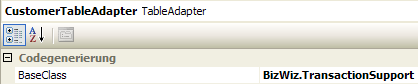
    Screenshot - ta-properties.png

  2. Change the property BaseClass from System.ComponentModel.Component to the class BizWiz.TransactionSupport I provided like is shown in the screenshot.

And that's it. Do this for each table adapter required. Then you can write code of the following pattern:

// begin transaction and share it among all participating table-adapters:
customerTableAdapter.BeginTransaction();
orderTableAdapter.Transaction = customerTableAdapter.Transaction;

// now start the modifications:
try
{
    // do modifications here, throw exceptions if things go wrong...
    // ...

    // ok, all is well, commit transaction:
    customerTableAdapter.CommitTransaction();
}
catch( Exception e )
{
    // if anything went wrong, roll-back transaction
    customerTableAdapter.RollbackTransaction();
}

You can choose any of the participating table-adapters to perform commit or rollback, but I make it good practice to have one dedicated transaction master, that is doing it all: BeginTransaction(), CommitTransaction()and RollbackTransaction().

History

Date Comment
2007-SEP-15 Uploaded modified version of base that looks for Connection property of generated table adapters in public as well as non-public scope, as this seems to differ throughout installations.

License

This article, along with any associated source code and files, is licensed under The Code Project Open License (CPOL)

About the Author

Mike Pagel
Software Developer (Senior) BMW AG
Germany Germany
Member
No Biography provided

Sign Up to vote   Poor Excellent
Add a reason or comment to your vote: x
Votes of 3 or less require a comment

Comments and Discussions

 
You must Sign In to use this message board.
Search this forum  
    Spacing  Noise  Layout  Per page   
GeneralNice articlememberAJMAL SHAHZAD13 Jul '12 - 20:13 
Presents a good concept of transaction in type Table-adapters.Thumbs Up | :thumbsup:
GeneralNice articlememberAJMAL SHAHZAD13 Jul '12 - 20:12 
Present a good concept of transaction in type Table-adapters.Thumbs Up | :thumbsup:
GeneralTransaction property returning nullmemberSCourt.NET24 Aug '10 - 10:19 
Hi everyone
 
I was trying to use this class, but I found that the property Transaction is returning null. I checked step by step and I found no problems. But when I try to access the property from outside it returns null Cry | :((
 
Any help will be very appreciated
 

 public bool AgregarAutorizacionPrestamo(Guid IdUsuario,int IdPrestamoSolicitud,DateTime FechaActivacion,double PorcentajeFondoGarantia,bool AplicarIVAInteresOrdinario,
            out string MensajeError)
        {
        	MensajeError = string.Empty;
        	bool Resultado = false;
            DataSet tablaAmortizacionDataSet = new DataSet();
            try
            {
                if (accesoServicioClass.CompruebaPermisos(IdUsuario, new Guid("ac4b6780-a833-4208-9fb7-9f75e065b3e7"), TipoObjeto.PrestamoAutorizacion, out MensajeError))
                {
                    tablaAmortizacionDataSet = tablaAmortizacionClass.ObtenTablaAmortizacion(IdUsuario, IdPrestamoSolicitud, out MensajeError);                    
                    prestamosAutorizacionesTableAdapter.BeginTransaction();
                    
                    int Id = (int)prestamosAutorizacionesTableAdapter.ObtenId();
                    if (prestamosAutorizacionesTableAdapter.InsertarPrestamoAutorizacion(Id, IdPrestamoSolicitud, FechaActivacion, PorcentajeFondoGarantia, AplicarIVAInteresOrdinario,
                        true) > 0)
                    {                        
                        if(MensajeError==String.Empty)
                        {
                            foreach (DataRow drAmortizacion in tablaAmortizacionDataSet.Tables["Resultado"].Rows)
                            {
                                if (!tablaAmortizacionClass.AgregarAmortizacion(IdUsuario, Id, Convert.ToInt32(drAmortizacion["NumeroPago"]),
                                    Convert.ToDateTime(drAmortizacion["FechaInicio"]), Convert.ToDateTime(drAmortizacion["FechaVencimiento"]),
                                    Convert.ToDecimal(drAmortizacion["Capital"]), Convert.ToDecimal(drAmortizacion["Interes"]),
                                    Convert.ToDecimal(drAmortizacion["IVAInteres"]), Convert.ToDecimal(drAmortizacion["AbonoCapital"]),
                                    Convert.ToDecimal(drAmortizacion["Pago"]), prestamosAutorizacionesTableAdapter.Transaction, out MensajeError))
                                    prestamosAutorizacionesTableAdapter.RollbackTransaction();
                            }
                            prestamosAutorizacionesTableAdapter.CommitTransaction();
                            Resultado = true;
                        }                        
                    }
                }
            }
            catch (System.Exception ex)
            {
                MensajeError = ex.Message;
            }
            finally
            {
                tablaAmortizacionDataSet.Dispose();
            }
        	return Resultado;
        } 
When I begin transaction the adapter assign the transaction, but when I try to access it in prestamosAutorizacionesTableAdapter it returns null.
I'm using Microsoft Visual Studio 2010, .net 4.0 Client profile (I've changed and got the same effect).

GeneralRe: Transaction property returning nullmemberSCourt.NET24 Aug '10 - 10:28 

By the way, the compiler show this warning


Warning 2 'ilink.DataSets.PrestamoSolicitudesDataSetTableAdapters.PrestamoSolicitudesTableAdapter.Transaction' hides inherited member 'BizWiz.TransactionSupport.Transaction'. Use the new keyword if hiding was intended. G:\Proyectos\Proehsa\FAIFAP\FAIFAP\ilink\ilink\DataSets\PrestamoSolicitudesDataSet.Designer.cs 983 63 ilink

GeneralThank you very much!!!memberHOUMAN MASNAVI10 Jun '10 - 3:49 
Thank you very much!!!
Your Article helped me a lot!!!
I have changed it to a .NET CLASS LIBRARY with your Name.
Then I Easily added a reference to it!
I named it LazyComp Sleepy | :zzz: for my students!
GeneralFabulous work....membermadhuraj00119 May '10 - 2:45 
Dear Mike Pagel,
 
This is what i was really looking for.
You have done really a great job. Please accept my heartiest thanks.
GeneralHi all,memberbruce2willis23 Jun '09 - 7:52 
I came across your code and I was in the middle of implementing your code.
 
But for shared transaction, the rollback was not initiated fully
 
/// xta.BeginTransation();
/// yta.Transation = xta.Transaction;
/// try
/// {
/// // perform xta and yta modifications here.
/// xta.CommitTransaction();
/// }
/// catch( Exception )
/// {
/// xta.RollbackTransaction();
/// }
 
In this eg: only rollback works for xta. How can I have the rollback for yta ?
GeneralThank YoumemberGeorge_Botros19 Mar '09 - 5:52 
Rose | [Rose] Thank You
You Saved Me from Writing dozens Of Code
 
George Batres

GeneralIf anyone is looking for a VB version of this...memberegbdfine29 Jan '09 - 7:03 
I found this works fine in VB.NET 2005. Although if you edit the dataset in the designer, the reference to BizWiz gets decorated to Global.BizWiz which breaks the compiler.
 
' ----------------------------------------------------------------------------
'
' TransactionSupport
'
' Original author: Mike Pagel
' After ideas given in
'     http:'www.codeproject.com/useritems/typed_dataset_transaction.asp
'     http:'entwickler-forum.de/showpost.php?p=2032&postcount=2
'
'  Translated to VB and converted to OLEDB for use with MS ACCESS  (Jet) by Jim Hansen, Jan 2009
' ----------------------------------------------------------------------------
 
'imports System.Data.SqlClient
Imports System.Data.OleDb
imports System.Data
imports System.Reflection
 
namespace BizWiz
 
    '/ <summary>
    '/ Transaction support for generated table adapters.
    '/ </summary>
    '/ <remarks>
    '/ me class adds transaction support to table adapters. It is used by changing the base
    '/ class of a table adapter from Component to me class. The implementation of me class
    '/ then accesses the derived table adapter's properties through reflection.
    '/ </remarks>
    Public MustInherit Class TransactionSupport
        Inherits System.ComponentModel.Component
 
        ' --------------------------------------------------------------------
#Region "Reflective access to table adapter properties"
        ' --------------------------------------------------------------------
        Private Property Connection() As OleDbConnection 'SqlConnection
 
            ' Access to propertis as public and non-public as generated table-adapter
            ' scope seems to be different for different installations:
            ' http:'www.codeproject.com/useritems/transactionta.asp?msg=2225021#xx2225021xx
            Get
                'return (SqlConnection)GetType().GetProperty( "Connection", BindingFlags.Public or BindingFlags.NonPublic or BindingFlags.Instance ).GetValue( me, nothing )
                Return Me.GetType().GetProperty("Connection", BindingFlags.Public Or BindingFlags.NonPublic Or BindingFlags.Instance).GetValue(Me, Nothing)
            End Get
            Set(ByVal value As OleDbConnection) ' SqlConnection)
                Me.GetType().GetProperty("Connection", BindingFlags.Public Or BindingFlags.NonPublic Or BindingFlags.Instance).SetValue(Me, value, Nothing)
            End Set
        End Property
 
        ' --------------------------------------------------------------------
        Private ReadOnly Property Adapter() As OleDbDataAdapter  'SqlDataAdapter
 
            Get
 
                Return Me.GetType().GetProperty("Adapter", BindingFlags.NonPublic Or BindingFlags.Instance).GetValue(Me, Nothing)
            End Get
        End Property
 
        ' --------------------------------------------------------------------
        Private ReadOnly Property CommandCollection() As OleDbCommand() 'SqlCommand()
 
            Get
 
                Return Me.GetType().GetProperty("CommandCollection", BindingFlags.NonPublic Or BindingFlags.Instance).GetValue(Me, Nothing)
            End Get
        End Property
 
#End Region
        ' --------------------------------------------------------------------
#Region "Properties"
        ' --------------------------------------------------------------------
        '/ <summary>
        '/ Transaction of me table adapter.
        '/ </summary>
        '/ <remarks>
        '/ me property is used to share a transaction and its associated connection
        '/ across multiple table adapters. The typical pattern is shown in the sample
        '/ code below.
        '/ </remarks>
        '/ <example>
        '/ XTableAdapter xta = new XTableAdapter()
        '/ YTableAdapter yta = new YTableAdapter()
        '/ 
        '/ xta.BeginTransation()
        '/ yta.Transation = xta.Transaction
        '/ try
        '/ {
        '/     ' perform xta and yta modifications here.
        '/     xta.CommitTransaction()
        '/ }
        '/ catch( Exception )
        '/ {
        '/     xta.RollbackTransaction()
        '/ }
        '/ </example>
        Public Property Transaction() As OleDbTransaction 'SqlTransaction
 
            Get
                Return my_transaction
            End Get
            Set(ByVal value As OleDbTransaction) ' SqlTransaction)
 
                ' attach transaction to all commands of my adapter:
                If CommandCollection IsNot Nothing Then
                    For Each command As OleDbCommand In CommandCollection 'SqlCommand In CommandCollection
                        command.Transaction = value
                    Next 'command
                End If
                If Adapter.InsertCommand IsNot Nothing Then
                    Adapter.InsertCommand.Transaction = value
                End If
                If Adapter.UpdateCommand IsNot Nothing Then
                    Adapter.UpdateCommand.Transaction = value
                End If
                If Adapter.DeleteCommand IsNot Nothing Then
                    Adapter.DeleteCommand.Transaction = value
                End If
 
                ' also set connection of my adapter accordingly:
                If value IsNot Nothing Then
                    Connection = value.Connection
                Else
 
                    ' only clear connection if it was attached to
                    ' transaction before:
                    If (Transaction IsNot Nothing) Then
                        Connection = Nothing
                    End If
                End If
 

                my_transaction = value
            End Set
        End Property
 
#End Region
        ' --------------------------------------------------------------------
#Region "Operations"
        ' --------------------------------------------------------------------
        Public Sub BeginTransaction()
 
            ' Open the connection, if needed
            If (Connection.State <> ConnectionState.Open) Then
                Connection.Open()
            End If
            ' Create the transaction and assign it to the Transaction property
            Transaction = Connection.BeginTransaction()
        End Sub
 
        ' --------------------------------------------------------------------
        Public Sub CommitTransaction()
 
            ' Commit the transaction
            my_transaction.Commit()
 
            ' Close the connection
            Connection.Close()
        End Sub
 
        ' --------------------------------------------------------------------
        Public Sub RollbackTransaction()
 
            ' Rollback the transaction
            my_transaction.Rollback()
 
            ' Close the connection
            Connection.Close()
        End Sub
 
#End Region
        ' --------------------------------------------------------------------
#Region "Fields"
        ' --------------------------------------------------------------------
        '/ <summary>
        '/ Fields supporting properties.
        '/ </summary>
        Private my_transaction As OleDbTransaction 'SqlTransaction
 
#End Region
        ' --------------------------------------------------------------------
 
    End Class
end namespace

GeneralRe: If anyone is looking for a VB version of this...membercbankovic18 Aug '10 - 5:21 
Is there anyway to fix the problem with the "global.bizwiz" problem? I'm searching Google and have come up empty so far.

General General    News News    Suggestion Suggestion    Question Question    Bug Bug    Answer Answer    Joke Joke    Rant Rant    Admin Admin   

Permalink | Advertise | Privacy | Mobile
Web01 | 2.6.130523.1 | Last Updated 5 Dec 2007
Article Copyright 2007 by Mike Pagel
Everything else Copyright © CodeProject, 1999-2013
Terms of Use
Layout: fixed | fluid
