Click here to Skip to main content

SQL Server Database Backup Utility using VB.NET and SQL-DMO (New version)

By , 17 Mar 2008
 

New Release (1.1.0)

It has been a year since I wrote this article. I got many responses for this backup utility. So I decided to update this program and made major changes to make it more stable in terms of functionality and performance. You can read my original article, SQL Server Backup Utility (Old Version).

Following is a list of changes for a new version:

  • Backup file extension is now .ZIP instead of .SQLBackup. This is to avoid any confusion.
  • Old version was having an issue with restoring data in certain conditions. It should have been fixed in this version.
  • Multi threading is added with backup and restore processes. This way, the program won't freeze during long operations.
  • UI is improved to display proper status of backup and restore.
  • Included GNU license.

I will be doing more updates to this program in the next few days. Please check my Website, shabdar.org, regularly to get the latest source.

Introduction

Whenever we want to backup or move the SQL Server database, most of us prefer to use a regular backup utility which is available through Enterprise Manager in SQL Server 2000 or Management Studio in SQL Server 2005. The limitation of using Enterprise Manager or Management Studio is that we have to use either complete or differential backups. This is a very tedious task when we want to backup only a small portion of a large database. For example, in my database I would like to take a backup of only 15 tables out of 100 tables or I may want to backup only a few records from these selected tables. For that reason, I was looking for a small utility which allows me to do so. After searching through hundreds of utility programs, I have decided to write my own utility.

Features

  • Backup of selected objects
  • Backup of selected data
  • Backup of only scripts
  • Backup of only data
  • Backup of both scripts and data
  • Supports backup from remote severs over Web, LAN or even local PC

Using Program
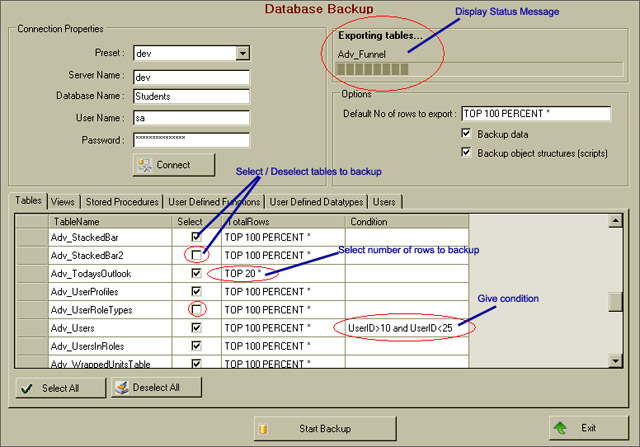
To backup the database,

  • Open the database backup window from tools menu.
  • Enter server name, database name, user name and password for SQL Server.
  • Click on Connect. This will display all available tables, views, stored procedures, user defined functions, user defined datatypes and users from database.
  • If you want to backup only data, check Backup Data and remove checkmark from Backup object structures (Scripts).
  • If you want to backup only scripts, check Backup object structures (Scripts) and remove checkmark from Backup Data.
  • Select objects that you want to backup from list. By default, all objects are selected. In the above picture, Adv_StackedBar2 and Adv_UserRoleTypes tables will be excluded from backup.
  • Apply any condition on table data. For example UserID > 10 and UserID < 25 in the above picture. It means only those records will be exported which satisfy this condition.
  • Modify number of rows to export on a particular 'table'. For example, in the above picture Top 20 *, means only top 20 rows will be exported for Adv_TodaysOutlook table.
  • Click on Start Backup. It will ask you to enter a file name and location. Note that backup file has extension *.zip. Remember that this is not a standard SQL server backup file. It's just a zip file which contains scripts for tables, views, stored procedures etc. It also includes data in row (*.dat) files.

To restore the backup,

  • Open Database restore window from tools menu.

  • Enter server name, database name, user name and password for SQL Server.
  • Select database backup file (*.zip) that you want to restore. Remember this utility can only restore those backup files (*.zip) which are created by this utility itself. It cannot restore regular SQL server backup files.
  • When you select backup file, it displays all objects available in backup.
  • If you want to create a new database, check Create New Database option.
  • If you want to drop the existing database and recreate it, check Drop Existing Database option.
  • Select objects that you want to restore from list. By default all objects are selected.
  • Click on Start Restore.

Using Other Features

As you can see, both backup and restore forms include Preset combo box. What it does is it records server name, database name, user name and password information every time you backup or restore a database. Next time when you want to use the same server, you don't need to enter all these parameters again. You can select it from Preset combo list. It also remembers last accessed SQL server name.

Using Code

I am not writing the description of code in much detail. Most of the code is self explanatory and commented. Just a few quick notes. I have used SQL-DMO library for all database related tasks. For SQL-DMO library, either SQL Express or SQL Server 2000 client tools must be installed on your computer.

Objects from SQL-DMO Library

    'Server object from SQL-DMO library
    Dim oServer As New SQLServer2
    'Database object from SQL-DMO library
    Dim db As SQLDMO.Database2
    'BCP Utility from SQL-DMO Library
    Dim objBCP As New SQLDMO.BulkCopy2

Function for Exporting Data to a File from SQL Server

objBCP.DataFilePath = "c:\temp\EmployeeData.dat"
db.Tables.Item("Employee").ExportData(objBCP)

Generating SQL Script for an SQL Server Object

'Generate script with drop statement
Dim SQL as String = db.GetObjectByName("Employee").Script_
(SQLDMO_SCRIPT_TYPE.SQLDMOScript_Drops) + db.GetObjectByName("Employee").Script()

Limitations

  • This utility cannot take backup of user roles and triggers.
  • Backup file is in zip format. (You can extract it using winzip or another zip utility and view its content.). It cannot be restored using SQL Server Enterprise Manager.

Enhancements

This program can be enhanced further to include a Windows service which can take regular backups for SQL Server without user interactions. Thus this utility can be utilized for your regular backups.

Acknowledgements

I have used SharpZipLib (ICSharpCode.SharpZipLib.dll), a free open source zip utility library available here, for zipping backup directory. This file is included in Bin\Release folder.

Requirements

  • Visual Studio .NET 2005 (For source code)
  • .NET Framework 2.0
  • Microsoft SQL Server 2000 or Microsoft SQL Express 2005 or Microsoft SQL Server 2005 client components (For SQL-DMO Library)

How to Install Utility

Make sure that you have either SQL Server 2000 or 2005 client components installed on your computer. If you do not want to install these components, you can install Microsoft SQL Server 2005 Backward Compatibility Components. These components are needed for SQL-DMO library.

Download the setup zip file from the link provided at the top of this article. Extract and run setup.exe. It should create icons in your programs menu and desktop.

How to Use the Source Code

Download the source code zip file from the link provided at the top of this article and run DatabaseBackup.sln solution file with Visual Studio 2005.


License

This article, along with any associated source code and files, is licensed under The Code Project Open License (CPOL)

About the Author

Shabdar Ghata
Web Developer
Canada Canada
Member
Software Developer
 
http://www.shabdar.org

Sign Up to vote   Poor Excellent
Add a reason or comment to your vote: x
Votes of 3 or less require a comment

Comments and Discussions

 
You must Sign In to use this message board.
Search this forum  
    Spacing  Noise  Layout  Per page   
QuestionPlease helpmemberpickatshou4 Feb '13 - 1:51 
Please help me I get this error
 
[Microsoft][ODBC SQL Server Driver][SQL Server]To connect to this server you must use SQL Server Management Studio or SQL Server Management Objetcs (SMO)
GeneralMy vote of 5memberwhomwhom8 Jun '12 - 5:30 
fast and stable.
GeneralMy vote of 5memberdesaihardikj@gmail.com22 Sep '11 - 18:36 
wow.... this is great tool ever .... great effort and very very thanks for this article..
QuestionCan't Get it to run in VS2010 on Windows 7memberBHort15 Sep '11 - 11:21 
I've got MS-SQL 2008 and VS2010 installed on my Windows 7 machine and I connected to the DLL from within the project. It compiles fine but when I try and bring up the Database Export screen it dies with an Invalid Operation Exception was unhandled error on the first line of code in DatabaseBackupToolStripMenuItem_click event (frmDatabaseBackup.MdiParent = Me)
 
The exception detail (shown below) seems to suggest that the class isn't registered ... but MS Management Console is running fine ... so I'm wondering if the problem is related to being on a 64 bit Windows 7 machine.
 
Any ideas on a solution ... I would love to be able to take this and provide it as a method to allow our staff to backup/restore the various databases they have to work on ... but I need it capable of running on a variety of platforms.
 
Thanks.
 
The first chunk of the exception detail is: (to keep the volume managable)
 
System.InvalidOperationException was unhandled
Message=An error occurred creating the form. See Exception.InnerException for details. The error is: Retrieving the COM class factory for component with CLSID {10021CC1-E260-11CF-AE68-00AA004A34D5} failed due to the following error: 80040154 Class not registered (Exception from HRESULT: 0x80040154 (REGDB_E_CLASSNOTREG)).
Source=DatabaseBackup
StackTrace:
at BackupDatabase.My.MyProject.MyForms.Create__Instance__[T](T Instance) in 17d14f5c-a337-4978-8281-53493378c1071.vb:line 197
at BackupDatabase.My.MyProject.MyForms.get_frmDatabaseBackup()
at BackupDatabase.MainMenu.DatabaseBackupToolStripMenuItem_Click(Object sender, EventArgs e) in \MainMenu.vb:line 24
at BackupDatabase.MainMenu.DatabaseBackup_Click(Object sender, EventArgs e) in \MainMenu.vb:line 37
at System.Windows.Forms.ToolStripItem.HandleClick(EventArgs e)
at System.Windows.Forms.ToolStripItem.HandleMouseUp(MouseEventArgs e)
 

AnswerRe: Can't Get it to run in VS2010 on Windows 7 [modified]memberBraks14 Dec '11 - 2:59 
To resolve that follow the following steps
1. In your vb window click on project
2. Followed by DatabaseBackup properties
3. Then go to the compile tab
4. Scroll down you shall see advanced compile settings
5. In the advanced compile settings change Target CPU to x86
6. Save the changes and try to run the project again
 
This shall resolve the error: 80040154
If you receive a lot of error messages on the error list do this:
1.With a project selected in Solution Explorer, on the Project menu, click Properties.
 
2.On the Compile tab, in the Option strict list, select Off.

modified 14 Dec '11 - 9:36.

QuestionColumn names with spacesmemberpetebob7969 Jul '11 - 12:48 
Hi this tool looks great but it seems to not be able to import data correctly when there were spaces in the column names.
GeneralMy vote of 5memberpandeypavankumar27 Apr '11 - 17:24 
This article really help full because it give smart working technique with dot net and sql server
thank you
General"error r6034 with sql backup/restore utility by Shabdar Ghata":memberrajeshvarikkol16 Mar '11 - 2:47 
pls help me when i click backup or restore button it shows an error r6034
and says the application used c++ runtime library incorrectly..
GeneralMy vote of 5memberraphu27 Nov '10 - 1:27 
this solved my problem.congrats
GeneralMy vote of 5memberenesiii21 Jul '10 - 4:12 
Thank you Microsoft
GeneralRe: My vote of 5memberraphu27 Nov '10 - 1:29 
excellent article
GeneralNot Working in Windows 7memberAnto George2 Jul '10 - 17:01 
The Code is prety cool in Win xp but in Windows 7
An error is raising that Registered COM class with CLSID {.........} not found
 
Please Update the code for working on windows 7
anto

GeneralRe: Not Working in Windows 7memberzylaoer23 Jul '10 - 23:51 
I can working it in Windows 7 U.
 
You should make sure:

Requirements
•Visual Studio .NET 2005 (For source code)
•.NET Framework 2.0
•Microsoft SQL Server 2000 or Microsoft SQL Express 2005 or Microsoft SQL Server 2005 client components (For SQL-DMO Library)
How to Install Utility
Make sure that you have either SQL Server 2000 or 2005 client components installed on your computer. If you do not want to install these components, you can install Microsoft SQL Server 2005 Backward Compatibility Components. These components are needed for SQL-DMO library.
 
Download the setup zip file from the link provided at the top of this article. Extract and run setup.exe. It should create icons in your programs menu and desktop.

GeneralExporting data does not workmemberMember 3081795 May '10 - 12:41 
Hi,
this is one of the best examples but export procedure does not work.
It throws the folowing error.
 
LINE: db.Tables.Item(sTableName).ExportData(objBCPExport)
 
ERROR TEXT:
[Microsoft][ODBC SQL Server Driver][SQL Server]Code page 852 is not supported by SQL Server
[Microsoft][ODBC SQL Server Driver]Unable to resolve column level collations.
 
Any idea why???
GeneralForeign Key ConstraintsmemberMember 6058853 Nov '09 - 7:37 
Did you ever figure out a solution for the foreign key issues when backing up and restoring?
 
Thanks
QuestionRestore locationmemberGitosh22 Sep '09 - 4:34 
I like this utility and it works perfectly. Just a small question, I deploy my software with it's DB and the DB is located in the software installation directory. When I use this tool to backup and restore, it restores to the SQL Server directory, how can I change the code so that it restores to my software installation directory?
 
Thanks
 
Every day is a learning day

GeneralThe system cannot find the file specifiedmembersvknair25 Jul '09 - 2:26 
An error occurred creating the form. See Exception.InnerException for details. The error is: Could not load file or assembly 'Interop.SQLDMO, Version=8.5.0.0, Culture=neutral, PublicKeyToken=null' or one of its dependencies. The system cannot find the file specified.
 
when i try to run this i get the above error
Questionhow to use this application for windows authentication.memberMember 43524214 Jul '09 - 3:10 
how to use this application for windows authentication.
GeneralTry EZmanage SQL Pro for better mssql backupmemberitayl27 May '09 - 3:08 
EZManage SQL Pro provids 5 time faster sql backup using VDI
 
http://www.futureitsoft.com
GeneralC# VersionmemberMember 458481523 Apr '09 - 18:16 
where did i find the C# version of This Project. i am tried to convert it in to C# but i can't, the SQlDmo shows some issues(Like it requires more arguments in some functions like refresh etc).... pls help me
GeneralSQLDMO not foundmemberskhurams18 Apr '09 - 11:05 
Sigh | :sigh: hi
thanks for the post but when i downloaded the source it is giving error
Warning 22 The referenced component 'SQLDMO' could not be found.
how to add reference
 
khurram saddique

GeneralCongratulationsmemberm.conta27 Nov '08 - 3:01 
Really good utility, I appreciate the speed and the clean interface.
 
Only one suggestion, why don't you add an "exit condition" near every table?
 
It would be useful to clean some data in the tables after the backup completition.
Imagine that I have one DB with 10GB size.
I need to backup all the records of some tables older then one date, and after the completition of the backup I need to clean the old rows in these tables.
 
Thanks for the great job
Questionvarchar (max)?membermurali_utr12 May '08 - 19:51 
Hi,
Thanks for Very Nice Article. varchar (max) data type is comes in script as varchar (-1). So While restore the database it's not working. Have any solution.
 
Thanks in advance!
 
Have A Nice Day!
Murali.M
 
Blog

AnswerRe: varchar (max)?memberRedi Linxa29 May '10 - 5:35 
I'm having the same problem!
Is there any solution?
GeneralSqlServer connectionmemberalhambra-eidos30 Apr '08 - 5:05 
Hi mister,
 
why use oledb connection, not use sqlserver connection? any reason about it ?
 
Thanks.
 
AE

General General    News News    Suggestion Suggestion    Question Question    Bug Bug    Answer Answer    Joke Joke    Rant Rant    Admin Admin   

Permalink | Advertise | Privacy | Mobile
Web03 | 2.6.130523.1 | Last Updated 17 Mar 2008
Article Copyright 2007 by Shabdar Ghata
Everything else Copyright © CodeProject, 1999-2013
Terms of Use
Layout: fixed | fluid