In this post, you will find an explanation of how to use the Pick Icon common dialog.
Introduction
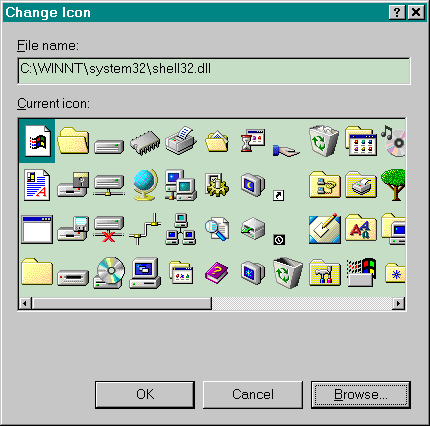
We all know the Pick Icon common dialog that the Windows shell displays when you choose "Change icon". However, the function to do this is undocumented. This article explains how to use this common dialog.
You bring up the dialog by calling the function PickIconDlg. This function is exported by ordinal from shell32.dll and has ordinal 62.
However, the function has one drawback: it has a different signature in Windows NT and Windows 95/98. Therefore, I wrote a wrapper around the function that dynamically binds to shell32.dll and converts arguments when necessary.
I provided two versions of the wrapper function: a Unicode version and an ANSI version.
The function returns you the name of the file that contains the icon and the index of the icon. This is a zero-based index, not a resource id. This means you can extract the icon with the function ExtractIcon.
The following piece of code (from the accompanying sample project) shows how to call the wrapper function:
if (::SelectIcon(m_hWnd, m_pszCurrentFile, MAX_PATH, &m_dwCurrentIndex))
{
    m_hIcon = ::ExtractIcon(::AfxGetInstanceHandle(),
        m_pszCurrentFile, m_dwCurrentIndex);
    SetIcon(m_hIcon, TRUE);
    SetIcon(m_hIcon, FALSE);
}
History
- 13th January, 2000: Initial version
License
This article has no explicit license attached to it, but may contain usage terms in the article text or the download files themselves. If in doubt, please contact the author via the discussion board below.
A list of licenses authors might use can be found here.
Henk studied computer science at the University of Ghent, specializing in theoretical computer science.
He is now working for
Artwork Systems, Belgium, and
Whirling Dervishes Software, Belgium.
Henk knows a little something about networking, graphics, object-oriented design, AI, embedded systems. He knows most of the PDF specs by heart.
Henk developed
NSELib, the NameSpace Extension Library.
You can find his latest freeware software at
regxplor.com. It contains a namespace extension that puts the registry in Windows Explorer. The newest commercial project is
Alpha ZIP, an explorer-embedded ZIP file utility.



 General
  News
News  Suggestion
  Question
  Bug
Bug  Answer
  Joke
Joke  Praise
  Rant
Rant  Admin
Admin 


 Submit an article or tip


