Introduction
Did you notice how Explorer in XP is intelligent enough to sort the files in a natural order?
If you have 10 files on your hard disk, they will show in this order:
file1.txt

file2.txt
file3.txt

file4.txt
file5.txt

file6.txt
file7.txt

file8.txt
file9.txt

file10.txt
However, if you try in under DOS, they will appear this way:
file1.txt

file10.txt
file2.txt
...
The reason for that is that DOS uses a simple alphabetical search.
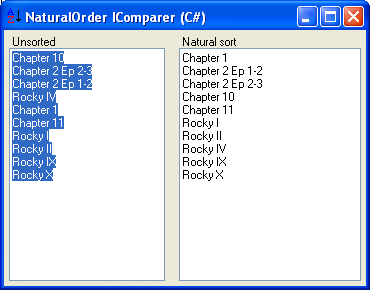
The aim of this article is to show how I think Explorer does this better than DOS and provide to the CodeProject readers a class to reproduce this in their .NET programs.
Background
The .NET framework uses the IComparer interface a lot. This interface is very simple to implement; it contains a single member:
Public Function Compare(ByVal x As Object, ByVal y As Object) As Integer
//C#
int IComparer.Compare(object x, object y)
The function you must provide returns an integer which must be:
- less than zero when
x is less than y - zero when
x equals y - more than zero when
x is greater than y
Comparing a null reference (Nothing in Visual Basic) with any reference type is allowed, and does not generate an exception. A null reference is considered to be less than any reference that is not null.
Using the code
The class NaturalComparer can be used anywhere the .NET framework requires an IComparer. That is about every operation which involves sorting data. The most common is probably Array.Sort.
In the demo program, for example, I use:
Array.Sort(lines, New NaturalComparer())
This will sort the lines using the natural order I have briefly described above.
How does this work
This NaturalComparer class uses a couple of StringParser classes to compare each item.
The StringParser is a pretty straightforward character parser. It eats the characters of the string, and returns through its member NextToken a series of tokens. Each token is either numerical or string.
public void NextToken()
{
do
{
if (mCurChar == '\0')
{
mTokenType = NaturalComparer.TokenType.Nothing;
mStringValue = null;
return;
}
else if (char.IsDigit(mCurChar))
{
mTokenType = NaturalComparer.TokenType.Numerical;
ParseNumericalValue();
return;
}
else if (char.IsLetter(mCurChar))
{
mTokenType = NaturalComparer.TokenType.String;
ParseString();
return;
}
else
{
NextChar();
}
} while (true);
}
The StringParser ignores the punctuations and spaces.
The NaturalComparer has very little to do. It will get the first token from each string and compares their numerical values if both are numerical, if not compares the string values.
int System.Collections.Generic.IComparer<string>.Compare(string string1,
string string2)
{
mParser1.Init(string1);
mParser2.Init(string2);
int result;
do
{
if (mParser1.TokenType == TokenType.Numerical &
mParser2.TokenType == TokenType.Numerical)
result = decimal.Compare(mParser1.NumericalValue, mParser2.NumericalValue);
else
result = string.Compare(mParser1.StringValue, mParser2.StringValue);
if (result != 0) return result;
else
{
mParser1.NextToken();
mParser2.NextToken();
}
} while (!(mParser1.TokenType == TokenType.Nothing &
mParser2.TokenType == TokenType.Nothing));
return 0;
}
Points of interest
As an option, you can ask the NaturalComparer to detect and parse Roman numerals.
New NaturalComparer(NaturalComparerOptions.RomanNumbers)
The problem is that sometimes the comparer could mix a valid English name for a Roman number. This is okay if the other side of the comparison is a string, but it can mess your sort order if the other side is a number or another false Roman numeral positive.
So, use this option if you believe the likelihood of having Roman numerals is worth messing the order.
History
- 2008 Jan 17: First release.
I am a French programmer.
These days I spend most of my time with the .NET framework, JavaScript and html.



 General
  News
News  Suggestion
  Question
  Bug
Bug  Answer
  Joke
Joke  Praise
  Rant
Rant  Admin
Admin 


 Submit an article or tip


