Introduction
A big question in the Windows Forms world is "How can I zoom and scroll the PictureBox?" The answer is to use the ImagePanel, which enables you to simply zoom and pan an image.
I use Microsoft Visual C# 2005 Express Edition to build it. It's easy and simple. You can start a new project and add a user control. In the Design window, you drag a vertical scrollbar and a horizontal scrollbar to the user control, then go to the code window and add the code as in the source file, ImagePanel.cs. That's all, a zoomable and scrollable PictureBox replacement has been built and you can use it now.
Zooming is done by a Matrix object:
Matrix mx=new Matrix();
mx.Scale(zoom,zoom);
Panning is done by the values returned by the scrollbars. We tell the scrollbar the image size, which is its real size multiplied by the zoom factor:
if ((canvasSize.Width * zoom - viewRectWidth) > 0)
{
    this.hScrollBar1.Maximum =(int)( canvasSize.Width * zoom) - viewRectWidth;
}
if ((canvasSize.Height * zoom - viewRectHeight) > 0)
{
    this.vScrollBar1.Maximum = (int)(canvasSize.Height * zoom) - viewRectHeight;
}
So, the correct position within the real image is the scrollbar values divided by the zoom factor:
Point pt=new Point((int)(hScrollBar1.Value/zoom),(int)(vScrollBar1.Value/zoom));
To display the image on the center of this control, the Matrix object is used again:
mx.Translate(viewRectWidth/2.0f,viewRectHeight/2.0f, MatrixOrder.Append);
This component has a good feature: during image zoom out, only a portion of the image is drawn. It saves a lot of computer resources:
if (canvasSize.Width * zoom < viewRectWidth &&
canvasSize.Height * zoom < viewRectHeight)
srcRect = new Rectangle(0, 0, canvasSize.Width, canvasSize.Height);
else srcRect = new Rectangle(pt, new Size((int)(viewRectWidth / zoom),
(int)(viewRectHeight / zoom)));
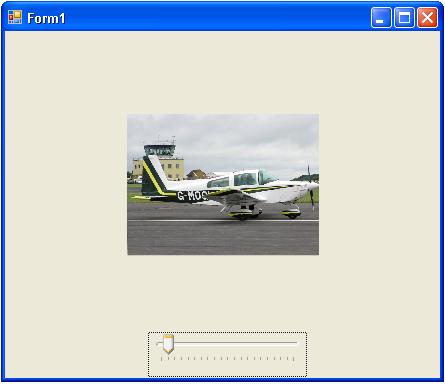
To test this little but strong control, I put it on a form and added a trackbar to provide the zoom factor. Double click the ImagePanel to load a picture. Try it, how's it?
Thanks.
This member has not yet provided a Biography. Assume it's interesting and varied, and probably something to do with programming.



 General
  News
News  Suggestion
  Question
  Bug
Bug  Answer
  Joke
Joke  Praise
  Rant
Rant  Admin
Admin 


 Submit an article or tip


