Introduction
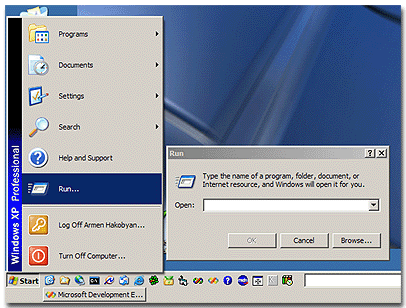
In this article, I am going to describe how to start the Run file dialog that you see when launching applications from the Start/Run menu. There are two ways of doing this - first documented, using the Shell object, and the second - using the undocumented Windows shell API function which is much more flexible.
Going the Documented Way
We should create an instance of the Shell object and call its FileRun method:
BOOL CRunFileDlgDlg::RunDocumented( void )
{
IShellDispatch* pShellDisp = NULL;
HRESULT hr = ::CoCreateInstance( CLSID_Shell, NULL,
CLSCTX_SERVER, IID_IShellDispatch, (LPVOID*)&pShellDisp );
if( hr == S_OK )
{
pShellDisp->FileRun();
pShellDisp->Release();
pShellDisp = NULL;
}
return ( hr == S_OK );
}
We can just launch run file dialog and that is all - it starts stuck to the Start menu.
Going the Undocumented Way
Declaration
This way is much more flexible - it allows us to define the dialog icon, title and description. I will not jump in the deeps of the implementation; you can look it in the header and source files I have provided. The function is exported from the shell32.dll by ordinal 61 (dynamically loaded) and its declaration is as follows:
BOOL
FASTCALL
RunFileDlg(
IN HWND hwndOwner, IN HICON hIcon, IN LPCTSTR lpszDirectory, IN LPCTSTR lpszTitle, IN LPCTSTR lpszDescription, IN UINT uFlags );
Parameters
You can specify one or more of the following values in the uFlags parameter:
RFF_NOBROWSE - Remove the browse buttonRFF_NODEFAULT - No default item selectedRFF_CALCDIRECTORY - Calculate the working directory from the file nameRFF_NOLABEL - Remove the edit box labelRFF_NOSEPARATEMEM - Remove the Separate Memory Space check box, NT only
Notification Handling
Other nice feature of this dialog is that it allows us to control which applications the user should run. When the user selects the OK button, it sends a notification message with the details of the program, that should be started, to the window, whose handle you passed in to this function. The notification is in the form of a WM_NOTIFY message with the wParam set to RFN_VALIDATE (-510) code and the lParam pointing to an NMRUNFILEDLG structure:
typedef struct tagNMRUNFILEDLG {
NMHDR hdr; LPCWSTR lpszFile; LPCWSTR lpszDirectory; int nShow; } NMRUNFILEDLG, *LPNMRUNFILEDLG, *PNMRUNFILEDLG;

Notification Handling Unicode Issue
As far as this is an undocumented function, it has different signatures in Windows NT and Windows 9x - Windows NT uses UNICODE version and Windows 9x - ANSI version despite you call RunFileA or RunFileW functions. In the implementation, the operating system version is checked and all necessary conversions are done. But when handling notification message, you should check it once again, because under Windows NT, you will receive NMRUNFILEDLGW and in Windows 9x - NMRUNFILEDLGA, no matter defined UNICODE or not. See the sample:
MFC Application Sample
void CSomeDlg::OnRunFileDlgOK( NMHDR* pNMHDR, LRESULT* pResult )
{
LPNMRUNFILEDLG lpNMRFD = (LPNMRUNFILEDLG)pNMHDR;
TCHAR szFile[ MAX_PATH ] = { 0 };
#ifndef UNICODE // If NT we get a unicode string anyway.
if( ::GetVersion() < 0x80000000 ) ::WideCharToMultiByte( CP_ACP, 0, (LPCWSTR)lpNMRFD->lpszFile,
-1, szFile, 2 * MAX_PATH, NULL, NULL );
#else
if( ::GetVersion() > 0x80000000 ) ::MultiByteToWideChar( CP_ACP, 0, (LPCSTR)lpNMRFD->lpszFile,
-1, szFile, 2 * MAX_PATH );
#endif
CString strMsg( _T("") );
strMsg.Format( _T("Run the file %s ?"), szFile );
int nRet = ::MessageBox( GetSafeHwnd(), strMsg,
_T("RunFile Dialog notification test"),
MB_YESNOCANCEL | MB_ICONQUESTION | MB_DEFBUTTON2 );
switch ( nRet )
{
case IDYES: *pResult = RF_OK; break;
case IDNO: *pResult = RF_RETRY; break;
default: *pResult = RF_CANCEL;
}
}
Win32 Application Sample
case WM_NOTIFY:
{
LPNMHDR lpNMHDR = (LPNMHDR)lParam;
if( lpNMHDR->code == RFN_VALIDATE )
{
LPNMRUNFILEDLG lpNMRFD = (LPNMRUNFILEDLG)lpNMHDR;
return RF_OK;
}
}
Return Values
The return value determines whether the application will be run or not.
You can use the following return values:
RF_OK - Allow the application to runRF_CANCEL - Cancel the operation and close the dialogRF_RETRY - Cancel the operation, but leave the dialog open
Compatibility
- Windows 9x - Requires Windows 95/98/ME
- Windows NT - Requires Windows NT4.0/2000/XP
Related Links
History
- 8th August, 2002 - Posted article
License
This article has no explicit license attached to it, but may contain usage terms in the article text or the download files themselves. If in doubt, please contact the author via the discussion board below.
A list of licenses authors might use can be found here.
This member has not yet provided a Biography. Assume it's interesting and varied, and probably something to do with programming.



 General
  News
News  Suggestion
  Question
  Bug
Bug  Answer
  Joke
Joke  Praise
  Rant
Rant  Admin
Admin 


 Submit an article or tip


