Click here to Skip to main content

ASP.NET with Managed C++

By , 19 Aug 2002
 

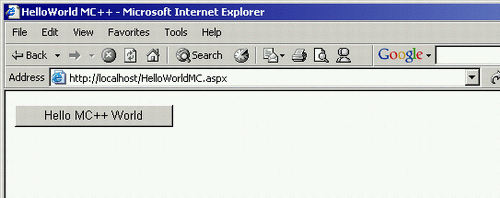
Sample Image - HelloWorldMC.gif

Introduction

I recently discussed this topic with Chris Maunder on the Message Boards. Chris concluded that ASP.NET does not support Managed C++, well I agree. But it does support MSIL compiled assemblies.

Eventhough the .NET Framework supports many language compilers, ASP.NET has out of the box support for parsing three languages only; C#, VB.NET, JScript. Therefore, we must bypass ASP.NET parser to use a language that ASP.NET does not support. The method we will use to accomplish this is called "code-behind". This method should work for any language that supports a compiler for .NET (e.g. COBOL). I will be demonstrating this technique with the renowned "Hello World" example. This article's only objective is to show you, how to use Managed C++ as code-behind for ASP.NET pages, it doesn't demonstrate any complex C++ coding.

Using Managed C++ as ASP.NET code-behind

First, lets create a simple ASP.NET file called HelloWorldMC.aspx. The most crucial part of this file is Inherits="HelloWorldMC", this will tell ASP.NET to look for an assembly (code-behind) file.

<%@ Page AutoEventWireup="false" Inherits="HelloWorldMC" %>
<html>
    <head>
        <title>HelloWorld MC++</title>
    </head>
    <body>
        <form runat="server" ID="Form1">
           <asp:Button id="Button1" runat="server" Text="Click Me Please" 
           OnClick="SayHello" Width="172px"></asp:Button>
        </form>
    </body>
</html>

Next we create the Managed C++ file, as our code-behind file named HelloWorldMC.aspx.cpp, I am following the naming convention of Visual Studio.NET here. It is important to keep the names of your server controls consistent between your .aspx file and your .cpp (code-behind) file. For example, id="Button1" is used in the .aspx file and Button* Button1 is used in the code-benind file, which will bind it to the <asp:Button id="Button1" runat=server></asp:Button> control. Also remember that the function SayHello must be public so the .aspx page can access it.

#using <system.dll>
#using <mscorlib.dll>
#using <system.web.dll>

using namespace System;
using namespace System::Web::UI::WebControls;

public __gc class HelloWorldMC : public System::Web::UI::Page
{
protected:

    Button* Button1;

public:

    void SayHello (Object* sender, EventArgs* e)
    {
        Button1->Text = "Hello MC++ World";	
        return;
    }

};

Compiling the project

Make sure that the HelloWorldMC.aspx and HelloWorldMC.aspx.cpp files are placed in the root of your IIS web server (i.e. C:\Inetpub\wwwroot). Now if the subdirectory bin does not exist in the root, create it (i.e. C:\Inetpub\wwwroot\bin). The following command line syntax will compile and create our code-behind file and place it in the bin. Make sure this is ran from the web server root direcotory.

cl /clr HelloWorldMC.aspx.cpp /link /dll /out:bin\HelloWorldMC.dll

Start up your browser and browse the file, http://localhost/HelloWorldMC.aspx, ASP.NET does not care how the code-behind (assembly) was created, as long as it adheres to the Inherits="HelloWorldMC" in the .aspx file, which tells ASP.NET there is an assembly named HelloWorldMC.dll. Please note that there are advantages to using code-behind techniques in all your ASP.NET programming, to list a couple:

  1. Compilation before execution
  2. Seperation of presentation code from business logic

Obtaining Intellisense for .CPP code-behind file, in VS.NET

My suggestion for obtaining intellisense for your .cpp file is, to add a blank Managed C++ project to a currentley existing web project. I tried creating the .cpp code-behind file first, then adding an existing item to my web project and the .cpp file was added to my web project, but the intellisense would not work properly.

License

This article has no explicit license attached to it but may contain usage terms in the article text or the download files themselves. If in doubt please contact the author via the discussion board below.

A list of licenses authors might use can be found here

About the Author

Soliant
Software Developer (Senior)
United States United States
Member
No Biography provided

Sign Up to vote   Poor Excellent
Add a reason or comment to your vote: x
Votes of 3 or less require a comment

Comments and Discussions

 
You must Sign In to use this message board.
Search this forum  
    Spacing  Noise  Layout  Per page   
QuestionCould not load file or assembly 'TradeQueueApi' or one of its dependencies. An attempt was made to load a program with an incorrect format.memberardyllesdavid23 Aug '07 - 21:35 
Hi Guys, i am having this error all the time.
On my development pc with VS2005 installed its runs fine on its IIS
but when i put it on a clean windows server it does this.
I think its missing one of the components of vss to load the c++ dll.
Btw its using 2 dlls i think managed and unmanaged.
 
Any ideas?
 
thanks Big Grin | :-D
 
ardy
QuestionWhy not just refrence a managed dll?memberrj4518 May '07 - 7:55 
That seems like a lot of work when you can just create a seperate unmanaged dll project and add it to your solution...?
Questionproblems with classesmemberSaturday3AM6 Mar '06 - 23:17 
I have problems accessing some classes and inheriting the MasterPage class.
 
forum thread:
http://www.codeproject.com/script/comments/forums.asp?forumid=12076&select=1395645&df=100&tid=1395645#xxxx
 
Do you know what I might be doing wrong?
Generalcannnot compile the cppmemberchenen16 May '04 - 17:47 
I've got this problem,
-----
Command line warning D4002 : ignoring unknown option '/clr'
HelloWorldMC.aspx.cpp
HelloWorldMC.aspx.cpp(1) : fatal error C1021: invalid preprocessor command 'using'
-----
 
Please tell me how to fix it, Thanks

GeneralRe: cannnot compile the cppmemberSoliant16 May '04 - 18:05 
It seems that you do not have the .NET Framework installed. The project in this article was built with Visual Studio.NET 2002. You may not have the enviornment setup with .NET, b/c the two problems you are having are specific to Managed C++
1. /clr is the switch telling the C++ compiler the code is to be ran in the Common Language Runtime
2. #using statement is a MC++ thing too.
 
You basically need VS.NET 02/03 and/or .NET Framework SDK to compile this project. I can help you troubleshoot if you give more details on your development environment.
 
Thanks.
 

R.Bischoff

Denn Gott hat die Menschen so sehr geliebt, daß er seinen einzigen Sohn für sie hergab. Jeder, der an ihn glaubt, wird nicht verlorengehen, sondern das ewige Leben haben


GeneralRe: cannnot compile the cppmemberchenen17 May '04 - 4:02 
Thanks for your reply,
But, I've installed .NET framework and VS.NET 2002.
and updated to .NET framework SP2 recently
Does anything go wrong?
Thanks a lot !!!
 

GeneralLooking for more on this topicmemberMike Seck29 Nov '03 - 9:06 
In order to do a web project as a senior project I must use C++ for the business logic. I would like to see more on using ASP.NET with Managed C++.
 
Are there anymore articles, books, other writings that cover this topic?
GeneralRe: Looking for more on this topicsussAnonymous30 Nov '03 - 16:01 
I am not sure. I think that Nick Hodapp would be a great person to ask.
GeneralKnown problems with this scenariositebuilderNick Hodapp (MSFT)26 Aug '02 - 7:10 
Unfortunately, at present there are known issues with using MC++ with certain scenarios involving ASP.NET. These are definately scheduled to be fixed in a future release.
 
The problem occurs when a call is made from unmanaged code to managed code, including direct unmanaged-to-managed calls within a single DLL. In ASP.NET, various events can cause applications to be reloaded into a new AppDomain. If you are using MC++ components and IJW in this application, you may receive an AppDomainUnloadException error message.
 
As part of the implementation of IJW, when a managed DLL that you created by using the C++ compiler loads, the runtime creates thunks for transitions from unmanaged code to managed code. These thunks contain a reference to the AppDomain in which the DLL loads. The runtime does not re-create these thunks if the DLL loads again; also, the runtime does not update the reference when the original AppDomain unloads and the DLL loads in another AppDomain.
 
When the program performs a transition from unmanaged code to managed code, the program uses the outdated AppDomain reference to run the managed code. Even if the original AppDomain is still loaded, the code cannot access static fields because the fields are specific to the AppDomain.
 
Read the details here, in Knowledge Base Article Q309694.


This posting is provided “AS IS” with no warranties, and confers no rights. You assume all risk for your use. © 2001 Microsoft Corporation. All rights reserved.

GeneralRe: Known problems with this scenariomemberSoliant26 Aug '02 - 22:32 
Nick Hodapp (MSFT) wrote:
Unfortunately, at present there are known issues with using MC++ with certain scenarios involving ASP.NET. These are definately scheduled to be fixed in a future release.
 
This is good news.
 
It seems that ASP.NET w/ MC++ code-behind is not recommended at this time. Thanks for the useful information.


Soliant | email
 
"The whole of science is nothing more than a refinement of everyday thinking." -Albert E.

General General    News News    Suggestion Suggestion    Question Question    Bug Bug    Answer Answer    Joke Joke    Rant Rant    Admin Admin   

Permalink | Advertise | Privacy | Mobile
Web02 | 2.6.130523.1 | Last Updated 20 Aug 2002
Article Copyright 2002 by Soliant
Everything else Copyright © CodeProject, 1999-2013
Terms of Use
Layout: fixed | fluid
