Introduction
Most bar code scanners emulate keyboards. This allows them to be easily used in any application. The user simply needs to put the focus on any text input control and then scan a bar code.
This same behaviour also allows the user to scan bar codes into fields not intended for scanning and can cause problem. This method does not allow the application to take instant action when a scan is received because the application has no way of distinguishing the bar code scanner input from the keyboard.
Many vendors have their own APIs which can be used to distinguish the bar code scanner from the keyboard. In the real world, there are thousands of bar code scanners and relying on vendor specific APIs is not practical. Many of the generic or clone scanners which are now a common commodity have no API and rely solely on keyboard emulation which further complicates the issue.
Fortunately, there is an easy yet not well known method for detecting distinct input from the bar code scanner. This allows the user to scan bar codes without needing to put the focus on a special field, or activate buttons or menu items before each scan.
Background
One of my projects required integration with POS peripherals for sales, receiving, inventory, and other standard retail functions. Recently we needed to integrate bar code readers. Previously we had used bar code scanners for lookups, serial number entry, etc. But users were required to tell the software first by clicking a button, or selecting a text box first and then scanning the code. The software did not know the difference between the scanner and the keyboard. The application just took the text sent to it and was oblivious as to wheter it came from the keyboard or a bar code scanner.
This approach permits a lot of user mistakes. It is also inefficient. There are ways to directly integrate with bar code scanners using third party libraries, SDKs, or OPOS. But this seemed like a lot of fuss just to be able to get data from the bar code scanner and know it came from the bar code scanner.
Many suggested to use OPOS. In the past we had used OPOS in the past for interacting with high speed thermal printers. OPOS however relies on individual setup on each machine, and a separate OPOS driver for each piece of hardware. Vendor support for OPOS is varied, and very often the vendor drivers are shoddy and not well supported. Bar code scanners however are lower cost items and in a given site ther eare often many different brands of scanners. In the end we later swtiched to raw support for the thermal printers as well and completely eliminated OPOS and all its hassles with it.
After more research I learned that many users resorted to the WinAPI and keyboard hooks. These solutions required a lot of external calls and many relied on Windows messages which did not work as well with WPF. This method also required the developer to uniquely identify they device specifically on each machine.
First Attempt
Bar code scanners can be programmed to send a prefix and suffix for each scan. Many scanners allow you to program them with a verity of characters. For widest compatibilty STX (start of text, 0x02 ASCII) and ETX (end of text, 0x03 ASCII) are the best choices.
I created a KeyDown event in a WPF app and scanned a bar code. The first key I received was LeftCtrl. LeftCtrl??? Obviously WPF didn't know how to handle low ASCII codes that keyboards were never designed to send. Part of this complication is because WPF generally deals with scan codes and not ASCII codes. Not all ASCII codes can map to scan codes.
I gave up this approach and tried many of the more complex WinAPI approaches to try to access the raw input from the bar code scanner. Most had problems with WPF and required a lot of adaptation because they were written for WinForms and relied on Windows messages.
I succeeeded wtih one test and became excited. But then I ran my first test and got a code of 162. 162 is the scan code for LeftCtrl. :(
Retry
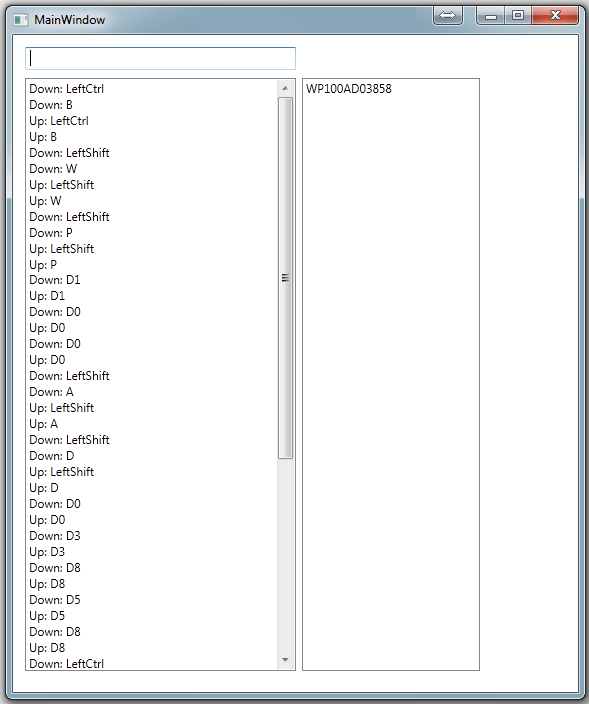
Back to WPF and a simple PreviewKeyUp. I dug a bit deeper beyond the first character and noticed a pattern. I hoped that I could detect this pattern reliably and intercept the keystrokes. I made a program to log key ups and downs and realized quickly that STX (0x02) was being translated to:
- Down: LeftCtrl
- Down: B
- Up: B
- Up: LeftCtrl
Then it hit me. My previous assumptions were wrong. Windows was seeing STX (0x02). I previously assumed Windows was getting confused. In fact it was doing a bit of translation. In the older times, Ctrl + <A-Z letter> was mapped to 1-26 in ASCII. That is, Ctrl-A was equivalent to 0x01. On many older 8 bit computers you could press Ctrl-M and the computer would see it the same as Enter (0x0D). So Windows was seeing the STX (0x02) from the bar code scanner and translating it into a series of key code scans that represented Ctrl-B.
Now I had something I could work with.
The Code
I added two events to my main WPF window: PreviewKeyUp and PreviewKeyDown. I kept track of the Ctrl key state and then looked for a B to detect Ctrl-B. From there I collected all input until I found a Ctrl-C (ETX, 0x03) sequence. Note that most bar code readers do not send these sequences by default, but nearly all can be easily configured to do so.
From Ctrl-B to the Ctrl-C, I assumed all input was from the bar code scanner and set the event handled property so other events in my program would not see the data. At the end, I called an event and handed the data off to my program.
Demo
In this demo, the sole purpose of the edit field is to show that normal keyboard input is taken, but bar code scanner input is not. The listbox on the left shows the raw key scan sequences. Bar code results are shown in the listbox on the right.
The demo was built in C#, WPF, and Visual Studio 2010. It can be very easily used with VB.NET, WinForms, and other versions of Visual Studio.
Reuse
This method can be easily encapsulated into a class for easy reuse on any window. In my application, all of our WPF windows descend from a common base class, so I have put the functionality there. For each window, I simply need to add this in the constructor:
ScanReceived = Scan;
void Scan(string aData) {
  MessageBox.Show("Scan received: " + aData);
}
Result
Without the use of WinAPI, invasive code, or complex code, I found a method to reliably interpret bar code scanner input. In fact the actual code fits easily on a screen. With this method, there is no need to identify to the code which device is the bar code scanner. The code simply looks for patterns in the key presses and separates the data out.
Caveat
There is one small caveat. Ctrl-B cannot be used in your application for menus or other hot key functions. The code relies on this to detect the start of input from the bar code scanner. The code also looks for Ctrl-C, but only after a Ctrl-B. At other times, it ignores Ctrl-C, so the commonly used shortcut for copy to clipboard does not conflict with the use of this technique.
In most applications this is not an issue. However if you need Ctrl-B for something like Bold in a word processor, it could be a problem for you. To get around this the code will need to be upgraded to look for Ctrl-B and then wait for a certain amount of time and if no characters appear followed by a Ctrl-C, it could thne pass on the Ctrl-B to the application as normal.
Known Issues
There are a few issues when other keypress handlers exist on the window. I have addressed these in my production code and will update the demo as time permits.
Future Expansion
Bar code scanners can also be programmed to issue other prefixes to identify the type of code scanned, i.e., UPC vs. Code39. With the products we deal with, this is useful because if a UPC is scanned we know it identifies the product, while Code39 and other non UPC/EAN codes typically represent serial numbers of the item. This allows users to receive items very quickly without the need to identify first what they want to do to the software, and instead the software can infer the user intended actions based on the active window. I have expanded my code to recognize other prefixes and respond with other available events.
Chad Z. Hower, a.k.a. Kudzu
"Programming is an art form that fights back"
I am a former Microsoft Regional DPE (MEA) covering 85 countries, former Microsoft Regional Director, and 10 Year Microsoft MVP.
I have lived in Bulgaria, Canada, Cyprus, Switzerland, France, Jordan, Russia, Turkey, The Caribbean, and USA.
Creator of Indy, IntraWeb, COSMOS, X#, CrossTalk, and more.



 General
  News
News  Suggestion
  Question
  Bug
Bug  Answer
  Joke
Joke  Praise
  Rant
Rant  Admin
Admin 


 Submit an article or tip


 I guess I'll have to dig deeper with something like this: