Introduction
If you've upgraded to Visual Studio .NET, you may not be aware that you have a database server on your hard drive. If you go to <rootdir>/FrameworkSDK/Samples/Setup/msde, there you will find a file called InstallMSDE.exe, which installs the Microsoft SQL Server Desktop Edition. This is basically SQL Server 2000, but designed to work with no more than 5 concurrent users. As far as I can see, the point of this is to allow you as a developer to write code that utilises SQL Server, and then create a product for which your customer will need to buy SQL Server, without your having to make any changes. This is somewhat similar to Oracle, who give their full product away to developers to encourage use of their product.
There's always a catch
Having a database product is all well and good, but sadly MSDE does not come with any GUI tools. If you're a beginner, it can be somewhat worrying to write code and to have only your code's return values to tell you if your database looks the way you expected. Additionally, when you're learning SQL or writing a query that is not simple, you're likely to want to be able to do it in a test environment first. Enter MSDEGUI. This program was my first using ADO.NET, and was written for exactly this reason - as I develop a product with MSDE as my database during development, it really is untenable that I am not able to check on the state of my data. Along the way I learned some ADO.NET (which was the point, after all), which I will share with you as I explain the program.
OleDb vs. Sql
Throughout I am using items with names like SqlConnection, SqlCommand, etc. If you want to use another database, all these objects have equivelents prefixed with OleDb instead of Sql, but as I wrote this to use with MSDE, I used the versions optimised for it.
Why not plug yourself in?
The first thing we need to do is connect to our database. Not surprisingly, the object to do this is called an SqlConnection, and we do it like this:
m_conn = new SqlConnection(sConnection);

try
{
    m_conn.Open();
}
catch(OleDbException e)
{
    MessageBox.Show(e.Message);
    return;
}
Our GUI accepts the a connection string and a database location, the first is used to connect via ADO.NET, the second to connect via SQLDMO. Note that unless both connections work, the program will report failure. This is also a change from the last version, we no longer build the connection string, although defaults are presented in the login dialog.
Listing databases and tables
With some help from fellow CPians, I was able to make the GUI list all databases on the current server with this query: select * from master.dbo.SysDatabases. Having populated the combo-box for databases, we populate our other combo, which lists tables in the current database, like this:
ComboBox cb = (ComboBox)sender;

m_conn.ChangeDatabase(cb.Items[cb.SelectedIndex].ToString());

SqlDataAdapter dataAdapter =
   new SqlDataAdapter("select * from INFORMATION_SCHEMA.TABLES",
                                                        m_conn);

DataSet ds = new DataSet();
dataAdapter.Fill(ds);

comboTable.Items.Clear();

foreach (DataRow r in ds.Tables["Table"].Rows)
    comboTable.Items.Add(r["TABLE_NAME"].ToString());
The most important point here is the need to call ChangeDatabase on our connection object. Until I worked that out, it went nowhere.
Using the main screen
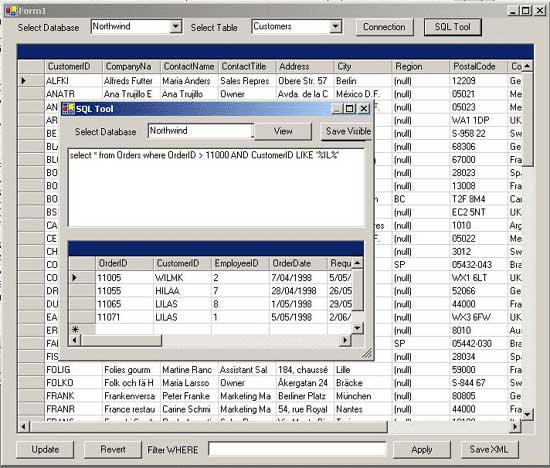
So on the main screen we're able to enter a connection string, choose a database and select a table. Once we've done this, we get a grid view of the table, and we're able to browse it and make changes. Any changes you make can be reverted with the revert button, or saved to the database with the Apply button.
This magic is done by the DataGrid component. To fill a DataGrid, we pass our query to a DataAdapter, and call it's fill method. The DataSet we passed in will be filled with a view of the data requested, and we simply attach that DataSet to the grid. To get the grid to show the table right away without the need to expand anything, we need to use a syntax that tells it what table to use. It looks like this:
ComboBox cb = (ComboBox)sender;
m_sDBName = cb.Items[cb.SelectedIndex].ToString();
m_sDBFilter = "";
SqlDataAdapter dataAdapter =
   new SqlDataAdapter("select * from " + m_sDBName, m_conn);

m_dsTables.Clear();

dataAdapter.Fill(m_dsTables, m_sDBName);

dgTables.DataSource = m_dsTables.Tables[m_sDBName].DefaultView;
But wait, there's more
The tool also offers an SQL window, filtering (just type your SQL 'where' clause into the bottom edit box and press 'filter'), and saving of data as XML, and also as text in the SQL window. You can press 'view' in the SQL window to alternate between a text window, and a dataGrid. The grid is nicer, and causes the save button to save as XML, but it does not show things like records affected, or the results of multiple queries.
Visual Studio .NET
After writing this article, several people have posted to present alternative tools, or point to the IDE itself as an alternative. I guess it's inevitable that others would have done what I am doing here, but the fact that so many do would seem to indicate the need for a tool on top of what the IDE offers (although the IDE is quite impressive as well). I'm not claiming to be the best, but I am hosted on the best developer site, so that will have to do.
SQLDMO
The other big request was for SQLDMO support. I had no idea what this means, so thanks to all who asked. The tool now uses SQLDMO to offer adding/removing of databases and of logins. I will shortly add manipulation of triggers and of stored procedures as well. In the meantime, the added items are as follows:
In the SQL dialog we have a button called 'Run File'. It causes a file dialog to allow browsing to an SQL file, then it attempts to execute it. I do not see a way to associate an SQLDMO connection with a database, so if your SQL assumes connection to a specific database, the results are likely not going to be what you're looking for, so beware. The code looks like this:
System.IO.StreamReader filSqlScript;
filSqlScript = System.IO.File.OpenText(dlg.FileName);
m_SQLServerDMO.ExecuteImmediate(filSqlScript.ReadToEnd(),
    SQLDMO.SQLDMO_EXEC_TYPE.SQLDMOExec_Default,    null);
filSqlScript.Close();
The main page also has a new button, labelled 'Admin'. This brings up a dialog with two combo-boxes, one labelled databases, the other users. In both cases they have a button to their right, and this will show 'Add' if a string is entered which does not correspond to an existing value in the database, and 'Remove' if the item entered does exist. The SQLDMO connection has a number of collections in it, including Databases and Logins. To remove a Database, we pass in it's name, but for some reason to remove a login we pass it's index. We therefore step through them all (they are 1 indexed, asking for item 0 results in an error), until we find the one that matches and remove it. To add an item we create an instance of the item, fill it's members with the required data, and append it to the collection. Here is the code we use for logins. Note that the password is set by calling a method designed for changing passwords. I will add the ability to change passwords shortly.
private void CreateLogin(string sLogin, string sPassword, string sDefault)
{
    SQLDMO.Login login = new SQLDMO.Login();

        login.Name = sLogin;
    login.Database = sDefault;
    login.SetPassword("", sPassword);

    m_SQLServerDMO.Logins.Add(login);
}

private void OnLoginClick(object sender, System.EventArgs e)
{
    try
    {
        switch(btnLogin.Text)
        {
            case "Delete":

                for(int n = 1; n <= m_SQLServerDMO.Logins.Count; ++n)
                    if (m_SQLServerDMO.Logins.Item(n).Name == comboLogin.Text)
                    {
                        m_SQLServerDMO.Logins.Remove(n);
                        break;
                    }
                comboLogin.Items.Remove(comboLogin.Text);
                comboLogin.Text = "";
                btnLogin.Text = "";
                break;
            case "Add":
                CreateDialog dlg = new CreateDialog(m_SQLServerDMO);

                dlg.ShowDialog();

                if (dlg.bOK)
                {
                    CreateLogin(comboLogin.Text, dlg.m_sPassword, dlg.m_sDefault);
                    comboLogin.Items.Add(comboLogin.Text);
                    btnLogin.Text = "";
                }
                break;
        }
    }
    catch (Exception ex)
    {
        MessageBox.Show(ex.Message);
    }
}
What's next?
Well, first of all I'm going to check CP, and if no-one has offered articles on the other stuff I use in the SQL window particularly, I'l expand the article to cover that. Otherwise I want to add menu options to speed up creating and dropping tables and databases, and a stored procedure window to make dealing with stored procedures easier. Any other suggestions, let me know.
Disclaimer
Thanks to Jason Henderson for the cool article helper tool, it really helped. No animals were harmed in the making of this article, except the cat, and she deserved it.
History
Version 1.2
Added SQLDMO support, including the ability to execute SQL files from disk, and adding and removing tables and logins.
Version 1.1
Fixed the problem with the hard coded string. You should still change the string to one that suits you, but if it fails it will now bring up the connection dialog.
Programming computers ( self taught ) since about 1984 when I bought my first Apple ][. Was working on a GUI library to interface Win32 to Python, and writing graphics filters in my spare time, and then building n-tiered apps using asp, atl and asp.net in my job at Dytech. After 4 years there, I've started working from home, at first for Code Project and now for a vet telemedicine company. I owned part of a company that sells client education software in the vet market, but we sold that and I worked for the owners for five years before leaving to get away from the travel, and spend more time with my family. I now work for a company here in Hobart, doing all sorts of Microsoft based stuff in C++ and C#, with a lot of T-SQL in the mix.



 General
  News
News  Suggestion
  Question
  Bug
Bug  Answer
  Joke
Joke  Praise
  Rant
Rant  Admin
Admin 


 Submit an article or tip


