Click here to Skip to main content

A Professional HTML Renderer You Will Use

By , 29 Jan 2009
 

(See history for list of changes.) 
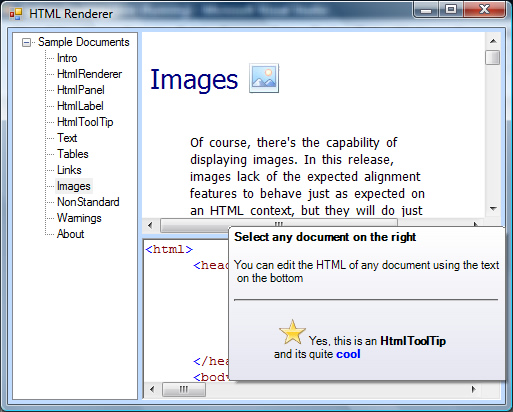
HtmlDemo

Introduction

This is a library of 100% managed code that draws beautifully formatted HTML. It comes along with three WinForms controls:

  • HtmlPanel
  • HtmlLabel
  • HtmlTooltip

And a static method ready to draw HTML:

  • HtmlRenderer.Render(Graphics g, string html, RectangleF area, bool clip) 

Note: The drawing engine is based on the CSS Level 2 specification.

Background

For years, I have been planning for a project like this. I prepared myself quite well. I went through the entire CSS Level 2 specification along with the HTML 4.01 specification.

One of the most interesting things I found is this: Drawing HTML is no more than laying out a bunch of boxes with borders margins and paddings. Once you overpass this paradigm, everything else is to help the code actually place the boxes on the right place, and then paint the string each box contains.

Imagine the power that drawing full-rich-formatted HTML on your controls can give to your applications. Use bold when you need it, italics on every message, and borders and fonts as you may like or need everywhere on the desktop application. One of the first projects where I will use it is on the tooltips of my Ribbon Project.

Although I have not tested it on mono yet, there should be no problem at all, since all of the code in the library is managed code and the methods it uses to paint are quite basic. It draws lines, rectangles, curves and text.

For now, the render looks really nice. Sometimes it can fool you to think you're using a real Web browser, trust me, download the demo, it is just an EXE and a DLL.

Using the Code

The library locates the code under the System.Drawing.Html namespace. The controls that render HTML are under the System.Windows.Forms namespace.

The renderer follows the CSS Box Model. Box model is nothing but a tree of boxes, just as the tree of HTML, each of these boxes is represented by a very used class called CssBox. The start node is represented by the class InitialContainer.

All the known CSS properties apply to each of these boxes. Each box may contain any number of child boxes and just one parent. The only box that has no parent at all is the so called Initial Container.

A typical use of an Initial Container to draw HTML would look like this:

//Create the InitialContainer
InitialContainer c = new InitialContainer("<html>");
 
//Give bounds to the container
c.SetBounds(ClientRectangle);
 
//Measure bounds of each box on the tree
c.MeasureBounds(graphics);

//Paint the HTML document
c.Paint(graphics);

renderer_002.jpg

First a label, then a panel and at last a ToolTip, all of which support HTML rendering.

You may never use it, since I provided controls and methods that create this object for you.

HtmlPanel

A panel that is ready to accept HTML code via its Text property. Its full name is System.Windows.Forms.HtmlPanel.

The only properties you need to know are:

  • AutoScroll. Activates/Deactivates the auto-scroll capabilities as you know. It is set to true by default.
  • Text. Gets/Sets the HTML source.

The panel will update the bounds of the elements as you scroll or resize the control.

HtmlLabel

A label that is ready to accept HTML code via its Text property. Its full name is System.Windows.Forms.HtmlLabel.

The only properties you need to know are:

  • AutoScroll. Activates/Deactivates the auto-scroll capabilities as you know. It is set to true by default.
  • AutoSize. Sets the size of the label automatically if activated.
  • Text. Gets/Sets the HTML source.

Some interesting things:

  • The label will update the bounds of the elements as you scroll or resize the control.
  • The label can be transparent.
  • The panel has better performance than the label.

HtmlToolTip

Works exactly like the ToolTip you already know, with the little difference that this tooltip will render HTML on it. It's full name is System.Windows.Forms.HtmlToolTip.

There are no properties here to learn. Use it just the way you use the ToolTip that comes with the framework. Internally, it just handles the OwnerDraw event.

Some Features of my Own

I took the liberty of adding a couple of features:

  • Background gradients
  • Rounded corners

These are achieved through the following CSS properties:

  • background-gradient: (color)
  • background-gradient-angle: (number)
  • corner-ne-radius: (length)
  • corner-nw-radius: (length)
  • corner-se-radius: (length)
  • corner-se-radius: (length)
  • corner-radius: (length){1,4} (shorthand for all corners)

What's Currently Supported by the Renderer?

  • Most border, padding and margin and positioning CSSproperties (except for the height property)
  • Text alignment horizontally and vertically, text indents too
  • Lists, ordered and unordered. Advanced numbering is not yet supported
  • Tables, almost all of it. Cell combinations work quite well as far as I tested them
  • Fonts (partially) and Colors
  • Backgrounds (just color)

Points of Interest

What can I say, this is one of the most fun projects I've ever been involved with. And so far, it runs beautifully and checks its original design goals.

I am planning to give it full rendering support, to the day that you may visualize a web page just as a good web browser would; and why not, make a WYSIWYG HTML editor to give amazing HTML editing power to your applications.

I'm also planning to make sure it runs perfectly well on Mono and on Mobile platforms.

In the next few days, I'll publish a list of supported HTML tags and CSS properties.

History

  • Jan 08 2009: First release
  • Jan 29 2009: Minor bugs fixed 
    • Text Encoding of samples
    • Large paragraphs and fonts because of Culture  
    • License 

License

This article, along with any associated source code and files, is licensed under The BSD License

About the Author

Jose Menendez Póo
Team Leader
Mexico Mexico
Member
Jose Manuel Menéndez Poó
 
- I've been programming Windows and Web apps since 1997.
- My greatest concern nowadays is user interface usability.
 
Questions and stuff by twitter: @menendezpoo
 
Jose Runs Goplek in Mexico
www.goplek.com
 
Blog
menendezpoo.com

Sign Up to vote   Poor Excellent
Add a reason or comment to your vote: x
Votes of 3 or less require a comment

Comments and Discussions

 
Hint: For improved responsiveness ensure Javascript is enabled and choose 'Normal' from the Layout dropdown and hit 'Update'.
You must Sign In to use this message board.
Search this forum  
    Spacing  Noise  Layout  Per page   
GeneralAwesomememberDavid Roh28 Jul '09 - 22:28 
Awesome work Jose - thank you for sharing it.   David Roh
QuestionLicense?memberCory Crooks7 Jul '09 - 9:48 
In the article it says this code is under the BSD license (can use it in a commercial app), but the demo application says it is under the GPL (for all intents and purposes, can't use it in a commercial app).   Can you clearify which it is?
QuestionProblems with spaces after punctuation and "&amp;nbsp;" [modified]memberJPaula25 Jun '09 - 13:03 
Spaces after punctuation (comma, point, colon; etc.) shouldn't disappear. I don't now where is the best place to deal with this situation. Any suggestions? &nbsp; wasn't being delt with, so I added a Replace("&nbsp;"," ") in the WordBox Text property.   Joel   modified on...
GeneralFont Size not honoured - trying to fix it [modified]memberJPaula23 Jun '09 - 11:01 
Thank you for a fantastic project and a very good work!   I need Font Tags to honour the size attribute. So I tried to fix it by adding code in HtmlTag.TranslateAttributes: case HtmlConstants.size: switch (t) { ...
GeneralBR was not working.memberdnaprice18 Jun '09 - 5:41 
<BR> or <BR /> tag was not working.
GeneralSame herememberJPaula23 Jun '09 - 14:43 
Can't figure out where in the code I can make it behave normally.
GeneralBR FixedmemberAndreas Stolle31 Jul '09 - 1:22 
First: Thanks for this great part of work.
 
I had the same problem: "br" does not break lines.
Fix is simple here:
 
Just change "CssDefaults.cs" line#26 to
dir, hr, menu, pre, br { display: block }

GeneralRe: BR FixedmemberDoncp14 Oct '09 - 14:32 
Thank you, thank you.   What about &lt; and &gt; ? they don't seem to work.     p>Examples: &lt;b&gt; &lt;i&gt; &lt;br&gt; &lt;img&gt; &lt;a&gt; </p>   Don
GeneralMissing Navigating EventmemberJan Prochazka alias jena15 May '09 - 23:59 
Hello,   I am using this control when rendering information about application state nicely and when showing shortcuts to some application actions (like in Explorer). Standard WebBrowser didn't work properly under Mono and Ubuntu, this very nice renderer works in my case under Mono without...
GeneralRe: Missing Navigating EventmemberMember 603819621 May '09 - 23:48 
Hi, Can you publishing the changes, because i also need a Navigating Event.   thx
GeneralRe: Missing Navigating EventmemberJan Prochazka alias jena25 May '09 - 9:00 
Hi, I used this hack (all changes are in file HtmlPanel.cs): put this somewhere in HtmlPanel class: #region Events public event LinkClickEventHandler LinkClick; #endregion in the OnMouseClick method, replace CssValue.GoLink(box.GetAttribute("href", String.Empty)); with string...
QuestionPossible browser?memberThe Dogcow Farmer12 May '09 - 12:54 
You could possibly make a browser by using HTTP requests, caching it, then feeding it the code. I am not sure how it would handle images though.   EDIT: HTTP linking are opening in FF, and throwing an exception.   People think it must be fun to be a super genius, but they don't...
GeneralBase64 encoded images supportmemberFco. Javier Marin6 May '09 - 4:44 
Hi Jose Manuel,   I have made some changes for support base64 encoded images in the renderer (you can find more info at http://dean.edwards.name/weblog/2005/06/base64-ie/[^])   I need to change only two sections of code:   HtmlTags.cs Constructor:   Change:  ...
GeneralChanges to support TransparencymemberJoaoGouveia24 Apr '09 - 15:28 
I did the following changes to HtmlPanel (under VS2008):   1. Removed the following line in OnPain()   if (!(this is HtmlLabel)) e.Graphics.Clear(SystemColors.Window);   2. Replaced in the constructor   SetStyle(ControlStyles.Opaque, true); by ...
GeneralRe: Changes to support TransparencymemberJose M. Menendez Poó27 Apr '09 - 15:15 
Great! I'll include it on the next release.   Jm www.menendezpoo.com
General<br> Not Supported.</br>memberAbydosgater16 Apr '09 - 15:23 
Hi, Great Great Project You Have Here.   Works so well, but i notice you have not added support for a simple html line break? ( < br > / < br /> )   Could someone advise me on adding support for this tag?   Thanks, Andy
GeneralSeems nice. &lt;table style="height: 100%"&gt; not being honoredmemberTK_dna8 Apr '09 - 7:38 
Seems like a nice control. Great job!   I'm trying to use the control to render an html table and I want the table to cover the full height and width of the control (have a background color for the table). A width specification of 100% seems to be honored properly, but not a height...
GeneralRe: Seems nice. &lt;table style="height: 100%"&gt; not being honoredmemberJose M. Menendez Poó8 Apr '09 - 10:04 
Mi Friend, height property is not currently working on the table algorithm.   Know for sure that it will be on the next release (It's causing me some trouble right now   Jm www.menendezpoo.com
GeneralScrollbarsmembertodna10 Mar '09 - 6:23 
Make please option for visibility Horizontal scrollbar or automaticly WordWrapper option.
GeneralOne feature is importantmemberSeraph_summer21 Feb '09 - 0:48 
I want to edit the HTML text and then save it,it seems the current version does not support it.
Generalother functions supported: search, copy and so on...memberSeraph_summer20 Feb '09 - 23:38 
great works and keep on going, I like it very much!
GeneralHTMLRender ignores the Location.YmemberOlafD19 Feb '09 - 5:43 
HtmlRender ignores the Location.Y Maybe the error ist here InitialContainer.SetBounds(..) or InitialContainer.MeasureBounds but i cant find it.
GeneralRe: HTMLRender ignores the Location.YmemberJPaula23 Jun '09 - 9:14 
I ended correcting this in CssBox.cs, line 2693 from: float top = (prevSibling == null && ParentBox != null ? ParentBox.ClientTop : 0) + MarginCollapse(prevSibling, this) + (prevSibling != null ?...
GeneralRe: HTMLRender ignores the Location.YmemberXNE115 Jul '10 - 8:26 
Another possibility for correction:   float top = (prevSibling == null && ParentBox == null ? ContainingBlock.Location.Y : 0) + (prevSibling == null && ParentBox != null ? ParentBox.ClientTop : 0) + MarginCollapse(prevSibling, this) + (prevSibling != null ?...
QuestionSupport for css hover link visited?memberroshihans17 Feb '09 - 1:59 
Does your htmlrenderer support css dynamic pseudo-class such as a.hover, a.link, a.visited, and a.active?   Finally, you got my 5 for this excellent control!   Thanks, Roshi

General General    News News    Suggestion Suggestion    Question Question    Bug Bug    Answer Answer    Joke Joke    Rant Rant    Admin Admin   

Permalink | Advertise | Privacy | Mobile
Web04 | 2.6.130516.1 | Last Updated 30 Jan 2009
Article Copyright 2009 by Jose Menendez Póo
Everything else Copyright © CodeProject, 1999-2013
Terms of Use
Layout: fixed | fluid
