Introduction
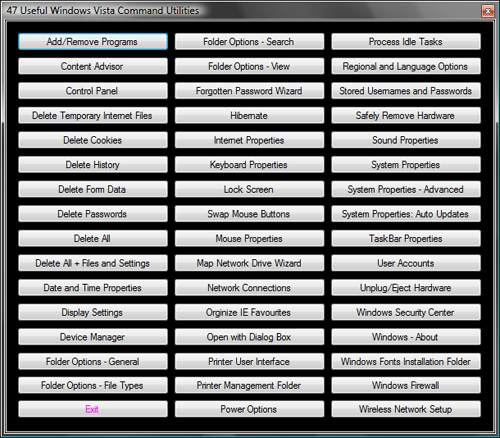
Have you ever tried to find a specific app in Vista, and when you did find it, how many mouse clicks did it take you to get there? 2, 3,...10? how many? If this has happened to you, then this is what you need. This app has 47 of the most commonly used command line functions(Example: RunDll32.exe, shell32.dll, Control_RunDll, appwiz.cpl, 0). This brings up the Add/Remove Programs dialog form. Copy and Paste this in your Start, Search box (and press the Enter key) to see what happens.
Typing these command lines and using multiple mouse clicks gets a little tiresome when trying to get to a specific point in the Vista arsenal of apps. So, I put all 47 commands in button click events.
Background
This program is not what I had intended. I was searching the net for a list of .NET DLLs and all their functions when I came across this site which can be viewed here. This site has a few tips-n-tricks and the 47 command lines that I use in the program.
All the command lines use 'RunDll32.exe' as a starting point, then the arguments list follows. The arguments consist of a few *.dll and *.cpl files that are all located in the 'C:\Windows\System32\' folder.
Problems... Always Problems
The first and only problem I came across was 'How do I execute these command lines in a button_click event?' I am not well versed in VB, but, I am learning. After a few failures and racking my brain, I decided to check out the Process Component in the tool box. I searched the properties and saw the 'Arguments, FileName, and Working Directory properties.' This was everything I needed to execute the command lines. The code is given below:
Public Class frmUtilities
Inherits Form
Dim fileArgs As String
Dim path As String = "C:\Windows\System32\"
Private Sub btnAddRemove_Click(ByVal sender As System.Object, ByVal e As
System.EventArgs) Handles btnAddRemove.Click
fileArgs = "shell32.dll,Control_RunDLL appwiz.cpl,,0"
cmdProcess.StartInfo.Arguments = fileArgs
cmdProcess.StartInfo.WorkingDirectory = path
cmdProcess.StartInfo.FileName = "RunDll32.exe"
cmdProcess.Start()
cmdProcess.WaitForExit()
Me.Focus()
Me.Show()
End Sub
Private Sub btnContAdvisor_Click(ByVal sender As System.Object, ByVal e
As System.EventArgs) Handles btnContAdvisor.Click
fileArgs = "msrating.dll,RatingSetupUI"
cmdProcess.StartInfo.Arguments = fileArgs
cmdProcess.StartInfo.WorkingDirectory = path
cmdProcess.StartInfo.FileName = "RunDll32.exe"
cmdProcess.Start()
cmdProcess.WaitForExit()
Me.Focus()
Me.Show()
End Sub
End Class
CAUTION
All the Delete button click events 'DO NOT' bring up any dialog windows. They start automatically. Be careful when using these click events. Make back-ups of all your files and stuff you will want to keep. An ounce of prevention... you know the rest.
WINDOWS XP USERS: You will have to do some digging on your own to find the correct '*.cpl' files to use in some of these. Vista uses 'inetcpl.cpl' and XP might use 'inet.cpl'. I'm not sure about the exact file name so do some research on this subject before use.
UPDATES
I just added some message boxes for the delete buttons giving you a choice to delete or not to delete. I also fixed the Internet Options fileArgs to work correctly and I disabled the Open With button because it had no use in this program. Special thanks goes to Hans Dietrich for his idea on the message box implementation.
History
- 25th January, 2009: Initial post
I am currently retired.
I have no degree but I have some programming experience
when I was in college(Cobol, Pascal).
My accomplishments thus far are;
Best VB.Net article for January(2009)
Best VB.Net article for July(2009)



 General
  News
News  Suggestion
  Question
  Bug
Bug  Answer
  Joke
Joke  Praise
  Rant
Rant  Admin
Admin 


 Submit an article or tip


