Introduction
This article explains step by step information on configuring Form Based Authentication (FBA) in SharePoint 2010. This article would be useful for developers/designers/architects and those who want to implement form based authentication (FBA) for their SharePoint 2010 sites as a business requirement.
We cannot use the classic / basic claimed based authentication for all business scenarios. I was recently working on a consumer portal or product selling site where form based authentication is most appropriate. This article resolves authentication issues by configuring a SharePoint 2010 site with form based authentication.
Difference between MOSS 2007 and SharePoint 2010
There is no huge difference in configuring FBA for a MOSS 2007 site and a SharePoint 2010 site. You cannot implement FBA for a SharePoint 2010 class authentication site. FBA can be implemented only for a claims authentication site in SharePoint 2010.
In MOSS 2007, it is required to configure the
web.config file of the FBA site and Central Administration site. In SharePoint 2010, it is required to configure the
web.config file of the FBA site, Central Administration site, and the Security Token Service (STS)
web.config file. STS is one of the next generation Single Sign On services used to store credentials of an application in SharePoint 2010.
I have also written article on enabling FBA in a MOSS 2007 site in CodeProject and Blogger and is available here.
CodeProject: http://www.codeproject.com/Articles/19055/Form-Authentication-for-MOSS-2007-Site, Blogger: http://nagendra-gunaga.blogspot.in/2012/03/form-based-authentication-fba-for-moss.html.
Steps to Configure FBA in SharePoint 2010
Below are the steps required to configure FBA in SharePoint 2010. I will be using MS SQL database as membership store for users.
A) Setting up ASP.NET Forms Authentication User and Role Data Source
1. Create Database
2. Configure Membership and Role Provider
3. Create User
B) Create Web Application and Site Collections
C) Configure Web.Config file
1. Configuring FBA web application web.config file
2. Configuring Central Administration web application web.config file
3. Configuring Security Token Service web.config file
D) Adding User Policy to the FBA Web Application
E) Verification Steps
A) Setting up ASP.NET Forms Authentication User and Role Data Source
This section explains creation of database which is used to store user's information such as credentials and roles which is used for Form Authentication. This section also explains the configuration of Membership and Role providers in the web.config file and creation of users using ASP.Net configuration wizard. This article shows creating a user and which will be used for testing Form Authentication later.
1. Create Database
To create database, Microsoft has provided a tool/ utility called
aspnet_regsql.exe that creates a database for us. This utility can be found in %windir%\Microsoft.Net\Framework64\v2.0.50727 folder. Please see the image below:
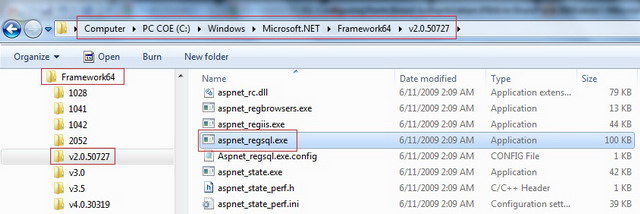
Executing aspnet_regsql.exe file will open ASP.Net SQL Setup wizard that will walk through creating the ASP.Net database. I have added the database name as FBANetDB and configured it for windows authentication. Please see the image below:

Click on Next button. Please see the image below:
Select Configure SQL Server for application services option and click Next button. Please see the image below:
Click Next button. Now the database FBANetDB is created successfully. Please see the image below:
2. Configure Membership and Role Provider
In the previous section, database is created successfully. Now we need to add a user in to database.
Using ASP.NET Configuration Wizard, users can be added the database. This can be achieved by creating web site that will allow us to add the users and roles and also
ensure the database connection strings, membership and role providers are correctly configured before we bring SharePoint in to equation.
Below steps explains creating web site and configuring membership and role providers and executing ASP.Net Configuration Wizard.
a) Open Visual Studio 2010 and select File ? New ? Web Site. In the New Web Site dialog, select the ASP.Net Web Site template and enter the location to store the web site files. Please see the image below:
You can choose any location whichever is comfortable for you. web.config file will be added to project automatically.
b) By default, you will see a <connectionStrings/> node within <configuration> node. Specify the connection string to the database which has been created in the previous section. Please see the image below:
I have mentioned server as GUNAGA1. This is the server in which SQL Server 2008 is installed. Please mention the respective server name.
Also add the membership provider and role provider within <system.web> tag. See the below image for more information.
c) Save web.config file and launch the ASP.Net Configuration Wizard by clicking on Website ? ASP.Net Configuration. Please see the image below:
d) Set the authentication type in the above wizard. To do this, click Security link. In the Security tab, under Users section, click Select authentication type link. Select From the internet option and press Done button which is available in the bottom right corner. By selecting this option, which means that site will use form authentication to identify users. Please see the image below:
e) To test the membership and role providers, click on Provider tab. In the Provider tab, click on Select a different provider for each feature (advanced) link. Select right / correct membership and role provider and click Test link to ensure that providers are communicating to right database.
At this point, we configured web.config file with connection string and providers information. Also we tested the providers with the database. Next section will explain adding users to database.
3. Create User
a) To add users, click on Security tab. In Security tab, under Users section, click Create user link. Here I am adding user as testFBA and password as password which will be used for testing form authentication later. Please see the image below:
Now we have created a user successfully. Do not worry about creating roles at this time and will be explained later.
B) Create Web Application and Site Collection
Follow the below steps to create web application and site collection.
a. Go to Central Administration ? Application Management ? Select ‘Manage Web Application’ link present under ‘Web Applications’ section.
b. Click on ‘New’ option in the ribbon.
1. See the below image for ‘Authentication’ and ‘IIS Web Site’ section.
2. See the below image for ‘Security Configuration’ and ‘Claims Authentication Type’ section.
3. See the below image for configuring ‘Sign In Page URL’ and ‘Public URL’ section.
4. See the below image for configuring ‘Application Pool’ and ‘Database Name and Authentication’ section.
5. Create Site Collection after creating web application. Select the template whichever you want to create site collection.
C) Configure We.Config file
1. Configuring FBA web application web.config file
Open FBA web application web.config file and add the below entries.
a. Add Connection String. Connection String has to be added after </SharePoint> and before <system.web> tag. See the below image for more information.
b. Add Membership Provider and Role Provider
2. Configuring Central Administration web application web.config file
Open Central Administration web application web.config file and add the below entries.
a. Add Connection String. Connection String has to be added after </SharePoint> and before <system.web> tag. See the below image for more information.
b. Add Membership Provider and Role Provider
3. Configuring Security Token Service web.config file
Open Security Token Service web.config file from %Program Files%\Common Files\Microsoft Shared\web server extensions\14\Web Services\SecurityToken location
and add the below entries.
a. Add Connection String. Connection String has to be added above <system.web> tag. See the below image for more information.
b. Add Membership Provider and Role Provider
D) Adding User Policy to the FBA Web Application
Follow the below steps to add user policy to the web application.
a. Go to Central Administration ? Manage Web Applications ? Select the FBA web application and click on ‘User Policy’ option in the ribbon.
b. Click on ‘Add Users’ link and select ‘Default’ as the zone and click on ‘Next’ button.
c. Type the user name created in ‘Create User’ section in the ‘Users’ textbox and click on people picker icon. You should see the user name get underlined in the ‘Users’ textbox.
d. Follow the verification steps to test form based authentication.
E) Verification Steps
1. Go to FBA SharePoint site and select ‘Forms Authentication’ option.
2. Enter User Name and Password and select ‘Sign In’ button.
3. You should be redirected to home page.
Comments
Provide your feedback if this article is helpful to you and post your issues/queries if any.
I have about 10 plus years of experience in professional software development with extensive involvement in Web based Object-Oriented, Multi-Tiered application design and development. I have experience in working with Content Management System and Portal Management System tools like SharePoint and also had experience in Integration of SharePoint with Commerce Server, Exchange Server.
Currently I am working in a Software firm Hewlett Packard Global Soft Private Limited as SharePoint Solution Architect located in Bangalore, India. My main responsibilities include designing SharePoint solution for a large enterprise product, automating SharePoint Deployment, Developing WebParts, Managing SharePoint Authentications. You can contact by emailing me at nagendragunaga@gmail.com



 General
  News
News  Suggestion
  Question
  Bug
Bug  Answer
  Joke
Joke  Praise
  Rant
Rant  Admin
Admin 


 Submit an article or tip


