
Introduction
Media Player
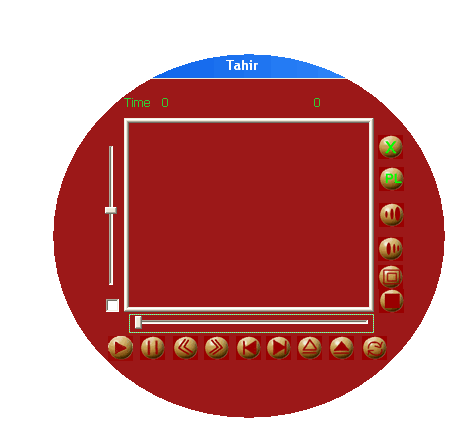
This is a simple media player which plays all audio and video formats .I am updating it becouse there were many of many complaints about it . Actually i had not time to do it , now found some ,so updating it . It uses Media Control Interface(MCI) Functions in the MFC .It is very simple , that is we only have to give the path and file name and other parameters to the function and the function will play that file .
Description
First the file names are taken from the user using the file dialog .These file name are stored in an array of CString type Files[Index] ; Index is the the index of files .Multiple files can be selected at a time . Now to Create window of playing the file is created in the following function
void CMP3Dlg::CreateWindowplay(CString str)
{
if(m_Video!=NULL)
OnFileClose();
m_Path=str;
MCIWndRegisterClass();
KillTimer(0);
SetTimer(0,1000,NULL); m_Path=str;
if(m_Video == NULL &&flag==0)
{
m_Video =MCIWndCreate(m_screen.GetSafeHwnd(),AfxGetInstanceHandle()
,MCIWNDF_NOOPEN|MCIWNDF_NOPLAYBAR |MCIWNDF_NOMENU,m_Path);
::ShowWindow(m_Video,SW_MAXIMIZE);
}
m_SVolume.SetRange( 0, 1000, TRUE ); m_SVolume.SetPos(500); m_mute.SetCheck(1); ptr=FromHandle(m_Video); ptr->UpdateWindow();
MCIWndSetTimeFormat(m_Video ,"ms"); m_length=MCIWndGetLength(m_Video ); TotalTime=m_length/1000;
TotalTime=TotalTime/100;
m_Seek.SetRange( 0, m_length, TRUE ); m_Seek.SetPos(0);
MCIWndPlay(m_Video); flag=1;
UpdateData(FALSE);
MCIWndSetVolume(m_Video, m_Volume); e=0; }
So now Our window is created and file is played . Now there is a option for pause that is
void CMP3Dlg::Onpause()
{
if(flag==0)
{
flag=1;
MCIWndResume(m_Video);
}
else
{
flag=0;
MCIWndPause(m_Video);
}
}
to stop
MCIWndSeek(m_Video,MCIWND_START);
To move to next file ,
OnFileClose() ;
SongNo++;
if(Files[SongNo]!="" )
{
CreateWindowplay(Files[SongNo]);
MCIWndPlay(m_Video);
flag=1;
}
else
if(Index==0)
OnOpen();
else
{
SongNo=0;
OnPlayPrevius() ;
}
}
The is a Implemenation for CD ROM door open and close . this is done as ,
To Increase the Speed of Play
int a;
a=MCIWndGetSpeed(m_Video);
a=a+200;
if(a<2000)
MCIWndSetSpeed(m_Video,a);
Similarly there is a function to decrease the speed
For full screen option, there is another dialog upon which the window is created . The dialog is maximized so full screen is got . It is done as
void CMP3Dlg::OnViewFullscreen()
{
FullScreen=1;
KillTimer(0);
MCIWndDestroy(m_Video);
FS.SeekPos=SeekPos;
FS.m_Volume=m_Volume;
FS.m_Path=m_Path;
FS.DoModal();
SeekPos=FS.SeekPos;
if(SeekPos==m_length )
{
if( repeat==1)
{
OnPlayNext();
Onfullscreen() ;
}
else
{
OnFileClose();
}
}
else
{
SetTimer(0,1000,NULL);
flag=1;
m_Video=MCIWndCreate(m_screen.GetSafeHwnd(),AfxGetInstanceHandle(),
MCIWNDF_NOOPEN|MCIWNDF_NOPLAYBAR|MCIWNDF_NOMENU ,m_Path);
::ShowWindow(m_Video,SW_MAXIMIZE);
MCIWndSetVolume(m_Video,m_Volume);
MCIWndSetTimeFormat(m_Video ,"ms");
MCIWndSetActiveTimer(m_Video,500);
ptr=FromHandle(m_Video);
m_length=MCIWndGetLength(m_Video);
m_Seek.SetRange(0,m_length,TRUE);
MCIWndPlay(m_Video);
flag=1;
MCIWndSeek(m_Video,SeekPos);
MCIWndPlay(m_Video);
FullScreen=0;
ptr->UpdateWindow();
}
}
Now In new dialog Create Window and play according to previous context,
We will do it in the ShowWindow Function which is called first time when the
 dialog is created .
void FScreen::OnShowWindow(BOOL bShow, UINT nStatus)
{
CDialog::OnShowWindow(bShow, nStatus);
CWnd* desk=GetDesktopWindow();
RECT re;
desk->GetClientRect(&re);
SetTimer(0,1000,NULL);
::ShowWindow(this->GetSafeHwnd(),SW_MAXIMIZE);
m_Video=MCIWndCreate(this->GetSafeHwnd(),AfxGetInstanceHandle(),
MCIWNDF_NOOPEN|MCIWNDF_NOPLAYBAR|MCIWNDF_NOMENU ,m_Path);
::ShowWindow(m_Video,SW_MAXIMIZE);
MCIWndSetTimeFormat(m_Video ,"ms");
MCIWndSetVolume(m_Video, m_Volume);
MCIWndSetActiveTimer(m_Video,500);
MCIWndSeek(m_Video,SeekPos);
MCIWndPlay(m_Video);
Length=MCIWndGetLength(m_Video);
}
We can add and remove files to the Play list . There is another dialog for
play list .
To add files :
void playlist1::OnAdd()
{
POSITION currPos;
CFileDialog avi(TRUE,NULL,NULL,OFN_ALLOWMULTISELECT | OFN_HIDEREADONLY
,"All Files(*.*)|*.*|MP3 Files (*.mp3)|*.mp3|AVI Files(*.avi)|*.avi|");
if(avi.DoModal() == IDOK)
{
currPos = avi.GetStartPosition();
while(currPos != NULL)
{
m_Path = avi.GetNextPathName(currPos);
((CMP3Dlg *)GetParent())->Files[((CMP3Dlg*)GetParent())->m_Index]=m_Path;
m_control.AddString(m_Path);
((CMP3Dlg*)GetParent())->m_Index=((CMP3Dlg*)GetParent())->m_Index+1;
}
UpdateData(FALSE);
}
}
Similary we can remove file through function
void playlist1::OnRemove()
{
i=m_control.GetCurSel();
m_control.DeleteString( i );
for(int j=0;j<=((CMP3Dlg*)GetParent())->m_Index;j++)
{
if(i==j)
{
((CMP3Dlg*)GetParent())->Files[i]=((CMP3Dlg*)GetParent())->Files[i+1];
for(int h=i;h<((CMP3Dlg*)GetParent())->m_Index;h++)
((CMP3Dlg*)GetParent())->Files[h]=((CMP3Dlg*)GetParent())->Files[h+1];
}
}
((CMP3Dlg*)GetParent())->m_Index--;
}
We can play a file by double clicking on File name
i=m_control.GetCurSel();
m_control.GetText(i,str);
if(((CMP3Dlg*)GetParent())->m_Video!=NULL)
{
MCIWndStop(((CMP3Dlg*)GetParent())->m_Video);
MCIWndDestroy(((CMP3Dlg*)GetParent())->m_Video);
((CMP3Dlg*)GetParent())->m_Video=NULL;
((CMP3Dlg*)GetParent())->m_Path=((CMP3Dlg*)GetParent())->OldFileName2;
}
((CMP3Dlg*)GetParent())->NewFileName2=st;
((CMP3Dlg*)GetParent())->OldFilename=st;
((CMP3Dlg*)GetParent())->flag=0;
((CMP3Dlg*)GetParent())->CreateWindowplay(str);
The Shape of Dialog is got through
CRect r;
GetClientRect(r);
m_rgn.CreateEllipticRgn(04,04,r.Width(),r.Height());
SetWindowRgn(m_rgn,TRUE);
<P>
So thats all from me .What could be done more in it ? that could be
1. We does not know about the file in the program ,whether its audio or video ,if audio to dont go to full screen
2. The full screen mechanism is not efficient , also it needs menu in full screen on right click .
3. Implementation of VCD cutter
and much more !!!!!!!!!!!!!
This member has not yet provided a Biography. Assume it's interesting and varied, and probably something to do with programming.



 General
  News
News  Suggestion
  Question
  Bug
Bug  Answer
  Joke
Joke  Praise
  Rant
Rant  Admin
Admin 


 Submit an article or tip


 What are the requirements to run this code?


 When i am running the avi file i am getting the MCI error(There is no Drive installed on your computer). But this application workingon Windows-xp os, when i am using Windows-2000 it is not working.