Click here to Skip to main content

Writing an MS Word addin

By , 13 Apr 2003
 

Introduction

After having written about developing Office COM addins in an earlier article, I get a lot of mail from people trying to write Word addins. Through this article we will discuss common development issues regarding Word addins in general. First, we learn how to build a simple WORD 2000 ATL COM addin. Later in the article, we will get down to Word's VBA macro side of things, and write an addin that works for all versions of Word, independent of COM addin support.

I'm assuming you have read my previous article on Office addins and taken a look at the sample project. There are a lot of issues in addin development like adding custom menu/toolbars, handling events, property pages etc that are common for all Office addins, including Word. These have already been discussed in that article. Here we are going to write a Word 2000 COM addin, to begin with. Later, we'll delve into Office and VBA in general, and with respect to with C++ addins.

Writing a Word2000 Addin

To begin, create a new ATL COM Appwizard generated dll project called WordAddin. Next insert an ATL Simple Object called Addin, as in the previous article. Next use the Implement Interface ATL Wizard to implement _IDTExtensibility2. This, as you know, is the at the heart of COM addin support for all Office applications. Next, to program against Word, we need to import Word's typelib. That means, we need to import 3 interdependent typelibs. In your project's stdafx.h add the following code:

//for Office XP 
//C:\Program Files\\Common Files\\Microsoft Shared\\Office10\\MSO.DLL

#import "C:\\Program Files\\Microsoft Office\\Office\\mso9.dll" 
   rename_namespace("Office2000")
using namespace Office2000;

#import 
  "C:\\Program Files\\Common Files\\Microsoft Shared\\VBA\\VBA6\\VBE6EXT.olb" 
  rename_namespace("VBE6")
using namespace VBE6;

In your project's Addin.h file, towards the top, add:

//for Office XP
//C:\\Program Files\\Micorosft Office\\Office10\\MSWORD.olb

#import "C:\\Program Files\\Microsoft Office\\Office\\MSWORD9.olb" 
   rename("ExitWindows","MyExitWindows"),named_guids,
   rename_namespace("MSWord")
using namespace MSWord;

Make sure that you change the path to point to the correct locations of the files for your system.

The different locations for the #import statements is needed for the compiler to recognize everything, generate the correct set of wrappers, and compile and link correctly. Moving on, to register your addin with Word2000, add the following code to Addin .rgs registry script file (under FileView->Resource Files) and add the following to the end of the file.

HKCU
{
  Software
  {
    Microsoft
    {
      Office
      {
        Word
        {
          Addins
          {
            'WordAddin.Addin'
            {
              val FriendlyName = s 'WORD Custom Addin'
              val Description = s 'Word Custom Addin'
              val LoadBehavior = d '00000003'
              val CommandLineSafe = d '00000001'
            }
          }
        }
      }
    }
  }
}

Yes, we'd like our addin to be called 'Word Custom Addin' ('I love CodeProject.com Addin', would have been too blatant!), and loaded when Word starts up. So what else is new? :)

If everything has gone right, you now have a working WORD addin to which you should add your own implementation code. By now you already know how to add buttons and menu items in your addin, property sheets etc; all that has been discussed in the previous article holds true. The only thing different in the Word Object Model, and from the code in the Outlook addin example, is that there is no ActiveExplorer object in Word, and you should get the CommandBars interface directly from Application, the topmost in the object model.

Handling Events

Probably in your addin, you'd also be interested in handling some of Word's events.A case in point is the Application objects DocumentOpen event, with DISPID=4, which is handled here. Word has a complex object model and you will find a host of other such events. If you use the good old OLE/COM Object Viewer to view msword9.olb, you'd find IDL like :

         ....

        [id(0x00000003), helpcontext(0x00061a83)]
            void DocumentChange();
            [id(0x00000004), helpcontext(0x00061a84)]
            void DocumentOpen([in] Document* Doc);

        ......

As before we will use ATL's IDispEventSimpleImpl<> template class to implement our sink. For brevity, only the changes necessary to the earlier code has been mentioned.

extern _ATL_FUNC_INFO DocumentOpenInfo;

class ATL_NO_VTABLE CAddin : 
    public CComObjectRootEx,
    public CComCoClass,
    public ISupportErrorInfo,
    public IDispatchImpl,
    public IDispatchImpl<_IDTExtensibility2, &IID__IDTExtensibility2,  
         &LIBID_AddInDesignerObjects>,
    public IDispEventSimpleImpl<1,CAddin,     
         &__uuidof(MSWord::ApplicationEvents2)>
{
public:
....    
....

void __stdcall DocumentOpen(IDispatchPtr ptr)
{
    CComQIPtr<_Document> spDoc(ptr);
    ATLASSERT(spDoc);
    ....
    ....
}

BEGIN_SINK_MAP(CAddin)
SINK_ENTRY_INFO(1,__uuidof(MSWord::ApplicationEvents2),4,
    DocumentOpen,&DocumentOpenInfo)
END_SINK_MAP()

private:
CComPtr<MSWord::_Application> m_spApp;
};

DocumentOpenInfo is defined at the top of CAddin.cpp as

_ATL_FUNC_INFO DocumentOpenInfo = {CC_STDCALL,VT_EMPTY,1,
    {VT_DISPATCH|VT_BYREF}};

All that remains for us to do is to add the code to setup and break down the connection. Using the ATL template class, therefore all we have to do is call DispEventAdvise() and DispEventUnadvise(). Our CAddin's OnConnection() and OnDisconnection(), needless to say, is the right place for doing this.

CComQIPtr<_Application> spApp(Application);
ATLASSERT(spApp);
m_spApp = spApp;
HRESULT hr = DispEventAdvise(m_spApp);
if(FAILED(hr))
return hr;

and in OnDisconnection(),

DispEventUnadvise(m_spApp);
m_spApp = NULL;

Now you have a working Word COM addin template, proudly under your belt. To this you should add your own implementation, error-handling routines etc. Moving on to something different, let's explore VBA side of WORD. Next, I'll discuss a very specific scenario where I use a mix of C++ code and VBA macros in my addin.

Macros and the Visual Basic Editor

I was working on a project, where the COM addin model of things suited us fine. Except the client had a large number of Word97 users, and Word97 has no support for COM addins, specifically the IDTExtensibility2 interface. Basically in my addin I needed to add a few custom menu items and buttons, clicking which usually meant displaying a couple of dialogs. Now, a COM addin would be perfect for Word2000 users. But was there some way we could make the addin Word97 compatible?

This leads us to Visual Basic for Applications(VBA). Most Office developers know that MS Office components and applications support a rich scripting object model and a scripting interface known as VBA. Before Office version 4, each application in the suite was very distinct. For developers, wasn't easy to create integrated solutions using multiple Office applications, because each application had a unique programming environment.

This problem was addressed through MS Visual Basic for Applications (VBA), which made it's debut in Office 95 - albeit, in a few applications. By Office97, every app in the suite supported standard VBA interfaces. The set of functions that a VBA routine, or macro, can use to control its host application is the same set of functions that the OLE Automation client can use to control the application externally, regardless of the programming language for the controller. Word 97 includes Visual Basic 5.0, a sophisticated development environment that is shared across Office applications: Word, Excel, PowerPoint, and Access.

In Word, VBA and Visual Basic goes beyond being merely a macro language—it is a full-featured programming development environment. The Visual Basic Editor (VBE) uses the familiar programming interface of Microsoft Visual Basic 4.0 as a base for creating and editing script code. Through VBA, Word supported everything from macros to addins to document templates. So what is a document template? A document template(*.dot) is simply a document with macro code (script) embedded in it. In Word, macros are persisted in documents and templates as Visual Basic modules. Although macros are ordinarily stored in the user's default template, Normal.dot, Word allows you store and use macros in any document or template. Moreover, any such document template in the Office installation's Startup folder, would be autorun.Additional templates and macros can be loaded using the Templates & Add-ins or Macros dialog box in the Tools menu. Macros and document templates (also supported for WordPerfect) can also be shared across users in a Workgroup.

What is also interesting is, MS Word97 onwards also supports a group of global macros that gets invoked with the host application. These AutoXXX macros like AutoExec(), AutoNew(),AutoOpen(),AutoClose() and AutoExit() gets executed along with the host application, just as their names suggest. This sounds most useful and it is.

How? If we were to create a document template, handle such Auto macros in it, and then create and destroy our addin (which is written as an ActiveX server) through VBA macros - then we should be on the home stretch. This is what IDTExtensibility2 does for COM addins - primarily a way to connect and disconnect to the topmost Application object. So how can we substitute something like this in our Word97 addin? Through document templates. Document templates, by themselves, can be described as VBA addins. Every document template is set up to interact with the Document object associated with the project through the ThisDocument property. We must also remember that all macros implicitly reference the Application object.

Back to the task at hand, suppose we were to write a document template and in it, add code to ourAutoExec() and AutoExit() handlers. In the handlers, we create and release our addin COM class object and subsequently call it's methods. Moreover, our ATL COM class should implement two methods, Init() and Uninit() through which the Application object is set in the C++ addin. Our macros ought to look like:

Dim o as Application
Dim obj as Object

Sub AutoExec()
Set obj = CreateObject("Word97Addin.Addin")
Set o = ThisDocument.Application
obj.Init o
End Sub

Sub AutoExit()
Set o = ThisDocument.Application
obj.Uninit o
Set obj = Nothing
Set o = Nothing
End Sub

We can choose to automatically load and unload our template by placing it in the Office's Startup folder.Similarly you can handle AutoClose(),AutoNew() and AutoOpen() macros, which are more document related. For the moment, since I'm handling all button/menu creation and events in my C++ COM object, the communication is unidirectional(i.e. macro->addin), but bidirectional communication is not too difficult.Suppose you have a macro defined in your template called "NewMacro"; one way to trigger this macro from a C++ addin is through Application::Run() or Application::RunOld(), depending on whether you need to pass any parameters. What is interesting is that, you can also trigger the macro through a button click, by setting the OnAction property of the CommandBarButton object of your button or menuitem.

// get CommandBarButton interface so we can specify button styles
CComQIPtr < Office::CommandBarButton> spCmdButton(spNewBar);
ATLASSERT(spCmdButton);
spCmdButton->PutCaption(_T("Button")); 
spCmdButton->put_OnAction(OLESTR("NewMacro")); 
//set other button properties
spCmdButton->PutVisible(VARIANT_TRUE);

This is just what I did for my project. We have a single solution, consisting of a dll and a dot file, that runs across all versions of Word - from 97 to XP, exposing and encapsulating most of it's functionilty through compiled C++ code. Unfortunately, this VBA support brings up the security issue, and in later versions of Office like XP, the user can determine the security level in macro execution context. Although this was a non-issue with us, you need to be aware.

All of what we have learnt so far. has been espoused in the accompanied VC++ 6.0 Universal Addin project, which I will briefly describe next.

Universal Addin

Universal Addin is a simple ATL/COM AppWizard generated dll project, to which I inserted an ATL COM IDispatch-based Simple Object called Addin. While the name sounds very pretentious, 'Universal' refers to it's ability to run across all versions of Word.
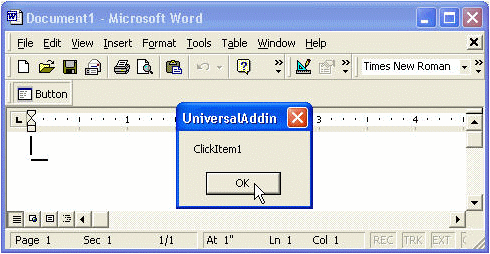
What lends it such universality is the addin.dot Word document template that is a part of the addin, and it's AutoXXX Macros. Our Addin class has two member methods Init() and Uninit() that take a single IDispatch* to the Application object. Our Uninit() implementation is very simple and we could have done without the IDispatchPtr parameter; might not be so for your implementation.In the project, we add a single button through the addin, clicking which triggers a VBA named macro, that in turn calls a method of our COM class. By all means, you can connect to CommandBarButtonEvents and write C++ code to handle button click, as done previously.

Out aim was to write an addin for Word, bypassing the the COM addin architecture and IDTExtensibility2.That concluded, all that remains for me to say is that whatever you can do with VBA, you can do from C++ and vice versa - the magic is in OLEAutomation.

Acknowledgements

Everything I know about Office development, I learnt at MSDN. You, too, can find a hoard of technical articles and short KB code snippets related to everything from Office development to COM and OLE Automation. MSDN rules - as we all know. :)

Thanks to Peter Hauptmann (a.k.a Peterchen) for his comments and suggestions.

History

  • First revision - 14th April, 2003.

License

This article has no explicit license attached to it but may contain usage terms in the article text or the download files themselves. If in doubt please contact the author via the discussion board below.

A list of licenses authors might use can be found here

About the Author

Amit Dey
Web Developer
India India
Member
Amit Dey is a freelance programmer from Bangalore,India. Chiefly programming VC++/MFC, ATL/COM and PocketPC and Palm platforms. Apart from programming and CP, he is a self-taught guitar and keyboard player.
 
He can be contacted at visualcdev@hotmail.com
 

Sign Up to vote   Poor Excellent
Add a reason or comment to your vote: x
Votes of 3 or less require a comment

Comments and Discussions

 
You must Sign In to use this message board.
Search this forum  
    Spacing  Noise  Layout  Per page   
QuestionHow to capture Word ApplicationEvents4_Eventmembermbncvbut26 Jan '13 - 20:25 
How to override Word's ApplicationEvents4_Event interface events such as quit/DocumentBeforeClose event? Most examles online are using VB or c#, how to handle the Quit or DocumentBeforeClose events in C++, how to override the default handler? Thank you!
Questionchange the default font sizememberitmelody@163.com28 Jun '11 - 22:53 
Now I have a problem that troubles me a lot.The problem is that how can I change the default font size of the office word2000 throught programming.

For example,I want to change the default font size 5 to the other size of I want. And how should I do with CommandBarControl ? Is there any functions to solve the problem or any other tips?

Hopes for your reply. Tks very much!
Best regards!
GeneralHWND handle to the addinmembermbncvbut12 Apr '11 - 3:00 
Is it possible to get a HWND handle to the CAddin or the ATL simple object? The HWND handle will be used in PostMessage() function as parameter. I tried to derive the CAddin from CWindowsImpl, but failed. Thanks for help!
 
class ATL_NO_VTABLE CAddin : public CWindowImpl<CAddin>,
    public CComObjectRootEx,
    public CComCoClass,
    ...

GeneralProblem in Opening Word Applicationmembersandeeprattu29 Sep '09 - 1:44 
Hi
 

I am facing a problem in opening MS word in Vc++ with VS2008.
 

Do u have any sample for refernce purpose. I have used MSWORD.OLB file but during build it is showing me number of errors in msword.tlh. Please tell me how to resolve all these errors
 
Errors:
 
d:\official\products\project\testsample\testsample\capplication.h(3) : warning C4278: 'ExitWindows': identifier in type library 'C:\\Program Files\\Microsoft Office\\Office10\\MSWORD.OLB' is already a macro; use the 'rename' qualifier
d:\official\products\project\testsample\testsample\capplication.h(3) : warning C4278: 'FindText': identifier in type library 'C:\\Program Files\\Microsoft Office\\Office10\\MSWORD.OLB' is already a macro; use the 'rename' qualifier
d:\official\products\project\testsample\testsample\debug\msword.tlh(6989) : warning C4003: not enough actual parameters for macro 'ExitWindows'
d:\official\products\project\testsample\testsample\debug\msword.tlh(6989) : error C2059: syntax error : 'constant'
d:\official\products\project\testsample\testsample\debug\msword.tlh(13287) : error C2146: syntax error : missing ';' before identifier 'Fonts'
d:\official\products\project\testsample\testsample\debug\msword.tlh(13287) : error C4430: missing type specifier - int assumed. Note: C++ does not support default-int
d:\official\products
QuestionThe source code does not accord with the articlemembervale12174 May '09 - 23:24 
Pls check it.
QuestionHow to retrieve document content or whole document on DocumentOpen EventmemberPatilVijay5 Nov '08 - 23:05 
How to retrieve document content or whole document on DocumentOpen Event.
 
void __stdcall DocumentOpen(IDispatchPtr ptr)
{
CComQIPtr<_Document> spDoc(ptr);
}
 
Vijit p

GeneralOffice addinsmemberMember 322037328 Jul '08 - 19:06 
I m a VC++ developer.
I want to write data in MSWord through VC++ program.
 
SO i need to know that how i can do it using OLE.
I know it is possible by OLE but i dont know how to use OLE,
Please send me the procedure or example source to use OLE for Word addins.
 
Experts I m waiting for ur reply.
GeneralInstalling universal addinmemberesanteva25 Jul '08 - 8:50 
Dear Amit, once the universal addin is ready how can I automatically install it for every version of Word? As far as I know, there is no way of being sure about what is the startup folder for word 97 (it could have been changed from inside Word options and there is no registry key nor VBA property telling you where it is). Do you know if this is correct?
GeneralVC++.NET 2003 and MS word 2003memberminad_78611 Sep '07 - 2:18 
Hello,
Could you please tell me how to open Msword
from a vc form and add a picture box's image to the word document.
Thank you.
Minad
Generalneed saveas event for word office 2000memberjustprabhaa29 Aug '07 - 4:36 
I want to be able to trap the event for saving a word document in Office 2000.
 
jp
GeneralRe: need saveas event for word office 2000memberkalukaley1 Sep '08 - 14:47 
Have you tried DocumentBeforeSave ?
QuestionHow to create the same for Palm?memberprogramvinod20 Jun '07 - 2:42 
Is this portable for Palm OS too or can we create the same add-in for microsoft mobile 5 or higher?
Generalset upmembersanbnayak12 Apr '07 - 20:30 
how to create set up file in COM addins project. and how to install in client system. what r the requrements of clients system please urgent
that is new ribbon control adding in word 2007
 
dd

Generalsetupmembersanbnayak12 Apr '07 - 20:29 
how to create set up file in COM addins project. and how to install in client system. what r the requrements of clients system please urgent
 
dd

GeneralSimple ATL DLL problemmemberr0dy__27 Mar '07 - 22:59 
Hi
 
I'm trying to make an ATL DLL to use in word/VBA for specific purpose.
But I ran into a problem I couldn't find the solution on the net so far:
for example, i want to have a class Big, and a class Little, and one property of Big would be a Little pointer, and in VBA i want to access methods and properties of those two classes.
This seems most simple but I don't know how to do it in MSVC++, I simply don't know how to put an object of a class i have defined as another class' property, and be able to see both in vba.
 
Can anyone let me see a simple example ?
 
Hope i've been clear enough...
QuestionI have a problem with MS Office 2003membercito71714 Mar '07 - 1:49 
If toolbar starts from a macro, i have this toolbar on a pane but button doesn't work. If i pressing it Word trowing me error: "The macro cannot be found or has been disabled becose of Macro security settings". However if put the function execution inside Init function (CAddin::ClickItem1();) it executing successfuly, and if i put it on action event of button i getting error. Besides, if i trying to load toolbar from COM Addins i getting another error" "Not loaded. A runtime error occured during the loading of the COM Add-in".
 
Thanx.
Generalcalling VBA macro from C++memberRobertoAmucano31 Jan '07 - 23:24 
I wrote an add-in in Visual Studio 2005 using the extensibility wizard project
I intercepted the events (DocumentBeforeClose, DocumentChange, ecc)
Now I'd like to call VBA macros from the C++ addin
 
I tried this code:
CComBSTR bstrMacroName(_T("Module.DB_ChiudiDocumento"));
VARIANT *varNull = NULL;
// Run takes 31 parameters!?!?
HRESULT res = m_pApp->Run(bstrMacroName, varNull,
varNull, varNull, varNull, varNull, varNull, varNull, varNull, varNull, varNull, varNull,
varNull, varNull, varNull, varNull, varNull, varNull, varNull, varNull, varNull, varNull);
 
I tried with or without "Module." in the name of the macro, it raises an exception
 
Does somebody know how to do that?
Thank you in advance
roberto
QuestionHow to Print from addinmemberrsundar1232 Nov '06 - 23:42 
Hi,
 
I am new to Office addin development, how do i invoke the print dialog ( to print the current document) by clicking the addin button.
 
thanks
sundar
QuestionHowto call c# add-in from VBAmembertartancli2 Aug '06 - 5:21 
Hi, I need to run my C# add-in (now running on Word 2000 and 2003) in Word 97. I presume i can use a similar method to that presented in this article? Any pointers much appreciated!
QuestionMSWord Extensibility APImemberSriram Panyam26 Jul '06 - 19:48 
Hi,
 
I was wondering if it was possible too create and add custom shapes to the Drawing shapes toolbox/toolbar. Is there anywhere I can find the api on the MSWord namespace. Or am I on the wrong track?
 
Cheers
Sri
GeneralIn PowerPoint the button event is not firing.memberAnil_gupta5 Jun '06 - 4:27 
Hi,
I am creating an Add-In for PowerPoint. I added new command bar in it. If I open two PowerPoint document the event are triggering two times. For avoiding it I am registering the events only First time but in this case I have another problem.
If I open two PowerPoint document simultaneously then the event firs only first time after button click. While if I open the PowerPoint document one by one its working fine.
I have tried tag property but its not working.
Do anybody have any clue.
Thanks
Anil Kumar Gupta

 
Anil Kumar Gupta
Generalurgentmembersruz12 Jan '06 - 17:45 
i need dll of Ms paint and Ms word.can i get it.
QuestionWord2000 Addin Errors Plz Solve ItmemberAmbrish Dwivedi27 Dec '05 - 1:41 
Hello Amit Dey,

I am working in VC++ and want to write a word addin and i m having Office2000. I got some code help from codeproject and its your article i go through that instruction i got some errors and warnings that are exactly stated below as they come to me.
I had edited some code
In Addin.h ==>
#import "C:\\Program Files\\Microsoft Office\\Office\\MSWORD9.olb" rename_namespace("MSWORD"), rename("ExitWindows","WordExitWindows"), named_guids, raw_interfaces_only
using namespace MSWORD;

In stdafx.h ==>
#import "C:\\Program Files\\Microsoft Office\\Office\\mso9.dll" rename_namespace("Office"), named_guids
using namespace Office;

#import "C:\\Program Files\\Common Files\\Microsoft Shared\\VBA\\VBA6\\VBE6EXT.olb" rename_namespace("VBE6")
using namespace VBE6;
and these three files are avilable on my programe files folder.
i extreemly need your help. either you can mail me some source code in zip format or give me the full flagged instruction for that. My System Configuration is Windows 2000 Office 2000 P4. i will be very thankful to you. Reply me as soon as possible.
 
--------------------------------------------------------------------------------
 
--------------------Configuration: UniversalAddin - Win32 Unicode Release MinDependency--------------------
Compiling resources...
Compiling...
StdAfx.cpp
c:\documents and settings\administrator\my documents\downloads\compressed\wordaddin\releaseumindependency\mso9.tlh(931) : warning C4146: unary minus operator applied to unsigned type, result still unsigned
Compiling...
Addin.cpp
C:\Documents and Settings\Administrator\My Documents\Downloads\Compressed\WordAddin\Addin.h(50) : error C2065: 'm_spButton' : undeclared identifier
C:\Documents and Settings\Administrator\My Documents\Downloads\Compressed\WordAddin\Addin.cpp(50) : error C2664: 'get_CommandBars' : cannot convert parameter 1 from 'struct Office::CommandBars ** ' to 'struct Office::_CommandBars ** '
Types pointed to are unrelated; conversion requires reinterpret_cast, C-style cast or function-style cast
C:\Program Files\Microsoft Visual Studio\VC98\ATL\INCLUDE\atlbase.h(417) : error C2504: 'CommandBars' : base class undefined
C:\Documents and Settings\Administrator\My Documents\Downloads\Compressed\WordAddin\Addin.cpp(67) : see reference to class template instantiation 'ATL::_NoAddRefReleaseOnCComPtr' being compiled
C:\Documents and Settings\Administrator\My Documents\Downloads\Compressed\WordAddin\Addin.cpp(67) : error C2039: 'Add' : is not a member of '_NoAddRefReleaseOnCComPtr'
C:\Program Files\Microsoft Visual Studio\VC98\ATL\INCLUDE\atlbase.h(417) : error C2504: 'CommandBarButton' : base class undefined
C:\Documents and Settings\Administrator\My Documents\Downloads\Compressed\WordAddin\Addin.cpp(89) : see reference to class template instantiation 'ATL::_NoAddRefReleaseOnCComPtr' being compiled
C:\Documents and Settings\Administrator\My Documents\Downloads\Compressed\WordAddin\Addin.cpp(89) : error C2039: 'PutStyle' : is not a member of '_NoAddRefReleaseOnCComPtr'
C:\Documents and Settings\Administrator\My Documents\Downloads\Compressed\WordAddin\Addin.cpp(90) : error C2039: 'PasteFace' : is not a member of '_NoAddRefReleaseOnCComPtr'
C:\Documents and Settings\Administrator\My Documents\Downloads\Compressed\WordAddin\Addin.cpp(91) : error C2039: 'PutVisible' : is not a member of '_NoAddRefReleaseOnCComPtr'
C:\Documents and Settings\Administrator\My Documents\Downloads\Compressed\WordAddin\Addin.cpp(92) : error C2039: 'PutCaption' : is not a member of '_NoAddRefReleaseOnCComPtr'
C:\Documents and Settings\Administrator\My Documents\Downloads\Compressed\WordAddin\Addin.cpp(93) : error C2039: 'PutEnabled' : is not a member of '_NoAddRefReleaseOnCComPtr'
C:\Documents and Settings\Administrator\My Documents\Downloads\Compressed\WordAddin\Addin.cpp(94) : error C2039: 'PutTooltipText' : is not a member of '_NoAddRefReleaseOnCComPtr'
C:\Documents and Settings\Administrator\My Documents\Downloads\Compressed\WordAddin\Addin.cpp(95) : error C2039: 'PutTag' : is not a member of '_NoAddRefReleaseOnCComPtr'
C:\Documents and Settings\Administrator\My Documents\Downloads\Compressed\WordAddin\Addin.cpp(96) : error C2039: 'PutCaption' : is not a member of '_NoAddRefReleaseOnCComPtr'
C:\Documents and Settings\Administrator\My Documents\Downloads\Compressed\WordAddin\Addin.cpp(97) : error C2039: 'put_OnAction' : is not a member of '_NoAddRefReleaseOnCComPtr'
C:\Documents and Settings\Administrator\My Documents\Downloads\Compressed\WordAddin\Addin.cpp(98) : error C2039: 'PutVisible' : is not a member of '_NoAddRefReleaseOnCComPtr'
C:\Documents and Settings\Administrator\My Documents\Downloads\Compressed\WordAddin\Addin.cpp(112) : error C2664: 'get_CommandBars' : cannot convert parameter 1 from 'struct Office::CommandBars ** ' to 'struct Office::_CommandBars ** '
Types pointed to are unrelated; conversion requires reinterpret_cast, C-style cast or function-style cast
UniversalAddin.cpp
C:\Documents and Settings\Administrator\My Documents\Downloads\Compressed\WordAddin\Addin.h(50) : error C2065: 'm_spButton' : undeclared identifier
Generating Code...
Error executing cl.exe.

UniversalAddin.dll - 17 error(s), 1 warning(s)


VC++,MFC,COM,ATL
GeneralUnable to remove Menu Item from MSWordmembermandanani21 Jul '05 - 0:49 
I had a problem while adding a menu item to Word. The menu item is being added to Word and is not removing after closing the Word (even if I made the Menu item to TEMPORARY). One new Menu Item is being added every time I open the MS Word.
please help to resolve this.

GeneralRe: Unable to remove Menu Item from MSWordmembertartancli28 Jul '05 - 0:32 
I don't know if its the same problem but for what its worth I had similar experience. Each time I opened Word I got a new button on the menu. The problem was that the code (auto generated by .net) first checks if the menu item exists and if it does not it adds a new one. My problem was that i edited the default name of the button and mis-spelled it when setting the caption
 
See "Button Name" and "Mis-spelled Button Name" in the code below:
 

// In case the button was not deleted, use the exiting one.
try
{
MyButton = (CommandBarButton)oStandardBar.Controls["Button Name"];
}
catch(Exception)
{
object omissing = System.Reflection.Missing.Value ;
MyButton = (CommandBarButton) oStandardBar.Controls.Add(1, omissing , omissing , omissing , omissing);
MyButton.Caption = "Mis-spelled Button Name";
MyButton.Style = MsoButtonStyle.msoButtonCaption;
}
 

General General    News News    Suggestion Suggestion    Question Question    Bug Bug    Answer Answer    Joke Joke    Rant Rant    Admin Admin   

Permalink | Advertise | Privacy | Mobile
Web01 | 2.6.130523.1 | Last Updated 14 Apr 2003
Article Copyright 2003 by Amit Dey
Everything else Copyright © CodeProject, 1999-2013
Terms of Use
Layout: fixed | fluid
