Introduction
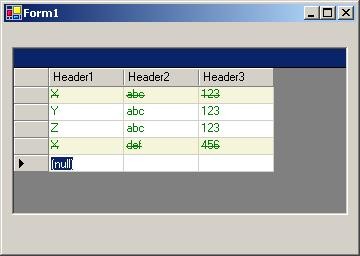
In this article I want to show you how to change the format of a single DataRow in the grid, based on the value of a single cell in that row.
Also, I will attempt to explain the process of adding custom styles to the Styles collection of your Datagrid collection editor, so that you can use them in the DataGrid at design time.
You can look at http://www.syncfusion.com/FAQ/WinForms/FAQ_c44c.asp#q1020q for more information on this topic.
Using the code
To control the formatting of a single row, based on the value of a cell, you have to do the following:
- Derive from the
DataGridTextBoxColumn.
public class FormattedTextBoxColumn : DataGridTextBoxColumn
{
    public CellPaint _handle ;
    public CellPaint PaintHandle
    {
        get
        {
            return _handle ;
        }
        set
        {
            _handle = value;
        }
    }
    ...;
    ...;
}
- Override the 4 paint methods of the
DataGridTextBox column.
protected override void Paint(Graphics g,Rectangle Bounds,
                              CurrencyManager Source,int RowNum,
                              Brush BackBrush ,Brush ForeBrush ,
                              bool AlignToRight)
{
   Object data = ( Object ) GetColumnValueAtRow(Source, RowNum);
   String strData ;
   strData = data.ToString() ;

   FormatEventArgs e = new FormatEventArgs(RowNum) ;

   if( _handle != null)
    _handle(new object(),ref e) ;

   g.FillRectangle(e.BackBrush, Bounds.X,
        Bounds.Y, Bounds.Width, Bounds.Height);

   FontStyle fs = FontStyle.Regular ;
   if( e.strikeThrough == true )
   {
     fs = FontStyle.Strikeout ;
   }
   System.Drawing.Font font = new
           Font(System.Drawing.FontFamily.GenericSansSerif,
           (float)8.25 ,fs);
   g.DrawString( strData ,font ,Brushes.Green ,
           Bounds.X ,Bounds.Y );

}
- Define a delegate, to be called from the paint functions ( The ones you override )
public delegate void CellPaint(object o, ref FormatEventArgs e);
- Define a class, which derives from
EventArgs, call this FormatEventArgs, and which will be used to pass information back to the delegate.
public class FormatEventArgs : EventArgs  {
 ... ;
 ... ;
}
To add the custom style to the designer, you need to:
- Create a custom
Datagrid, which derives from the DataGrid ( user defined control )
public class CustomDataGrid : DataGrid {
  ....
}
- Hide the data member,
GridTableStylesCollection of the DataGrid like this:
[Editor(typeof(CustomTableStylesCollectionEditor),
              typeof(UITypeEditor))]
public new GridTableStylesCollection TableStyles
{
   get{return base.TableStyles;}
}
This is the data member which returns the Table Style collection in your designer. Hide it, so that you can return your own type.
- Create an
internal class, which derives from the CollectionEditor, and override the function CreateNewItemTypes, which will now return your custom styles.
private class CustomTableStylesCollectionEditor :
CollectionEditor
{
public CustomTableStylesCollectionEditor
(Type type):base(type)
{
}
protected override System.Type[] CreateNewItemTypes()
{
return new Type[] {typeof(CustomStylesCollection)};
}
}
- Create a custom
DataGridTableStyle, which is derived from the DataGridTableStyle.
public class CustomStylesCollection : DataGridTableStyle
{
    ... ;
    ... ;
}
- Now, hide the data member
GridColumnStylesCollection, this member shows the default ColumnStyles available at design time.
Editor(typeof(CustomColumnStylesCollectionEditor),
                 typeof(UITypeEditor))]
public new GridColumnStylesCollection GridColumnStyles
{
  get {return base.GridColumnStyles;}
}
and,
protected override DataGridColumnStyle
      CreateGridColumn(PropertyDescriptor prop, bool isDefault)
{
    return base.CreateGridColumn(prop, isDefault);
}
- Create an
internal class which derives from the CollectionEditor, and override the function CreateNewItemTypes, which will now return your custom styles.
private class CustomColumnStylesCollectionEditor :
CollectionEditor
{
public CustomColumnStylesCollectionEditor(Type type) :
base(type)
{
}
protected override System.Type[] CreateNewItemTypes()
{
return new Type[]
{
typeof(FormattedTextBoxColumn),
typeof(DataGridTextBoxColumn),
typeof(DataGridBoolColumn)
};
}
}
Once you build the project, the CustomDataGrid, should be available in your Toolbox.
In your Form application, drop this CustomDataGrid. Then use the designer to add column styles to the DataGrid.
I attempted to expose the PaintHandler, in the properties box, but for some reason, it won't let me hook the delegate there.
If some one has any ideas to how I could do it, please let me know.
For now, manually hook the delegate like this:
formattedTextBoxColumn1.PaintHandle += new CellPaint(PaintHandler) ;
And, define the function PaintHandler, which will allow customized handling of your formats.
public void PaintHandler( object o, ref FormatEventArgs e)
{
  try
  {
    FormatEventArgs E = (FormatEventArgs) e ;
    int rowNum = E.RowNum ;
        DataRow dr = ds.Tables["table"].Rows[rowNum] ;

    if( dr[0].ToString() == "X" || dr[0].ToString() == "x")
    {
       E.BackBrush = Brushes.Beige;
       E.strikeThrough = true ;
    }
    else
    {
      E.BackBrush = Brushes.White ;
    }


  }
  catch( System.SystemException )
  {
  }
}
You would need to declare all the column styles for the DataGrid of type FormattedTextBoxColumn, and hook each style to the function.
I hope this helps.
This member has not yet provided a Biography. Assume it's interesting and varied, and probably something to do with programming.



 General
  News
News  Suggestion
  Question
  Bug
Bug  Answer
  Joke
Joke  Praise
  Rant
Rant  Admin
Admin 


 Submit an article or tip


 eofn
eofn