Click here to Skip to main content

A class to combine Slider Control and Progress Bar windows

By , 7 Jan 2004
 

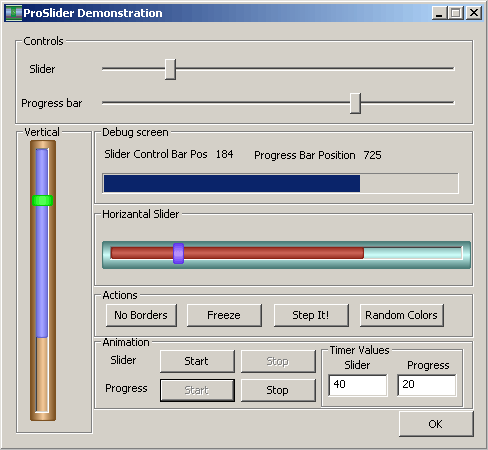
ProSlider Control - ProSlider.gif

Introduction

This article describes the implementation of CProSliderCtrl class, which uses custom draw functionality of CSliderCtrl class to combine Slider Control and Progress bar in one window.

This kind of a control is especially required for streaming multimedia applications, because of its less window space requirements and its freezing capability also helps preventing unbuffered scenes to be viewed/listened.

Features

CSliderCtrl has the following features:

  • All the basic features of the standard CSliderCtrl and CProgressCtrl classes,
  • Custom draw borders, thumb, channel and progress bar,
  • Borders could be shown or hidden,
  • The colors could be changed on demand,
  • The slider thumb could be disabled (frozen),
  • Flicker free progress bar.

Background

The custom draw system heavily uses recursive functions to draw the windows' objects and uses negative exponential random numbers in order to get better colors (will be described later).

A recursive function calls itself for many times, until a control mechanism stops recursion. The prototype of this kind of functions is given below:

void Recursion(int val)
{
    // computing stuff
    val ++;
    if(val<=255)Recursion(val);
    return;
}

This is the easiest way to calculate a given color's lighter versions and also gives 3D look to the objects. You may examine the differences by commenting the recursion line inside the function in the given source code.

Since this recursive drawing function lightens the colors every time it calls itself, giving darker color values will result in better colored 3D objects. In order to generate dark colors to use in this recursive function, a negative exponential random number (nexp) generator is implemented. The simulation of the function in Matlab for the input 255 is given in the figure below:

Negative exponential of a given number

How to use CProSliderCtrl Class

The exported functions are:

 // Gets the current lower and upper limits, or range, of the progress bar 
 // control.
 void _GetRange(int& nLower, int& nUpper);

 // Sets the upper and lower limits of the progress bar control's range and
 // redraws the bar to reflect the new ranges.
 void _SetRange(short nLower, short nUpper);

 // Sets the upper and lower limits of the progress bar control's range and 
 // redraws the bar to reflect the new ranges.
 void _SetRange32(int nLower, int nUpper);

 // Sets the background color for the progress bar. 
 COLORREF _SetBkColor(COLORREF clrNew);

 // Sets the thumb color
 COLORREF _SetThumbColor(COLORREF clrNew);

 // Sets the channel color
 COLORREF _SetChColor(COLORREF clrNew);

 // Gets the current position of the progress bar.
 int _GetPos(void);

 // Advances the current position of a progress bar control by a specified 
 // increment and redraws the bar to reflect the new position.
 int _OffsetPos(int nPos);

 // Sets the current position for a progress bar control and redraws the 
 // bar to reflect the new position.
 int _SetPos(int nPos);

 // Specifies the step increment for a progress bar control.
 int _SetStep(int nStep);

 // Advances the current position for a progress bar control by the step
 // increment and redraws the bar to reflect the new position.
 int _StepIt(void);

 // De/Freezes the slider and returns the prev. state
 BOOL Freeze(void);

 // Enables/Disables borders
 HRESULT _EnableBorders(BOOL bEnable=TRUE);

 // Test if the borders are enabled or not
 BOOL _IsEnabled(void);

CProSliderCtrl Class

This class uses the function OnNMCustomdraw(NMHDR *pNMHDR, LRESULT *pResult) to handle the custom drawing tasks. When the system sends TBCD_CHANNEL message, the class draws the progress bar to the area of the slider channel.

How to use CProSliderCtrl Class in your applications

Simply add the class to your workspace and define the slider control variable as:

 // Pro Slider handle
 CProSliderCtrl m_ProSlider;

and use the functions listed above to control progress bar, the functions starting with a "_" are related to progress bar controls.

Terms of Use

This code is free to use in any kind of applications at your own risk.

License

This article has no explicit license attached to it but may contain usage terms in the article text or the download files themselves. If in doubt please contact the author via the discussion board below.

A list of licenses authors might use can be found here

About the Author

Cem KARACA
Web Developer
Turkey Turkey
Member
Electrical & Electronic Engineer.
Finished studying MS in Electrical & Electronics Eng. (2004). Founder & Manager of VeriTeknik Ltd. VeriTeknik.com

Sign Up to vote   Poor Excellent
Add a reason or comment to your vote: x
Votes of 3 or less require a comment

Comments and Discussions

 
You must Sign In to use this message board.
Search this forum  
    Spacing  Noise  Layout  Per page   
Generaldynamically created sliderssussAnonymous2 Jun '05 - 5:10 
Hello,
I'm hoping this questions is not too noobish Wink | ;)
 
Here's my problem: When i create the control via Create()
e.g.
CProSliderCtrl slider1;
slider1.Create(...);
, the slider appears as the normal slider(no colored thumb etc.).
Am I doing something wrong or is it simply impossible to create the slider this way?
 
thx a lot
aguirre
Generalvertical progress from bottom to topmemberromansm18 Jan '05 - 0:08 
Your control is really light and cool.
But I want use it with vertical slider
growing from bottom to top.
I made slider by multiply -1 on range values and changing places min and max on SetRange().
But what should I change to get progress growing from bottom to top?
Can somebody help?
GeneralRe: vertical progress from bottom to topmemberCem KARACA18 Jan '05 - 22:22 
Thank you!
 
I think you should set the initial values to the end of the slider, I just don't rememner the code so much but, I suppose you should change:
switch(Vert)
{
case TRUE:...
if(m_ProRange.iHigh!=0) <<-- to bottom coordinate such as 400
{
rr= (crect.Height()*m_ProgressPos)/m_ProRange.iHigh;
crect.bottom =(LONG)rr+9; <<-- make it minus
} else crect.bottom=9; <<-- and make it bottom - 9
I hope this helps

 
Cem KARACA
GeneralProgress bar drawing bugmemberericericeric8822553 Nov '04 - 7:15 
Hi,   Thanks for the code, was great for what i needed.   One small bug showed up when you have non-zero starting positions.   To fix it, change the drawing code as below.   Fix is shown for hoizontal bar and similar change is needed for the vert bar as well.
 
// remove this line
//rr= (crect.Width()*m_ProgressPos)/m_ProRange.iHigh;
 
// change to this instead
rr=   crect.Width()*(m_ProgressPos-m_ProRange.iLow)/(m_ProRange.iHigh-m_ProRange.iLow);
 

Thanks,
-eric
Generalexcellentmemberhozgur13 Jan '04 - 8:24 

 
Turkish : Gurur duydum.
Hakan ÖZGÜR

General$25.00memberPJ Arends8 Jan '04 - 12:38 
Please see the CP FAQ (http://www.codeproject.com/info/faq.asp[^]), Articles section, paragraph 4.
 
Can I use code snippets and programs in my own work?
Yes. Some authors may have specific restrictions on using code in commercial apps such as providing credit in documentation or sending them an email first, but all code can be used for free.
 
Can you please clear this up before you cause too much confusion.


Sonork 100.11743 Chicken Little
 
"You're obviously a superstar." - Christian Graus about me - 12 Feb '03
 
Within you lies the power for good - Use it!
GeneralRe: $25.00memberCem KARACA8 Jan '04 - 20:34 
I changed my mind, now it is free.
Thank you again!
 
Cem KARACA
GeneralProgress bar messagesmemberPJ Arends8 Jan '04 - 12:30 
Excellent job!!
 
Just one suggestion. Because the control is derived from CSliderCtrl, it already has support for TBM_* track bar messages, but how about adding support for PBM_* progress bar messages. That way if one had a CWnd* pointer to your control, they could manipulate the progress bar portion by either sending PBM_* messages, or they could cast the pointer to a CProgressCtrl* pointer and use those member functions to manipulate it.
 
PBM_SETRANGE
PBM_SETPOS
PBM_DELTAPOS
PBM_SETSTEP
PBM_STEPIT
PBM_SETRANGE32
PBM_GETRANGE
PBM_GETPOS
PBM_SETBARCOLOR
PBM_SETBKCOLOR


Sonork 100.11743 Chicken Little
 
"You're obviously a superstar." - Christian Graus about me - 12 Feb '03
 
Within you lies the power for good - Use it!
GeneralRe: Progress bar messagesmemberCem KARACA8 Jan '04 - 20:20 
Very good idea!
 
I'll make the changes in the next release!
 
Thank you.
 
Cem KARACA
GeneralRe: Progress bar messagesmemberDrew S12 Jan '04 - 14:32 
How would that work? I mean PBM_SETRANGE maps to WM_USER + 1 but for a slider WM_USER + 1 means TBM_GETRANGEMIN.

General General    News News    Suggestion Suggestion    Question Question    Bug Bug    Answer Answer    Joke Joke    Rant Rant    Admin Admin   

Permalink | Advertise | Privacy | Mobile
Web01 | 2.6.130523.1 | Last Updated 8 Jan 2004
Article Copyright 2004 by Cem KARACA
Everything else Copyright © CodeProject, 1999-2013
Terms of Use
Layout: fixed | fluid
