Introduction
The world of mobile computing is growing with each new day. Today the convergence of handheld devices with traditional desktop computing is just beginning to take off. There are limitless possibilities for extending desktop applications with handheld devices.
For example: consider a Pocket PC with an application remote control for PowerPoint. A presenter could take advantage of an existing 802.11 connection and control the presentation from anywhere in the room without having to hover over the presentation machine.
Another example would be an application remote control for Windows Media Player. This could be an add-on for Windows XP Media Center, or just the regular Windows Media Player. The user could select the next song to play on a connected home entertainment system from a play list of available songs on the network.
Of course, there are many other ideas like WinAmp remote controls, operating system remote controls (reboot, shutdown, or restart a machine remotely), and whole home automation systems. There are many possibilities for monitoring applications as well, where the handheld is more of a data pad for viewing remote state information.
This article is the first in a series that will discuss one possible method of creating application remote controls.
Background
The proposed solution involves using the TcpClient class, which is available in the .NET Compact Framework and as well as in the full .NET Framework.
You might be asking why not use Web services? The only problem with Web services is the user will be required to host the Web service. This is usually found in enterprise solutions, but does not really work with the consumer market. Remoting services are not an option since the .NET Compact Framework does not support them.
While Remoting would be an ideal solution, especially if .NET Compact Framework supported serialization of objects and classes, the TcpClient has enough power to get the job done with minimal hassles.
One limitation that will make the task harder than it should be is the missing object and class serialization support. It would be cleaner to create a class that had all the necessary methods and properties that are needed for control the desktop application remotely. TcpClient will allow two applications to read and write to a network stream. It is easier, therefore, to write command messages for the application remote control, similar to how an FTP client might send simple text commands over a socket connection.
In a future article, we will look how to improve the communications subsystem. Instead of simple text commands, we will consider custom class serialization to and from XML.
Most of the good implementation is in the source code. To be honest, it really is not complicated. There are some things that really make life easier for a desktop application remote control developer. One is having a wireless network and a handheld device that works on that network.
Unfortunately, ActiveSync cannot be used since it will put the device on a different subnet from the rest of your network. This can make debugging a royal pain. Since you cannot perform Debug.WriteLine's on the .NET Compact Framework without creating custom listeners, it is a good idea to have a multi-line TextBox to send messages to while testing.
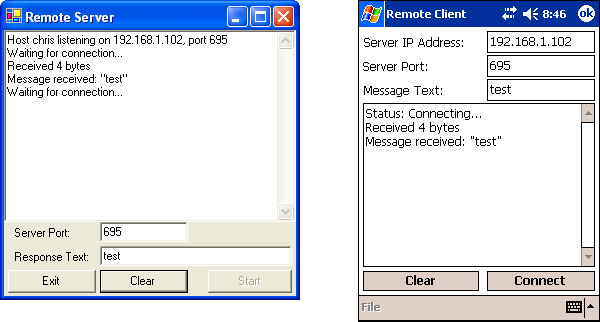
There are two parts to a desktop application remote control, a remote client running on a handheld device of some type, and a remote server running on a desktop machine of some type. In this example test PocketRemote, the handheld can send the server a message of the users choice. The server simply shows the message and sends a response back to the handheld device running the remote client application. The handheld takes the response from the remote server and shows it to the user on the handheld.
In the next few days, I hope to take a section at a time discussing and detailing how they work. I'd love to hear any feedback, questions, ideas, or suggestions regarding this article or any future articles.
This member has not yet provided a Biography. Assume it's interesting and varied, and probably something to do with programming.



 General
  News
News  Suggestion
  Question
  Bug
Bug  Answer
  Joke
Joke  Praise
  Rant
Rant  Admin
Admin 


 Submit an article or tip


