Introduction
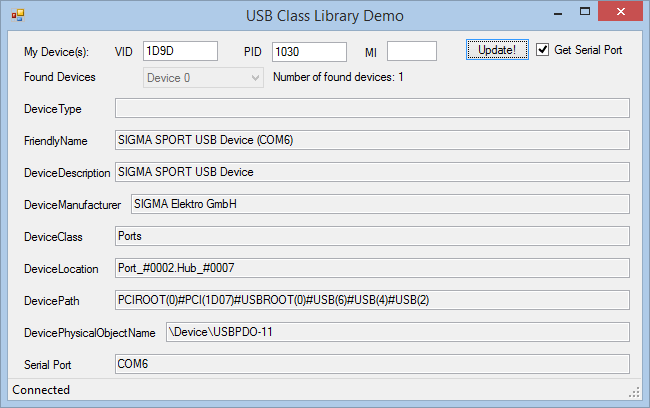
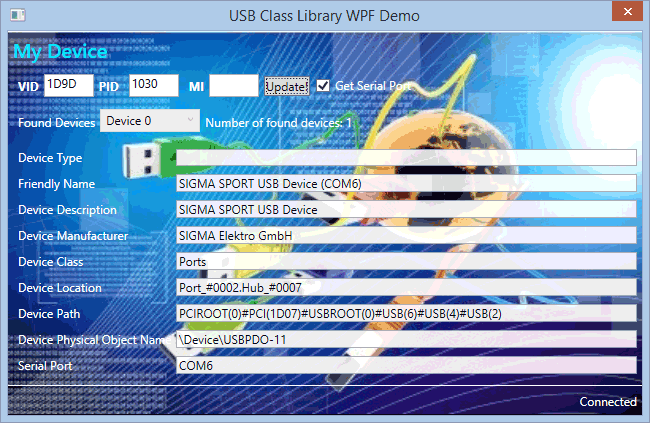
This article is about a USB library which enables you to manage Attach and Detach events of USB devices and detect your own device. I was not able to find a working code written in C# and which runs under both Windows XP and Windows 7 x64. I therefore decided to write my own code. I read various articles about USB Attach and Detach detection, and got some help from both the Microsoft website and the PINVOKE.NET website (http://www.pinvoke.net).
This code is a separate module that you can link to your own project. The code explains how to add additional properties.
Using the Code
Updating your Code
Windows Forms
- Add a reference to your project.
- Add the
using directive in your code:
using USBClassLibrary;
- Declare an instance of
USBClass.
private USBClassLibrary.USBClass USBPort;
- Declare an instance List<T> of
DeviceProperties if you want to read the properties of your devices.
private List<USBClassLibrary.USBClass.DeviceProperties> ListOfUSBDeviceProperties;
- Create an instance of the
USBClass class.
USBPort = new USBClass();
- Create an instance List<T> of
DeviceProperties class.
ListOfUSBDeviceProperties = new List<USBClassLibrary.USBClass.DeviceProperties>();
- Add handlers for the events exposed by the
USBClass class.
USBPort.USBDeviceAttached += new USBClass.USBDeviceEventHandler(USBPort_USBDeviceAttached);
USBPort.USBDeviceRemoved += new USBClass.USBDeviceEventHandler(USBPort_USBDeviceRemoved);
- Register your form to receive Windows messages when devices are added or removed.
USBPort.RegisterForDeviceChange(true, this.Handle);
- Then, check if your device is not already connected:
if (USBClass.GetUSBDevice(MyDeviceVID, MyDevicePID,
ref ListOfUSBDeviceProperties, false))
{
MyUSBDeviceConnected = true;
}
- Implement Attach and Detach handlers:
private void USBPort_USBDeviceAttached(object sender,
USBClass.USBDeviceEventArgs e)
{
if (!MyUSBDeviceConnected)
{
if (USBClass.GetUSBDevice(MyDeviceVID, MyDevicePID,
ref ListOfUSBDeviceProperties, false))
{
MyUSBDeviceConnected = true;
}
}
}
private void USBPort_USBDeviceRemoved(object sender,
USBClass.USBDeviceEventArgs e)
{
if (!USBClass.GetUSBDevice(MyDeviceVID, MyDevicePID,
ref ListOfUSBDeviceProperties, false))
{
MyUSBDeviceConnected = false;
}
}
- Handle Windows message in your form to pass them to the
USBClass class:
protected override void WndProc(ref Message m)
{
   bool IsHandled = false;
   USBPort.ProcessWindowsMessage(m.Msg, m.WParam, m.LParam, ref IsHandled);
   base.WndProc(ref m);
}
WPF
- Add a reference to your project.
- Add the
using directive in your code:
using USBClassLibrary;
- Declare an instance of
USBClass.
private USBClassLibrary.USBClass USBPort;
- Declare an instance List<T> of the
DeviceProperties class if you want to read the properties of your devices.
private List<USBClassLibrary.USBClass.DeviceProperties> ListOfUSBDeviceProperties;
- Create an instance of the
USBClass class.
USBPort = new USBClass();
- Create an instance List<T> of the
DeviceProperties class.
ListOfUSBDeviceProperties = new List<USBClassLibrary.USBClass.DeviceProperties>();
- Add handlers for the events exposed by the
USBClass class.
USBPort.USBDeviceAttached += new USBClass.USBDeviceEventHandler(USBPort_USBDeviceAttached);
USBPort.USBDeviceRemoved += new USBClass.USBDeviceEventHandler(USBPort_USBDeviceRemoved);
- Override OnSourceInitialized in order to:
- Retrieve the Windows Handle
- Add an event handler that receives all window messages
- Register your form to receive Windows messages when devices are added or removed
-
protected override void OnSourceInitialized(EventArgs e)
{
base.OnSourceInitialized(e);
HwndSource source = PresentationSource.FromVisual(this) as HwndSource;
source.AddHook(WndProc);
USBPort.RegisterForDeviceChange(true, source.Handle);
USBTryMyDeviceConnection();
MyUSBDeviceConnected = false;
}
- Handle Windows message in your form to pass them to the
USBClass class
private IntPtr WndProc(IntPtr hwnd, int msg, IntPtr wParam, IntPtr lParam, ref bool handled)
{
   USBPort.ProcessWindowsMessage(msg, wParam, lParam, ref handled);

   return IntPtr.Zero;
}
- Then, check if your device is not already connected:
-
if (USBClass.GetUSBDevice(MyDeviceVID, MyDevicePID,
ref ListOfUSBDeviceProperties, false))
{
MyUSBDeviceConnected = true;
}
- Implement Attach and Detach handlers:
private void USBPort_USBDeviceAttached(object sender,
USBClass.USBDeviceEventArgs e)
{
if (!MyUSBDeviceConnected)
{
if (USBClass.GetUSBDevice(MyDeviceVID, MyDevicePID,
ref ListOfUSBDeviceProperties, false))
{
MyUSBDeviceConnected = true;
}
}
}
private void USBPort_USBDeviceRemoved(object sender,
USBClass.USBDeviceEventArgs e)
{
if (!USBClass.GetUSBDevice(MyDeviceVID, MyDevicePID,
ref ListOfUSBDeviceProperties, false))
{
MyUSBDeviceConnected = false;
}
}
Getting the COM Port Associated to a USB Device
If your device emulates a Serial Port, then you can retrieve its COM Port.
The GetUSBDevice function has a fourth parameter GetCOMPort:
public static bool GetUSBDevice(UInt32 VID, UInt32 PID, ref List<deviceproperties> ListOfDP, bool GetCOMPort, Nullable<uint32> MI=null)
Set its value to True in your connection code and retrieve the COM Port from the DeviceProperties structure:
if (USBClass.GetUSBDevice(MyDeviceVID, MyDevicePID,
ref ListOfUSBDeviceProperties, true))
{
String COMPort;
MyUSBDeviceConnected = true;
COMPort = DP.COMPort;
}
Compiling
In the project properties, Build tab, do not select Any CPU in the "Platform target" drop down list, pick up x86 or x64.
Updating the Code
If you need to read other device properties, simply update the code as follows:
- Look up the
SetupDiGetDeviceRegistryProperty function in MSDN and find the property you want to get. - Add a new variable to the
DeviceProperties matching the characteristics of your property:
public struct DeviceProperties
{
   public string FriendlyName;
   public string DeviceDescription;
   public string DeviceType;
   public string DeviceManufacturer;
   public string DeviceClass;
   public string DeviceLocation;
   public string DevicePath;
   public string DevicePhysicalObjectName;
   public string COMPort;
}
- Update the
GetUSBDevice function:
public static bool GetUSBDevice(UInt32 VID, UInt32 PID, ref List<deviceproperties> ListOfDP, bool GetCOMPort, Nullable<uint32> MI=null)
{
   ...
    DP.DevicePhysicalObjectName = String.Empty;
    if (Win32Wrapper.SetupDiGetDeviceRegistryProperty(h, ref DevInfoData,
      (UInt32)Win32Wrapper.SPDRP.SPDRP_PHYSICAL_DEVICE_OBJECT_NAME,
      ref RegType, intptrBuffer, BUFFER_SIZE, ref RequiredSize))
    {
      DP.DevicePhysicalObjectName = Marshal.PtrToStringAuto(intptrBuffer);
    }
    ...
}
History
- Feb 22, 2010
- Feb 26, 2010
- Added code to retrieve the COM Port associated to USB Devices emulating a serial port
- Updated documentation accordingly
- November 17, 2013
- Added support to detect composite devices and fixed a bug where DeviceProperties strings were not intialized correctly.
- Updated Demo application by adding a "MI" field.
- February 5, 2014
- Added support for WPF applications: the USB Class Library is modified to remove any reference to Windows Forms specific objects.
- The code works on Windows 8 and Windows 8.1 too
- September 21, 2014
- Added the capability to identify more than 1 identical devices returning an array of Device Properties.
This member has not yet provided a Biography. Assume it's interesting and varied, and probably something to do with programming.



 General
  News
News  Suggestion
  Question
  Bug
Bug  Answer
  Joke
Joke  Praise
  Rant
Rant  Admin
Admin 


 Submit an article or tip

