 |
|
 |
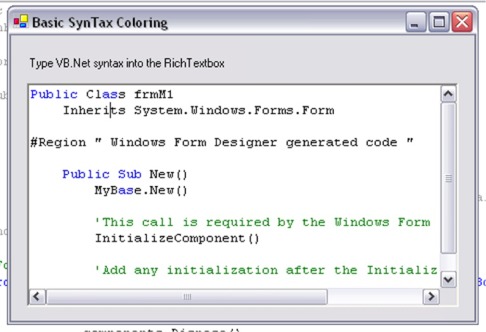
"The code is pretty much self-explanatory, but the idea behind it works something like this:
Find the number of visible lines.
For each visible line, color it.
Simple enough, eh?
Now, on to the actual code, the first subroutine that finds the number of visible lines is called ColorVisibleLines and it looks something like this:"
THAT'S your explanation of the code?! Every time I see the phrase "the is self-explanitory" in an article, I want to smack the person who wrote it.
Yeah, the code may or may not be commented, but code comments cannot describe the concepts behind the design, and FAR more often than not, the code comments are glossly inadequate to describe the code they siutting over.
Write up how the code works and the concepts behind it and you might have something.
|
|
|
|
 |
|
 |
Great post actually but it only works when everything is put under form event.
Can it be possible to make a class that handles this. i tried with a class but then i have a problem with this line
Return SendMessage(RTB.Handle.ToInt32, EditMessages.GetFirstVisibleLine, 0, 0)
it wants me to declare it as new or so.
Can u help me out here!
PS: discovered that it just hightlights a word or a letter just once and on the next instance it doesn't..
thx
|
|
|
|
 |
|
 |
Is it possible to background highlight an entire line AS USER IS TYPING... if it STARTS WITH "fox"
|
|
|
|
 |
|
 |
Hi Aaron!
Awesome code! Im using this in my application which is a front end compiler. This compiler creates a log file, and i want to use your code do colorize error messages in that logfile.
But anyway, something strange is happening, check it out:
http://www.themightyatom.nl/screenshots/screenshot_colored_text.png
As you can see, something is wrong:
The word "hlcsg is colored yellow, which is working fine. But there's another instance of this word (Current hlcsg settings) in the log which is not colored yellow! Why?"
Also note that the word "estimate" is colored purple, but i haven't added this word to the Keywords on the left! What the.
The words "max texture memory" (below the purple estimate) is not colored at all.
The word "zhlt.wad" is colored red, but the word "wadinclude" is partially colored red, only the first character and the last character of that word is left white (which is the default color) and it not even in the Keywords! Below the second zhlt.wad is another instance of zhlt.wad, but this one is left white, while it should be colored red as well.
The words "discarded from clipping hulls" is colored greenyellow, only the last character of the word "hulls" is left white.
This is really weird, and i can't figure it out.
I guess this has something to do with text encoding, since the log text is actually being read from a .log file on my hard drive.
When i empty the RichtTextBox and start to type in words manually, it works fine.
If you know why this is happening and how to fix this, please tell me how, i would really appreciate it and ill give you credits in my app when i release it.
- Atom
http://www.themightyatom.nl
|
|
|
|
 |
|
 |
Looks like Aaron doesn't care.
Great.
http://www.themightyatom.nl
|
|
|
|
 |
|
 |
wow Im very pleased with this piece of code... need it for my program obviosly (poor english sorry). It's going to take me a while to turn it into a function though.. I have a keyword list of over 4500 words so my own code was way to slow.. to about .2 seconds to cover the entire text and well... thats a long time for each character you type....
Anyway.. thanks for this excellent piece of code! 5 points
|
|
|
|
 |
|
 |
Hello Aaron,
I typically work with 50 MB+ RTF texts, and coloring a few hundred words in the whole text typically takes 30 minutes on a 3.2GHz, 2GB RAM workstation! useless...
Therefore I love your idea of only coloring what is actually displayed! I have two questions:
(1) I understand that the key part of your program is:
Dim FirstLine As Integer = FirstVisibleLine()
Dim LastLine As Integer = LastVisibleLine()
i.e. get the part of the text that is actually displayed.
Unfortunately you don't explain how to write the two functions: FirstVisibleLine() and LastVisibleLine() are not RichTextBox methods, and I cannot find them in MSDN or in Visual C# or .NET help system.
Are these some kind of "only for Basic users" methods?
(2) Actually I would rather have the text's area as two addresses (i.e. the character positions in the whole text buffer, rather than the index of the lines) because I don't know how to go from the line index to the char position, and I cannot scan my text at each resize or scroll event because it is too large).
Thanks
Max Silberztein
|
|
|
|
 |
|
 |
...for more than 30 lines. Not much else to say really.
A nice example for beginners, but hardly something practical.
|
|
|
|
 |
|
 |
The code works well as long as it is in my mainForm. However, I would like to make a module of it. After some considerable effort I have not been successful.
Near as I can figure the problem seems to stem from SendMessage(rtb.Handle, EM_LINEINDEX, LineIndex, 0) in GetCharFromLineIndex() returning a -1 after the second call to it. "Error #5, -1 not a valid value for value"
The only real change I have made to the code is an attempt to gain access to the RichTextBox of Form1 by
Dim Form As New Form1()
Dim rtb As RichTextBox = Form.txtCodePage
Would appreciate some hints as to where or what I might look into to find a solution.
|
|
|
|
 |
|
 |
I'm sorry that it has taken so long to respond. I've been away for a couple weeks.
I'll work on it and see what I can come up with, though I have a couple idea's currently.
1. In the module, add a handle argument to the GetCharFromLineIndex() function.
Public Function GetCharFromLineIndex(byval hWnd as IntPtr, byval Lin...) as Integer
Then, use the handle for the SendMessage API call
SendMessage(hWnd, EM_LINEINDEX, LineI...)
2. Make it a class instead. If you make a inherited control class, you can make the function without using the extra arg using the Me.Handle for the handle for the SendMessage API.
Again, I apologize for the delayed response. Hope this gives you some idea's.
--
Aaron Eldreth
|
|
|
|
 |
|
 |
You'll notice in your picture, that the "as" in "Class" is coloured, but the whole word isn't. What you really need to search for is whole words, skipping any part words, otherwise you'll start colouring parts of variable names etc, which probably isn't a good idea
Ryan "Punctuality is only a virtue for those who aren't smart enough to think of good excuses for being late" John Nichol "Point Of Impact"
|
|
|
|
 |
|
 |
Yes I know about this bug. Unfortunately, the best way to fix this problem would be to create a lexer. I have been planning to do this for a while now, just haven't gotten to it yet.
But, using the RichTextBox for syntax coloring is not it's intended use. The RichTextBox is a word processor, not a code editor. To add on a lexer would mainly just slow it down more.
The best way to fight the speed (actually, lack of speed) issue would be to create an owner-drawn code editor that would only use a single font. I am currently working on implimenting this, but it is rather difficult.
Anyway, thanks for your comments. I appreciate them. I'll definitely look into fixing the problems.
--
Aaron Eldreth
|
|
|
|
 |
|
 |
I partly solved this by cheating a bit. I have added space to the word string eg. " as ", words that might not have a leading space don't get one, eg. "Dim " or will always have an ending space "Function ".
|
|
|
|
 |
|
 |
This article provides an over-simplistic implementation. It provides the impression of working, but as can be seen in the screenshot, the letters 'AS' are highlighted, even in the middle of words. What about multi-line comments? What about block quotes in C#?
So how to do this properly?
1) Build a lexer, a simple state-table driven lexer will do.
2) Store each line of text in a linked list
3) Lex each line of text, storing the starting and ending lexer state for each line.
4) When relexing a line, use the END lex state of the previous line as the start state of the new line. This allows lexing of lines in the middle of a document without relexing the entire document. Continue lexing lines until the lex START of the subsequent line equals the END of the last lexed line - then the lex is consistent for all lines. This allows block quotes, for instance.
5) The hard part: display. Create a multi-line editor : you already have the list of lines, and each line's lex data. Use the GetCharacterPlacement API to render each lex token separately, in the appropriate colors for the lex token type. Use the Caret API for positioning the caret properly. Render only visible lines of course.
6) Add user editing semantics.
Et voila!
On the other hand, check out www.actiprosoftware.com - these guys have done the work already!
ActiPro Syntax Editor.
Caractacus
Yes, I thought so.
|
|
|
|
 |
|
 |
Thanks for the suggestions. I'll see what I can do with 'em.
"What about block quotes in C#?"
I didn't know that was possible with the RichTextbox.
"On the other hand, check out www.actiprosoftware.com - these guys have done the work already!"
True, but have you noticed that it costs money? Also, Compona's SyntaxBox is much better in my opinion.
Aaron Eldreth
TheCollective4.com
My Articles
While much is too strange to be believed,
Nothing is too strange to have happened.
- T. Hardy
|
|
|
|
 |
|
 |
Your comment made me interested in syntax highlighting/text parsing.
Do you have any reference where I could find more information. Or maybe even an implementation that works according to your description?
Thanks
Rolf
|
|
|
|
 |
|
 |
My introduction to parsing techniques was though parser generators, such as YACC (Yet Another Compiler Compiler) and Bison.
My current tool of choice (though maybe not ideally suited to colorizing editors) is ANTLR (Another Tool for Language Recognition). Check out http://www.antlr.org/. Emits parser source code in Java, C++, C#, ...
This tool provides a good look at what goes into an industrial strength parser: the lexical analyzer (Lexer) and the parser.
The lexer feeds the parser with 'tokens', such as 'string', 'float', 'comment', 'keyword' etc. The parser looks for patterns of tokens, possibly using lookahead, etc.
Check it out, it is worth the time.
Caractacus
|
|
|
|
 |
|
 |
Thanks a lot for this link. ANTLR indeed seems to be worth looking at.
So far, I've not yet done any work with lexers and parsers; in my job I'm programming hardware oriented software, where there is nothing to parse.
However, I always found parsers quite fascinating; probably because I don't have a clue of how they're doing their magic
I think I have to expand my education and have a very close look at ANTLR, Bison and Yacc.
Rolf
|
|
|
|
 |
|
 |
I am unable to download your source/demo files. Could you please fix the links?
Regards,
Dejan Petrovic
|
|
|
|
 |
|
 |
Ok, it should be fixed. Sorry about that and most of all, thanks for telling me.
Aaron Eldreth
TheCollective4.com
My Articles
While much is too strange to be believed,
Nothing is too strange to have happened.
- T. Hardy
|
|
|
|
 |
