Introduction
In today's websites, we often need to save images from users whether to create personal galleries or product galleries, etc. Simultaneously we don’t want to limit user’s right to upload a certain type of image of a certain quality most of the time. That is, the user can upload any common format of image (.jpg, .gif, .bmp or .png) and/or Dimensions of image and/or Size of Image (in bytes). Then the whole process of optimization has gone to be internal, to process image and convert that into a specific format, specific dimensions, also you can watermark an image programmatically. Here in this context, I want to describe about changing the dimensions of image and side by side image is optimized for size (in bytes). For getting reference about other topics like format conversion and watermarking, please visit the links listed at the end of this article.
Using the Code
For this program to work, inclusion of these four namespaces is required:
using System.IO;
using System.Drawing;
using System.Drawing.Imaging;
using System.Drawing.Drawing2D;
The first one is used to access ‘Path’ class through which we extract the extension of uploaded image. Next, it is required to use other image processing related classes like ‘Bitmap’, ‘Graphics’, ‘StringFormat’, etc. The third one provides us the flexibility of choosing a format for our resultant image, and the fourth one is used to keep the quality of image intact using interpolation operations.
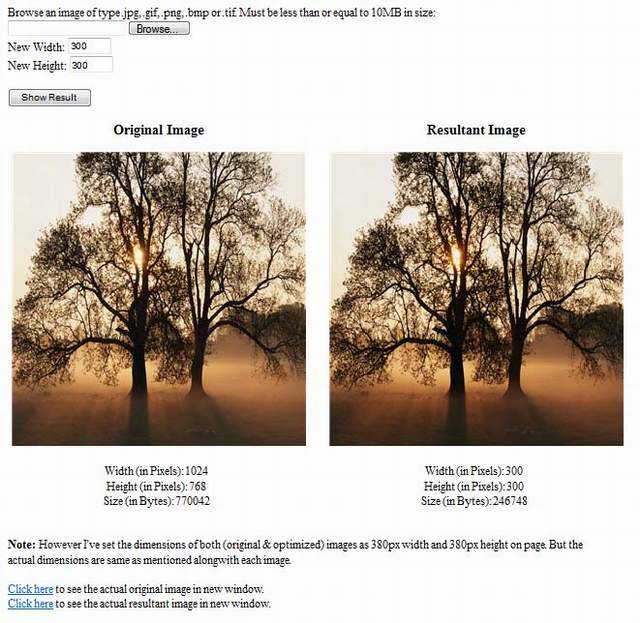
In my demonstration program, there are two blank directories ‘Original Images’ and ‘Resultant Images’. The former is for saving original images and the latter is for optimized and resized images. There is a Default.aspx page. Six ASPX controls have been put there.
FileUpload: To upload image file that has to be processed TexBox1: Used to specify the width of the resultant image (in pixels) TexBox2: Used to specify the height of the resultant image (in pixels) Button: Used to trigger the operation of processing Image1: Used to show the original Image Image2: Used to show the resultant Image
Also there are other controls which have been used for furnishing the data about images.
Once your image has been processed, both of your images (original & resultant) will be shown in Image1 and Image2 controls respectively. Data specific to each image (width, height, size in bytes) will be shown along with the images.
The handler function of the button clicking which the image has been processed for optimization and resizing is given below:
protected void btnResults_OnClick(object sender, EventArgs e)
{
    if (Page.IsValid && fpImage.HasFile)
    {
        string tmpName = Guid.NewGuid().ToString();
        fpImage.SaveAs(MapPath("~/Original Images/" +
		tmpName + Path.GetExtension(fpImage.FileName)));
        imgOriginal.ImageUrl = "~/Original Images/" +
		tmpName + Path.GetExtension(fpImage.FileName);

        Bitmap original_image = new Bitmap(fpImage.FileContent);
        lblOIW.Text = original_image.Width.ToString();
        lblOIH.Text = original_image.Height.ToString();
        lblOIS.Text = fpImage.FileContent.Length.ToString();

        OptimizeNResize(original_image, tmpName);
        if(original_image != null) original_image.Dispose();
    }
}
I create a new GUID and collect it in a string variable tmpName. This is the name to save the original as well as optimized image. The next line is to save the original image to ‘Original Images’ folder. This saved image is then linked to an Image control on page.
The image is now collected in a new Bitmap and this bitmap. The dimensions and size of original images has been shown along with it. Now the bitmap of the original image and tmpName are passed to a new function which is responsible for optimizing this image. This function is as under:
protected void OptimizeNResize(Bitmap original_image, string tmpName)
{
Bitmap final_image = null;
Graphics graphic = null;
int reqW = Int32.Parse(txtWidth.Text);
int reqH = Int32.Parse(txtHeight.Text);
final_image = new Bitmap(reqW,reqH);
graphic = Graphics.FromImage(final_image);
graphic.FillRectangle(new SolidBrush(Color.Transparent),
new Rectangle(0, 0, reqW,reqH));
graphic.InterpolationMode = InterpolationMode.HighQualityBicubic;
graphic.DrawImage(original_image, 0, 0, reqW, reqH);
final_image.Save(MapPath("~/Resultant Images/" + tmpName +
Path.GetExtension(fpImage.FileName)));
imgResult.ImageUrl = "~/Resultant Images/" + tmpName +
Path.GetExtension(fpImage.FileName);
lblRIW.Text = final_image.Width.ToString();
lblRIH.Text = final_image.Height.ToString();
FileInfo nfi = new FileInfo(MapPath("~/Resultant Images/" +
tmpName + Path.GetExtension(fpImage.FileName)));
lblRIS.Text = nfi.Length.ToString();
lnkSave1.NavigateUrl = "~/Original Images/" + tmpName +
Path.GetExtension(fpImage.FileName);
lnkSave2.NavigateUrl = "~/Resultant Images/" + tmpName +
Path.GetExtension(fpImage.FileName);
if (graphic != null) graphic.Dispose();
if (original_image != null) original_image.Dispose();
if (final_image != null) final_image.Dispose();
}
The first few lines of the above function are used to specify variables of Bitmap and Graphics classes. Width and height of resultant image have been extracted from textboxes and a blank bitmap has been created of the same dimensions. This bitmap has now been formed into an image and collected in a graphic variable.
The above graphic has now been filled with a rectangle of transparent background. Interpolation operation has been applied to keep the quality of image intact and then the original image has been drawn on this graphic. This graphic originally is a reference to a Bitmap object (final_image). Now the final image has been saved in a resultant image folder and shown int the image2 control with the specific values (width, height, and size) mentioned along with it.
However, I have made the dimensions of controls image1 and image2 fixed on page. But the dimensions of image contained could be different. I have put two links on page which will show images in actual sizes in new browser windows.
Finally all the containers of images, original image bitmap, final image bitmap and graphics object have been disposed and we get an image optimized in size with the required dimensions.
Points to Ponder
The practical stuff is attached as a demo. You will easily understand when you look at the download files. Image processing operations require high amount of server resources, if not managed properly, they can slow down the performance. It is important to release resources by disposing the objects of classes like Bitmap, when you're done. You might also be interested in some other articles that I have written:
Final Words
I hope you find the stuff helpful. Thanks for reading. Good luck!
History
- 31st March, 2010: Initial post
Senior Software Professional with 13+ years of experience in web/desktop applications development.



 General
  News
News  Suggestion
  Question
  Bug
Bug  Answer
  Joke
Joke  Praise
  Rant
Rant  Admin
Admin 


 Submit an article or tip


