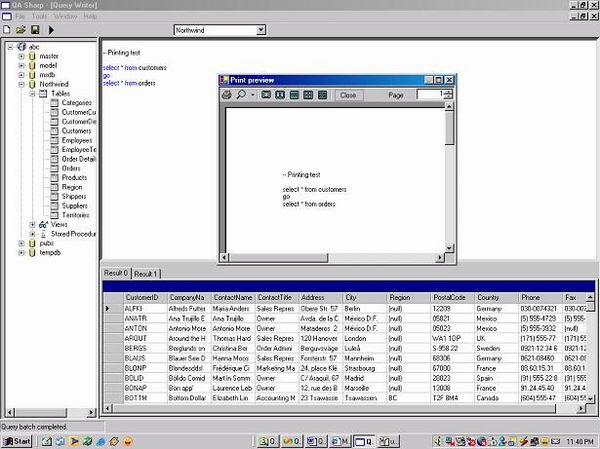

The QASharp was developed for those using the MSDE (Microsoft Desktop
Engine). This project is meant to provide a tool similar to query analyzer which
can be used to execute queries, create tables, and do all other common database
activities.
All suggestions, apprehensions, criticisms are welcome.
SqlDBHandler.cs by http://www.aspenterprisemanager.com/.
Functionality Supported
- Create new query.
- Save existing query.
- Open existing query.
- Execute queries.
- Multiple query output window.
- Connect to different data source.
- Flicker free Syntax highlighting of major keywords.
- Added Show Errors in Help menu.
- Object browser.
- Data/Stored procedure editing functionality.
- Printing queries.
Configuration settings to be made
In order for the application to work, make the following changes in the
app.config file, in the keys listed below:
="1.0"="Windows-1252"
<configuration>
<appSettings>
<add key="server" value="(local)" />
<add key ="database" value="master" />
<add key="uid" value="sa"/>
<add key="pwd" value=""/>
</appSettings>
</configuration>
| Keys | Values |
Server | The server to connect to |
Database | The initial database to connect to |
Uid | User ID |
Pwd | Password |
- Select a database.
- Create a new document by clicking on New.
- Type in the query (for multiple queries, add a “
GO”
keyword after each query).
- Press “F5” to execute query, or click on the Execute icon on the toolbar.
- To select a different server:
- Click on File-> Connect. Enter the required parameters, and click on
Connect.
The main code changes from V1.2 to V1.3
private void rtbQueryPad_TextChanged(object sender, System.EventArgs e)
{
Regex r = new Regex("([ \\t{}();])");
if (rtbQueryPad.Text.Trim() =="")
return;
int currentLine = rtbQueryPad.GetLineFromCharIndex(
rtbQueryPad.GetCharIndexFromPosition(Cursor.Position));
try {
string currentLineString = rtbQueryPad.Lines[currentLine];
int startPos = 0;
for (int i = 0; i < currentLine-1; i++)
{
startPos = startPos + rtbQueryPad.Lines[i].Length;
}
string [] tokens = r.Split(currentLineString);
foreach (string token in tokens)
{
if (token.Trim() != string.Empty)
{
if (IsKeyWord(token))
FindAndHighlight(token,Color.Blue,false,true,startPos);
else
FindAndHighlight(token,Color.Black,false,true,startPos);
}
}
}
catch (Exception ex)
{
Console.WriteLine(ex.Message);
}
}
private bool IsKeyWord(string input)
{
for (int i = 0; i < keywords.Length; i++)
{
if (input.Trim().ToLower() == keywords[i].ToLower())
{
return true;
}
}
return false;
}
protected void pdQuery_PrintPage (object sender,
System.Drawing.Printing.PrintPageEventArgs ev)
{
float linesPerPage = 0;
float yPosition = 0;
int count = 0;
float leftMargin = ev.MarginBounds.Left;
float topMargin = ev.MarginBounds.Top;
string line = null;
frmQueryWriter frmCurrentForm;
frmCurrentForm = (frmQueryWriter)this.ActiveMdiChild;
Font printFont = frmCurrentForm.rtbQueryPad.Font;
SolidBrush myBrush = new SolidBrush(Color.Black);
linesPerPage = ev.MarginBounds.Height / printFont.GetHeight(ev.Graphics);
while(count < linesPerPage && ((line=myReader.ReadLine()) != null))
{
yPosition = topMargin + (count * printFont.GetHeight(ev.Graphics));
ev.Graphics.DrawString(line, printFont, myBrush,
leftMargin, yPosition, new StringFormat());
count++;
}
if(line != null)
ev.HasMorePages = true;
else
ev.HasMorePages = false;
myBrush.Dispose();
}
The main code changes from V1.1 to V1.2
// Update the table with changed values.
public void UpdateDT(DataTable dt)
{
   string sql;dt.TableName;
   try
   {
       if (m_conn.State == ConnectionState.Closed)
       {
           m_conn.Open ();
       }
       SqlDataAdapter da = new SqlDataAdapter(
        sql,m_conn.ConnectionString);
       string field="";
       string values="";
       string sql1 = "";
       foreach(DataRow dtr in  dt.Rows)
       {
          if (dtr.RowState == DataRowState.Added)
          {
             sql1 = " insert into " + dt.TableName + " (";
             field = "";
             values = "";
             foreach(DataColumn dc in dt.Columns)
             {
                if (dc.AutoIncrement == false)
                {
                    field += dc.ColumnName + ",";
                    values +=  "'" +  dtr[dc.ColumnName] + "',";
                }
             }
             field = field.Substring(0,field.Length-1);
             values = values.Substring(0,values.Length-1);
             sql1 += field  + ")" + "Values (" + values + ")" ;
          }
          else if (dtr.RowState == DataRowState.Modified)
          {
             sql1 = " update  " + dt.TableName + " set ";
             string stmt="";
             string where = " where ";

             foreach(DataColumn dc in dt.Columns)
             {
                field  = dc.ColumnName + " = ";
                values =  "'" +
                 dtr[dc.ColumnName].ToString().Trim() + "' ";
                stmt += field +  values + ",";
                where += field + "'" +
                dtr[dc.ColumnName,
                 DataRowVersion.Original].ToString().Trim()
                     +   "' and " ;
             }

             stmt = stmt.Substring(0,stmt.Length-1);
             where = where.Substring(0,where.Length-5);
             sql1 += stmt + where;
          }

          else if (dtr.RowState == DataRowState.Deleted)
          {
             sql1 = " delete from " + dt.TableName ;
             string stmt="";
             string where = " where ";
             foreach(DataColumn dc in dt.Columns)
             {
                 field  = dc.ColumnName + " = ";
                 where += field + "'" +
                 dtr[dc.ColumnName,DataRowVersion.Original].ToString().
                    Trim() + "' and " ;
             }
             where = where.Substring(0,where.Length-5);
             sql1 += stmt + where;
          }
          if (sql1.Trim() != string.Empty)
                ExecNonQuery(sql1);
      }

   }

   catch (Exception ex)
   {
       System.Diagnostics.Debug.WriteLine(ex.Message);
   }
}
Revision History
06-Oct-2004
- Added windows integrated security while logging in.
- Improved flicker-free Syntax highlighting.
- Added support for printing.
- Bug fixes.
05-Aug-2004
- Object Browser.
- Data / Stored Procedure Editor.
- Database Tree Control.
1.1 22nd-Feb-2004
- Multiple query output window.
- Syntax highlighting.
- Connect to different data source menu option.
Co Founder at Algorisys Technologies Pvt. Ltd.
http://algorisys.com/
https://teachyourselfcoding.com/ (free early access)
https://www.youtube.com/user/tekacademylabs/



 General
  News
News  Suggestion
  Question
  Bug
Bug  Answer
  Joke
Joke  Praise
  Rant
Rant  Admin
Admin 


 Submit an article or tip


 Tom McAnnally