Click here to Skip to main content

A Simple DataGrid Row Tooltip For Beginners.

By , 14 Sep 2006
 

Sample Image - tooltip.gif

Introduction

There are lot of examples and articles on tooltip but I didn't find any which displays the content from a database table dynamically. I have gone through different articles and at last used the following approach which I want to share with you all.

This article describes how to create a dynamic tooltip in ASP.NET using JavaScript. Here, we can design our tooltip as we want its look, it's not like conventional Windows tooltip. If we want, we can insert images also to our tooltip. The appearance of the tooptip can be changed according to requirement. This article contains very simple code of JavaScript and ASP.NET.

Implementation

I'll try to explain this article using an example. Let us take a database table having the following fields:

  • Client_Id
  • Client_Name
  • Address
  • City
  • State
  • Phone
  • Fax
  • Status

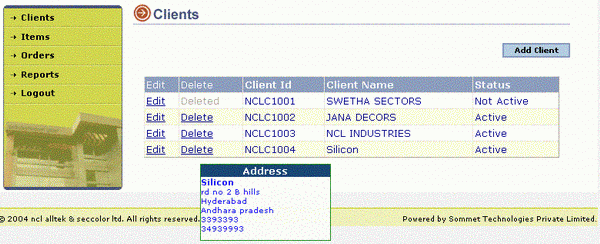
Here, we are binding this table to a DataGrid and we are displaying only few fields (Client_id, Client_Name and the Status of the client). Now, our requirement is when the user places his mouse over a particular row of the DataGrid, we need to display the Client_name, Address, city, state, Phone and Fax of the client using a tooltip.

First, we'll design our tooltip. It'll be better if we'll use a DIV tag so that we can move this tag anywhere in our document, and whenever required, we can hide it on mouseout event. Within the DIV tag here, I am using a table, and each cell of the table is dynamically filled at mouseover event using JavaScript.

<div id="Popup" class="transparent">
  <div style="background-color: #003366"><b><center>
                 <span>Address</span></center></b></div>
   <div>
   <table width=100% border=0 cellpadding=0 cellspacing=0>
    <tr>
     <td id=td0 align=left class=runtext1></td>
    </tr>
    <tr>
     <td id=td1 align=left class=runtext></td>
    </tr>
    <tr>
     <td id=td2 align=left class=runtext></td>
    </tr>
    <tr>
     <td id=td3 align=left class=runtext></td>
    </tr>
    <tr>
     <td id=td4 align=left class=runtext></td>
    </tr>
    <tr>
     <td id=td5 align=left class=runtext></td>
    </tr>
   </table>
   
   </div>
 </div>

Here for each cell of the table, the text we'll fill dynamically using innerText property of the table cell. This we'll see in our JavaScript function.

Next step is to write the JavaScript function which will fill the table cells dynamically.

<script language="javascript">
function ShowTooltip(name,address,city,state,phone1,fax)
{
    document.getElementById("td0").innerText=name; 
    document.getElementById("td1").innerText=address;
    document.getElementById("td2").innerText=city;
    document.getElementById("td3").innerText=state;
    document.getElementById("td4").innerText=phone1;
    document.getElementById("td5").innerText=fax;
    x = event.clientX + document.body.scrollLeft;
    y = event.clientY + document.body.scrollTop + 10;
    Popup.style.display="block";
    Popup.style.le ft = x;
    Popup.style.top = y;
 }

function HideTooltip()
{
    Popup.style.display="none";
}
</script>

Here in ShowTooltip function, we are getting 6 arguments and setting these values to the cells of the table. After this, we are getting the current mouse position x-y coordinates and displaying the tooltip at desired location. I think hide function is understood; it is fired at mouseout event of the DataGrid row.

Now, our final and most important task is to pass the values from the database table to the JavaScript function at the time of DataGrid binding, and add the mouseover and mouseout events to each DataGrid row. For this, we'll use the DataGrid's ItemDataBound event, which occurs after an item is data bound to the DataGrid control. This event provides us with the last opportunity to access the data item before it is displayed on the client. After this event is raised, the data item is nulled out and no longer available.

//[C#]

void dgClient_ItemDataBound(object sender, 
             DataGridItemEventArgs e)
{
  if (e.Item.DataItem != null)
  {
    e.Item.Attributes.Add("onmouseover", "ShowTooltip('" + 
      DataBinder.Eval(e.Item.DataItem, "client_name").ToString() + "','" + 
      DataBinder.Eval(e.Item.DataItem, "Address").ToString() + "','" + 
      DataBinder.Eval(e.Item.DataItem, "CITY").ToString() + "','" + 
      DataBinder.Eval(e.Item.DataItem, "STATE").ToString() + "', '" + 
      DataBinder.Eval(e.Item.DataItem, "PHONE1").ToString() + "','" + 
      DataBinder.Eval(e.Item.DataItem, "FAX").ToString() + 
      "');"); 
   e.Item.Attributes.Add("onmouseout","HideTooltip();");
  }
}

Conclusion:

I am also new to ASP.NET, there may be some better way to do this also. If you are having any suggestion or comments, please do tell me, it will really help me to improve myself. I hope the rest of the code is not required for this simple example, and I don't want to waste the precious CP space. If the complete code is required, just tell me, I'll send the code.


License

This article, along with any associated source code and files, is licensed under The Code Project Open License (CPOL)

About the Author

Prakash Kalakoti
Technical Lead
India India
Member
Its me Smile | :)

Sign Up to vote   Poor Excellent
Add a reason or comment to your vote: x
Votes of 3 or less require a comment

Comments and Discussions

 
You must Sign In to use this message board.
Search this forum  
    Spacing  Noise  Layout  Per page   
GeneralRe: An Easier waymemberchachansin@hotmail.com29 Jun '10 - 4:10 
Thank you very much!!! Big Grin | :-D
 
It's really an easier way, it worked me so easy and it was a very simple and clean implementation.
 
The only thing I didn't hope is that the ToolTipText is enabled for every field of the row.
Questiontable stylememberMaxAtChamber18 Jan '07 - 16:48 
It's very useful,
 
Can you send me the DIV transparent style to me
 
wwwdotmax@yahoo.co.uk
 
Many Thanks! Smile | :)
Questioni need your helpmemberanil 1kumar28 Nov '06 - 22:24 
hello dear
i manil from mumabi, i m intermidiate user of .net.
now i i m able to add textbox control in datarid.. so my quetion statrs from here?
1) how can valiate the editable datagrid cells?
explianing you my quetion::: if i m updating the data at that time we should validate that textbox control?
how is it works?
please reply me
thnks in advance..
anil sahu
 
we

QuestionI need your HelpmemberCCs_Vzla_Asp29 Sep '06 - 3:03 
Hi Prakash
 
I test your code, and i can say it's excellet.
 
But, i can't to use in ASP.net
 
I don't know why, but, the mistake it's when i call the javascript
 
I use this code:
 
e.Item.Attributes.Add("onmouseover", "javascript:ShowTooltip(DataBinder.Eval(e.Item.DataItem,Codigo));")
 
The error is: DataBinder is not declared
 
Can you help me??
 
I try to change the code, but always obtain a mistakes in a debbugin
 
Excuseme for my english but i only speak spanish.
 
Regards from Venezuela Roll eyes | :rolleyes:
 
Confused | :confused: Confused | :confused: Confused | :confused: Confused | :confused: Confused | :confused: Confused | :confused: Confused | :confused:


GeneralSource codememberleosong17 Sep '06 - 6:54 
Hi Prakash,
 
I need the source code for this project. Can you please send it to me at songleo@hotmail.com ?
 
Thanks.
Leo

 
songleo

GeneralRe: Source codememberPrakash Kalakoti17 Sep '06 - 18:19 
Hi, source code is now attached with this article. You can find the download link at the top of the article.
GeneralI would like to have the source code as wellmemberSue_NC13 Sep '06 - 5:31 
this is cool! I would like to have the source code as well Smile | :)
 
sue AT edream DOT org
 
Thanks!!!
Sue
http://www.edream.org
 
Sue's edream
.NET, AJAX, Flash oh My!
http://www.edream.org

GeneralSource CodememberStephen Noronha1 Sep '06 - 7:13 

Prakash,
 
Neat article. Can you send me the source code Please? I think you should publish your source code... Smile | :) there are a number of requests..
 
My email id: stephen_jn@hotmail.com
 

Thanks,
Stephen
Generalsource code please..membernmarun25 Aug '06 - 8:17 
Hi Prakash,
 
I need the source code for this project.. can you please send it to me: nmarun@rediffmail.com
 
Thanks
Arun
GeneralSource Codememberluke687 Aug '06 - 8:13 
Can you please send me the source code? Thanks!
 
luke68

QuestionStyle Sheet?membermikemachos26 Jul '06 - 9:22 
I'd just like to say thanks for the code..it works great.
 
Do you have the style transparent for this.
 
muster765@yahoo.com
 
Thanks
Mike
GeneralReally simple and excellentmemberBala-vikash25 Jul '06 - 21:08 
Yaa cool.. man. Smile | :)
i apply this code in my page. but Tooltip is not moving.
 
Please send me the code.
 
my id is : sri_balasubramanian@yahoo.com Smile | :)
 
Bala
GeneralRe: Really simple and excellentmemberPrakash Kalakoti26 Jul '06 - 17:50 
Done
GeneralSorce CodememberPrakash Kalakoti24 Jul '06 - 3:35 
Hi,
 
Those who want the source code before I update my article, please provide me your mail id so that i'll send you the source code.
GeneralRe: Sorce Codemembercs23126 Jul '06 - 17:11 
Prakash,
 
Could you please send me the source code. I am having problem with the DIV. so hope it will be solved if I can look at the source code.
 
Thank you,
Chandu
GeneralRe: Sorce Codemembercs23126 Jul '06 - 17:12 
my email is chandu231@yahoo.com
 
Thanks,
Chandu
GeneralRe: Sorce CodememberPrakash Kalakoti26 Jul '06 - 17:47 
Done Smile | :)
GeneralRe: Sorce Codememberasifrazach4 Aug '06 - 7:57 
Cna You Please Sned Me The Code at
5177637@gmail.com
 
Thanks
QuestionRe: Sorce CodememberA.M.Sivakumaran15 Aug '06 - 23:51 

Hi Prakash
 
This stuff is amazing, it would be great if you can share the source code.
 
This is my email id.shivan4u@gmail.com
 
Cheers
Shiva
GeneralRe: Sorce CodememberDavid Leyva23 Aug '06 - 7:05 
Hi
 
I want the source code too, my e-mail is dleyva@ewong.com
 
Regards
 
David Leyva
GeneralRe: Sorce Codememberslayer3516 Dec '06 - 13:51 
I want it too;
slayer35@gmail.com
Generalsource code..membernonny200524 Jul '06 - 0:12 
May i have the source too?
 

GeneraldgClient_ItemDataBoundmemberShayeb16 Jul '06 - 1:26 
i cant call this method ??
GeneralHellomemberredamekaoui7 Jul '06 - 4:04 
Can I have the complete Code please? It doesn´t work !!!!!
 
redamekaoui@yahoo.com
 
Thank you
GeneralArticle is Really Goodmembersatheeshcse20052 Jul '06 - 19:54 
I need the complete code to use it effectively,Plz send it to me..
 
Satheeshcse2005@yahoo.co.in.
 
Thanks
 
Satheesh
Generalsource codememberrumon70722 Apr '06 - 19:18 
hello prakash
 
this is a very good article.
i am new in asp dot net .
can you plz send me the full source code of the project ?
my email add rumon707@yahoo.com
 
thanks
rumon

QuestionImages?membereggsovereasy14 Mar '06 - 5:23 
I the text of the article it mentions that the tooltip could be used to display images, but never goes into details. I assumed it meant I could just use html to load an image <img> tag, but that did not work.
AnswerRe: Images?membertickko0614 Sep '06 - 9:48 
Did you find out how to implement images (html) into the popup?
 
I'm trying to put a string of formatted html into it with no luck? HTML doesn't seem to work at all. Even if you put a text string like 'Test
123'. Any ideas would be greatly appreciated!


AnswerRe: Images?memberPrakash Kalakoti17 Sep '06 - 18:45 
Pass the image name from ther server side to the ShowTooltip javascript function, create an new table row for image with id "img" and use following approach.
 
document.getElementById("img").innerHTML="<img src=" + image + " border=0 >";
 

Don't use innterText for displaying the image only use innerHTML.
GeneralDiv Tag / CSSmemberRAyRAy=)27 Feb '06 - 15:54 
The div shows up where I end up placing it. Does anyone have the CSS to make it pop up where the mouse is.
 
I saw the tooltip from the e.Item.ToolTip, but I need a to have a white background so the div seems easiest to do (meaning not having to create a whole new custom control) to get the job done.
 
So can somone post the CSS that would make the div float next to the mouse.
 
Thanks =)
Generalpopup not popping up where mouse ismemberShaun Longhurst13 Feb '06 - 22:38 
I have used your code and the pop up works great thanks but it does not appear at the mouse position it just appears at the bottom of the page in the html where i have placed the div's. Any help would be greatly appreciated.
 
Regards
Shaun
 
-- modified at 7:07 Tuesday 14th February, 2006
GeneralRe: popup not popping up where mouse ismemberShaun Longhurst14 Feb '06 - 3:38 
No matter, worked out that it was because I hadn't added the stylesheet element. Working
fantastically well Thanks alot.
 
Regards
Shaun
GeneralRe: popup not popping up where mouse ismemberSriramv8217 Feb '06 - 0:20 
hey can u just send the stylesheet element that u have added. i've got to use it.
GeneralRe: popup not popping up where mouse ismembereggsovereasy14 Mar '06 - 5:21 
You could please be more specific than "I hadn't added the stylesheet element"? I have the javascript setting style properties (.left = x and .top = y), but I still have the problem where the tooltip just appears where its written into the markup.
GeneralRe: popup not popping up where mouse ismemberShaun Longhurst24 Mar '06 - 8:08 
Where ever you are setting the style properties, Css sheet or in the html you need to add a class for the
class="transparent"
 
i use a css stylesheet and have a class
 
.tranparent
{
"your style"
}
 
-- modified at 14:10 Friday 24th March, 2006
GeneralRe: popup not popping up where mouse ismemberDrew Hysong26 May '06 - 3:56 
This style attribute needs to be added to the div tag:
 
style="position:absolute; z-index:1000;"
 
Drew Hysong
Generalurgent need of source codememberSriramv827 Feb '06 - 17:34 
hi
 
i need the source code of this article to use it efficiently. i've done the same way u have done but there is some problem in the mouse over event. can u plz send me the source code
 
plz send me the source code to pussri@yahoo.co.in
 

Regards
 
Sriram
GeneralRe: urgent need of source codememberaaava14 Aug '06 - 11:57 
What is the point of writing an article without source code? Sorry, but it's dotting the 'i's and crossing the 't's that makes the diff between a good and a poor article. I appreciate the time you've spent, but this is not useable without the source. And it appears you have not answered one question from anyone regarding any questions.
GeneralhimemberSriramv827 Feb '06 - 6:23 
i am working as a .net developer in chennai
i am new to asp.net.
 
i saw ur article. it was useful but can u plz mention what is that "Transparent class". that is the css class file for the "Transparent class". i've been editing ur code for more than 3hrs but cud not fix the tooltip position. i don't know where it is actually displayed. it is not displaying in the current screen itself.
 
if u have used any css class plz do mention it or plz post the source code so that it can be used effectively.
 
waiting for ur rply as early as possible.
 
Thnx
 
Sriram

Questioncan we create a movable tool tipmembergojessi21 Dec '05 - 4:38 
Hello prakash,
Can we create a movable tool tip. aslo i want to display something like this in the tool tip
Address:123 main street
Name:xyz
Phone:1234567
is this possible. please send me some sample code in vb.net Thanks
Questioncan we apply it for only one columnmembermeet_to_sandy27 Nov '05 - 20:30 
hi friend,
 
good code and very useful and easy to understand. can we write code for single column for grid or any column of grid we write different tool is it possible n how?
 
waiting for u reply
 
sandy
 
meet_to_sandy@yahoo.com
Big Grin | :-D
 
Be Cool, Sandy kul
GeneralSelect listmemberjkleinig15 Nov '05 - 6:58 
Sniff | :^) Hey, your information is very well laid out, informative and simple. Well done. I am interested in creating a set of tool tips that I can apply to a select list on a form that's reading from a database. Is this possible? I want to display the full content of each cell as the tooltip text. Am I being way to amitious or is it a feasible concept?
 
James
 
-- modified at 12:59 Tuesday 15th November, 2005
Generalusing datasource coloumn as tooltipmembertjh21 Sep '05 - 10:52 
in sqldatasource : select a,b,c from sometable
show a and b in gridview, and using the value of c as tooltip
 
How can that be done?

GeneralurgentsussAnonymous15 Sep '05 - 2:32 
i need code for checking the cells in datagrid by using X,Y co oredinates( row index , column index as parameters)
 
thx
ravi
QuestionFirefox?membercapnchicken14 Jun '05 - 10:44 
It works beatifully in IE, but I can't get it to work in Firefox, anyone else have the same problem or am I alone on this one?
GeneralPlease help me!!memberkiran Surwade30 Apr '05 - 5:53 

Dear Sir,
 
I am new to Dot Net Programing and I want to study ASP.NET by heart but as the institute people are not good enough to give any project or help the student to do project.
 
So, I kindly request you to please help me to build ASP.NET Web Pages alongwith its data access from the server.
 
I will very grateful to you if you will kindly provide me with any available project with you on the above, will realy help me to proceed further in ASP.NET.
 
Hope to receive your favourable early.
 
Thanks
Kiran Surwade
Mumbai
 
secretkls@hotmail.com
secretkls@yahoo.com

GeneralA simple way to do thismemberK.Djenkov27 Apr '05 - 3:52 
You can add a tool tip an by using only this code:
 
void dgClient_ItemDataBound(object sender,
DataGridItemEventArgs e)
{
if (e.Item.DataItem != null)
{
e.Item.ToolTip=
DataBinder.Eval(e.Item.DataItem, "client_name").ToString() + "," +
DataBinder.Eval(e.Item.DataItem, "Address").ToString() + "," +
DataBinder.Eval(e.Item.DataItem, "CITY").ToString() + "," +
DataBinder.Eval(e.Item.DataItem, "STATE").ToString() + "," +
DataBinder.Eval(e.Item.DataItem, "PHONE1").ToString() + "," +
DataBinder.Eval(e.Item.DataItem, "FAX").ToString();
}
}
GeneralRe: A simple way to do thismembergustimi13 May '05 - 2:12 
Is there any way to brake lines in tooltip. Suppose we have a text of 100 characters to show.
 
I think there's no way so we have to do it in the way shown in the article..
 

GeneralRe: A simple way to do thismemberJonathan Craig8 Jul '05 - 5:01 
You can add line breaks to the tooltip like this:
Label1.ToolTip = string1 + "\r\n" + string2;
Hope this helps Smile | :)
 
Jonathan Craig
mcw-tech.com
GeneralRe: A simple way to do thismemberShayeb16 Jul '06 - 1:11 
I't aint work with me and here is my code i have added it after page load :
void dgClient_ItemDataBound(object sender,DataGridItemEventArgs e)
{

if (e.Item.DataItem != null)
{
e.Item.ToolTip=
DataBinder.Eval(e.Item.DataItem, "FirstName").ToString() + "," +
DataBinder.Eval(e.Item.DataItem, "Address").ToString() + "," +
DataBinder.Eval(e.Item.DataItem, "City").ToString() + "," +
DataBinder.Eval(e.Item.DataItem, "Region").ToString() + "," +
DataBinder.Eval(e.Item.DataItem, "PostalCode").ToString() + "," +
DataBinder.Eval(e.Item.DataItem, "FAX").ToString();
}
}

General General    News News    Suggestion Suggestion    Question Question    Bug Bug    Answer Answer    Joke Joke    Rant Rant    Admin Admin   

Permalink | Advertise | Privacy | Mobile
Web04 | 2.6.130516.1 | Last Updated 14 Sep 2006
Article Copyright 2004 by Prakash Kalakoti
Everything else Copyright © CodeProject, 1999-2013
Terms of Use
Layout: fixed | fluid