Download demo project - 82 KbDownload source files - 15 Kb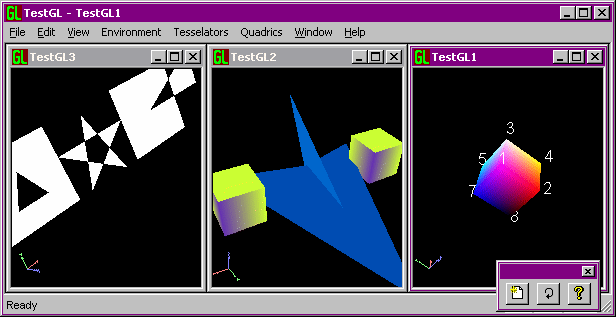
What is it
CGEnabledView is a view class designed to wrap all OpenGL stuff (initialization, managing of Rendering Contexts and palettes, destruction, etc.) allowing the creation of multiple views in a MDI application.
CGEnabledView also offers these basic services:
- a function to get various information about the OpenGL implementation which is currently being used (separate information for the OPENGL and GLU libraries).
- manages internally the creation of display lists and offers a primitive interface for display lists execution.
- defines mouse cursor to be used inside the views.
- offers an object oriented encapsulation of quadric objects for drawing of spheres, cylinders and disks.
- offers an object oriented encapsulation of glu tessellator routines for translating non simple polygons (concave, self-intersecting and with holes) in groups of simple ones (triangle strips and fans).
- presents a simple interface to draw text strings as 2D bitmaps or complete 3D glyphs.
Use
This article uses the trackball code introduced in the companion article
A virtual trackball rotation controller
.
To start experimenting OpenGL drawing you just need to follow these steps:
- Use AppWizard to geneate an MDI project.
- Substitute CView with
CGLEnabledView in [YourProject]View.cpp and [YourProject]View.h.
- Use ClassWizard to remove the
OnDraw and PreCreateWindow functions (delete the bodies too).
- Override the
VideoMode function if you need to ask for a particular combination of color-buffer depth,depth-buffer depth and double-buffering mode.
- Override the
OnCreateGL if you need to perform some initializations
- Override the
OnDrawGL function and issue some GL calls.
- Remember to link OpenGL libraries (look at the top of
GLEnabledView.cpp for explanations) before building your project.
Since it's not adviseable to mix Windows GDI and OpenGL drawing commands some WM handlers have been made private, use the overridable virtual functions instead.
Other details are in the demo code (wich should be well commented) which can be used as a good starting point.
The Demo
In the sample project you can open multiple views each presenting a sample scene and rotate them interactively with the mouse. You can get some information about OpenGL implementation via the Help/View OGL Info menu item. Look at the about dialog box for some shortcut-keys.
This demo project shows the use of a virtual trackball controller which permits to rotate the scene as if you are manipulating a virtual sphere superimposed on the application child window.
Male.
Living in Rome, Italy
Computer addict since 12 years old (first computer: Commodore 64).
Master degree in Computer Science.
Very interested in computer generated graphics both real time (mainly OpenGL) and photorealistic rendering.



 General
  News
News  Suggestion
  Question
  Bug
Bug  Answer
  Joke
Joke  Praise
  Rant
Rant  Admin
Admin 


 Submit an article or tip

