Click here to Skip to main content

OAG Library (OpenGL) Part 1 - Setting Up the Library for an MFC Application

By , 7 Aug 2011
 

Introduction

This library has been written for creating OpenGL based applications. In this tutorial, we will setup the library.

About the Library

The library works with plug-ins, and you can save and open the objects in XML format. In this tutorial, we are going to work with some classes to draw Geometry 2D. The library has plug-ins for Geometries 2D, textures, and text (True Type Font). The file OAG_2D_Demo.zip shows this. The library is available for download at SourceForge.

Sample

This sample demonstrates how to setup the library with MFC, setup the directories for directories, and setup the directories for libraries. For the sample, the project name is RenderGraphicMFC. This project tutorial has been created with Visual Studio 2008.
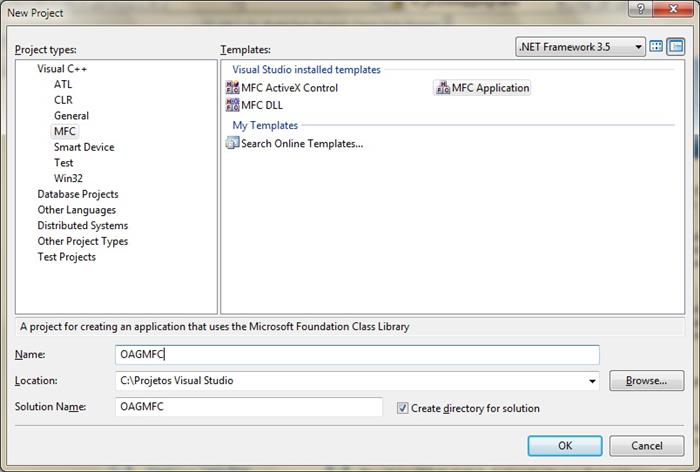
NewProject.jpg

Setting up the directories for includes for the project: The folder OAGLibrary is the folder where the library is stored. The folder OpenGL stores the classes for the OpenGL applications.

Setting up the directories for libraries for the project: the bin folder stores the libraries. The folder VC9 stores the libraries with Visual Studio 2008.

Setting up the View Class

The class oag::Win32Renderer is a renderer, and the class oag::WinGraphicContext sets up OpenGL in an MFC application.

oag::WinRenderer*		m_pRender;
oag::WinGraphicContext*		m_pWinGraphicContext;

Now we will create the method OnInitialUpdate to initialize the library and the method EraseBkgnd. So OpenGL will be initialized and prepared to draw objects on the screen.

void COAGMFCView::OnInitialUpdate()
{
    CView::OnInitialUpdate();

   //Delete the current m_pWinGraphicContext, 
   //m_pRender and tool if a new document is called
   UnloadData();

   m_pWinGraphicContext = new oag::WinGraphicContext(this);
   m_pRender = new oag::WinRenderer(m_pWinGraphicContext, false);
   m_pRender->SetBackGroundColor(0, 0, 0);

   if ( m_pWinGraphicContext->MakeCurrent() )
   {
      GetDocument()->m_pObjectsMappingTable->LoadOpenGLExtensions();

      m_pWinGraphicContext->DeleteCurrent();
   }
}

BOOL COAGMFCView::OnEraseBkgnd(CDC* pDC)
{
	// TODO: Add your message handler code here and/or call default
	return FALSE;
}

Now we will create the method OnSize to update the window size and the objects on the screen when the window size is changed. We need call the method RenderScene used by the renderer in the function OnDraw to draw the objects on the screen.

void COAGMFCView::OnSize(UINT nType, int cx, int cy)
{
    CView::OnSize(nType, cx, cy);

    if ( m_pWinGraphicContext )
	    m_pWinGraphicContext->OnSize(cx, cy);
}

void COAGMFCDoc::OnDraw(CDC* pDC)
{
  COAGMFCDoc* pDoc = GetDocument();
  ASSERT_VALID(pDoc);
  if (!pDoc)
   return;

  if( m_pRender )
  {
    m_pRender->SetScene( pDoc->m_pScene );
    m_pRender->RenderScene();
  }
}

Setting up the Document Class

The class oag::OAGScene stores the objects and draws them on the screen.

oag::OAGScene* m_pScene; 
oag::ObjectsMappingTable* m_pObjectsMappingTable;

Implementing the constructor and destructor:

COAGMFCDoc::COAGMFCDoc()
:m_pScene(NULL)
,m_pObjectsMappingTable(NULL)
{
  CreateLibraryObjects();
}

Deleting Objects

We have two ways to delete objects. You can either call m_pScene->DeleteAllObjects(), or delete the objects in the class where the user is adding the objects. For the demo, I use m_pScene->DeleteAllObjects() because the objects are being adding to the scene only.

COAGMFCDoc::~COAGMFCDoc()
{
   UnloadLibraryObjects();
}

void COAGMFCDoc::CreateLibraryObjects()
{
  if( m_pObjectsMappingTable == NULL)
     m_pObjectsMappingTable = new oag::ObjectsMappingTable();

  if( m_pScene == NULL )
  {
     m_pScene = new oag::OAGScene();
     m_pScene->SetFontMappingTable(  m_pObjectsMappingTable->GetFontMappingTable() );
     m_pScene->SetTextureMappingTable( m_pObjectsMappingTable->GetTextureMappingTable() );
  }
}

void COAGMFCDoc::UnloadLibraryObjects()
{
   //Deletes the scene and all objects from the memory
   if ( m_pScene )
   {
	   m_pScene->DeleteAllObjects();

     delete m_pScene;
     m_pScene = NULL;
   }

   if ( m_pObjectsMappingTable )
   {
	   delete m_pObjectsMappingTable;
      m_pObjectsMappingTable = NULL;
   }
}

Compile the application, and you will see a window with a black background:

Showing Objects on the Screen

The first thing to do is to change the function OnInitialUpdate on the view. The snippet below shows all the lines of the function. We just need to add a line for CreateObjects().

void COAGMFCView::OnInitialUpdate()
{
  CView::OnInitialUpdate();

  m_pWinGraphicContext = new oag::WinGraphicContext(this);
  m_pRender = new oag::WinRenderer(m_pWinGraphicContext, false);
  m_pRender->SetBackGroundColor(0, 0, 0);

   if ( m_pWinGraphicContext->MakeCurrent() )
   {
      GetDocument()->m_pObjectsMappingTable->LoadOpenGLExtensions();

      m_pWinGraphicContext->DeleteCurrent();
   }

  CreateObjects();
}

The second thing to is to create the function CreateObjects that creates objects and adds them to the scene. So the scene draws the objects on the screen.

void COAGMFCView::CreateObjects()
{
   //Creating a lines
   oag::OAGPrimitives* pLine = new oag::OAGPrimitives();
   pLine->SetGeometryType(GL_LINES);
   GetDocument()->m_pScene->AddObject( pLine );

   pLine->SetArraySize( 4 );
   pLine->AddVertex(450, 100, 0 );
   pLine->AddVertex(450, 200, 0 );
   pLine->AddVertex(400, 150, 0 );
   pLine->AddVertex(500, 150, 0 );

   //Creating a rectangle
   oag::OAGPrimitives* pQuad = new oag::OAGPrimitives();
   pQuad->SetGeometryType(GL_QUADS);
   GetDocument()->m_pScene->AddObject( pQuad );

   pQuad->SetArraySize( 4 );
   pQuad->AddVertex( 100, 100, 0);
   pQuad->AddVertex( 100, 200, 0);
   pQuad->AddVertex( 200, 200, 0);
   pQuad->AddVertex( 200, 100, 0);
}

Building Geometries by Command Line

To build geometries using the library, you need to create a new instance of OAGPrimitives. With the class, you can draw primitives supported by OpenGL such as line, polylines, rectangles, and triangles. After creating a new instance of OAGPrimitives, you must use the command SetGeometryType to change the primitive type that you want to draw. The supported types by SetGeometryType are GL_LINES, GL_LINE_STRIP, GL_QUADS, and GL_TRIANGLES. The CreateNewGeometry2D function below shows how to create primitives and add them to the scene. The function CreateNewGeometry2D is not shown in this tutorial.

void COAGMFCDoc::CreateNewGeometry2D(int nType)
{
	switch( nType )
	{
	case 1: //Line
		{
           oag::OAGPrimitives* pGeo = new oag::OAGPrimitives();
           pGeo->SetGeometryType( GL_LINES );
           m_pScene->AddObject( pGeo );
		}

		break;
	case 2: //Polyline
		{
          oag::OAGPrimitives* pGeo = new oag::OAGPrimitives();
          pGeo->SetGeometryType( GL_LINE_STRIP );
          m_pScene->AddObject( pGeo );
		}
		break;
	case 3: //Rectangle
		{
          oag::OAGPrimitives* pGeo = new oag::OAGPrimitives();
          pGeo->SetGeometryType( GL_QUADS );
          m_pScene->AddObject( pGeo );
		}
		break;
	case 4: //Triangle
		{
          oag::OAGPrimitives* pGeo = new oag::OAGPrimitives();
          pGeo->SetGeometryType( GL_TRIANGLES );
          m_pScene->AddObject( pGeo );
		}
		break;
	}
}

History

  • 5th June, 2010
    • Initial version
  • 11th June, 2010
    • Added plug-ins for images (BMP, JPG, TGA, PCX)
  • 19th June, 2010
    • Added plug-ins for True Type font
    • Added XML for texture and font
  • 23rd July, 2010
    • Changes in textures
    • Added Texture Mapping (RectangleMapping and TriangleMapping)
    • Added object table for texture and font
  • 15th August, 2010
    • Added simple objects 3D (Cube, Pyramid, and Quadrics)
    • Added Texture Mapping (CubeMapping and PyramidMapping) and Textures for Quadrics
  • 20th October, 2010
    • Added Filters and Wrap for texture
    • Added Multitexture
    • Added Reflection and Scene for Reflection
    • Added Multiple scene for the renderer
  • 1st August, 2011
    • Added plug-in for image PNG
    • Add Transformations using Matrix. The commands SetTranslation, SetScale, SetRotation were replace by SetTransform.
    • For Primitives, the function AddVertex was removed. This command was replaced by SetArrayVertices that uses a list of vector as parameter.
    • Added Billboard (oag::OAGBillboard , OAGBillboardTextureItems, OAGBillboardGroup). The Billboard has support for Texture for the classes RectangleMapping and TriangleMapping.

License

This article, along with any associated source code and files, is licensed under The Code Project Open License (CPOL)

About the Author

Eduardo Tucci
Software Developer
Brazil Brazil
Member
I live in Matão, a small city in Brazil. I studied as Programmer in a College for Software Development in Database.
After finishing the College I have been working with java, c# and Computer Graphics with searches for OpenGL.


Sign Up to vote   Poor Excellent
Add a reason or comment to your vote: x
Votes of 3 or less require a comment

Comments and Discussions

 
You must Sign In to use this message board.
Search this forum  
    Spacing  Noise  Layout  Per page   
GeneralAnother Complaint : Please specify in your article all dependencies on other librariesmemberMicroImaging20 Oct '10 - 8:31 
I down loaded and am trying to use you OAG_SDK but there is a depenedency on some freetype2311.lib.
Is this the right project ?
http://freetype.sourceforge.net/index2.html
 
I assume the libJpeg.lib come from the Independent JPEG Group ? But it could come from somewhere else maybe ?
 
That appears to be all the errors I have when I try to build the OAG_SDK
I apologize if I sound arrogant, but I was hoping this to be a modern library i could use for my current project,
and so I WAS excited, but am now just frustrated.
GeneralRe: Another Complaint : Please specify in your article all dependencies on other libraries [modified]memberEduardo Tucci21 Oct '10 - 1:24 
All the libraries are with zip file.
 
When unzipping the file you see the folders OAGLibrary and WinApis.
 
The folder WinAPis contains all the libraries that you to need to compile the OAG_SDK.
Compile the projects in Debug and Release Mode.
 
Today has new version there. I am creating the library according to chapters that see in books and modern libraries.
 
If you want a modern library use openscenegraph. It Is a complete library.

modified on Thursday, October 21, 2010 7:45 PM

GeneralRe: Another Complaint : Please specify in your article all dependencies on other librariesmemberMicroImaging23 Oct '10 - 19:18 
Very Nice reference Thank you. I will vote 5 now
GeneralWhile I appreciate this tutorial and the Open Source Library Glaux.h is very very dead since VS 6.0amemberMicroImaging20 Oct '10 - 8:22 
Please refer here
http://social.msdn.microsoft.com/forums/en-US/windowssdk/thread/b66e5f7a-91f6-4dbe-b388-0c131008b08f/
Here is another discussion from 2005
 
http://www.dreamincode.net/forums/topic/13258-glglauxh-no-such-file-or-directory/
 
If you wish to present yourself in a good way remove all references to glaux
GeneralRe: While I appreciate this tutorial and the Open Source Library Glaux.h is very very dead since VS 6.0amemberEduardo Tucci21 Oct '10 - 1:17 
I am using glaux tom read *.bmp files.
 
If you have some file to load *.bmp file please send for me. I update the library. I can send glaux.h e glaux32.lib with the zip file.
 
My mail is edutucci@hotmail.com.
GeneralRe: While I appreciate this tutorial and the Open Source Library Glaux.h is very very dead since VS 6.0amemberMicroImaging23 Oct '10 - 19:16 
There are several open source alternative like CXImage for MFC or Devil
here is a thread that should be helpful
http://www.gamedev.net/community/forums/topic.asp?topic_id=445226
Which include a straight C++ class to load Bitmaps, and is called a pixmap
GeneralRe: While I appreciate this tutorial and the Open Source Library Glaux.h is very very dead since VS 6.0amemberEduardo Tucci25 Oct '10 - 5:28 
Hi
 
Thank you by the links.
I want to use c++ libraries for reading image. I have opensources for jpg, tga and pcx. I need one for bmp only.
GeneralRe: While I appreciate this tutorial and the Open Source Library Glaux.h is very very dead since VS 6.0amemberDarren Schroeder19 Jan '11 - 5:33 
For an opensource C++ bmp handler use CImg. http://cimg.sourceforge.net
GeneralLots of stuff here ... paucity of direction ... entitling counsel ... [modified]memberRedDK28 Jul '10 - 9:39 
I see that this is a multi-part tutorial on using a library you've gratiously released to the general development community. And I thank-you for including me ... but I'm one of those users who like things to be perfect for me when I sit down at my computer and actually attempt to load project/solution from included files.
 
fair enough ...
 
Thumbs Up | :thumbsup:

modified on Sunday, August 1, 2010 12:36 PM

GeneralRe: Lots of stuff here ... paucity of direction ... entitling counsel ...memberEduardo Tucci30 Jul '10 - 16:56 
Sorry, I just understood the first paragraph.
 
I see that this is a multi-part tutorial on using a library you've gratiously released to the general development community. And I thank-you for including me ... but I'm one of those users who like things to be perfect for me when I sit down at my computer and actually attempt to load project/solution from included files.
 
I think that the others paragraph is not for this article.
GeneralQuick Style QuestionmemberAescleal5 Jun '10 - 19:48 
Is there any particular reason you used:
 
oag::OAGScene*	m_pScene;
 
with all the associated new/delete headaches rather than something more idiomatic and easier to handle like:
 
oag::OAGScene	m_scene;
 
or, if you really have to have dynamic memory allocation:
 
std::auto_ptr<oag::OAGScene> m_scene;
 
Cheers,
 
Ash
GeneralRe: Quick Style QuestionmemberEduardo Tucci6 Jun '10 - 4:29 
I use oag::OAGScene just to store the objects. Now the class oag::WinRenderer uses oag::OAGScene to show the objects on the screen that you stored in oag::OAGScene.
 
A particular reason would be to show objects on the screen according to the current scene set for the
oag::WinRenderer
 
When you call delete oag::OAGScene all the objects stored are deleted and frees the memory.
GeneralRe: Quick Style Question [modified]memberAescleal6 Jun '10 - 7:01 
I get what you're using the object for, no probs with that.
 
Seeing as the only place you do delete m_pScene is in the destructor of your document I still can't see why you're using extra, trickier and more prone to error code. As I said before if you're using dynamic memory allocation for a reason then it would still be better to use a smart pointer of some sort to manage it.
 
Now you might be thinking: "Huh, it's not a lot of code..." but if you change your pointer to an actual object then you can also bin the constructor for the document AND the destructor. That's quite a saving in terms of conceptual load that any maintenance programmer has to carry to understand your code.
 
Cheers,
 
Ash

modified on Sunday, June 6, 2010 5:15 PM

GeneralRe: Quick Style QuestionmemberEduardo Tucci6 Jun '10 - 14:10 
Currently, I do not use dynamic memory allocation in my code as
std::auto_ptr<oag::OAGScene> m_scene;
 
Now, for the m_pScene, I use new/delete to set a scene to renderer to draw objects on the screen.
 
I understand that deleting objects using delete m_pScene in the destructor of the document is dangerous because we can have objects in others classes and add the to a scene. Maybe would be better I to remove the code for deleting the objects of the destructor of oag::OAGScene for this case.
 
You do not need to use delete m_pScene in the destructor of the document. I use there because I do not have a class to store the oag::OAGScene for the demo.
 
If you want add me in your msn. The my msn is edutucci@hotmail.com.
If you want change a library for your question and send to me the code or an example you can do it.
I get code of others programmers.
GeneralRe: Quick Style QuestionmemberSotaio20 Jun '10 - 9:12 
I could be that he needs a late initialization of the object. I didnt read the code though so I wouldn't really know.
GeneralNice WorkmemberReymonARG5 Jun '10 - 15:19 
Nice, but in the Demo version I Open de ToolMenu an then Customize an when I close I get THIS
 
Smile | :)
 
EDIT: I fix. Is a problem of MFC with Updating the Control, I Minimize an then Maximize an all work perfect.

General General    News News    Suggestion Suggestion    Question Question    Bug Bug    Answer Answer    Joke Joke    Rant Rant    Admin Admin   

Permalink | Advertise | Privacy | Mobile
Web03 | 2.6.130516.1 | Last Updated 7 Aug 2011
Article Copyright 2010 by Eduardo Tucci
Everything else Copyright © CodeProject, 1999-2013
Terms of Use
Layout: fixed | fluid