Introduction
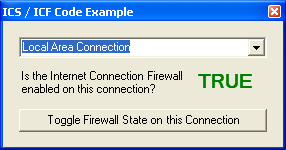
With the release of Windows XP's Service Pack 2, Microsoft's Internet Connection Sharing (ICS) and Internet Connection Firewall (ICF) features quickly obtained a large degree of notoriety. Many developers have been actively looking for ways to easily "peek and poke" at the ICS & ICF configurations on a given machine.
The good news is that Microsoft released the interfaces with a COM wrapper. The bad news is that it isn't well advertised and it's not very intuitive to use. Getting a full set of details on a particular connection's configuration can require several method calls.
Overview
This project contains a strongly-typed collection named NetworkConnectionCollection. When you create an instance of this collection, it automatically uses the ICS/ICF COM interfaces to iterate all of the Network Connections on the local machine and create NetworkConnection objects (as members of the NetworkConnectionCollection).
The NetworkConnection class impliments three ICS/ICF interfaces: INetConnection, INetConnectionProps and INetSharingConfiguration. When you use the ICS/ICF COM interfaces directly, you need to reference each of these independantly. By using the NetworkConnection class, you can access all of the members in one place.
Work Remaining
I haven't spent much time on this, since it does what I need at this point. One obvious improvement would be to overload a few of the members to expose/use native types (e.g. the INetConnectionProps.GUID property returns a String, but a System.Guid would be preferable). Another improvement would be to wrap the PortMappings.
References
Microsoft has exposed the API for the ICS & ICF in a couple of places, but this code uses the COM interface HNetCfg.HNetShare. You can add a reference to this interface to your own projects by using the Reference Browser to select HNETCFG.DLL (typically located in the "C:\Windows\System32\" directory).
Tony Selke is an independant consultant who has spent the last 20 years working with Microsoft technologies (VB, VC++, ASP, J++, C#, VB.NET, SQL Server, etc.) to develop solutions used in all kinds of market verticals (industrial, pharmaceutical, financial, marketing, multimedia, educational, telecommunications, etc.). He obtained his first MCSD certification in 1998 and his second in 2004, with an MCDBA in 2005. In addition, he has taught courses for MCSD certification students as well as programming classes at Penn State University.



 General
  News
News  Suggestion
  Question
  Bug
Bug  Answer
  Joke
Joke  Praise
  Rant
Rant  Admin
Admin 


 Submit an article or tip


 . Once compile it throws the exception mentioned above.
  How can i disable ICS on a certain Adapter/Interface? The "Share this connection" is still present.
