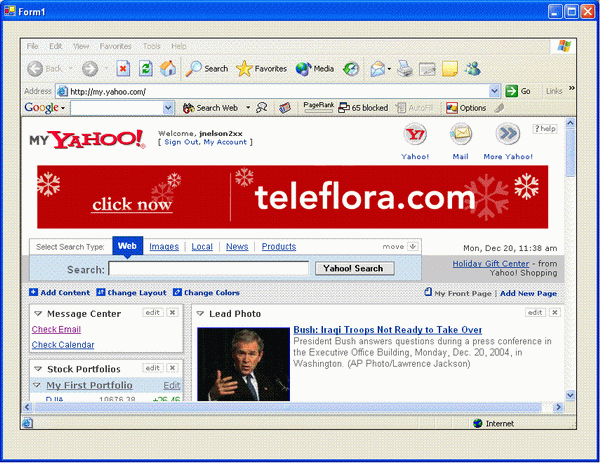
In this post, you will learn about a custom C# control that allows you to specify the name of an executable you want embedded into your application.
Introduction
Though not a common task, recently I needed to take an existing executable application and embed it into an application I was building. Oddly enough, I did not need any interaction between my application and the existing EXE. As it ends up, this is not a difficult thing to do. To make it even easier, I created a custom C# control that allows you to specify the name of an executable you want embedded into your application. The control takes care of all the rest.
How Does It Work
In design time, the user can specify the name of the executable to embed. When the control is created in runtime, it launches the application as follows:
Process p = null;
try
{
p = System.Diagnostics.Process.Start(this.exeName);
p.WaitForInputIdle();
appWin = p.MainWindowHandle;
}
catch (Exception ex)
{
MessageBox.Show(this, ex.Message, "Error");
}
After launching, the code must then set the parent of the executable's main window to the control handle. It does this as follows:
SetParent(appWin, this.Handle);
SetWindowLong(appWin, GWL_STYLE, WS_VISIBLE);
MoveWindow(appWin, 0, 0, this.Width, this.Height, true);
Any time the control is resized, it must also resize the executable window. To do so, it does this in the Resize function:
protected override void OnResize(EventArgs e)
{
  if (this.appWin != IntPtr.Zero)
  {
    MoveWindow(appWin, 0, 0, this.Width, this.Height, true);
  }
  base.OnResize (e);
}
Lastly, when the control is destroyed, it should shut down the executable. To do so, it does the following:
protected override void OnHandleDestroyed(EventArgs e)
{
if (appWin != IntPtr.Zero)
{
PostMessage(appWin, WM_CLOSE, 0, 0);
System.Threading.Thread.Sleep(1000);
appWin = IntPtr.Zero;
}
base.OnHandleDestroyed (e);
}
History
- 30th December, 2004: Initial release
License
This article has no explicit license attached to it, but may contain usage terms in the article text or the download files themselves. If in doubt, please contact the author via the discussion board below.
A list of licenses authors might use can be found here.
I have been developing software professionaly since 1991 writing software in automation and manufacturing environments. For 14 years I worked for companies that built custom robotic automated equipment for the semiconductor, telecommunications, and other industies. Presently, I work for a company that manufacturers industrial robots where I write high level coordination and control software.
My undergraduate degrees are in Mathematics and Philosopy. My graduate degree is in Management Information Systems. I am MCSD certified in Visual C++ 6.0 and MCSD.NET certified in C#. I am also have the PMI-ACP certification.
I enjoy karate and reading.



 General
  News
News  Suggestion
  Question
  Bug
Bug  Answer
  Joke
Joke  Praise
  Rant
Rant  Admin
Admin 


 Submit an article or tip

