Click here to Skip to main content

Using the DirectShow Video Mixing Renderer 9 filter

By , 1 Feb 2005
 

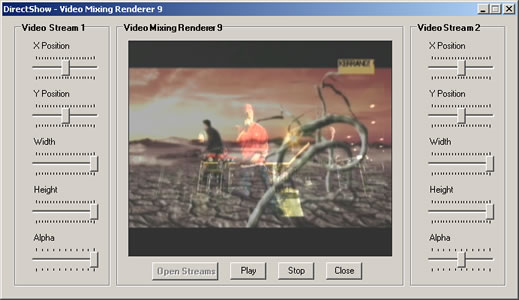
Sample Image - DirectShowVMR91.jpg

Introduction

This article shows the steps involved in creating and configuring DirectShow’s Video Mixing Renderer Filter 9 (VMR9). The two video streams, one on top of the other, are rendered on a single surface. This surface, in our case, is a PictureBox control. Each stream's alpha value, position and height/width can be adjusted at runtime.

How VMR9 is different

The following diagrams show the difference between rendering two videos with VMR9 and without VMR9.

Without VMR9

Rendering without VMR9

We notice that simply rendering two videos will result in two separate Video Renderers, which means that the videos are being played on two separate surfaces.

With VMR9

Rendering with VMR9

In this case, the VMR9 filter directs both video streams into its own input pins. This means there is only one renderer, and thus a single rendering surface for both video streams.

The Working

To enhance reusability and readability factors, the functionality of the VMR9 filter has been encapsulated inside a class named myVMR9.

The myVMR9 class

This class has the following private data members:

  • VMR9NormalizedRect *r;
  • IVMRWindowlessControl9 *pWC;
  • IVMRMixerControl9 *pMix;
  • IGraphBuilder *pGB;
  • IBaseFilter *pVmr;
  • IVMRFilterConfig9 *pConfig;
  • IMediaControl *pMC;
  • IMediaSeeking *pMS;

The constructor

The constructor receives a PictureBox's coordinates of type System::Drawing::Rectangle, along with its handler of type HWND. These two attributes are used by VMR9 for rendering purposes.

public: myVMR9(System::Drawing::Rectangle rect, HWND hwnd)
{
    // initialize video coordinates with normal values
    r = new VMR9NormalizedRect;
    r->left = 0;
    r->top = 0;
    r->right = 1;
    r->bottom = 1;

    pWC = NULL;
    pMix = NULL;
    pGB = NULL;
    pVmr = NULL;
    pConfig = NULL;
    pMC = NULL;
    pMS = NULL;
    // create an instance of the Filter Graph Manager
    CoCreateInstance(CLSID_FilterGraph, NULL, CLSCTX_INPROC_SERVER, 
        IID_IGraphBuilder, (void **)&pGB);
    // create an instance of the VMR9 filter
    CoCreateInstance(CLSID_VideoMixingRenderer9, NULL, CLSCTX_INPROC,
        IID_IBaseFilter, (void**)&pVmr);
    // add the VMR9 filter to the Graph Manager
    pGB->AddFilter(pVmr, L"Video");    
    // get a pointer to the IVMRFilterConfig9 interface
    pVmr->QueryInterface(IID_IVMRFilterConfig9, (void**)&pConfig);
    // make sure VMR9 is in windowless mode
    pConfig->SetRenderingMode(VMR9Mode_Windowless);
    // get a pointer to the IVMRWindowlessControl9 interface 
    pVmr->QueryInterface(IID_IVMRWindowlessControl9, (void**)&pWC);
    // explicitly convert System::Drawing::Rectangle type to RECT type
    RECT rcDest = {0};
    rcDest.bottom = rect.Bottom;
    rcDest.left = rect.Left;
    rcDest.right = rect.Right;
    rcDest.top = rect.Top;

    // set destination rectangle for the video
    pWC->SetVideoPosition(NULL, &rcDest);

    // specify the container window that the video should be clipped to    
    pWC->SetVideoClippingWindow(hwnd);
    // IVMRMixerControl manipulates video streams
    pVmr->QueryInterface(IID_IVMRMixerControl9, (void**)&pMix);
    // IMediaSeeking seeks to a position in the video stream
    pGB->QueryInterface(IID_IMediaSeeking, (void **)&pMS);
    // IMediaControl controls flow of data through the graph
    pGB->QueryInterface(IID_IMediaControl, (void **)&pMC);
}

The methods

HRESULT play()
{
    pMC->Run(); return
    S_OK;
}

HRESULT pause()
{
    pMC->Pause();
    return S_OK;
}

HRESULT stop()
{
    LONGLONG pos = 0;
    pMC->Stop();
    pMS->SetPositions(&pos, AM_SEEKING_AbsolutePositioning, 
                      NULL,AM_SEEKING_NoPositioning);
    pMC->Pause();
    return S_OK;
}

HRESULT close()
{
    // make sure resources are freed
    SAFE_RELEASE(pWC);
    SAFE_RELEASE(pMix);
    SAFE_RELEASE(pGB);
    SAFE_RELEASE(pVmr);
    SAFE_RELEASE(pConfig);
    SAFE_RELEASE(pMC);
    SAFE_RELEASE(pMS);
    return S_OK;
}

HRESULT setAlpha(DWORD stream, float alpha)
{
    // set alpha of specified video stream
    pMix->SetAlpha(stream, alpha);
    return S_OK;
}

HRESULT setX(DWORD stream, float x)
{
    // video displacement along x-axis
    r->right = x + (r->right - r->left);
    r->left = x;
    pMix->SetOutputRect(stream, r);
    return S_OK;
}

HRESULT setY(DWORD stream, float y)
{
    // video displacement along y-axis
    r->bottom = y + (r->bottom - r->top);
    r->top = y;
    pMix->SetOutputRect(stream, r);
    return S_OK;
}

HRESULT setW(DWORD stream, float w)
{
    // video stretching/shrinking along x-axis
    r->right = r->left + w;
    pMix->SetOutputRect(stream, r);
    return S_OK;
}

HRESULT setH(DWORD stream, float h)
{
    // video stretching/shrinking along y-axis
    r->bottom = r->top + h;
    pMix->SetOutputRect(stream, r);
    return S_OK;
}

HRESULT renderFiles(String* file1, String* file2)
{
    // convert String type to LPCSTR type and render the videos
    LPCTSTR lFile;
    lFile = 
      static_cast<LPCTSTR>(const_cast<void*>(static_cast<const void*>
      (System::Runtime::InteropServices::Marshal::StringToHGlobalAuto(file1))));
    pGB->RenderFile((LPCWSTR)lFile, NULL);
    lFile = 
      static_cast<LPCTSTR>(const_cast<void*>(static_cast<const void*>
      (System::Runtime::InteropServices::Marshal::StringToHGlobalAuto(file2))));
    pGB->RenderFile((LPCWSTR)lFile, NULL);
    System::Runtime::InteropServices::Marshal::FreeHGlobal
      (static_cast<IntPtr>(const_cast<void*>
      (static_cast<const void*>(lFile))));
    pMC->StopWhenReady();
    return S_OK;
}

Now that the VMR9's functionality has been separated from the GUI, Button and TrackBar handlers can simply create a pointer to a myVMR9 object and call the required methods.

Sample screenshot

Additional Information

  • The second video stream opened is on top of the first one, i.e., file-2 video is rendered on top of file-1 video. Therefore, if the first video's alpha value is a 100% and the second video's alpha value is 50%, then both videos will be equally (50%) visible.
  • It should be noted that the values of Width and Height of trackbars can run into negative values. So when a video stream's width is -100%, it is laterally inverted. Similarly, when a video stream's height is -100%, the video is upside down.

License

This article has no explicit license attached to it but may contain usage terms in the article text or the download files themselves. If in doubt please contact the author via the discussion board below.

A list of licenses authors might use can be found here

About the Author

Sameer Ahmed
Software Developer
Pakistan Pakistan
Member
No Biography provided

Sign Up to vote   Poor Excellent
Add a reason or comment to your vote: x
Votes of 3 or less require a comment

Comments and Discussions

 
You must Sign In to use this message board.
Search this forum  
    Spacing  Noise  Layout  Per page   
QuestionhellomemberMember 353456823 Sep '12 - 0:23 
Ahmed i'm from Mongolia. I need alphablending logo on video window. help me vb.net Sniff | :^) Sniff | :^)
GeneralCompiles with VS2010membermerano8 Dec '10 - 12:27 
Just compiled the Sample with VS2010 and SDK 7.1
 
replaced several places like this:
 
// public delegate void EventHandler(  Object^ sender, EventArgs^ e )
// this->trackBarX1->Scroll += new System::EventHandler(this, trackBarX1_Scroll);
this->trackBarX1->Scroll += new System::EventHandler(this, &DirectShowVMR9::Form1::trackBarX1_Scroll);
 
It works but a hint is displayed:
 
warning D9035: Option "clr:oldsyntax" has been deprecated and will be removed in a future release

 
<CLRSupport>OldSyntax</CLRSupport>

 
Managed Extensions for C++ syntax is deprecated in Microsoft Visual C++ 2005 (and above)

After switching this to normal clr Support the line

public __gc class Form1 : public System::Windows::Forms::Form


shows error

Form1.h: error C4980: "__gc": use of this keyword requires /clr:oldSyntax


and

HRESULT renderFiles(String* file1, String* file2)
 
Form1.h: error C3699: "*": Diese Referenzierung kann nicht für den Typ "System::String" verwendet werden.
 
Compiler replaces "*" to ^"

QuestionDraw rubberband rectangle on anywhere in the video?member$uresh $hanmugam29 Sep '09 - 21:00 
Hi,
I'm Developing a live video streaming application in vc++ using DirectX VideoMixingRenderer7 filter. I can able to draw rubber band rectangle on video using DirectX SetAlphaBitmap() through my mouse move. if my video frame size(4CIF) is greater than my picture box control size, it's working fine. Suppose, my video frame size(CIF) is less than my picture box control size,
1) only 3 sides of the rectangle can be visible.
2) sometimes 2 sides only can be visible.
3) Above two context has been happen randomly.
Please, somebody help me out from this issue.
 
Thanx in advance,
Regards
Surez
GeneralLIVEVIDEO ROTATION or FLIP H/V FILTERmembergiuegiu6 Jul '09 - 21:14 
HI all,
have you implemented such a livevideo rotation or flip H/V filter?
 
Any help would be appreciated.
 
giuegiu@hotmail.com
General3D object on videomemberdeepakpansheriya11 Jun '09 - 23:02 
I want to show live videoin background of 3D object. do you know how to implements this?
 
Nothing is impossible

GeneralRe: 3D object on videomemberSameer Ahmed12 Jun '09 - 4:11 
I have never tried it. Here's a pointer:
http://msdn.microsoft.com/en-gb/library/ms867211.aspx[^]
GeneralError on building in Visual studio team System 2008membercodiebank5 Jun '09 - 0:06 
When I build the code in Visual Studio Team System 2008 then I encounter the follwing error in the event handler of the system class.
error C3350: 'System::EventHandler' : a delegate constructor expects 2 argument(s)c:\documents and settings\vmukti\desktop\directshowvmr9_src\Form1.h 384 DirectShowVMR9
GeneralRe: Error on building in Visual studio team System 2008memberSameer Ahmed5 Jun '09 - 3:58 
This project was successfully compiled on Visual Studio .Net 2003, I have not tried compiling it on a newer version.
The same error has been posted before by someone else. A part of it was as follows:
 
**********
e:\down\codeproject\directshowvmr9_src\Form1.h(365) : error C3350: 'System::EventHandler' : a delegate constructor expects 2 argument(s)
e:\down\codeproject\directshowvmr9_src\Form1.h(384) : error C3867: 'DirectShowVMR9::Form1::trackBarY2_Scroll': function call missing argument list; use '&DirectShowVMR9::Form1::trackBarY2_Scroll' to create a pointer to member
**********
 
The answer, I believe, is embedded inside the error: "use '&DirectShowVMR9::Form1::trackBarY2_Scroll' to create a pointer to member"
Did you try using the ampersand?
GeneralRe: Error on building in Visual studio team System 2008memberLinnnat2 Jan '11 - 20:57 
After "use '&DirectShowVMR9::Form1::trackBarY2_Scroll' to create a pointer to member".
 
you need to do other change.
 
Form1.cpp:
 
using namespace DirectShowVMR9;
 
//ADD
[STAThread]
//ADD
 
int APIENTRY _tWinMain(HINSTANCE hInstance, ...
HINSTANCE hPrevInstance,
LPTSTR lpCmdLine,
int nCmdShow)
 

and then program should work.
GeneralVFW Video Capture Format Dialog Boxmembervikasneedu22 Oct '08 - 2:51 
Hello Mr Sameer
I need ur help regarding VFW ,becoz I guess you have used VFW and DirectShow,plz help me
I would like to know what is the purpose of VFW Format dialog box.I know Format dialog box is used to select the image dimensions and bit depth. But is it necessry to use it.As if you see skype only uses Vfw Source dialog box and not using display and format dialog boxes. (My query) Is it necessary to use format dialog box or not.?If not then why ? ,if yes why it is necessary ..
 
Kindly Help me..
 
Thanks in advance
QuestionCan you make your code to a wmp plugin?membersunny_chn1 Jun '08 - 2:47 
Can you make your code to a wmp plugin? so,we can use your code in the wmp like substitle plugin,we don't want to rewrite a media player because
we have already a windows media player.
 
sunny_chn

AnswerRe: Can you make your code to a wmp plugin?memberSameer Ahmed1 Jun '08 - 2:54 
I'm sorry, I'm preoccupied with a lot of work, and what you want would require a lot of research.
Questionhi,Sameer Ahmedmemberowen992419 Oct '08 - 16:06 
I didn't find your E-mail address, so I have to reply message to your article.
Do you know DShow better? I have a question about the "infinite pin tee filter".I have made a media player with DShow, I want to achieve its input pin to two output pins, then display one multimedia file in two Picture Control Tools, and control the two pins with different ways.
Could you help me kindly? Thank you. You could send me E-mail to me(zds9924@hotmail.com).
AnswerRe: hi,Sameer AhmedmemberSameer Ahmed19 Oct '08 - 17:15 
1.) First, join the Video Decoder pin to the Infinite Pin Tee Filter.
2.) Then, join the Tee Filter's output pin to what ever you want (maybe to a VMR9 filter for PictureBox1).
3.) The 2nd step will create a another output pin on the Tee Filter, which you can now connect (to another VMR9 filter for PictureBox2).
GeneralRe: hi,Sameer Ahmedmemberowen992419 Oct '08 - 19:01 
I'm so glad to see your reply.
I know the theory aobut the filter,but I don't know the function about the DShow filter exactly.
Could you tell me your e-mail address, and help me have a look at my programming.Thans.
GeneralVideo croppingmemberMember 242714926 Dec '07 - 1:44 
Can anyone tell me the way to create a direct show filter for video cropping and video hue,saturation for particular selected area within the video.
 
gaurav mahajan

GeneralRe: Video croppingmemberSameer Ahmed30 Mar '08 - 17:57 
this paper on writing filters is highly recommended for beginners: http://www.cs.ucf.edu/~lspencer/vid_app.pdf[^]
QuestionVB6 or VB.NET?memberXristos200021 Aug '07 - 22:20 
it is impossible to can with VB6 or VB.NET (studio 2005)
 
thanks

AnswerRe: VB6 or VB.NET?memberSameer Ahmed22 Aug '07 - 0:32 
i'm sorry, i did not understand your question.
GeneralRe: VB6 or VB.NET?memberXristos200022 Aug '07 - 1:55 
in VB6 i want to play 2 video files with alpha%
 
This code is perfect and use very low CPU.
How i can that in VB6 or VB.NET?
 
thanks
GeneralRe: VB6 or VB.NET?memberSameer Ahmed22 Aug '07 - 10:53 
i'm sorry i am not aware of such a method. please refer to the following link:
http://www.ureader.com/message/398536.aspx
GeneralRe: VB6 or VB.NET?memberXristos20003 Sep '07 - 10:11 
I can make this work in VB6:
1 Master video with alpha% (V1)
1 Transparent video and with alpha% (V2)
1 Transparent BITMAP and with alpha% (B1)
 
all works fine but i have some quetions.
A. How i can hide or show one video or the bitmap (only solution i have is the rezise to witdh=0 and height=0)
B. How i can stop one video (V2) and others works with no problem.
C. How i can stop the video (V1) and play other (V1')
D. How i can pause one video (V2) and others videos (V1) continues to play
 
If any help me in C++ and i try converted at VB6.
(I try for all there 1 month)
 
thanks
GeneralRe: VB6 or VB.NET?memberSameer Ahmed3 Sep '07 - 12:28 
In this case, I think it would be better if you created an ATL ActiveX control in C++ and called it's functions through VB.
GeneralRe: VB6 or VB.NET?memberXristos20003 Sep '07 - 12:31 
i dont know C++
can you make this DLL you?
all my quetions it is imbossible to make in c++?

GeneralRe: VB6 or VB.NET?memberSameer Ahmed3 Sep '07 - 12:39 
This link contains source code:
http://www.codeguru.com/cpp/g-m/directx/article.php/c4351
 
But it exports only 3 functions. You will need to extend it's functionality. I'm sorry, I do not have the time to create such a module for you.

General General    News News    Suggestion Suggestion    Question Question    Bug Bug    Answer Answer    Joke Joke    Rant Rant    Admin Admin   

Permalink | Advertise | Privacy | Mobile
Web02 | 2.6.130523.1 | Last Updated 1 Feb 2005
Article Copyright 2005 by Sameer Ahmed
Everything else Copyright © CodeProject, 1999-2013
Terms of Use
Layout: fixed | fluid
