Click here to Skip to main content

How to pass ASP.NET server side array to client side and binding them with HTML element?

By , 8 Jul 2010
 

This is a frequent requirement for an ASP.NET developer to pass a server side array to client side and access them through JavaScript. There are several ways to do that. But here I am describing one of the simplest steps to pass server side array to client side. In this blog post, you will get to know two things, the first one is how to pass the array from server side to client side and the second one is how to bind that array to an empty “html dropdown” list.

Well, the easiest way to pass the server side array to a client side is by using “RegisterArrayDeclaration”. RegisterArrayDeclaration method registers a JavaScript array with the System.Web.UI.Page object. As the array object is registered with the “Page" object, we can access it from JavaScript easily. RegisterArrayDeclaration takes array name and value of the array element as arguments.

In the below example, I have registered one array with the name of “Skills”.

  protected void Page_Load(object sender, EventArgs e)
    {
       // Register List of Languages
        Page.ClientScript.RegisterArrayDeclaration("Skills", "'C#'");
        Page.ClientScript.RegisterArrayDeclaration("Skills", "'VB.NET'");
        Page.ClientScript.RegisterArrayDeclaration("Skills", "'C'");
        Page.ClientScript.RegisterArrayDeclaration("Skills", "'C++'");
    }

Now, what does the above declaration do? This is nothing but a declaration of a JavaScript array like:

Var Skills = new Array('C#', 'VB.NET','C','C++');

This “Skills” array is now only a JavaScript array which is easily accessible by client side code. Now let’s take a look at how to access them and how to bind them in a dropdown list.
In my form, I have an HTML select element and one HTML Button. I want my server side (which is now a client side) array to bind in the dropdown list.

  <select id="ddlNames" name="D1">
    </select><input id="BtnNameLoad" type="button" 
	value="Load Name" onclick="return BtnNameLoad_onclick()" />
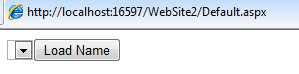
Below is the code snippet for binding the array to HTML control:

function BtnNameLoad_onclick() {

            //Get The Control ID for the dropdown
            var listID = document.getElementById("ddlNames");
            //Check if the object is not null
            if (listID != null) {
                for (var i = 0; i < Skills.length; i++) {
                   // Create and Element Object of type "option"
                    var opt = document.createElement("option");
                    //Add the option element to the select item
                    listID.options.add(opt);
                    //Reading Element From Array
                    opt.text = Skills[i];
                }
            }
        }

In the above code snippet, I have read the skills name using Skills[i] which was actually registered from server side. Another interesting thing is to bind the array elements in “Select” item. As we all know, “Option” tag element is the placeholder for the select content. So I have created one “Option” element using “createElement”.

var opt = document.createElement("option");

This opt object is nothing but the placeholder for item of this “Select” element. So for every element, I have created an object for “option” element and added them into the actual list by reading the value from array.

You can also check the array elements that are registred through debugging:

Below is the sample output:

If you have any questions regarding this, please post your question in the comments section or use contact us page to contact me.
Shout it


Filed under: ASP.NET, C#

License

This article, along with any associated source code and files, is licensed under The Code Project Open License (CPOL)

About the Author

Abhijit Jana
Software Developer (Senior)
India India
Member
.NET Consultant | Former Microsoft MVP - ASP.NET | CodeProject MVP, Mentor, Insiders| Technology Evangelist | Author | Speaker | Geek | Blogger | Husband
 
Blog : http://abhijitjana.net
Web Site : http://dailydotnettips.com
Twitter : @AbhijitJana
My Kinect Book : Kinect for Windows SDK Programming Guide

Sign Up to vote   Poor Excellent
Add a reason or comment to your vote: x
Votes of 3 or less require a comment

Comments and Discussions

 
You must Sign In to use this message board.
Search this forum  
    Spacing  Noise  Layout  Per page   
QuestionGet ListView ul li items into a javascript arraymembermfisher815 May '13 - 6:35 
I have a listview being loaded from my database. How can I put these values into an array in javascript? Here is what I wrote but it is not working. I cannot find any info online anywhere. I am fetching locations from my data base, put them into a javascript array, where I can put push pins on a map for each location.
function AddData() {
    var locationDB = document.getElementById('myList').item;
    var locationAry = [];
 
    // fetch locations returned by database
    var items = locationDB;
    if (items.length == 0) {
        clearMap('No results found.  Please try widening your search area.');
        return;
    }
    // loop through found locations in the database
    for (var i = 0; i < items.length; i++) {
        var locationid = items[i].getAttribute('LocationId');
        var healthCenterName = items[i].getAttribute('CenterName');
        var typeofCenter = items[i].getAttribute('TypeofCenter');
        var address = items[i].getAttribute('Address');
        var city = items[i].getAttribute('City');
        var state = items[i].getAttribute('State');
        var zipCode = items[i].getAttribute('ZipCode');
        var phone = items[i].getAttribute('PhoneNumber');
        var url = items[i].getAttribute('Website');
        var services = items[i].getAttribute('PatientServices');
        var distance = parseFloat(items[i].getAttribute('DistanceMiles'));
        var location = new Microsoft.Maps.Location(parseFloat(items[i].getAttribute('Lat')), parseFloat(items[i].getAttribute('Long')));
        var description = address + '<br/>' + city + '<br/>' + state + '<br/>' + phone + '<br/>' + url + '<br/>' + distance;
        // push location to array for use in map viewing
        locationAry.push(location);
    }
 
        var pin1 = new Microsoft.Maps.Pushpin(new Microsoft.Maps.Location(location));
        pin1.Title = healthCenterName;
        pin1.Description = description;
        Microsoft.Maps.Events.addHandler(pin1, 'click', displayInfobox);
        dataLayer.push(pin1);
 
    }

GeneralNeed to use C# array in a Javascript filememberDevang26 Sep '10 - 18:33 
Hi Abhijit,
 
Nice post, I was searching to do something similar. But I have a problem with this one. I have a user control 'MyControl.ascx' which includes a javascipt file 'MyScript.js' which in turn is loaded into 'Default.aspx'. Now I want to access a string array 'myArray', populated in 'MyControl.ascx', in 'MyScript.js'. I tried your approach but when I tried to de-bug 'MyScript.js' in Firebug, it says myArray is undefined.
 
You help is really appreciated.
 
Thnx,
 
Devang.
Generalyes sirmemberYves22 Sep '10 - 4:22 
Yes indeed it's working ... thanks
GeneralRe: yes sirmvpAbhijit Jana22 Sep '10 - 10:58 
cool sir Smile | :) !!Thumbs Up | :thumbsup:

GeneralMCP Certificationmemberhemant.gujarati12 Jul '10 - 22:37 
Hi
 
I want to do MCP certification for web application Please provide me the notes(Dumps) for the same.
 
Thanks in advance.
GeneralRe: MCP CertificationmentorKunalChowdhury6 Sep '10 - 8:13 
hemant.gujarati wrote:
I want to do MCP certification for web application Please provide me the notes(Dumps) for the same.

 
Hello Hemant,
 
We are here to learn and help others to learn. And regarding certification, I will suggest you to sit for the exam if you are comfortable with the technology. Don't go for it with dump. Though it will give you 90% + chance, but what's the value of it if you don't know the basics.
 
I am totally against dumps and don't suggest others to read them.

 
Don't forget to Click on [Vote] and [Good Answer] on the posts that helped you.


Regards - Kunal Chowdhury | Software Developer | Chennai | India | My Blog | My Tweets | Silverlight Tutorial

General General    News News    Suggestion Suggestion    Question Question    Bug Bug    Answer Answer    Joke Joke    Rant Rant    Admin Admin   

Permalink | Advertise | Privacy | Mobile
Web01 | 2.6.130523.1 | Last Updated 8 Jul 2010
Article Copyright 2010 by Abhijit Jana
Everything else Copyright © CodeProject, 1999-2013
Terms of Use
Layout: fixed | fluid
