Introduction
Anyone who has used the .NET System.Timers.Timer class for low interval times will realise that it does not offer a very high resolution. The resolution will be system dependant, but a maximum resolution is usually around 15ms (System.Windows.Forms.Timer has an even worse resolution, although it is unlikely a UI will need to be updated this fast). Significantly better performance can be achieved using the Win32 multimedia timer (there are various .NET projects that wrap this timer); however, there are no timers available in the microsecond range.
The problem I encountered was that I needed to send an Ethernet UDP message packet out every 800µs (0.8ms); it did not matter if a packet was slightly delayed or did not go off exactly 800µs after the last one. Basically, what I needed was a microsecond timer that was accurate the majority of the time.
The fundamental problem with a software timer in the region of 1ms is that Windows is a non real-time Operating System (RTOS) and is not suitable for generating regular and accurate events around the 1ms mark. MicroTimer cannot and does not solve this problem; however, it does offer a microsecond timer which offers a reasonable degree of accuracy (approx. 1µs) the majority (approx. 99.9%) of the time. The trouble is, the 0.1% of the time, the timer can be very inaccurate (whilst the Operating System gives some of the processing time to other threads and processes). The accuracy is highly system/processor dependant; a faster system will result in a more accurate timer.
The beauty of MicroTimer is that it is called in a very similar way to the existing System.Timers.Timer class; however, the interval is set in microseconds (as opposed to milliseconds in System.Timers.Timer). On each timed event, MicroTimer invokes the predefined (OnTimedEvent) callback function. The MicroTimerEventArgs properties provide information (to the microsecond) on when exactly (and how late) the timer was invoked.
Using the code
'MicroLibrary.cs' encompasses three classes (under the namespace MicroLibrary):
MicroStopwatch - This derives from and extends the System.Diagnostics.Stopwatch class; importantly, it provides the additional property ElapsedMicroseconds. This is useful as a standalone class where the elapsed microseconds from when the stopwatch was started can be directly obtained.MicroTimer - Designed so it operates in a very similar way to the System.Timers.Timer class, it has a timer interval in microseconds and Start / Stop methods (or Enabled property). The timer implements a custom event handler (MicroTimerElapsedEventHandler) that fires every interval. The NotificationTimer function is where the 'work' is done and is run in a separate high priority thread. It should be noted that MicroTimer is inefficient and very processor hungry as the NotificationTimer function runs a tight while loop until the elapsed microseconds is greater than the next interval. The while loop uses a SpinWait, this is not a sleep but runs for a few nanoseconds and effectively puts the thread to sleep without relinquishing the remainder of its CPU time slot. This is not ideal; however, for such small intervals, this is probably the only practical solution.MicroTimerEventArgs - Derived from System.EventArgs, this class provides an object for holding information about the event. Namely, the number of times the event has fired, the absolute time (in microseconds) from when the timer was started, how late the event was and the execution time of the callback function (for the previous event). From this data, a range of timer information can be derived.
By design, the amount of work done in the callback function (OnTimedEvent) must be small (e.g. update a variable or fire off a UDP packet). To that end, the work done in the callback function must take significantly less time than the timer interval. Separate threads could be spawned for longer tasks; however, this goes outside the scope of this article. As discussed earlier, because Windows is not a real time Operating System, the callback function (OnTimedEvent) may be late; if this happens and any particular interval is delayed, there are two options:
Either: Set the property IgnoreEventIfLateBy whereby the callback function (OnTimedEvent) will not be called if the timer is late by the specified number of microseconds. The advantage of this is the timer will not attempt to 'catch up', i.e., it will not call the callback function in quick succession in an attempt to catch up. The disadvantage is that some events will be missed.Or: By default, MicroTimer will always try and catch up on the next interval. The advantage of this is the number of times the OnTimeEvent is called will always be correct for the total elapsed time (which is why the OnTimedEvent must take significantly less time than the interval; if it takes a similar or longer time, MicroTimer can never 'catch up' and the timer event will always be late). The disadvantage of this is when it's trying to 'catch up', the actual interval achieved will be much less than the required interval as the callback function is called in quick succession in an attempt to catch up.
The timer may be stopped in one of three ways:
Stop (or Enabled = false) - This method stops the timer by setting a flag to instruct the timer to stop, however, this call executes asynchronously i.e. the call to Stop will return immediately (but the current timer event may not have finished).StopAndWait - This method stops the timer synchronously, it will not return until the current timer (callback) event has finished and the timer thread has terminated. StopAndWait also has an overload method that accepts a timeout (in ms), if the timer successfully stops within the timeout period then true is returned, else false is returned.Abort - This method may be used as a last resort to terminate the timer thread, for example, to abort the timer if it has not stopped after waiting 1sec (1000ms) use:
if( !microTimer.StopAndWait(1000) ){ microTimer.Abort(); }
The code below shows the MicroLibrary namespace (MicroLibrary.cs) which contains the three classes, MicroStopwatch, MicroTimer and MicroTimerEventArgs. See the 'Download source' link above.
using System;
namespace MicroLibrary
{
public class MicroStopwatch : System.Diagnostics.Stopwatch
{
readonly double _microSecPerTick =
1000000D / System.Diagnostics.Stopwatch.Frequency;
public MicroStopwatch()
{
if (!System.Diagnostics.Stopwatch.IsHighResolution)
{
throw new Exception("On this system the high-resolution " +
"performance counter is not available");
}
}
public long ElapsedMicroseconds
{
get
{
return (long)(ElapsedTicks * _microSecPerTick);
}
}
}
public class MicroTimer
{
public delegate void MicroTimerElapsedEventHandler(
object sender,
MicroTimerEventArgs timerEventArgs);
public event MicroTimerElapsedEventHandler MicroTimerElapsed;
System.Threading.Thread _threadTimer = null;
long _ignoreEventIfLateBy = long.MaxValue;
long _timerIntervalInMicroSec = 0;
bool _stopTimer = true;
public MicroTimer()
{
}
public MicroTimer(long timerIntervalInMicroseconds)
{
Interval = timerIntervalInMicroseconds;
}
public long Interval
{
get
{
return System.Threading.Interlocked.Read(
ref _timerIntervalInMicroSec);
}
set
{
System.Threading.Interlocked.Exchange(
ref _timerIntervalInMicroSec, value);
}
}
public long IgnoreEventIfLateBy
{
get
{
return System.Threading.Interlocked.Read(
ref _ignoreEventIfLateBy);
}
set
{
System.Threading.Interlocked.Exchange(
ref _ignoreEventIfLateBy, value <= 0 ? long.MaxValue : value);
}
}
public bool Enabled
{
set
{
if (value)
{
Start();
}
else
{
Stop();
}
}
get
{
return (_threadTimer != null && _threadTimer.IsAlive);
}
}
public void Start()
{
if (Enabled || Interval <= 0)
{
return;
}
_stopTimer = false;
System.Threading.ThreadStart threadStart = delegate()
{
NotificationTimer(ref _timerIntervalInMicroSec,
ref _ignoreEventIfLateBy,
ref _stopTimer);
};
_threadTimer = new System.Threading.Thread(threadStart);
_threadTimer.Priority = System.Threading.ThreadPriority.Highest;
_threadTimer.Start();
}
public void Stop()
{
_stopTimer = true;
}
public void StopAndWait()
{
StopAndWait(System.Threading.Timeout.Infinite);
}
public bool StopAndWait(int timeoutInMilliSec)
{
_stopTimer = true;
if (!Enabled || _threadTimer.ManagedThreadId ==
System.Threading.Thread.CurrentThread.ManagedThreadId)
{
return true;
}
return _threadTimer.Join(timeoutInMilliSec);
}
public void Abort()
{
_stopTimer = true;
if (Enabled)
{
_threadTimer.Abort();
}
}
void NotificationTimer(ref long timerIntervalInMicroSec,
ref long ignoreEventIfLateBy,
ref bool stopTimer)
{
int timerCount = 0;
long nextNotification = 0;
MicroStopwatch microStopwatch = new MicroStopwatch();
microStopwatch.Start();
while (!stopTimer)
{
long callbackFunctionExecutionTime =
microStopwatch.ElapsedMicroseconds - nextNotification;
long timerIntervalInMicroSecCurrent =
System.Threading.Interlocked.Read(ref timerIntervalInMicroSec);
long ignoreEventIfLateByCurrent =
System.Threading.Interlocked.Read(ref ignoreEventIfLateBy);
nextNotification += timerIntervalInMicroSecCurrent;
timerCount++;
long elapsedMicroseconds = 0;
while ( (elapsedMicroseconds = microStopwatch.ElapsedMicroseconds)
< nextNotification)
{
System.Threading.Thread.SpinWait(10);
}
long timerLateBy = elapsedMicroseconds - nextNotification;
if (timerLateBy >= ignoreEventIfLateByCurrent)
{
continue;
}
MicroTimerEventArgs microTimerEventArgs =
new MicroTimerEventArgs(timerCount,
elapsedMicroseconds,
timerLateBy,
callbackFunctionExecutionTime);
MicroTimerElapsed(this, microTimerEventArgs);
}
microStopwatch.Stop();
}
}
public class MicroTimerEventArgs : EventArgs
{
public int TimerCount { get; private set; }
public long ElapsedMicroseconds { get; private set; }
public long TimerLateBy { get; private set; }
public long CallbackFunctionExecutionTime { get; private set; }
public MicroTimerEventArgs(int timerCount,
long elapsedMicroseconds,
long timerLateBy,
long callbackFunctionExecutionTime)
{
TimerCount = timerCount;
ElapsedMicroseconds = elapsedMicroseconds;
TimerLateBy = timerLateBy;
CallbackFunctionExecutionTime = callbackFunctionExecutionTime;
}
}
}
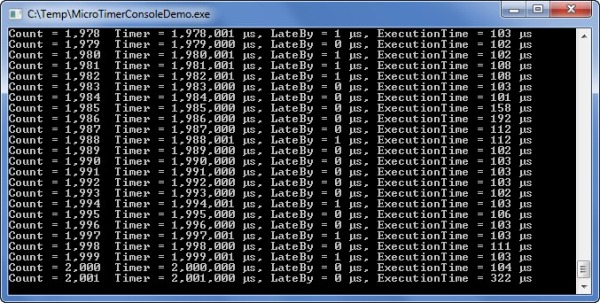
The code below shows a very simple (console application) implementation of the MicroTimer class with the interval set to 1,000µs (1ms). See the 'Download Console demo project' link above.
using System;
namespace MicroTimerConsoleDemo
{
class Program
{
static void Main(string[] args)
{
Program program = new Program();
program.MicroTimerTest();
}
private void MicroTimerTest()
{
MicroLibrary.MicroTimer microTimer = new MicroLibrary.MicroTimer();
microTimer.MicroTimerElapsed +=
new MicroLibrary.MicroTimer.MicroTimerElapsedEventHandler(OnTimedEvent);
microTimer.Interval = 1000;
microTimer.Enabled = true;
System.Threading.Thread.Sleep(2000);
microTimer.Enabled = false;
Console.ReadLine();
}
private void OnTimedEvent(object sender,
MicroLibrary.MicroTimerEventArgs timerEventArgs)
{
Console.WriteLine(string.Format(
"Count = {0:#,0} Timer = {1:#,0} µs, " +
"LateBy = {2:#,0} µs, ExecutionTime = {3:#,0} µs",
timerEventArgs.TimerCount, timerEventArgs.ElapsedMicroseconds,
timerEventArgs.TimerLateBy, timerEventArgs.CallbackFunctionExecutionTime));
}
}
}
The screenshot below shows the console output. The performance varies on different runs, but was usually accurate to 1µs. Due to system caching, the accuracy was worse on the first run and got better after the first few events. This test was on a 2GHz Dell Inspiron 1545 with an Intel Core 2 Duo (running Windows 7 64bit). The performance improved significantly on faster machines.
It is very unlikely a UI will need to be updated at intervals in the millisecond range. Purely for the point of demonstration, the 'Download WinForms demo project' link above contains a very simple WinForms application that updates a UI using the MicroTimer. The screenshot below demonstrates the application acting as a stopwatch (with a microsecond display) where the UI is being updated with the ElapsedMicroseconds every 1111µs (1.111ms).

Summary
MicroTimer is designed for situations were a very quick timer is required (around the 1ms mark); however, due to the non real-time nature of the Windows Operating System, it can never be accurate. However, as no other microsecond software timers are available, it does offer a reasonable solution for this task (and although processor hungry, is reasonably accurate on fast systems).
History
- 31 July 2010 - Article submitted.
This member has not yet provided a Biography. Assume it's interesting and varied, and probably something to do with programming.



 General
  News
News  Suggestion
  Question
  Bug
Bug  Answer
  Joke
Joke  Praise
  Rant
Rant  Admin
Admin 


 Submit an article or tip


![Java | [Coffee]](https://www.codeproject.com/script/Forums/Images/coffee.gif)