Introduction
Extending the components or API is not new to the IT industries; it was introduced in Object oriented programming model long back. The method of extending the components based on your requirement is so called Overriding. Modern programming languages like Java, .NET and many other languages supports it.
Similarly BizTalk 2004/ 2006 supports extending the Pipeline component or assembler to give a new meaning to the existing functionalities. Unlike .NET framework or Java Virtual machine base class libraries, BizTalk 2006 offers very good documentation on all supported classes, more over there are very good blogs and Newsgroups serve you better information.
Prerequisites
This article assumes that you have knowledge of custom pipeline creation and deployment.
Debatching
Integration projects mostly require splitting the large messages into chunks of small messages in the receive pipeline or in the orchestration. This process is so called De-batching. De-batching messages using biztalk can be achieved in many ways as follows:
(Available in many Geek blogs)
- Envelope Message debatching: In general two schemas are configured in receive pipeline and called either from Adapter or Orchestration (BizTalk 2006 only).
- Orchestration debatching: Orchestration is designed to loop through until end of messages and splits by calling custom .NET component or using the xpath function in the orchestration expression editor.
- Custom Pipeline debatching:
Disassemble() and GetNext() methods of Pipeline disassembler component will be overridden to debatch the input messages.
Scenario
Assume that you work for a Health care Insurance company and you receive all the participants list who have completed activities like "Master Health check up" from different Hospitals all over country from the third party data vendors. You are scheduled to receive the participant list as a pipe delimited large flat file (size of 10 MB approx) once in a week.
Your company exposes you a .NET web service that accepts an array of participant details as input and helps you to store the details into a global database. Your requirement is to poll the flat file using Biztalk 2006 , split it into 50 participant details record as a batch and pass it to intranet web service. Sounds easy?
Extending FF Disassembler Component
Custom Flatfile disassembler class can be extended by inheriting "FFDasmComp" class which is available under namespace "Microsoft.BizTalk.Pipeline.Components". For accessing namespace "Microsoft.BizTalk.Pipeline.Components", you have to add the following DLL as reference under your project.
Microsoft BizTalk Server 2006\Pipeline Components\Microsoft.BizTalk.Pipeline.Components.dll
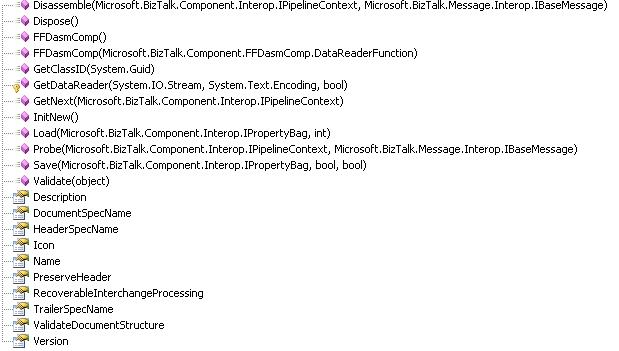
FFDasmComp class exposes the following methods and properties:

A short description of core members is as follows:
InitNew
- Initializes the current
FFDasm class, this method is called only once. - Accepts Nothing
- Returns Nothing
Disassemble
- Takes apart of the given message and makes it as Biztalk understandable XML message and stores it into message set. This method will be called only once for the given message.
- Accepts
IPipelineContext and IBaseMessage as input parameters, whereas IPipelineContext is the context of executing pipeline and IBaseMessage is the Flatfile in our case. - Returns Nothing
GetNext
- Returns a single message from the Message set, that was stored in
Disassmble() method call. This method will be called until it returns Null. - Accepts
IPipelineContext as input parameter, whereas IPipelineContext is the context of executing pipeline. - Returns
IBaseMessage from the message set.
Load
- Load the Key value pair from property bag.
Save
- Store the key value pair into property bag for future execution.
DocumentSpecName
- Gets or sets the Schema name for the disassemble method to parse the given input file into BizTalk understandable format.
Developing Component
Let us delve into developing the component now.
Step 1
Create your own class and inherit class and interfaces as shown below:
[ComponentCategory(CategoryTypes.CATID_PipelineComponent)]
[ComponentCategory(CategoryTypes.CATID_DisassemblingParser)]
[System.Runtime.InteropServices.Guid("57D51828-C973-4a62-A534-6DB3CB3CB251")]
public class LargeFlatfileSplitter :
FFDasmComp,
IBaseComponent,
Microsoft.BizTalk.Component.Interop.IDisassemblerComponent,
Microsoft.BizTalk.Component.Interop.IPersistPropertyBag
{
publicLargeFlatfileSplitter()
{

}
……
}
Step 2
As usual give a meaningful Description, Name and Version to your component.
Step 3
Create your GUID using .NET GUIDGen tool, copy it to clipboard and paste into your GetClassID method.
#regionIPersistPropertyBag Members
void IPersistPropertyBag.GetClassID(out Guid classID)
{
classID = new Guid("57D51828-C973-4a62-A534-6DB3CB3CB251");
}
void IPersistPropertyBag.InitNew()
{
base.InitNew();
}
void IPersistPropertyBag.Load(IPropertyBag propertyBag, int errorLog)
{
base.Load(propertyBag, errorLog);
}
void IPersistPropertyBag.Save
	(IPropertyBag propertyBag, bool clearDirty, bool saveAllProperties)
{
base.Save(propertyBag, clearDirty, saveAllProperties);
}
#endregion
Note InitNew, Load and Save method call the base class (FFDasmComp) methods respectively.
Step 4
public new void Disassemble(IPipelineContext pContext, IBaseMessage pInMsg)
{
try
{
base.DocumentSpecName = this.DocumentSpecName;
base.Disassemble(pContext, pInMsg);
}
catch (Exception ex)
{
System.Diagnostics.EventLog.WriteEntry("Disassemble:Error", ex.Message);
}
}
The above method diassembles the input flatfile into XML message. Flatfile schema (DocumentSpecName) you mention in property browser will be used here.
Step 4
public new IBaseMessage GetNext(IPipelineContext pContext)
{
try
{
if (stopCollectingMessages == false)
{
IBaseMessage ibmTemp = base.GetNext(pContext);
GetSplittedMessages(ibmTemp, pContext);
stopCollectingMessages = true;
if (0 == outboundMessages.Count)
return null;
}
}
catch (Exception ex)
{
System.Diagnostics.EventLog.WriteEntry("GetNext:Error", ex.Message);
}
if (currentMessage == outboundMessages.Count)
return null;
return (IBaseMessage)outboundMessages[currentMessage++];
}
The above mentioned method is a core method in our case. This loads your disassembled message stream into XPathDocument (This is where your performance goes down if your message is greater than 10 MB, we will discuss it later).
Using Xpath expression we split your XPathDocument, loop through each child node of your interest 50 times and append it into new XmlDocument.
So you collected 50 child nodes in XmlDocument, then you create a new IBaseMessage and save the XmlDocument into IBaseMessage Data stream at the same time you store them into collection list.
Do these steps until you complete collecting messages and mark your stopCollectingMessage flag as true, so that when next time Biztalk calls your GetNext function, you return IBaseMessage from the CollectionList.
Compile the project and copy the DLL into your PipelineComponents directory and GAC it.
That's all. You are ready to go.
Performance
This component is suitable for only the message size of less than 15 MB. Since this article only aims to explain about the other way of splitting message in pipeline, you can easily enhance this component using SeekableReadOnlyStream and Microsoft.BizTalk.XPathReader classes for extremely large messages (100 MB+).
SeekableReadOnlyStream is a wrapper class of System.IO.Stream that provides a faster and better way of accessing IBaseMessage stream when you are not required to modify the input stream. XPathReader class is not directly available to add reference in your component. You have to go browse your GAC directory from command shell, get the path of "Microsoft.Biztalk.XpathReader.dll" and refer in your component. Most likely it can be found in the "C:\WINDOWS\assembly\GAC_MSIL\Microsoft.BizTalk.XPathReader\3.0.1.0__31bf3856ad364e35" directory.
private void GetSplittedMessages(IBaseMessage ibmParam, IPipelineContext pCxt)
{
System.Xml.XmlDocument xDoc;
string temp = "";
if (ibmParam != null)
{
XPathDocument xp = new XPathDocument(ibmParam.BodyPart.Data);
XPathNodeIterator xNI = xp.CreateNavigator().Select
("/*[local-name()='CustomersList' and namespace-uri()=
'http://BiztalkArticle.Customers']/*[local-name()='Customers'
and namespace-uri()='']");
bool blnMoveNext = true;
while (blnMoveNext)
{
xDoc = new System.Xml.XmlDocument();
System.Xml.XmlElement xParent = xDoc.CreateElement
("CustomersList", http:
for (int i = 0; i < this.recordsPerMsg; i++)
{
blnMoveNext = xNI.MoveNext();
if (blnMoveNext == false) break;
XPathNavigator xn = xNI.Current;
if (xn != null)
{
temp = xn.InnerXml;
System.Xml.XmlElement xe = xDoc.CreateElement("Customers");
xe.InnerXml = temp;
xParent.AppendChild(xe);
}
}
xDoc.AppendChild(xParent);
IBaseMessage msg = null;
msg = pCxt.GetMessageFactory().CreateMessage();
msg.Context = ibmParam.Context;
IBaseMessagePart msgPart = pCxt.GetMessageFactory().CreateMessagePart();
System.IO.MemoryStream memStrm = new MemoryStream();
xDoc.Save(memStrm);
memStrm.Position = 0;
memStrm.Seek(0, System.IO.SeekOrigin.Begin);
msgPart.Data = memStrm;
msg.AddPart(ibmParam.BodyPartName, msgPart, true);
outboundMessages.Add(msg);
pCxt.ResourceTracker.AddResource(memStrm);
}
}
}
#regionIBaseComponent Members
[Browsable(false)]
public newstring Description
{
get { return "Biztalk Large flatfile splitting"; }
}
[Browsable(false)]
public new string Name
{
get { return "Large Flat File Disassembler"; }
}
[Browsable(false)]
public new string Version
{
get { return "1.0"; }
}
#endregion
History
- 13th January, 2007: Initial post


