Introduction
In this article, I will explain the basic concepts of MS ADO.NET and how to involve use it programmatically.
Background
It is well known that Visual Studio .NET supports developers with many wizards. One of them is the Data Form Wizard. If you want to create forms involving single and master detail databases, this tool will give you many detailed and interesting opportunities while creating your form. But when you are developing real-world applications, generally, you have to face altering these standard methods to match your target application requirements. Therefore, you need to write some code to make your application flexible. Here is an example of using ADO.NET fully programmatically with C#.
Using the Code
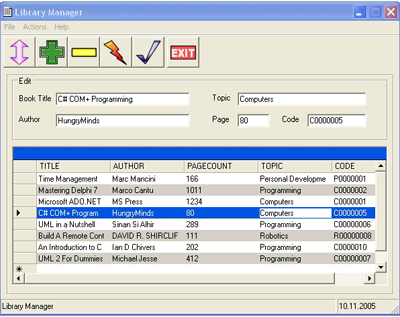
The program uses a simple SQL database named 'Library' and a table named 'Books' in it. We have a few ways to create this database. After receiving a request, I decided to write some code to create the necessary database programmatically. I added a menu item Settings->Create Database to create the database.
public void CreateDatabase()
{
string sCreateDatabase="CREATE DATABASE Library";
string sCreateTable="CREATE TABLE Books (BookID INTEGER PRIMARY KEY IDENTITY,"+
"Title CHAR(50) NOT NULL , Author CHAR(50), " +
"PageCount INTEGER,Topic CHAR(30),Code CHAR(15))" ;
string sInsertFirstRow="INSERT INTO BOOKS (TITLE,AUTHOR,PAGECOUNT,TOPIC,CODE)"
+"VALUES('Test Book','Test Author', 100, 'Test Topic', 'Test Code');";
SqlConnection mycon=new SqlConnection();
mycon.ConnectionString="workstation id=;initial catalog=; integrated security=SSPI";
SqlCommand mycomm=new SqlCommand();
mycomm.CommandType=CommandType.Text;
mycomm.CommandText=sCreateDatabase;
mycomm.Connection=mycon;
try
{
mycon.Open();
mycomm.ExecuteNonQuery();
}
catch
{
MessageBox.Show(" The database already exists. ");
}
finally
{
mycon.Close();
}
mycon.ConnectionString=
"workstation id=;initial catalog=Library; integrated security=SSPI";
try
{
mycon.Open();
mycomm.CommandText=sCreateTable;
mycomm.ExecuteNonQuery();
mycomm.CommandText=sInsertFirstRow;
mycomm.ExecuteNonQuery();
}
catch
{
MessageBox.Show(" There is already a table named 'Books' in the database. ");
}
finally
{
mycon.Close();
}
}
We can also do this via MS Visual Studio .NET or MS SQL Server Manager. Let us create a Books table in the Library database. Here are the table columns:
| Column Name | Data Type | Length | Allow nulls |
| BookID | int | 4 | |
| Title | char | 50 | |
| Author | char | 50 | V |
| PageCount | int | 4 | V |
| Topic | char | 30 | V |
| Code | char | 15 | V |
First of all, to move data between a data store and our application, we must have a connection to the data store. We will use a Connection object from ADO.NET to create and manage the connection. Because our data source is SQL Server, we use SqlConnection.
SqlConnection mycon=new SqlConnection();
To determine the settings, we must use the ConnectionString property.
mycon.ConnectionString="workstation id=;initial catalog=LIBRARY; integrated security=SSPI";
DataSet is a memory-resident representation of data, and can include table(s), constraint(s), and relationship(s).
DataSet myds=new DataSet();
A DataAdapter is used to retrieve data from a data source and populate within a DataSet and to resolve changes made to the DataSet back to the data source. We can also say simply, interaction with data source(s) and dataset(s) is controlled through the DataAdapter.
SqlDataAdapter myadap=new SqlDataAdapter();
A DataTable is used for representing a single table of memory-resident data. In our project, as we have only one table in our database, we must create a table as a presentation of the table in our database and add it to our DataSet object.
DataTable mytable=new DataTable("books");
myds.Tables.Add(mytable);
A Command object is used to access data directly in the database in a connected environment. CommandType is declared as Text. CommandText is a SQL statement.
mycomm SqlCommand =new SqlCommand();
mycomm.CommandType=CommandType.Text;
mycomm.CommandText="SELECT TITLE,AUTHOR,PAGECOUNT,TOPIC,CODE FROM BOOKS";
To be able to declare and use these ADO.NET objects, we must include the System.Data and System.Data.SqlClient namespaces in our application.
using System.Data;
using System.Data.SqlClient;
Indeed we have two options. We can manipulate data through the DataAdapter object using the Fill and Update methods. We use the Fill method for loading and searching data in our application because of its simplicity. As a second option, we can use SqlConnection and SqlCommand to access our data directly. It is faster than the first. This method is used to insert, delete, and modify functions with the ExecuteNonQuery method of the Command object. We can create a class and put all the necessary code and make some necessary items public to reach them from everywhere in our namespace.
public class dataManipulationClass
{
    public SqlConnection mycon;
    public DataSet myds;
    public DataTable mytable;
    public SqlDataAdapter myadap;
    public SqlCommand mycomm;

    public bool ManupulateData()
    {
        mycon=new SqlConnection();
        mycon.ConnectionString="workstation id=;initial catalog=LIBRARY;
            integrated security=SSPI";

        myds=new DataSet();
        mytable=new DataTable("books");
        myds.Tables.Add(mytable);
        myadap=new SqlDataAdapter();

        mycomm=new SqlCommand();
        mycomm.CommandType=CommandType.Text;
        mycomm.CommandText="SELECT TITLE,AUTHOR,PAGECOUNT,TOPIC,CODE FROM BOOKS";
        mycomm.Connection=mycon;
        myadap.SelectCommand=mycomm;

        return true;
    }
}
To use this class in the FormMain class, we must declare it.
dataManipulationClass cDataMan=new dataManipulationClass();
To load data, we have a simple LoadData function:
public void LoadData()
{
cDataMan.ManupulateData();
dataGrid.DataSource=cDataMan.myds;
dataGrid.DataMember="books";
try
{
cDataMan.myadap.Fill(cDataMan.mytable);
}
catch(Exception xcp)
{
MessageBox.Show(xcp.ToString());
}
finally
{
cDataMan.mycon.Close();
}
}
The DeleteData and ModifyData functions are very similar to AddData except for their connection string. The connection string is for the DeleteData function:
cDataMan.mycomm.CommandText="DELETE FROM BOOKS WHERE BOOKID=@BookID";
A SqlParameter is added to the string for BookID.
cDataMan.mycomm.Parameters.Add(new SqlParameter("@BookID",sBookID));
The connection string is for the ModifyData function:
cDataMan.mycomm.CommandText="SELECT TITLE,AUTHOR,PAGECOUNT,"
    +"TOPIC,CODE FROM BOOKS WHERE TITLE=@Title";
A SqlParameter is then added to the string.
cDataMan.mycomm.Parameters.Add(new SqlParameter("@Title",sTitle));
Conclusion
I think this code can be used for generating code and an application without design-time data object replacements and wizard-free application development which generates sometimes unclear code. The code is simple, but of course, should be improved to overcome your real-time problems. I know that there are a lot of things to do with my code. I am planning to improve my code in the future and expect your help.
History
- 14 Dec. 2005: Created paramaterized SQL queries. Added database creation feature to create the necessary database for this article. Fixed the Delete and Modify functions to invoke exact selection on the
DataGrid. - 03 Dec. 2005: Initial revision.
Sources


