Introduction
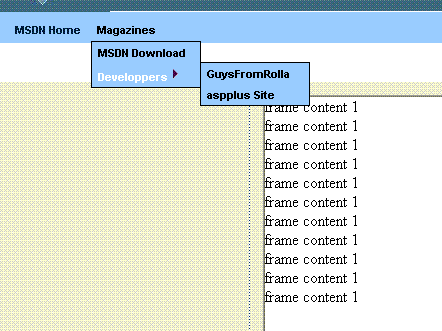
This article will show a nice & simple cool Web control for drill down menu with diverse client side behaviors and functionality and it will also show some few nice and handy options on the server side. The next section explains a little bit the urge for this kind of UI components and also raises a few points regarding situations when we should use those kinds of controls and when we shouldn't.
As long as the Web exists, developers want to make a rich UI client within their Web applications. UI components like hierarchy trees, drill down menus and so on spread their charm on us and sometimes on our customers. We are all used to see it in WinForms and we like to see it also in our Web applications - why not? if to ask...
There are several why not answers that even a non UI expert, like me, can raise.
- Web applications are stateless and sometimes this fact itself makes it harder to achieve a rich client, where state should be maintained between round trips from client to the server.
- Rich UIs means lots of client scripts to achieve UI interactions with the end user which are sometimes hard to debug and require additional skills.
- Lots of scripts can eventually influence the page loading time.
- When designing a Web application, our customer's feedback and our UI experts recommend keeping the UI simple (this golden rule is true for everything). E.g., display simple flat links instead of drill down menu - let the user see his options and don't hide it within "hidden places" - like it is in drill down menu. Simple UIs will be much more user friendly UIs. All wishes that our customers will find our applications easy to use and use it. Eventually we will be able to sale our future releases and everyone will be happy.
There used to be other problems like IE compatibility, slow network connections and lacking the necessary set of script languages features - but thanks god, they were over.
OK, before I'll start to drill down into the drill menu bits, I would like to point that my version base on the great XML & XSL & JS code was originally written by Dan Wahlin and I got his permission to add my enhancements (I'm not the only one). You can find the original bits at Dan's web site on XML which is recommended for anyone who is interested in .NET and specifically with XML for ASP.NET.
The drill down menu major feature list
- It is possible to configure the location of the menu files – CSS, JS, XSL and XML. Our options are:
- within our Web application, Web folder.
- within aspnet_client web folder which is usually located under wwwroot folder.
- within a site which is not defined on port 80 but on another port.
- Support for permissions check - two levels of permission behaviors.
- low level restriction – HTML visually disable menu item(s) which the user not allow to activate.
- strict restriction - omit from the client any of the item(s) which the user should not know about (will not be part of the client rendered HTML).
- Webcontrol server events.
- Different levels of caching.
- Application level (when no permission checks should be done) – the rendered HTML menu will be saved on the Cache object.
- User session cache - with or without enforcing permission checks.
- No cache mode.
- RTL/LTR support.
All files can be located in language specific direction folder.
- Client
onClick event handler enhancements.
- You can open a clicked menu item link in a new window (dialog or regular), open it in the same page or within an
IFrame.
- Developers can attach custom client functions that will take place before the menu client logic flow occur. The custom function can override the default behaviour by returning "skip" value which will indicate the menu default function to be skipped. The plug in client side functions are:
customOnClick canNavigate – This function can be used to check isDirty flag on the current entry forms and act accordingly.
- The following additional custom client side functions can be attached:
clientParamsGetFunction
This function will be called by the menu internal onclick function in order to get additional parameter values that will be used/send in the further steps.
clientWindowGetStyleFuncName
Configure to open a new window (dialog or simple) when menu is clicked. We can attach a function that will return the window display style settings (size, show toolbar etc.).
clientWindowAfterCloseEvent
After a window close, we will call this function if it is defined and send to it any parameter values we got from the window and from the other steps (see clientParamsGetFunction).
- PostBack can be done on the current page or within
IFrame page when we configure the menu to load pages within IFrames. The function signature that will trigger postback within IFrame loaded pages:
menu_doPostback( gCurrentMenu, key, gDefaultLink, url, args);
Arguments' purposes:
gCurrentMenu – not implemented. Key – the clicked menu key. Can be used when we don't want to obligate to specific link like in cases when we are working with UIP Application Block. gDefaultLink – a global link value which we pre-define in menu XML root element metadata. We can use global link when we are working with MasterPage mechanism. url – the URL we pre-define for the menu item. Args – a string delimiter value/pair arguments(&).
- Client caching using
IFrames.
When configure the menu items to use IFrames without settings the Postback to true, we achieve client side caching by using IFrames. The moment a menu item is clicked and IFrame mode is on, we check in the client browser if we had already created the IFrame that would hold the clicked menu link page. In case we already have it, we set its display style to visible, otherwise we create it and load it from the server.
It is recommended to use the IFrame configuration when you have pages whose load time is not acceptable and that after they load they can be displayed without the need to go back to the server (E.g. page with huge XML & XSL that enable different filtering and display on the client).
Actually, there are more different configuration options and there is also a way to combine different options and get a mixed behavior.
I download ZIP file including the code of the Web control and 6 simple samples about different ways you can configure the menu metadata XML.
Menu global settings
public struct MenuSettingsType
{
    public string name;
    public bool forcePermission;
    public bool ommitNotAuthMenus;
    public string defaultLink;
    public string customCSSFile;
    public string customJSFile;
    public string customXSLFile;
    public bool recheckPermissionsOnPostBack;
    public bool triggerPostBack;
    public string appFolder;
    public string port;
    public string frameDivHolderID;
    public string customOnClick;
    public bool customOnClickIsInFrame;
    public bool canNavigateIsInFrame;
}
Most of the settings are optional. The following settings can be overridden by specific menu item settings.
public string defaultLink;
public bool triggerPostBack;
public string frameDivHolderID;
public string customOnClick;
public bool customOnClickIsInFrame;
public bool canNavigateIsInFrame;
Menu Item Metadata
public const string EL_NAME= "name";
public const string EL_PERMISSIONS="permissions";
public const string EL_FORCE_PERMISSIONS="forcePermission";
public const string EL_CAPTION="caption";
public const string EL_TOOL_TIP="toolTip";
public const string EL_DISABLED="disabled";
public const string EL_ACCESS_DENIED_MESSAGE="accessDeniedMessage";
public const string EL_VISIBLE="visible";
public const string EL_TRIGGET_POSTBACK="triggerPostBack";
public const string EL_LINK="link";
public const string EL_CLIENT_OPEN_TARGET_TYPE="clientOpenTargetType";
public const string EL_CLIENT_FRAMES_DIV_ID="clientFramesDivHolderName";
public const string EL_CLIENT_PARAMS_GET_FN="clientParamsGetFunction";
public const string EL_CLIENT_WINDOW_TYPE="clientWindowType";
public const string EL_CLIENT_AFTER_WIN_CLOSE_FN="clientWindowAfterCloseEvent";
public const string EL_CLIENT_GET_WIN_STYLE_FN="clientWindowGetStyleFuncName";
public const string EL_CLIENT_TAGET_FRAME_NAME="clientTargetFrameName";
public const string EL_CLIENT_CUSTOM_CLICK_FN="customOnClick";
public const string EL_CLIENT_CUSTOM_CLICK_IN_FRAME="customOnClickIsInFrame";
public const string EL_CLIENT_CAN_NAV_IN_FRAME="canNavigateIsInFrame";
The mandatory elements are:
public const string EL_NAME= "name";
public const string EL_CAPTION="caption";
public const string EL_CLIENT_OPEN_TARGET_TYPE="clientOpenTargetType";
When you are working in frame mode you have to supply a DIV id that will contain the frames (clientFramesDivHolderName). You also have to set with this DIV to your default IFrame.
The XML size depends on the different elements you are using. Most of the menu items metadata elements are optional. Its also depend on the behavior configuration you need - using PostBack to the same page, using IFrame – with postback to IFrame or without and eventually when using windows mode.
The web control, server side functionality
As already mentioned, there are three server side events you can subscribe and change the final results.
public delegate void MenuItemClickedHandler(MenuItemClickedEventArgs e);

public delegate void MenuItemRanderHandler(XmlNode item, out bool skipItem,
                                           out string xmlAdditionalAttr);

public delegate void MenuItemCheckPermissionHandler(XmlNode menu,
       string permissions, bool forcePermissions, string caption,
       string originalToolTip, out bool skip,
       out bool enable, out string toolTip);
MenuItemClickedEventArgs - includes the following arguments:
NextMenu - value which is the menu that was clicked by the user. CurrentMenu – the current display menu (not implemented). AdditionalArgs – hash table name/value of the parameters a user added on the client in a custom client side function.
The MenuItemCheckPermissionHandler event will be fired when forcePermissions will be set to true. There is also internal permission check within the which I have removed and replaced with TODO word. This is the place where you can add your default permission checks using entLib relevant components or other components.
The menu element definition within ASP.NET page
<?XML:NAMESPACE PREFIX = CC1 /><CC1:DDMENU id=DDMenu1
dir=ltr MenuName="FramesAndPostBackToFrame"
MenuXMLFileName="FramesAndPostBackToFrame.xml"
MenuXMLRelPath="menu" runat="server">
</CC1:DDMENU>
When using Frame mode you need to add the DIV element where the default IFrame definition is located. The DIV id should be defined within the Menu XML metadata. The Frame ID should be the same as the Menu name element of the default menu item and which also defined within the menu XML metadata.
Important
When working with single IFrame (the default) and postback to IFrame loaded page (like I did in the attached sample), you need to use the menu item element called clientTargetFrameName and set its value to the name of the default, single IFrame.
Samples code files attached
Few remarks
- When you define a global link for all the menu items and you would like that specific menu item located on the first level and the one that has no child will be clickable – you need to define it for the link. This is a known behavior.
- There are a few of the annoying JavaScript debug alerts in the demo in order that it will be easier to follow the
onclick function.
- The menu
onclick functionality with the XML on the client side can be re-used in different UI components and not just in the DDMenu.
- You are welcome to report any bugs or any feedback regarding the menu in case you decide to use it.
- You are welcome to add your enhancements to the control and share it with us.
Summary
The article mostly explain the different ways to configure the DDMenu web control. The demo code I added to the ZIP file is simple and straightforward and can assist to understanding how the Web control can configure and work.


