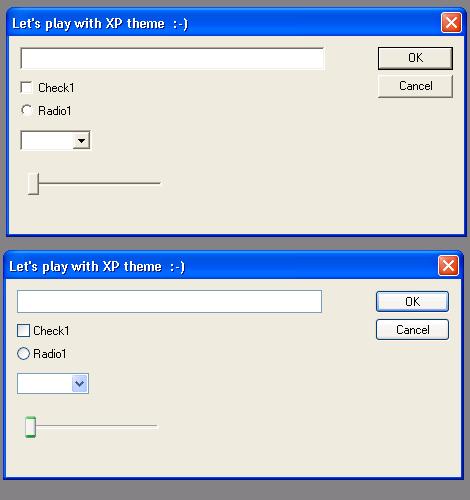
 |
|
 |
Hi all,
I have an IE toolbar in VC2003. I did all the thigs you described but the theme is not working . Please help
|
| Sign In·View Thread·PermaLink | 1.50/5 (2 votes) |
|
|
|
 |
|
 |
Dear All,
I want know about, Is it possible to enable(embed) xp themes to application without manifest file? I used previously in precompiled header stdafx.h
#pragma comment(linker,"/manifestdependency:\"type='win32' name='Microsoft.Windows.Common-Controls' version='6.0.0.0' processorArchitecture='*' publicKeyToken='6595b64144ccf1df' language='*'\"") It works fine in VS2005 and later verisons, I need a solution that must run on all VS versions(including VS2003, VS2004).
Thank you, Basavaraj.
modified on Tuesday, May 20, 2008 1:46 AM
|
| Sign In·View Thread·PermaLink | 1.00/5 (1 vote) |
|
|
|
 |
|
 |
I Used this a lot when I was on VC++6, but now i migrated to VS2005, I can't do this any more! Do you know how to achive same thing on VS2005? Thanks!
|
| Sign In·View Thread·PermaLink | |
|
|
|
 |
|
 |
#pragma comment(linker, "/manifestdependency:\"type='win32' name='Microsoft.Windows.Common-Controls' version='6.0.0.0' processorArchitecture='*' publicKeyToken='6595b64144ccf1df' language='*'\"")
Use it for VS2005...It works fine , (It is compiler dependen)
Thanks, Basavaraj.
|
| Sign In·View Thread·PermaLink | 2.00/5 (1 vote) |
|
|
|
 |
|
 |
Not sure you still need this, but you can define the manifest directly into your project options. Check for something called Manifest whatever, then go to Input and Output. There should be there a field called additional manifest files, so write there the name of your manifest at it will be embedded instead of the regular one (which doesn't allow XP themes).
As for the reply above, your method didn't work for me. :/
|
| Sign In·View Thread·PermaLink | |
|
|
|
 |
|
 |
I'm developing a DLL addin of Outlook which will be called by Outlook. I do like the articale said, but it does not work. Anyone has this kind of experience?
Thanks
Justin Li ----------- www.rollingsoftware.com
|
| Sign In·View Thread·PermaLink | 1.50/5 (2 votes) |
|
|
|
 |
|
 |
Hello, I create a simple IE toolbar in VC6 ATL COM. But it appears in Classic style. Is there any method to convert it into XP style.
Ansif
|
| Sign In·View Thread·PermaLink | |
|
|
|
 |
|
 |
Hello.
I guess your IE Toolbar is a DLL. To enable XP style on your project create manifest file described on this article and do the two single steps:
Put this line on your stdafx.h
#define ISOLATION_AWARE_ENABLED 1
And these lines on your resource file
#include ISOLATIONAWARE_MANIFEST_RESOURCE_ID RT_MANIFEST "yourapp.dll.manifest"
I hope it works.
More information can be found here http://msdn2.microsoft.com/en-us/library/ms649781.aspx[^]
Best Regards
Rafael Franco.
|
| Sign In·View Thread·PermaLink | |
|
|
|
 |
|
 |
Hi,
My toolbar is a DLL. And I´m doing these steps, but my toolbar for IE doesn´t work with XP styles.
Could you help me?
Thanks in advance.
|
| Sign In·View Thread·PermaLink | |
|
|
|
 |
|
 |
I added Xp style to my application. But the problem was there was a border around the button i created using CButton::Create()
So i need to get rid of that problem.pls reply me
bhw
|
| Sign In·View Thread·PermaLink | 3.00/5 (1 vote) |
|
|
|
 |
|
 |
I add Windows XP Theme Style via manifest file in the same application folder.
And now I not see the focus rectangle when a button gets the focus.
Anyone knows how to fix it?
Note: I don't use MFC, I calls the Windows API directly.
Thanks for your useful article.
Conxita
|
| Sign In·View Thread·PermaLink | |
|
|
|
 |
|
 |
I can't change the check box text color after I apply the XML to my project. I change the text color in OnCtlColor via SetTextColor. But It doesn't work. How can I change the text color?
|
| Sign In·View Thread·PermaLink | 1.67/5 (3 votes) |
|
|
|
 |
|
 |
In VS2005 for an upgraded project (originally created in VS2003) I also needed to insert the following in my stdafx.h:
#ifdef _UNICODE #if defined _M_IX86 #pragma comment(linker,"/manifestdependency:\"type='win32' name='Microsoft.Windows.Common-Controls' version='6.0.0.0' processorArchitecture='x86' publicKeyToken='6595b64144ccf1df' language='*'\"") #elif defined _M_IA64 #pragma comment(linker,"/manifestdependency:\"type='win32' name='Microsoft.Windows.Common-Controls' version='6.0.0.0' processorArchitecture='ia64' publicKeyToken='6595b64144ccf1df' language='*'\"") #elif defined _M_X64 #pragma comment(linker,"/manifestdependency:\"type='win32' name='Microsoft.Windows.Common-Controls' version='6.0.0.0' processorArchitecture='amd64' publicKeyToken='6595b64144ccf1df' language='*'\"") #else #pragma comment(linker,"/manifestdependency:\"type='win32' name='Microsoft.Windows.Common-Controls' version='6.0.0.0' processorArchitecture='*' publicKeyToken='6595b64144ccf1df' language='*'\"") #endif #endif
Hope that helps...
|
| Sign In·View Thread·PermaLink | 1.00/5 (1 vote) |
|
|
|
 |
|
 |
Hi all,
I have an application in vc6,in that i am using XP style.
The way I am giving XP Style to my application is by adding an XML File
to my resource . The content of the Xml file is given below
/******************************************************************************/
manifestVersion="1.0">
version="1.0.0.0" processorArchitecture="X86" name="Microsoft.Windows.YourApplication" type="win32" /> LitmusPro
type="win32" name="Microsoft.Windows.Common-Controls" version="6.0.0.0" processorArchitecture="X86" publicKeyToken="6595b64144ccf1df" language="*" />
/****************************************************************************/
It is working fine in VC6 .
But, when I compile my application in Visual Studio 2005 , this is not working . How can I make it work.
Please Help me
Thanks Vinod
|
| Sign In·View Thread·PermaLink | 2.00/5 (1 vote) |
|
|
|
 |
|
 |
In VS 2005 you can include via the project settings "Manifest" and "include additional Manifest". Then delete it out of your resources and watchout that no other Manifests are in your Projects your you ran into troble.
"There only be can One"
Greetings from Germany
|
| Sign In·View Thread·PermaLink | 5.00/5 (1 vote) |
|
|
|
 |
|
 |
That was great help!!! Thanks a lot...
There is a much easier way to do this in Visual Studio 2005... http://www.mathies.com/weblog/?p=225
|
| Sign In·View Thread·PermaLink | |
|
|
|
 |
|
|
 |
|
|
 |
|
|
 |
|
 |
VS 2005 automatically generates manifest files with its manifest tool. This tools is enabled by defualt when you create a new project.
Following these directions will cause a resource collision error. There are two simple steps to resolve this:
1. Turn off this feature (loses manifest generation by code)
Project->Properties->Configuration Properties->Manifest Tool:
Set Embed Manifest to "No"
2. Use this code as an additional manifest (Best) by saving the code above in an xml file
Project->Properties->Configuration Properties->Manifest Tool->Input and Output Add the code as an "Additional Manifest File"
|
| Sign In·View Thread·PermaLink | 4.48/5 (12 votes) |
|
|
|
 |
|
 |
Could some one point me in the direction of a general manifest creation tutorial or give me a manifest file that will link well with my x64 application? My 32bit version works fine ;o)
|
| Sign In·View Thread·PermaLink | 2.00/5 (1 vote) |
|
|
|
 |
|
 |
Found it myself in another file, I cant get this forum to post it right, but the neccesary parts are there.
version="1.0.0.0" processorArchitecture="amd64" name="Logitech.GamingDesktop.LGDCore" type="win32" />
Logitech Gaming Desktop Core Service.
type="win32" name="Microsoft.Windows.Common-Controls" version="6.0.101.0" processorArchitecture="amd64" publicKeyToken="6595b64144ccf1df" language="*" />
|
| Sign In·View Thread·PermaLink | 3.50/5 (2 votes) |
|
|
|
 |
|
 |
I have tried following this procedure, but get the following error when I try to run the application on XP (it runs OK on 2000):
"The application has failed to start because the application configuration is incorrect."
The only difference I can see is that I have no WinMain - as its an MFC project, so I have put the InitCommonControls() call into InitInstance(). Should this work with an MFC application?
Can anyone help?
|
| Sign In·View Thread·PermaLink | 2.00/5 (1 vote) |
|
|
|
 |
|
 |
Hi Kinnos,
I've had the same problem! While doing the copy/paste, somehow a <PRE...> tag was added to the manifest code. I simply removed this tag (and of course the final </PRE> tag also) in notepad and copied/pasted again to DevStudio. And viola ... the App was XP-ready 
Ahh, one second slight change: I changed 'processorArchitecture="x86"' to 'processorArchitecture="*"'
The final manifest code looks as follows: <?xml version="1.0" encoding="UTF-8" standalone="yes"?> <assembly xmlns="urn:schemas-microsoft-com:asm.v1" manifestVersion="1.0"> <assemblyIdentity processorArchitecture="*" version="5.1.0.0" type="win32" name="RapidX.exe"/> <description>RapidX</description> <dependency> <dependentAssembly> <assemblyIdentity type="win32" name="Microsoft.Windows.Common-Controls" version="6.0.0.0" publicKeyToken="6595b64144ccf1df" language="*" processorArchitecture="*"/> </dependentAssembly> </dependency> </assembly>
My App is also MFC, the InitCommonControls call is also placed at 'InitInstance'.
Hopefully this helps, Hartmut
|
| Sign In·View Thread·PermaLink | |
|
|
|
 |
|
|
 |
