Hiding Properties
When you create a custom control (or any class), you inherit a lot of properties from the base class, most of which are fine. However, particularly in the case of a control derived from UserControl, this brings a lot of properties which may not be relevant to the new control.
For example, if your control never scrolls, then the UserControl inherited property AutoScroll is confusing, and makes your control look unprofessional.
The solution is to hide them. However, actually hiding them took me quite a while to work out:
Create a new property with the same signature as the property you wish to hide, and give it a default getter and setter:
[Browsable(false),
EditorBrowsable(EditorBrowsableState.Never)]
public new bool AutoScroll { get; set; }
The Browsable attribute tells the designer that it should not appear in the Properties window.
The EditorBrowsable attribute tells Intellisense that it should not appear in the autocomplete list.
When you run this, you will find that the AutoScroll property still appears in Intellisense! Annoying, isn't it? Don't worry.
It will only appear in Intellisense within your solution.
If you add a reference to your control library within an different solution, Intellisense will not list the property. (You can however still access it if you type the name in fully. Irritating, but true.)
Hiding Tasks
In addition, you can hide the Task list for a derived control.
In the Visual Studio designer, when you add a component, it shows a "tasks" indicator for some. For example, the TextBox control has a Task which allows the designer to change the Multiline property without accessing the property page:
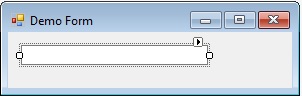

If you create a class derived from Textbox that doesn't support multiline (a password entry textbox for example), then even if you have "hidden" the Multiline property using the code above, it still appears in the Task.
You can hide it though, by decorating your class with this attribute:
[Designer(@"System.Windows.Forms.Design.ControlDesigner, System.Design," +
" Version=2.0.0.0, Culture=neutral, PublicKeyToken=b03f5f7f11d50a3a")]
public class PasswordTextBox : TextBox
{
This removes the Task indicator in the designer.
History
- 3rd October, 2011: Original version
- 6th December, 2015: Added Task hiding and headings
- 6th December, 2015: Changed title to reflect Task removal
Born at an early age, he grew older. At the same time, his hair grew longer, and was tied up behind his head.
Has problems spelling the word "the".
Invented the portable cat-flap.
Currently, has not died yet. Or has he?



 General
  News
News  Suggestion
  Question
  Bug
Bug  Answer
  Joke
Joke  Praise
  Rant
Rant  Admin
Admin 


 Submit an article or tip


