|

Introduction
AJAX stands for Asynchronous JavaScript and XML, and is one of the fastest growing technologies on the web, leading the charge for the "Web 2.0" generation. While definitely not a "new" technology per se, it's only recently gained market share with its use by Google, Wikipedia, and numerous other sites. This article won't go into great depth about what AJAX is (you can find more information about it by visiting Wikipedia), but will delve into some simple concepts that will help you easily implement AJAX into your next ASP.NET application.
Background
Microsoft seems to have been slow to adopt AJAX, having very little support for it in .NET 1.1 and VS2003. They did release ATLAS, which was their set of libraries that aided in the implementation of AJAX in .NET 2.0. You can read more about ATLAS on Wikipedia. But, rather than just dump some libraries on you and say "have fun", I'd prefer to illustrate the usage of the XMLHttpRequest object, and show how easy it can be to implement its functionality into your website with very little overhead.
Getting started
The reason I like AJAX so much is two-fold. First, I like that websites don't have to do continual postbacks to gather information. Secondly, I like how AJAX is a "jack of all trades" technology. It takes a little knowledge of HTML, a little knowledge of JavaScript, a little knowledge of a server-side scripting language (PHP, ASP.NET, etc.), and a little knowledge of CSS. So, before launching into this, it'd be good to have these tools at your disposal. While the code I'm going to present is not that complicated, a fundamental knowledge of the above four technologies is definitely required.
Overview
The root functionality of AJAX lies in the XMLHttpRequest object. There are four primary steps in utilizing this object.
- Create the request
- Send the request
- Receive the response
- Process the response
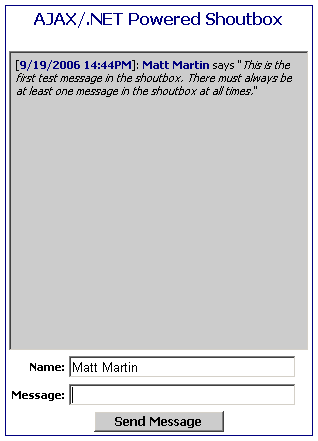
In the Shoutbox sample, I use a separate JavaScript function to handle each task. All we're really doing, in layman's terms, is accessing the XMLHttpRequest object, adding a delegate to handle the response processing, giving it a URL with the address of our server-side script (and including any query string variables we want), then waiting for the server-side script to pass us back a response. The great thing about the response is that it's basically just text we're going to be getting back, so it could be formatted HTML, a comma delimited list, an XML document, etc. So, once we have the response from the server, we use JavaScript to put the text into a table, div, span, etc.
Using the code
There are several different steps to creating and using the code. Because AJAX uses multiple technologies to accomplish its tasks, I'll break it down here with a brief explanation using my included example:
- shoutBox.aspx - Honestly, doesn't even need to be an ASP.NET page. This could be just a standard HTML file. It contains the HTML that we will use to activate the JavaScript and display the response.
- shoutBox.js - This is the JavaScript file (referenced from the shoutBox.aspx page) that handles all of our request processing.
- shoutbox.xml - Houses all of the messages in XML format.
- shoutbox.css - The stylesheet. This is optional, but will definitely help make your app look cool.
- saveXML.aspx - The HTML page is nothing...We're only interested in the code-behind. This is the server-side script that handles the XML request, does all of the processing, and returns a response.
I'm not going to include a lot of source code in this article, because the code I'm providing in the source is fairly well documented. If you're fairly up to date on your C#, the provided server-side code should be a no brainer for you. If not, I'll explain the three methods:
Page_Load() - Here, we receive the query string from the XMLHttpRequest object, save the message to our XML file (see below), and write out a response (the response contains our formatted messages in HTML format).
saveNewMessage() - Accepts a message string and a username. This adds a new node to the XML file with the message, and saves the XML server-side.
getMessages() - This loads the messages from the XML file, creates a data table, and loads the messages in as rows, sorts the data table by the timestamp, and then converts all of the rows in the datatable to formatted HTML. This method returns a string, which is the output in the response.
Points of interest
I tried several JavaScript-ing options before settling on the library I'm providing here. The biggest point of contention I noticed was the exact coding of the response handling delegate (in my code, called processResponse()). It seems the key to ensuring your XMLHttpRequest object never loses scope is to declare the variable globally and initialize it once. I was previously attempting to create the object within a function, then pass the object to the delegate as an argument, which failed miserable (I kept getting a type mismatch error).
You may notice that I handle all of the formatting on the server-side, then return a formatted string to the client. I did this for a few reasons. First and foremost, I'm not a JavaScript guru, so processing XML client-side is problematic for me. I'd rather use VS.NET and handle it all server-side with my trusted Intellisense. Secondly, servers are there for one purpose (to quote a recent IBM commercial): "To Serve"! So, why not make them do what they do best?
Feature suggestions
All you'll really need to worry about with this code is styling the Shoutbox using the provided CSS. All of the code should work "out of the box". Some changes you might want to make? Well, for starters, you could easily turn this into a Web Control. You could also scrub the message input for links, and format the anchor tags appropriately. You could make a user login, and capture their login name in a hidden HTML input so they wouldn't need to enter a name. There are a lot of possibilities. Hopefully, this can get you started down the right path.
Security concerns
Some added points you might want to consider: The Shoutbox should be somewhat spam-proof. Entering a single message and clicking dozens of times will only add the message once. There is a check to ensure the Name and Message boxes are at least 1 character long. The Shoutbox will not scrub out links, JavaScript, or any sort of formatted HTML.
Happy coding!
| You must Sign In to use this message board. |
|
| | Msgs 1 to 20 of 20 (Total in Forum: 20) (Refresh) | FirstPrevNext |
|
 |
|
|
Haii..can u help me.. my prob is, i converted your code to aspx.vb..all work good with your code in c#
the prob is at saveXML.aspx.vb at a page load
it seems like it dont detect this function with blue line..
Response.Write(getMessages())
when i mouse over got this error:
overload resolution failed because no accessible 'write' can be called with these arguments:
'public sub write (ch as char)' :expression does not produce a value. 'public sub write (obj as object)' :expression does not produce a value. 'public sub write (s as string)' :expression does not produce a value.
do u know how to handle this?
thx in advance UsualDosage 
|
| Sign In·View Thread·PermaLink | |
|
|
|
 |
|
|
 |
|
|
hmm i think theres no different just only their syntax..its still can save on xml and all work okay but cannot write msg on xml to display at html table on load event....ill try to figure out.anywhere thx for your reply
|
| Sign In·View Thread·PermaLink | |
|
|
|
 |
|
|
i had install the shout box and it works fine
but.. i dunno why it only can run (read the message), if i put the address as http://localhost ... when i try to put it as my local IP address something like http://192.168.1.2 , it did not run and when i view using Internet Explorer, it give the error message : Permission denied
i know it got something to do with the permission but i dunno what to do. I'm using win XP pro and using IIS 5.1 as the web server.
Merrick
|
| Sign In·View Thread·PermaLink | |
|
|
|
 |
|
|
Sounds like an IIS configuration issue. I'll try to help you out here by showing you how my IIS is configured, and hopefully that will solve the problem.
Launch the Internet Information Services (Control Panel->Administrative Tools->Internet Information Services).
In the left treeview, you will see something like Your Computer Name->Websites->Default Web Site->Name of your Shoutbox Website. Right click on the name of your Shoutbox website, and select "Properties".
Select the Directory Security tab. Under Anonymous Access and Authentication Control, click the "Edit" button.
Ensure the "Anonymous Access" checkbox is checked, as well as "Integrated Windows Authentication". Once done, click OK, and close out of the properties window.
That should allow your site to be browsed (if the site was initially configured properly in IIS) to be browsed anonymously.
Hope it helps!
-UD
Quae narravi nullo modo negabo.
|
| Sign In·View Thread·PermaLink | |
|
|
|
 |
|
|
Thx for your helps UD. I already check that the anonymous access and integrated windows authentication had been checked before.
And at my web server, other thing such as saving xml or file or database to the server... can be done without having any problem. Only it is become problem when reading XML file via AJAX. Is there anything that actually I missed out? I think it still related to security issue but i also had give full control to everyone group, and it were still the same
Thank you Merrick
|
| Sign In·View Thread·PermaLink | |
|
|
|
 |
|
|
Hi Merrick,
I'm pretty sure you just need to make sure that your ASP.NET worker process's service account can read, write and modify the XML file. I'd also make sure the IIS guest account could as well (IUSR_ComputerName). I wish I could help diagnose the problem a little better, but network administration isn't really my strong point! Have you checked browser settings on the accessing machines? If they have JavaScript disabled, that would be a problem...though I don't think they would get an "Access Denied" error. Worth a check, though.
Hope you can get it working!
-UD
Quae narravi nullo modo negabo.
|
| Sign In·View Thread·PermaLink | |
|
|
|
 |
|
|
The error is simple.. I had fixed it.. it's very stupid that i always thought it was related to the permission issue...
It's because the address for the asp file.. I put http://localhost/ , which is actually for internal testing (127).. thanks for your reply.. hahah..
Cheers! Merrick
|
| Sign In·View Thread·PermaLink | |
|
|
|
 |
|
|
 |
|
|
what steps do i need to take to put this shoutbox on my webpage. I mean, files to upload and code to change etc.
Saad
|
| Sign In·View Thread·PermaLink | |
|
|
|
 |
|
|
Hello,my problem is that i have some problems with some some portuguese words like "cão" or "anuário" for example,the shoutbox.xml save the words like "co" or "anurio",maybe this is some kind of problem about encoding but i having problems in resolving it.Please help.
|
| Sign In·View Thread·PermaLink | |
|
|
|
 |
|
|
There is a very good article concerning Globalization at the 4 Guys from Rolla website. You can examine the article here: http://aspnet.4guysfromrolla.com/articles/030304-1.aspx[^].
The best way to approach saving the text in a different language would be to create a Custom Culture class (inheriting from CultureInfo) for your language (in this case Portuguese). The ISO 639 language code to use in the resource is "pt".
The rest of the code in the article is pretty well documented, but I'm probably not the best person to ask about any of the details as I rarely work within the System.Globalization namespace.
Hope it helps!
Quae narravi nullo modo negabo.
|
| Sign In·View Thread·PermaLink | |
|
|
|
 |
|
|
Thanks, man. I thoroughly enjoyed setting this up as a learning project and fun communication tool for my ASP.NET club web site. Our group found what seems to be a bug in displaying the messages. Some messages would display out of order and were not sorted as descending -- particulary AM and PM. I'm trying some combinations of specifying different date format strings and sorting the date objects that way. I'll post my conclusion as I reach it. Thanks again for the great tutorial.
|
| Sign In·View Thread·PermaLink | |
|
|
|
 |
|
|
You said this: "Microsoft seems to have been slow to adopt AJAX, having very little support for it in .NET 1.1 and VS2003."
After that you talk about using the XmlHttpRequest object which is at the very root of your AJAX solution. Isn't the XmlHttpRequest object a piece of software from Microsoft? You ought to think about what you're writing.
|
| Sign In·View Thread·PermaLink | |
|
|
|
 |
|
|
You are correct in that Microsoft originally developed the XmlHttpRequest object (XMLHTTP in the MS-world), and has supported it in IE since version 5.
What I meant by "slow to adopt AJAX" is the plain fact that Microsoft VS.NET 2003 does not have any native MS-built IDE controls that support AJAX. All AJAX functionality has to be created by the users in JavaScript libraries, or handled by third party control libraries.
When ATLAS comes out of beta, I won't make that claim anymore, so please calm down.
Quae narravi nullo modo negabo.
|
| Sign In·View Thread·PermaLink | |
|
|
|
 |
|
|
I have relatively little experience with the whole visual studio thing.
I can download your code but I can't work out where to put it or how to persuade Visual Studio to open it up as a project or web site.
this must be a FAQ but I can't seem to find an answer.
Pete
|
| Sign In·View Thread·PermaLink | |
|
|
|
 |
|
|
Hey Pete,
I won't call you stupid! All you need to do is configure your IIS for the project so Visual Studio knows what to do. The easiest way to get this to work is by following these steps:
1) Unzip the demo project into the folder: C:\inetpub\wwwroot\ShoutBox
2) Launch your IIS console. (Start->Control Panel->Administrative Tools->Internet Information Services)
3) Expand the tree on the left (IIS->COMPUTERNAME (local computer)->Web Sites->Default Web Site
4) Find the directory you just created (ShoutBox).
5) Right-click and select Properties.
6) In the Application Settings section, you'll see a button that reads: "Create". Click it, then click OK on the dialog.
7) Close IIS, and navigate via your Windows Explorer to: C:\inetpub\wwwroot\ShoutBox
8) Double-click the Solution (.sln) file to launch it in Visual Studio.
This should be all you need to do in order to get the solution file open. Let me know if you have any problems!
Quae narravi nullo modo negabo.
|
| Sign In·View Thread·PermaLink | |
|
|
|
 |
|
|
Well...
I do all that and get a project conversion dialogue/log which tells me there were warnings relating to the .proj file.
When I open the solution, I get to see a class view and references on the right hand side. The solution explorer has to be opened manually.
I get a permissions error when running the application. Specifically, when sending a message. I can probably sort that but don't really know where to look exactly.
Is it me or is this Visual Studio thing a bit tricky until you have done a lot of it?
Recently someone described Office as something designed more for producing slick demonstrations than actually getting any work done.
thanks for your help
Pete
|
| Sign In·View Thread·PermaLink | |
|
|
|
 |
|
|
Hey Pete,
Well, the problem sounds to me like you're using a different version of Visual Studio. This demonstration was created using Visual Studio .NET 2003. If you're getting a conversion dialog, chances are you're trying to open the project using VS.NET 2005, which may be a problem.
Visual Studio can be tricky, yes, especially with the conversions. But, unlike Office, VS.NET is actually a very good IDE, in my opinion. Since the demo project is not a very large project, you might want to just go the manual route. Create a new ASP.NET web project in your Visual Studio, then just go in and "Add Existing Item", and add the following files: ajaxShoutbox.js, ajaxShoutbox.css, and shoutbox.xml. Then, create two new web forms, and copy the HTML and codebehind from the old project into the newly created pages.
The permissions error you are getting may very well be from the serialization/deserialization of the shoutbox.xml file. All you would need to do in order to remedy this is to give that file, specifically the folder in which the file resides, read/write permissions.
Like anything, the more you use a tool, the more proficient you become, and that holds very true for VS.NET. I was bewildered when I started using VS years ago, since I was used to developing most of my applications in a Linux environment, using a text editor.
Anyway, hope that helps, and let me know if I can help you with any questions.
Cheers!
Quae narravi nullo modo negabo.
|
| Sign In·View Thread·PermaLink | 5.00/5 (1 vote) |
|
|
|
 |
|
|
Sorted.
I gave the ASP account write access to the xml file.
Yes, it is VS2005.
All works a treat now.
Many thanks
Pete
|
| Sign In·View Thread·PermaLink | |
|
|
|
 |
|
|
General News Question Answer Joke Rant Admin
|
