
Scratchpad: An Auto Save Notepad


4.25/5 (9 votes)


Scratchpad is a very simple Notepad-like editor that performs an automatic save every 5 minutes and when the application is closed.
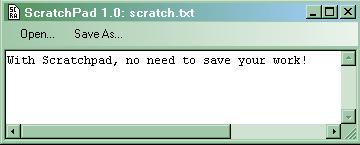
Background
I always like to have an open text editor window where I write any idea that crosses my mind. But sometimes I forget to save this text when I shutdown the computer and consequently lose anything I had written.
To avoid this problem, I have written scratchpad which is a very simple text editor that automatically saves when the application is closed.
Features
Scratchpad supports the following features:
- When the application is started, it automatically re-opens the last edited file and restores the window position, size, and state.
- When the application is closed and every 5 minutes, the edited file is saved.
- To be able to recover the text in case of a computer crash during the save operation, a backup file is created.
The Code
Persistency of Window Position and Last Opened File
The following information needs to be made persistent:
- The window position
- The window size (in normal state)
- The window state (maximized/minimized/normal)
- The name of the edited file
To perform this persistence, I created a serializable class (PersistentData) that is used as a structure to contain all the data that requires persistency:
[Serializable]
public class PersistentData
    {
    public int Top;
    public int Left;
    public int Width;
    public int Height;
    public string FilePath;
    public FormWindowState WindowState;
    }
To save the content of pData (the instance of PersistenData), I use the Serialize method:
//save the context
//================
pData.WindowState = this.WindowState;

// Force the window to normal size to retrieve normal size bounds
this.WindowState = FormWindowState.Normal;
pData.Top = this.Top;
pData.Left = this.Left;
pData.Width = this.Width;
pData.Height = this.Height;

IFormatter formatter = new BinaryFormatter();
Stream stream = new FileStream(Application.CommonAppDataPath +
	@"\scratchpad.ini", FileMode.Create, FileAccess.Write, FileShare.None);
formatter.Serialize(stream, pData );
            stream.Close();
Note 1: The path where to save the settings is obtained by a call to Application.CommonAppDataPath.
Note 2: To avoid saving the "maximized" size, the window is forced to "normal" size before reading its size and position.
To restore the persistent data, I use the Deserialize method. In case the deserialization fails (because the application setting file is not available), pData is initialized with default values:
try
  {
  IFormatter formatter = new BinaryFormatter();
  Stream stream = new FileStream(Application.CommonAppDataPath+@"\scratchpad.ini",
		FileMode.Open, FileAccess.Read, FileShare.Read);
  pData = (PersistentData)formatter.Deserialize(stream);
  stream.Close();
  }
catch //deserialization failed
  {
  pData = new PersistentData();
  pData.Top = this.Top;
  pData.Left = this.Left;
  pData.Width = this.Width;
  pData.Height = this.Height;
  pData.WindowState = this.WindowState;
  pData.FilePath = "scatch.txt";
  }
Autosave Every 5 Minutes
The autosave every 5 minutes is done by a timer that triggers a save operation every 300,000ms if the text was modified since the last save.
private void timer1_Tick(object sender, EventArgs e)
{
 if (textBox1.Modified)
     {
     Save();
     }
}
Note that the textbox1.modified flag is not automatically set or cleared by the framework, i.e. the application has to explicitly set and clear it.
Backup File Creation
To be sure that the data won't be corrupted even if the computer crashes during the save operation, I create a copy of the original file using File.Copy before performing any write operation on the edited file. Note: The try catch that is used to avoid the problem in case the edited file is a new file that does not exist yet on the disk is:
//
//creates the backup
//===================
try
    {
    File.Copy(pData.FilePath,pData.FilePath+".bak",true);
    }
catch { /* ignore error */ }

// write the file
//=================
using (StreamWriter sw = new StreamWriter(pData.FilePath))
    {
    sw.Write(this.textBox1.Text);
    }
History
- 27th March, 2007: Version 1.0 was created