
Click here to Skip to main content

Strings are from earth and StringBuilder from mars.

By , 1 May 2012
 

Introduction

I was happily married to string for a long time until I came to know the reality that “Strings are immutable” and not suitable for all scenarios. Recently I was working on a heavy HTML parser application and the program used to go out of memory frequently. The completely HTML parsing logic was using string variables.

After reading around I came to know the main reason was the immutable behavior of string. Immutable means once the data is assigned cannot be changed.

For instance if you are looping using a string variable like the code given below. Every assignment to the string creates new copies of variables and the previous copy is sent for garbage collection. So the below for loop generates different memory copies of data and the recently created is the current value.
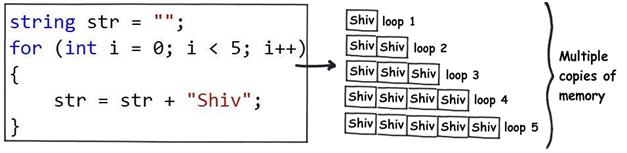
   

Now you must be wondering why this absurd behavior. Any lame person (like me?) can conclude this is not efficient and neither looks logical.

The sacrifice for thread safety

Before I start with the solution I wanted to understand why Microsoft team thought about this weird behavior. Thanks to http://stackoverflow.com/questions/2365272/why-net-string-is-immutable things started looking logical.

If you are using string variables in multithreaded scenarios every thread modification will create new copy of memory ensuring that you do not land in to multi-threaded issues. In other words thread safety is built-in by itself when new copies of data are created.

Not all work on ships

The next thing which started itching me is what if my application is not multi-threaded. What if my main motive is to save memory resources and ensure that I do not go out of memory issues?. Here’s comes the hero from mars “StringBuilder”.

“Stringbuilder” are not immutable, in other words if you change the variable data the same memory location is modified. VOW, that looks lot of memory saving during heavy concatenation operation as compared to string.
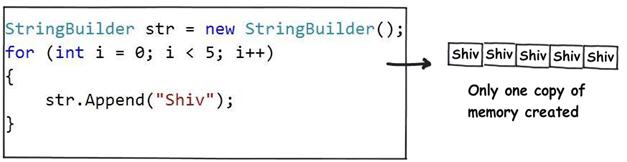
   

I wanted to see for myself that earth is flat

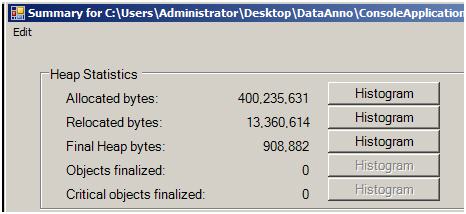
As a curios developer it was difficult for me to digest that internally string creates different copies of data. Out of curiosity I downloaded the CLR Profiler and ran two test of code as shown below.

One for string as the below.

string x ="";

for (inti = 0; i< 10000; i++)
{
x = "Shiv"+ x;

}
One for string builder.

StringBuilder x = newStringBuilder();

for (inti = 0; i< 10000; i++)
{
x.Append("Shiv");

}
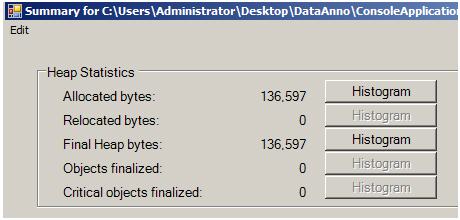
Watch the allocated bytes, 400235631 bytes is way greaterthan 136597bytes.

Watch the video below for the real demo

If you do not believe what I have written see the actual video demo as follows
License

This article, along with any associated source code and files, is licensed under The Code Project Open License (CPOL)

About the Author

Shivprasad koirala
Architect http://www.questpond.com
India India
Member

I am a Microsoft MVP for ASP/ASP.NET and currently a CEO of a small
E-learning company in India. We are very much active in making training videos ,
writing books and corporate trainings. Do visit my site for 
.NET, C# , design pattern , WCF , Silverlight
, LINQ , ASP.NET , ADO.NET , Sharepoint , UML , SQL Server  training 
and Interview questions and answers


Sign Up to vote   Poor Excellent
Add a reason or comment to your vote: x
Votes of 3 or less require a comment

Comments and Discussions

 
You must Sign In to use this message board.
Search this forum  
    Spacing  Noise  Layout  Per page   
GeneralMy vote of 5memberRahul Rajat Singh28 Jun '12 - 1:12 
Excellent blog.
GeneralMy vote of 5memberFarhan Ghumra17 Jun '12 - 19:23 
Excellent
GeneralMy vote of 5memberPerić_Željko7 Jun '12 - 10:29 
My 5 , allways when I learn something new.
 
All the best,
Perić Željko
QuestionNicememberCIDev7 Jun '12 - 6:30 
While the article is a little short, it is well written and well illustrated. Although, StringBuilder has been written about before I still see programmers using string instead of StringBuilder because it is simplier. It is good to provide more evidence as to why StringBuilder should be used instead of string.
Just because the code works, it doesn't mean that it is good code.

GeneralMy vote of 4memberChamila Ranasinghe5 May '12 - 18:30 
Picture tells more than 10k words. Thanks for posting.
QuestionDon't forget about...memberGamersWanted4 May '12 - 4:10 
First off, great article. I have been telling people for years to start using stringbuilder and stop concatenating.
 
Your article talks about using string and stringbuilder in a loop and I often get asked the question of why use a stringbuilder if you are not looping and only want to concatenate a couple of items together. For example:
 
Dim HTMLBody As String = String.Empty
HTMLBody += "User Specified Domain: " & UserDomainName & "<br/>"
 
I tell them there is no reason to use a StringBuilder if you have a small set of items to concatenate together, instead use a string, and use format with that string and then give them an example like this.
 
Dim HtmlBody as String = String.Format("User Domain: {0}<br />", UserDomainName) 
 
I do make sure to tell them that if you have a lot of items and the string is pretty long that you should use a stringbuilder instead so it's a little easier to follow.
Sharky.Me

SuggestionRe: Don't forget about...memberRichard Deeming10 May '12 - 9:01 
The String.Format code might be more readable, but it's not more efficient.
 
Behind the scenes, it creates a new StringBuilder object, calls its AppendFormat method, and then calls ToString to return the string:
 
public static string Format(IFormatProvider provider, string format, params object[] args)
{
    if ((format == null) || (args == null))
    {
        throw new ArgumentNullException((format == null) ? "format" : "args");
    }
    StringBuilder builder = new StringBuilder(format.Length + (args.Length * 8));
    builder.AppendFormat(provider, format, args);
    return builder.ToString();
}
 
The StringBuilder.AppendFormat method has to work through the format string to replace the placeholders with the specified parameters. The method will allocate an additional StringBuilder instance for each placeholder which includes a format specifier (eg: "{0:D}").
 
Your first example will typically be compiled as a call to String.Concat(String, String, String), which is optimized to build the string in one go, without using a StringBuilder instance. Even in the worst-case, the two String.Concat(IEnumerable) methods use a StringBuilder.
 
So, whilst I would prefer your second example for readability, the first is actually more efficient! Smile | :)


"These people looked deep within my soul and assigned me a number based on the order in which I joined."
- Homer


AnswerRe: Don't forget about...memberDrWheetos7 Jun '12 - 11:12 
If you're concatenating a small number of short strings (about 4 to 8), it's faster to just concatenate them than use a StringBuilder. But obviously StringBuilder is the way to go for 10,000 strings! In the early days of .NET (v1.0) concatenating strings was slow but (for a small number of strings) the compiler has been optimised as this is quite a common activity. There are plenty of articles around that measure the performance of concatenating against using StringBuilder.
 
And if you use a StringBuilder, don't forget to use the constructor that sets its initial capacity as this will speed it up a bit more. From memory, the default capacity is 16 chars. Each time the string builder is increased by doubling its size, e.g. 16, 32, 64, 128..., so if you expect 10,000 4-letter words, give it an initial capacity of 40000.
GeneralMy vote of 5mvpthatraja2 May '12 - 17:56 
Nice one. BTW Video demo is missing.

GeneralRe: My vote of 5memberShivprasad koirala2 May '12 - 18:09 
I can see it. Not sure.
My book .NET interview questions with 500 mostly asked questions in .NET world .NET Interview questions and answers

QuestionStringBuilder does allocate and discard *some* memorymembersupercat92 May '12 - 9:56 
I think it would be good to note that StringBuilder works by allocating an initial buffer, and each time that buffer overflows, allocating a bigger one. The difference between StringBuilder's allocations, however, and those of the repeated-string-concatenation scenario, is that each allocation is twice the size of the previous. Consequently, the worst-case total amount of memory allocated if one builds a string using StringBuilder and then calls ToString on it will be roughly five times the final size of the string (the worst case would occur when the final string would be one character longer than the space allocated for it; the buffer size would then become twice the previous allocated space (i.e. almost twice as long as the final string), all previous allocations together would roughly total the present buffer size; the final string would of course be equal to the size of the final string. Adding those things together gives a 5x multiple, which doesn't sound great, but is *bounded* and *finite*. By contrast, if one builds up a string by adding a piece at a time, 100,000 times, the total allocation will be roughly 50,000 times the size of the final string.
AnswerRe: StringBuilder does allocate and discard *some* memorymemberRichard Deeming10 May '12 - 9:09 
This was the case prior to .NET 4.0; for .NET 4.0, they changed it to use a linked list of StringBuilder objects.
 
http://1024strongoxen.blogspot.co.uk/2010/02/net-40-stringbuilder-implementation.html[^]


"These people looked deep within my soul and assigned me a number based on the order in which I joined."
- Homer


GeneralMy vote of 5memberNicolas Gordillo2 May '12 - 8:43 
Very simple and well explained tech article, and with tests included!
GeneralMy vote of 5mentorBrij2 May '12 - 3:49 
Nice explanation
GeneralMy vote of 5memberBRShroyer2 May '12 - 2:06 
Every website that talks about .NET strings says they are immutable.
 
But I have not seen any that explain why and show a comparison as clearly and concisely as you have. Well done.
GeneralMy vote of 5memberJαved2 May '12 - 1:26 
Neat and Well explained.
GeneralMy vote of 5mvp_ Kunal Chowdhury _2 May '12 - 0:48 
Well explained Shiv. Thumbs Up | :thumbsup: 5ed
GeneralRe: My vote of 5memberBRShroyer2 May '12 - 2:01 
Not sure why someone 2-voted your reply, so have a 5 on me.
Brad
 
If you think you can, you will.
If you think you can't, you won't.
Either way, you're right.

GeneralRe: My vote of 5mvp_ Kunal Chowdhury _2 May '12 - 2:46 
ha ha ha... thanks Smile | :)
Regards - Kunal Chowdhury
Microsoft MVP (Silverlight) | Codeproject MVP & Mentor | Telerik MVP

 
Follow me on: My Technical Blog | Silverlight-Zone | Twitter | Facebook | Google+

GeneralRe: My vote of 5memberShivprasad koirala2 May '12 - 4:06 
I never knew people vote at message level also. I also upvoted you.
My book .NET interview questions with 500 mostly asked questions in .NET world .NET Interview questions and answers

GeneralRe: My vote of 5mvp_ Kunal Chowdhury _2 May '12 - 4:10 
ha ha ha... not an issue Sirji... and Thanks for your vote.
Regards - Kunal Chowdhury
Microsoft MVP (Silverlight) | Codeproject MVP & Mentor | Telerik MVP

 
Follow me on: My Technical Blog | Silverlight-Zone | Twitter | Facebook | Google+

General General    News News    Suggestion Suggestion    Question Question    Bug Bug    Answer Answer    Joke Joke    Rant Rant    Admin Admin   

Permalink | Advertise | Privacy | Mobile
Web01 | 2.6.130523.1 | Last Updated 2 May 2012
Article Copyright 2012 by Shivprasad koirala
Everything else Copyright © CodeProject, 1999-2013
Terms of Use
Layout: fixed | fluid