
Understanding the Insides of the IMAP Mail Protocol: Part 3


This article describes the receiving mail process in IMAP for beginners of the mail protocol.
Introduction
Everyone who has a computer or mobile device has used mail. Mail system is an old, traditional simple protocol. The purpose of this article (Part 3) is to explore the inside of the IMAP protocol and show you how to implement it with C#.
You can get libraries that include Mail, Twitter, Facebook, dropbox, Windows Live at http://higlabo.codeplex.com/.
IMAP
You can select two protocols to receive mail from a mailbox. This article describes about the IMAP protocol. Here is a basic flow to receive mail.
- Open connection
- Authenticate
- SelectFolder
- Fetch
- Logout

Open Connection
See Open connection section of this post here.
Authenticate
At first, you must authenticate the mailbox with your username and password.
public ImapCommandResult ExecuteLogin()
{
    if (this.EnsureOpen() == ImapConnectionState.Disconnected)
       { throw new MailClientException(); }

    String commandText = String.Format(this.Tag +
           " LOGIN {0} {1}", this.UserName, this.Password);
    String s = this.Execute(commandText, false);
    ImapCommandResult rs = new ImapCommandResult(this.Tag, s);
    if (rs.Status == ImapCommandResultStatus.Ok)
    {
        this._State = ImapConnectionState.Authenticated;
    }
    else
    {
        this._State = ImapConnectionState.Connected;
    }
    return rs;
}
Get Folder List
After authenticate, you must select a folder to get the actual mail data. To select a folder, you would like to get the folder list which exists in the mailbox. You can get the folder list by sending a list command to the mail server.
public ListResult ExecuteList(String folderName, Boolean recursive)
{
    this.ValidateState(ImapConnectionState.Authenticated);

    List<ListLineResult> l = new List<ListLineResult>();
    String name = "";
    Boolean noSelect = false;
    Boolean hasChildren = false;
    String rc = "%";
    if (recursive == true)
    {
        rc = "*";
    }
    String s = this.Execute(String.Format
               (this.Tag + " LIST \"{0}\" \"{1}\"", folderName, rc), false);
    foreach (Match m in RegexList.GetListFolderResult.Matches(s))
    {
        name = NamingConversion.DecodeString(m.Groups["name"].Value);
        foreach (Capture c in m.Groups["opt"].Captures)
        {
            if (c.Value.ToString() == "\\Noselect")
            {
                noSelect = true;
            }
            else if (c.Value.ToString() == "\\HasNoChildren")
            {
                hasChildren = false;
            }
            else if (c.Value.ToString() == "\\HasChildren")
            {
                hasChildren = true;
            }
        }
        l.Add(new ListLineResult(name, noSelect, hasChildren));
    }
    return new ListResult(l);
}
Under the hood, such a command text is sent to the mail server:
tag1 LIST "" "*"
The response text from the server is like this:
* LIST (\HasNoChildren) "/" "INBOX"
* LIST (\HasNoChildren) "/" "Notes"
* LIST (\Noselect \HasChildren) "/" "[Gmail]"
* LIST (\HasNoChildren) "/" "[Gmail]/All Mail"
......
* LIST (\HasNoChildren) "/" "[Gmail]/Trash"
tag1 OK Success
The ListResult, ListLineResult class diagrams are like below:


You can get all folders by calling the GetAllFolders method of the ImapClient class.
MailMessage mg = null;

using (ImapClient cl = new ImapClient("imap.gmail.com"))
{
    cl.Port = 993;
    cl.Ssl = true;
    cl.UserName = "xxxxx";
    cl.Password = "yyyyy";
    var bl = cl.Authenticate();
    if (bl == true)
    {
        //Get all folder
        var l = cl.GetAllFolders();
    }
}
Select Folder
Before you receive mail from the server, you must select the folder in your mailbox. To select the folder, you send a select command to the server. Here is the inside of the ExecuteSelect method of the ImapClient class.
public SelectResult ExecuteSelect(String folderName)
{
    this.ValidateState(ImapConnectionState.Authenticated);
    String commandText = String.Format(this.Tag + " Select {0}",
                         NamingConversion.EncodeString(folderName));
    String s = this.Execute(commandText, false);
    var rs = this.GetSelectResult(folderName, s);
    this.CurrentFolder = new ImapFolder(rs);
    return rs;
}
Client sends the below text to server.
tag1 Select INBOX
Server returns response text to client.
* FLAGS (\Answered \Flagged \Draft \Deleted \Seen $Forwarded)
* OK [PERMANENTFLAGS (\Answered \Flagged \Draft \Deleted \Seen $Forwarded \*)] Flags permitted.
* OK [UIDVALIDITY 594544687] UIDs valid.
* 223 EXISTS
* 0 RECENT
* OK [UIDNEXT 494] Predicted next UID.
tag1 OK [READ-WRITE] INBOX selected. (Success)
This response text would be represented as SelectResult class.
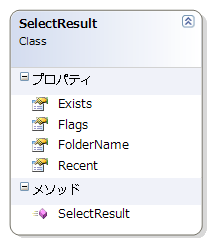
The ImapClient class has a SelectFolder method that is easy to use. And this method returns an ImapFolder object that is created from SelectResult object inside of SelectFolder method.
public ImapFolder SelectFolder(String folderName)
{
    var rs = this.ExecuteSelect(folderName);
    return new ImapFolder(rs);
}
Here is the ImapFolder class diagram:

Get Message
After folder selection, you can get the mail list using the Fetch command. You can get the actual mail message data by calling the GetMessage method of the ImapClient class. Here is a sample code to receive a mail message:
private static void ImapMailReceive()
{
    MailMessage mg = null;

    using (ImapClient cl = new ImapClient("imap.gmail.com"))
    {
        cl.Port = 993;
        cl.Ssl = true;
        cl.UserName = "xxxxx";
        cl.Password = "yyyyy";
        var bl = cl.Authenticate();
        if (bl == true)
        {
            //Select folder
            var folder = cl.SelectFolder("[Gmail]/All Mail");
            //Get all mail from folder
            for (int i = 0; i < folder.MailCount; i++)
            {
                mg = cl.GetMessage(i + 1);
            }
        }
    }
}
You must pass an index to the GetMessage method larger than 1. Please make sure that the first value is 1, not zero.
Client sends the below text:
tag1 FETCH 1 (BODY[])
Server would return the below text:
* 1 FETCH (BODY[] {2370}
Delivered-To: xxxx@gmail.com
To: = <yyyyy@gmail.com>
Date: Thu, 23 Apr 2009 08:22:21 +0900
From: <xxxxx@gmail.com>
Subject: Test Mail
...Mail body data....

)
tag1 OK Success
Format is same to Pop3Message.ImapClient class extract text and pass it to MailMessage class and create MailMessage object.
Get Message Header Only
You can get message header without body data like below. You can save network traffic and improve performance.
using (ImapClient cl = new ImapClient("imap.xxx.com"))
{
    cl.UserName = "xxx@gmail.com";
    cl.Password = "xxx";
    var authenticated = cl.TryAuthenticate();
    if (authenticated == true)
    {
        //Select folder
        var folder = cl.SelectFolder("YourFolder");
        //Get all mail header
        var mailIndex = 1;
        var headers = cl.GetHeaderCollection(mailIndex);
    }
}
Attached File, HTML Mail, .eml File
Aattached file, HTML mail, .eml file are the same as for the POP3 protocol. Please see this article: Understanding the insides of the POP3 mail protocol: Part 2.
Delete Mail
Here is the delete process on IMAP:

You add a flag as delete to the selected mail that you indicate by mail index. These marked mails will be deleted when you send the EXPUNGE command.
You can delete a mail by using the DeleteMail method of the ImapClient object.
protected void Button1_Click(object sender, EventArgs e)
{
    MailMessage mg = null;
    String htmlText = "";

    using (ImapClient cl = new ImapClient("imap.gmail.com"))
    {
        cl.Port = 993;
        cl.Ssl = true;
        cl.UserName = "xxxxx";
        cl.Password = "yyyyy";
        //Select folder
        var folder = cl.SelectFolder("[Gmail]/All Mail");
        cl.DeleteMail(1, 2, 3);
    }
}
There is no authenticate required since all processes (open connection, authenticate, select folder, expunge, logout) will automatically execute inside of the DeleteMail method. Here is an implementation of the DeleteMail method.
public Boolean DeleteMail(params Int64[] mailIndex)
{
    this.ValidateState(ImapConnectionState.Authenticated, true);
    return this.DeleteMail(this.CurrentFolder.Name, mailIndex);
}
public Boolean DeleteMail(params Int64[] mailIndex)
{
    if (this.EnsureOpen() == ImapConnectionState.Disconnected) { return false; }
    if (this.Authenticate() == false) { return false; }

    for (int i = 0; i < mailIndex.Length; i++)
    {
        var rs = this.ExecuteStore(mailIndex[i], StoreItem.FlagsAdd, @"\Deleted");
        if (rs.Status != ImapCommandResultStatus.Ok) { return false; }
    }
    this.ExecuteExpunge();
    this.ExecuteLogout();
    return true;
}
Manage Read or Unread
IMAP is a new protocol after POP3 to solve POP3 problem. IMAP has a search command that can receive only unread mail. So you don't have to manage read state in your application. The only thing you must do is to send a search command to the mail server. Here is a sample code to receive unread mail list from a server.
MailMessage mg = null;

using (ImapClient cl = new ImapClient("imap.gmail.com"))
{
    cl.Port = 993;
    cl.Ssl = true;
    cl.UserName = "xxxxx";
    cl.Password = "yyyyy";
    var bl = cl.Authenticate();
    if (bl == true)
    {
        //Select folder
        var folder = cl.SelectFolder("[Gmail]/All Mail");
        //Search Unread
        var list = cl.ExecuteSearch("UNSEEN UNDELETED");
        //Get all unread mail
        for (int i = 0; i < list.MailIndexList.Count; i++)
        {
            mg = cl.GetMessage(list.MailIndexList[i]);
        }
    }
}
Client sends the below text under the hood.
tag1 SEARCH UNSEEN UNDELETED
Server would return such text to client.
* SEARCH 1 2 3 4 9 10 11 12 13 14 17 18 19 20 21 22 30 32 33
tag1 OK SEARCH completed (Success)
This response text is represented as SearchResult class.

You can easily get mail index list by Search command. It is pretty easy compared with POP3.
Draft Mail
You can save a draft mail to the mail server by calling the Append command.
MailMessage mg = null;

using (ImapClient cl = new ImapClient("imap.gmail.com"))
{
    cl.Port = 993;
    cl.Ssl = true;
    cl.UserName = "xxxxx";
    cl.Password = "yyyyy";
    var bl = cl.Authenticate();
    if (bl == true)
    {
        //Add Draft
        var smg = new SmtpMessage("xxx@gmail.com", "yyy@hotmail.com",
            "yyy@hotmail.com", "This is a test mail.", "Hi.Is it correct??");
        cl.ExecuteAppend("GMail/Drafts", smg.GetDataText(), "\\Draft", DateTimeOffset.Now);
    }
}
You can get a draft mail by the same process shown above.
MailMessage mg = null;

using (ImapClient cl = new ImapClient("imap.gmail.com"))
{
    cl.Port = 993;
    cl.Ssl = true;
    cl.UserName = "xxxxx";
    cl.Password = "yyyyy";
    var bl = cl.Authenticate();
    if (bl == true)
    {
        //Select folder
        var folder = cl.SelectFolder("[Gmail]/Drafts");
        //Get all mail from folder
        mg = cl.GetMessage(1);
        //Create SmtpMessage object
        var smg = mg.CreateSmtpMessage();
        //And send mail!!
    }
}
To send a mail, see this article: Understanding the insides of the SMTP Mail protocol: Part 1.
Subscribe
You can subscribe to a folder that you want to watch.
MailMessage mg = null;

using (ImapClient cl = new ImapClient("imap.gmail.com"))
{
    cl.Port = 993;
    cl.Ssl = true;
    cl.UserName = "xxxxx";
    cl.Password = "yyyyy";
    var bl = cl.Authenticate();
    if (bl == true)
    {
        cl.ExecuteSubscribe("CodeProject");
        cl.ExecuteSubscribe("Codeplex");
    }
}
Once you subscribe to a folder, you can get the folder list using the below code:
MailMessage mg = null;

using (ImapClient cl = new ImapClient("imap.gmail.com"))
{
    cl.Port = 993;
    cl.Ssl = true;
    cl.UserName = "xxxxx";
    cl.Password = "yyyyy";
    var bl = cl.Authenticate();
    if (bl == true)
    {
        var rs = cl.ExecuteLsub("", false);
        foreach (var line in rs.Lines)
        {
            var folder = new ImapFolder(line);
            //Do something...
        }
    }
}
Idle Command
IMAP has a idle command that enables you to receive a message (new mail, deleted, etc.) from server.
using (ImapClient cl = new ImapClient("imap.gmail.com", 993, "user name", "password"))
{
    cl.Ssl = true;
    cl.ReceiveTimeout = 10 * 60 * 1000;//10 minute
    if (cl.Authenticate() == true)
    {
        ImapFolder r = cl.SelectFolder("INBOX");
        using (var cm = cl.CreateImapIdleCommand())
        {
            cm.MessageReceived +=
            (Object o, ImapIdleCommandMessageReceivedEventArgs e) =>
            {
                foreach (var mg in e.MessageList)
                {
                    String text = String.Format("Type is {0} Number is {1}"
                       , mg.MessageType, mg.Number);
                    Console.WriteLine(text);
                }
            };
            cl.ExecuteIdle(cm);

            while (true)
            {
                var line = Console.ReadLine();
                if (line == "done")
                {
                    cl.ExecuteDone(cm);
                    break;
                }
            }
        }
    }
}
When you receive new mail and the count of INBOX folder changed, server will send client a text as response.
* 224 EXISTS
If you delete a mail, server sends such text to client.
* 224 EXPUNGE
* 223 EXISTS
You can receive these messages by registering event handler to MessageReceived event.
cm.MessageReceived += (Object o, ImapIdleCommandMessageReceivedEventArgs e) =>
{
    foreach (var mg in e.MessageList)
    {
        String text = String.Format("Type is {0} Number is {1}"
            , mg.MessageType, mg.Number);
        Console.WriteLine(text);
    }
};
ImapIdleCommandMessageReceivedEventArgs object has MessageList property that is List<imapidlecommandmessage>. ImapIdleCommandMessage has two properties, MessageType and Number.


You can know what happens in the server and pop up notification window to user with idle command.
Other...
IMAP has so many specifications that I could not cover in this article. I focus on the most important topics for IMAP beginners to start easily. I hope this article will help you. Thank you for reading.
Related articles are listed here:
- Understanding the insides of the SMTP Mail protocol: Part 1
- Understanding the insides of the POP3 Mail protocol: Part 2
History
- 25th June, 2012: First post
- 6th July, 2012: Modified source code and article
- 24th July, 2012: Modified source code and added some detail description about Idle and other