Introduction
This code does download pictures on background (shadow) and convert or resize them to a specific format/size. May be some guys will also find how to use the background worker in this article useful, but we don't lose focus. It's not our goal in this article.
Background
This code doesn't really need hard stuff to know about, may be you will need some information about asynchronous programming since I'm using a background worker (after all, I will explain, don't worry...).
Using the Code
Let's start !
In our project, we will need:
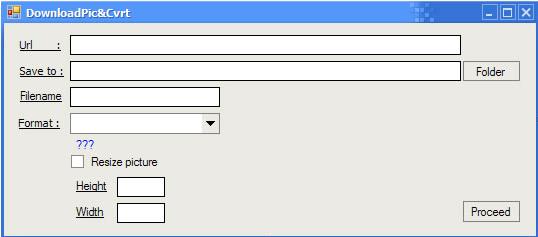
The main form that will include:
- 7 Labels: {Url, Save to, Filename, Format, ???, Height, Width}
- 1 Combo Box: contains the different supported picture formats (BMP, ICO, PNG, WMF, JPG, TIFF, GIF and EMF)
- 2 command buttons: [Folder] to select a folder, and [Proceed] to download and convert our picture
- 1 check box, may be you will need to resize your picture... who knows !!!!!!
- 2 components : Background worker, and
FolderBrowserDialog
Well since we are using a background worker, we will need a class (GetFiles), and it's our precious "cargot" !
How It Works
First we start by filling all information: the URL from where we will grab our picture (in my example, only HTTP server is supported, may be you can add FTP transfer), folder that will hold the file, the file name, the format of the picture, and if we set the checkbox to true (checked), the two other textboxes will permit us to enter the width/height of our resulting picture.
Note: If you set the width/height to 0, the resulting picture will hold the original size (width/height).
When we click on proceed:
Private Sub Button1_Click(ByVal sender As System.Object, _
ByVal e As System.EventArgs) Handles Button1.Click
Me.BackgroundWorker1.RunWorkerAsync()
Me.Button1.Enabled = False
End Sub
Private Sub BackgroundWorker1_DoWork(ByVal sender As Object, _
ByVal e As System.ComponentModel.DoWorkEventArgs) _
Handles BackgroundWorker1.DoWork
Dim MyGetFiles As Getfiles
If CheckBox1.Checked Then
MyGetFiles = New Getfiles(Label4.Text, TextBox1.Text, _
TextBox4.Text, TextBox5.Text, MyNewFormat)
Else
MyGetFiles = New Getfiles(Label4.Text, _
TextBox1.Text, 0, 0, MyNewFormat)
End If
MyGetFiles.MyPictureConverter()
MyGetFiles = Nothing
End Sub
Now we can jump to our class :
Private MyURLex As String
Private MyPATHex As String
Private MyWidthEx As Int32 = 0
Private MyHeightEx As Int32 = 0
Private MyFormatEx As Imaging.ImageFormat
As you did see in the BackgroundWorker1_DoWork sub, there is a constructor of class [new] that helps us to set all our private properties. This reminds me of the encapsulation concept.
Sub New(ByVal MyPath As String, ByVal MyURL As String, _
	ByVal Height As Int32, ByVal Width As Int32, _
	ByVal MyFormat As Imaging.ImageFormat)
        MyURLex = MyURL
        MyPATHex = MyPath
        MyHeightEx = Height
        MyWidthEx = Width
        MyFormatEx = MyFormat
    End Sub
After our properties are set, the MypictureConverter subroutine will be invoked! What about it ?
Friend Sub MyPictureConverter()
Dim MyTarget As New Uri(MyURLex)
Dim MyMemStream As New MemoryStream
Dim MyDownData As Integer = 0
Dim FileSize As Int64
Dim MyWebRequest As HttpWebRequest = WebRequest.Create(MyTarget)
MyWebRequest.Timeout = 5000
Dim MyWebResponse As WebResponse = MyWebRequest.GetResponse
FileSize = MyWebResponse.ContentLength
Dim MyStream As Stream = MyWebResponse.GetResponseStream
Dim MyCache(1024) As Byte
Dim MyCount As Integer = MyStream.Read(MyCache, 0, MyCache.Length)
MyDownData = MyCount
While MyCount > 0
MyMemStream.Write(MyCache, 0, MyCount)
MyCount = MyStream.Read(MyCache, 0, MyCache.Length)
MyDownData += MyCount
End While
MyMemStream.Flush()
MyMemStream.Seek(0, SeekOrigin.Begin)
MyStream.Close()
MyWebResponse.Close()
If FileSize = MyDownData Then
MyConverter(MyMemStream)
MyMemStream.Close()
Else
MsgBox("An error occurred when downloading the file")
MyWebResponse.Close()
End If
Let's see where the hell she comes from... MyConverter(MyMemStream)
Private Sub MyConverter(ByVal MemStream As MemoryStream)
Dim MyOriginalPic As New Bitmap(MemStream)
Dim MyFinalPic As Bitmap
If MyWidthEx = 0 Then
MyWidthEx = MyOriginalPic.Width
End If
If MyHeightEx = 0 Then
MyHeightEx = MyOriginalPic.Height
End If
Try
MyFinalPic = New Bitmap(MyOriginalPic, MyWidthEx, MyHeightEx)
MyFinalPic.Save(MyPATHex, MyFormatEx)
Catch ex As Exception
MsgBox(ex.Message & "/" & Err.Number & "/" & Err.Description)
End Try
End Sub
And now that all is finished, we enable the [Proceed] command button! And we can try to download again. I noticed that this code does support only HTTP/file transfer...later I will add a routine that supports other kinds of transfer such as FTP !
Points of Interest
I guess it's better to act like this, since now our computer comes up with a very big physical memory (in my example 1024 MB) so we can let the Hard disk Rest In Peace...for a while...
History
In the next version, I will try to add some useful graphical optimisation / modification.


