Click here to Skip to main content
6,304,948 members and growing! (18,461 online)
Email Password   helpLost your password?
Web Development » HTML / CSS » General     Intermediate

Incorporating Yahoo! Messenger into your website

By Thang Q. Tran

To see if a Yahoo! user is online or not... and send a message to this user via web...
HTML, Windows, Dev
Posted:28 Mar 2005
Views:144,820
Bookmarked:35 times
Announcements
Loading...
 
Search    
Advanced Search
printPrint   Broken Article?Report       add Share
  Discuss Discuss   Recommend Article Email
26 votes for this article.
Popularity: 4.72 Rating: 3.33 out of 5
3 votes, 11.5%
1
3 votes, 11.5%
2
3 votes, 11.5%
3
4 votes, 15.4%
4
13 votes, 50.0%
5

Sample Image

Introduction

Have you ever heard of Yahoo! Messenger? If you have a website, and you want your users to contact you by a Yahoo! nickname, your users can send you an instant message by clicking on an icon on your website. You website will check if you are online or not to view the exact icons, then the users know your status.

Do you think it is interesting? If yes, please take a look over this article. I hope it is helpful for you and your website.

Using the code

I assume that you are in the intermediate level, so you know how to create an HTML website with HTML tags.

At first, I will show you how to create a hyperlink that users can use to send an instant message to the defined user using Yahoo! Messenger. It is very simple, you create a hyperlink with <a> tag with the 'href' attribute in the form 'ymsgr:sendim?userID'. For example:

<a href = 'ymsgr:sendim?novavnu'>Send me a message</a>

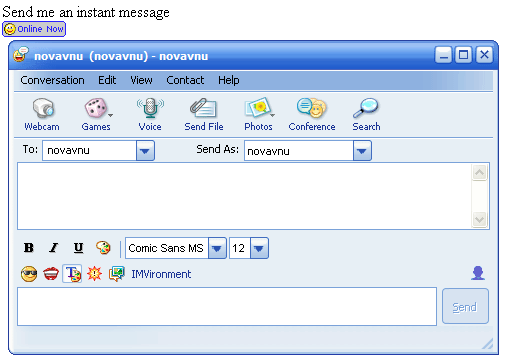
In this example, when the user clicks on the hyperlink, a new Yahoo! Messenger chat window will appear for the user to send a message to the defined user, in this example the user is novavnu. You can put your user ID instead of novavnu. The result looks like in the picture below:

If you use this code:

<a href = 'ymsgr:sendim?novavnu&m=hello+my+friend'>Send me a message</a>

The users don't need to type the message because the message is by default represented by the 'm' attribute value. Notice that if your message has spaces, you have to represent each space by the character '+'.

Now, you know how to let users send an instant message to you. But, there is a problem, how do the users know that if you are online or not? Remember, when you use Yahoo! Messenger, there is a small icon for you to know if the user is online or not. Why don't you use this icon like Yahoo! Messenger. Don't worry how to know if the user is online or not, because Yahoo! will do this for you, all you have to do is get the result from Yahoo! website and show the icon.

<a href = 'ymsgr:sendim?novavnu'>
  <img src="http://opi.yahoo.com/online?u=YourID&m=g&t=StyleID" border=0>
</a>

In this example, you use an <img> tag to view the picture from the result of Yahoo! website. You have two attributes in the Yahoo! website link. The first attribute is 'u', you replace YourID by your Yahoo! ID. The second attribute is 't', you replace StyleID by a number from 1 to 3, this is the style of the picture. Yahoo! gives you three styles as in the picture below. I give you six pictures, the first three pictures are for users who are online and the last three pictures are for users who are offline.

Conclusion

In this article, I showed you how to use Yahoo! icon in your website to show if the defined user is online or not. It is helpful when your website wants people to contact you by Yahoo! Messenger easily. If you have any comments or advice, please email me to improve this article.


License

This article has no explicit license attached to it but may contain usage terms in the article text or the download files themselves. If in doubt please contact the author via the discussion board below.

A list of licenses authors might use can be found here

About the Author

Thang Q. Tran


Member
TANNER AG
Developer
Mobile: +8490-378-9619
Email: tranquocthang@gmail.com
www.tanner.de
------------------

I have worked with computer for more than 10 years... I have worked as a .NET Developers at Xtreme Biz, India
Click here to get more information about me @ xtremebiz.biz

I have also worked part-time as a developer in FPT Music... I worked in some projects with Music, such as www.NhacSo.net. I worked with Java as well. I was responsible to all mobile projects in FPT Music. I have developed a software for Mobile Devices for FPT Music called FSinger, its information is located at http://www.nhacso.net/Music/fSinger/fSinger.htm

I have worked at Ngu Lam Quan Co., Ltd. as Technology Director from 2005 to 2006. We worked on Advertising and IT Industry.

Since January 2007 I have been working for Tanner AG as a Software Developer.

My blog: http://thangtran.blogspot.com
Occupation: Web Developer
Location: United States United States

Other popular HTML / CSS articles:

Article Top
You must Sign In to use this message board.
FAQ FAQ 
 
Noise Tolerance  Layout  Per page   
 Msgs 1 to 25 of 32 (Total in Forum: 32) (Refresh)FirstPrevNext
GeneralInvisible status PinmemberMahdi Manavi10:00 11 Feb '09  
GeneralRe: Invisible status Pinmemberyayiharish21:02 19 Jun '09  
Generalspecial thanks PinmemberAli (X)3:15 7 Nov '08  
GeneralThanks PinmemberYulianto.21:31 16 Apr '07  
Questionwhere can i download Incorporating yahoo ? PinmemberNtajneeb17:15 6 Apr '07  
AnswerRe: where can i download Incorporating yahoo ? Pinmembercrystvn21:45 18 Jul '07  
Generalym installed Pinmembermarquoc5:39 28 Mar '07  
Generalon line problem.. [modified] Pinmemberperhentianboy15:29 14 Mar '07  
GeneralSend me a message PinmemberKedar V19:25 18 Jan '07  
QuestionCan this be incorporated with Trillian? PinmemberKDawg444:15 21 Nov '06  
Generalsome questions PinmemberSw Jiten17:13 21 Aug '06  
Generalfor blog Pinmemberseli28276:16 19 Aug '06  
GeneralWe can do a command like that Pinmembervietdoorgroup3:29 20 Jul '06  
Generalrefresh icon status Pinmemberyyhhcc8:54 27 Nov '05  
Generalgreat article PinsussAnonymous10:56 22 Oct '05  
QuestionYahoo icon PinsussAnonymous19:16 12 Oct '05  
AnswerRe: Yahoo icon PinmemberThang Q. Tran19:42 12 Oct '05  
Generalyahoo messenger client PinsussAnonymous19:58 8 Oct '05  
GeneralIM Message Window PinmemberWVB8:32 8 Sep '05  
GeneralRe: IM Message Window PinmemberThang Q. Tran16:02 8 Sep '05  
Generalhtml code in yahoo msg PinsussAnonymous5:41 28 Jul '05  
GeneralRe: html code in yahoo msg PinmemberThang Q. Tran15:49 28 Jul '05  
GeneralThanks a lot! but I have a question... Pinmemberzhusq16:18 14 Jul '05  
GeneralRe: Thanks a lot! but I have a question... PinmemberThang Q. Tran2:24 15 Jul '05  
GeneralRe: Thanks a lot! but I have a question... PinsussAnonymous18:17 30 Sep '05  

General General    News News    Question Question    Answer Answer    Joke Joke    Rant Rant    Admin Admin   

PermaLink | Privacy | Terms of Use
Last Updated: 28 Mar 2005
Editor: Smitha Vijayan
Copyright 2005 by Thang Q. Tran
Everything else Copyright © CodeProject, 1999-2009
Web20 | Advertise on the Code Project